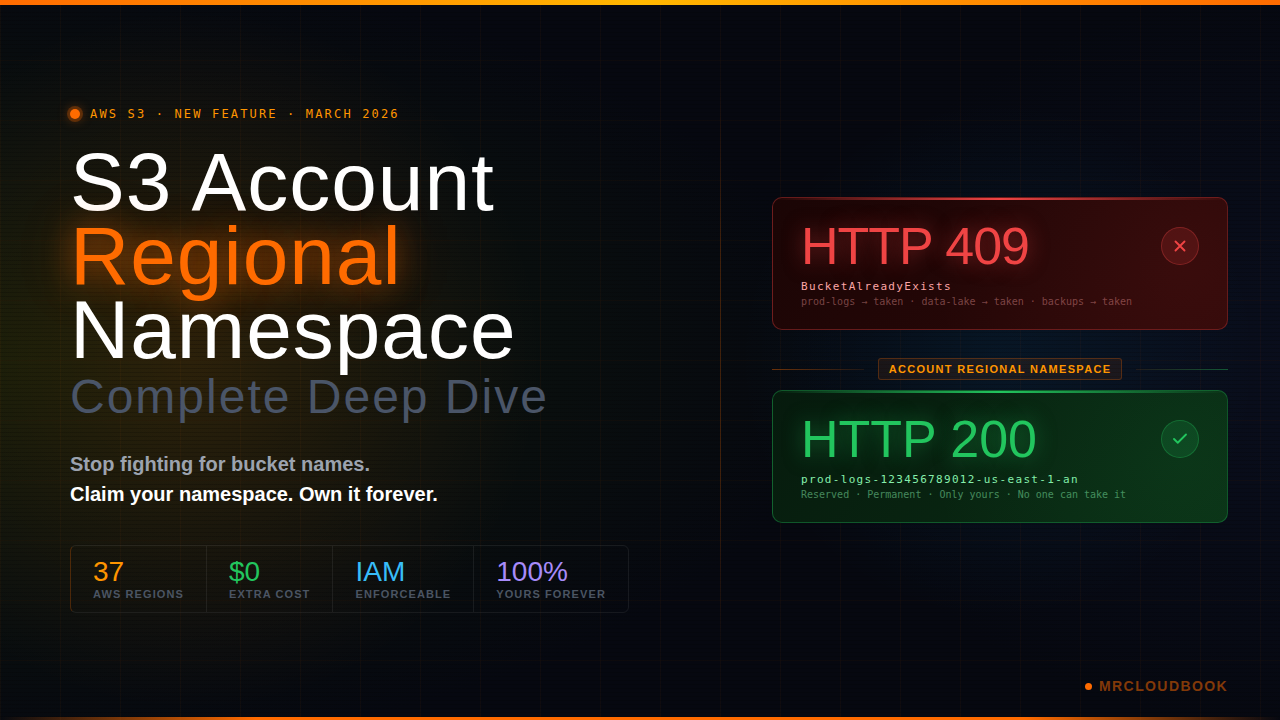
The Old Problem with S3 Bucket Names
Global namespace, global pain - and why it was always going to end this way
S3 launched in 2006. Since then, a single rule has governed every bucket ever created: bucket names must be globally unique across every AWS account, in every region, within a partition.
This sounds reasonable when you’re one company with a few buckets. It becomes a complete nightmare when you’re a large org with dozens of teams, hundreds of accounts, and engineers constantly naming buckets logs, backups, data, or - and this is painfully common - the exact name that some random person registered five years ago and never deleted.
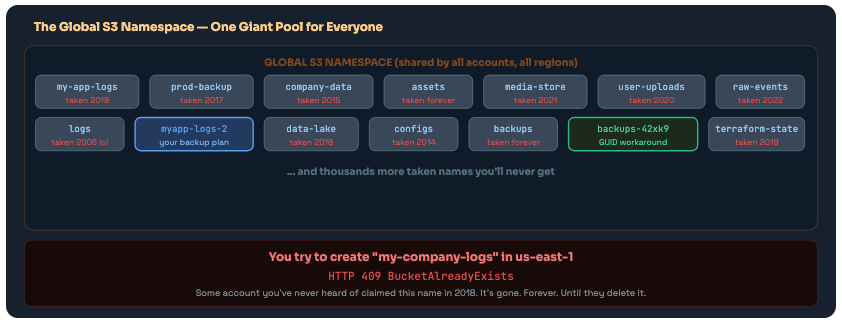
The shared global S3 namespace - a first-come, first-served free-for-all where great names are taken and the only options are GUID suffixes or creative spelling.
The Three Specific Pains This Caused
Pain #1
Bucket squatting. Popular generic names like logs, backups, data, assets, media were all claimed by someone years ago and will never be available again. If you’re starting a new company today, good luck getting a simple bucket name.
Pain #2
The deleted bucket trap. You delete a bucket. The name goes back into the global pool. Anyone can now re-create it. If a misconfigured app somewhere still references that bucket name - which happens constantly in large orgs - it could accidentally write to someone else’s bucket. Or an attacker could grab the name within seconds of deletion and start collecting your orphaned data.
Pain #3
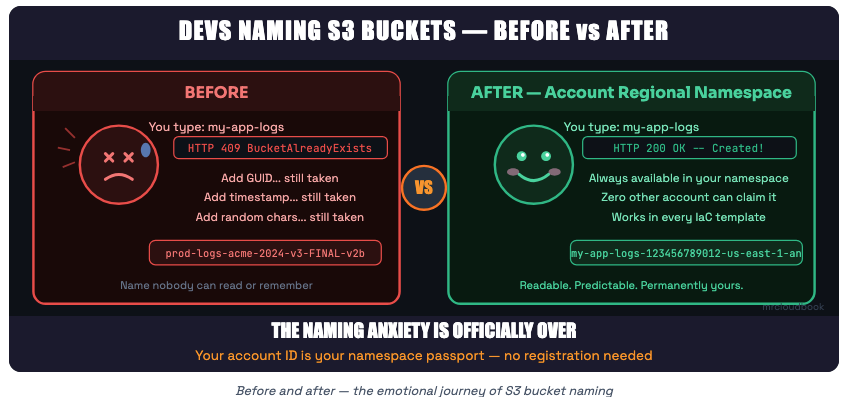
You can’t predict your own names. You’re writing a CloudFormation template that creates a bucket. You want to name it myapp-logs. You can’t just write that name in your template - you don’t know if it’s available until you try to create it. So you end up appending account IDs, GUIDs, timestamps, random strings - and your bucket names become completely unreadable garbage.
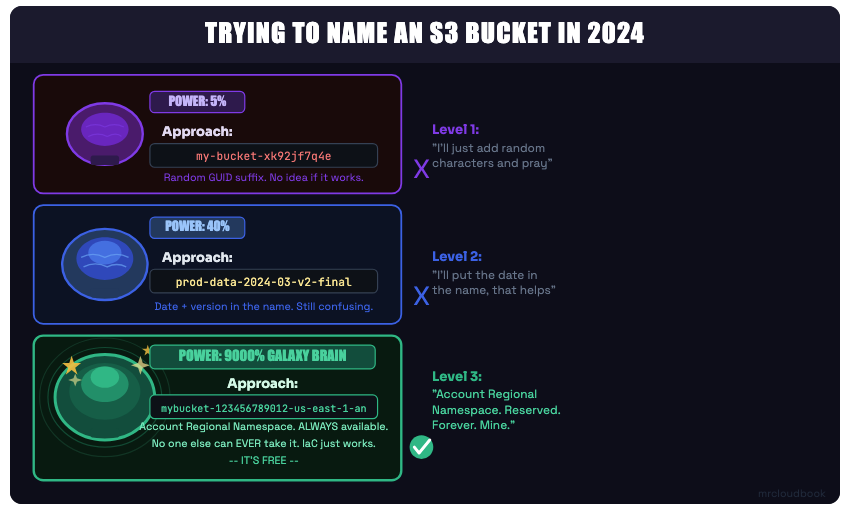
The S3 bucket naming evolution - three levels of enlightenment

What Is Account Regional Namespace?
A reserved subdivision of the global namespace that only you can create buckets in - forever
On March 12, 2026, AWS announced account regional namespaces for Amazon S3 general purpose buckets. The idea is elegant: instead of competing in a shared global namespace, you get your own personal reserved subdivision of that namespace based on your AWS account ID and the region you’re creating the bucket in.
Once you use this feature, bucket names with your account ID and region suffix belong to you and only you. No other AWS account can ever create a bucket with your account’s suffix. If they try, the CreateBucket request is immediately rejected.
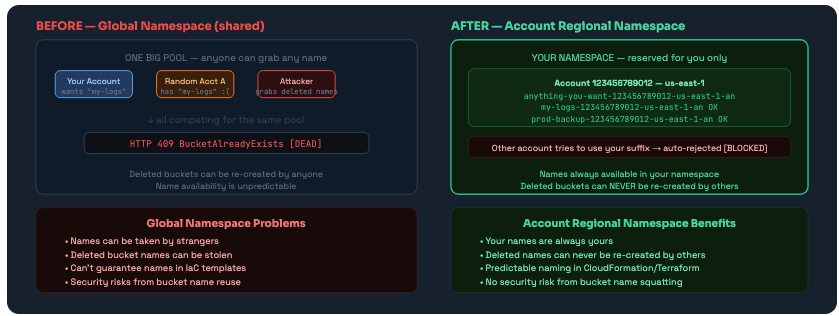
Global namespace vs Account Regional Namespace - the difference between competing in a shared pool and owning your own guaranteed space.
🆕 Key Point This feature is fully backward compatible. All existing global-namespace buckets continue to work exactly as before. Account regional namespace is an opt-in choice when creating new buckets. You choose, per bucket, which namespace to use.
The Naming Convention Explained
Format: your-prefix + account-id + region + “-an” - and the math on how many characters you get
Account regional namespace buckets follow a specific, structured naming convention. It’s not optional - the format is enforced by S3. If your bucket name doesn’t match the pattern exactly, the request is rejected.
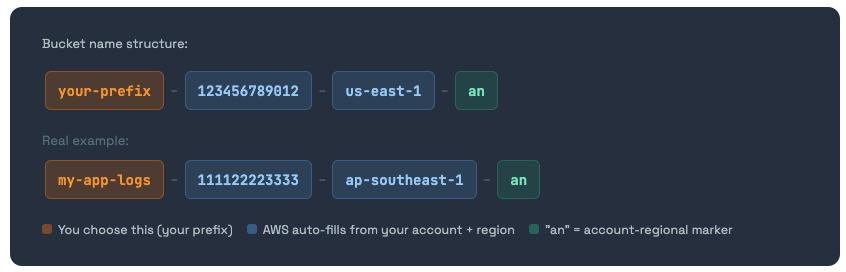
Character Budget - The Math You Need to Know
S3 bucket names have a maximum of 63 characters. The account regional suffix eats into that budget. Here’s how to calculate what’s left for your prefix:
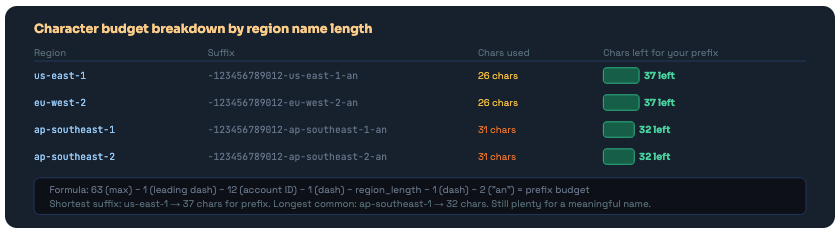
The suffix consumes 26-31 characters depending on your region. Even for the longest region names, you have 32 chars for your prefix - enough for a meaningful name.
Rules That Still Apply
The account regional namespace doesn’t get you out of all naming rules. Your prefix still has to follow standard S3 conventions:
- Only lowercase letters, numbers, and hyphens (-) - no underscores, no dots
- Must begin and end with a letter or number
- The full name (prefix + suffix) must be between 3 and 63 characters
- No two adjacent periods (not that you can use periods anyway in this context)
How to Create - Console, CLI, SDK & IaC
Every method with the exact commands, code, and templates you need
Method 1 - AWS Console
In the S3 console, choose Create bucket. You’ll see a new option: Account regional namespace. Select it. Enter your prefix (just the part you choose - the console automatically appends the account ID, region, and -an suffix). That’s it.
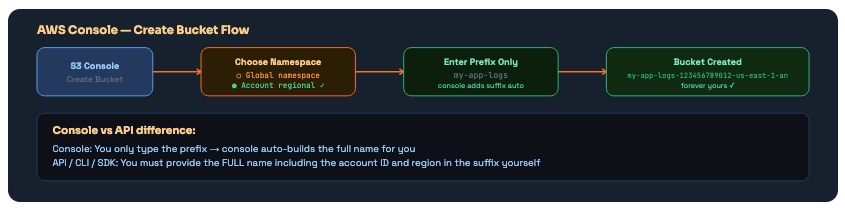
The console is the easiest way - enter your prefix, it builds the full name. The API requires you to provide the complete name yourself.
Method 2 - AWS CLI
# Create bucket in account regional namespace
# Full bucket name required - account ID + region + "-an" suffix
aws s3api create-bucket \
  --bucket mybucket-123456789012-us-east-1-an \
  --bucket-namespace account-regional \
  --region us-east-1

# For regions OTHER than us-east-1 you need LocationConstraint:
aws s3api create-bucket \
  --bucket mybucket-123456789012-ap-southeast-1-an \
  --bucket-namespace account-regional \
  --region ap-southeast-1 \
  --create-bucket-configuration LocationConstraint=ap-southeast-1

# Tip: Get your account ID dynamically so you don't hardcode it:
ACCOUNT_ID=$(aws sts get-caller-identity --query Account --output text)
REGION=$(aws configure get region)
BUCKET="${PREFIX}-${ACCOUNT_ID}-${REGION}-an"

echo "Creating bucket: $BUCKET"
aws s3api create-bucket \
  --bucket "$BUCKET" \
  --bucket-namespace account-regional \
  --region "$REGION"
Method 3 - Python SDK (Boto3)
import boto3

class AccountRegionalBucketCreator:
    """Creates S3 buckets in account-regional namespace."""

    SUFFIX = "-an"

    def __init__(self):
        self.s3  = boto3.client('s3')
        self.sts = boto3.client('sts')

    def create(self, prefix: str) -> dict:
        """
        Creates a bucket with name: {prefix}-{account_id}-{region}-an
        """
        account_id = self.sts.get_caller_identity()['Account']
        region     = self.s3.meta.region_name
        bucket_name = f"{prefix}-{account_id}-{region}-an"

        params = {
            "Bucket":          bucket_name,
            "BucketNamespace": "account-regional",
        }

        # us-east-1 doesn't need LocationConstraint - all others do
        if region != "us-east-1":
            params["CreateBucketConfiguration"] = {
                "LocationConstraint": region
            }

        response = self.s3.create_bucket(**params)
        print(f"Created: {bucket_name}")
        return response


# Usage:
creator = AccountRegionalBucketCreator()
creator.create("my-app-logs")
creator.create("terraform-state")
creator.create("prod-backups")
# All guaranteed unique to your account!
Method 4 - CloudFormation (IaC)
This is where the feature really shines. CloudFormation’s pseudo parameters AWS::AccountId and AWS::Region let you build completely predictable, portable templates that always create bucket names unique to the account and region they deploy into.
# Option A: Full name with !Sub (explicit, you control the format)
Resources:
  MyLogsBucket:
    Type: AWS::S3::Bucket
    Properties:
      BucketName: !Sub "my-app-logs-${AWS::AccountId}-${AWS::Region}-an"
      BucketNamespace: "account-regional"

  MyBackupBucket:
    Type: AWS::S3::Bucket
    Properties:
      BucketName: !Sub "prod-backups-${AWS::AccountId}-${AWS::Region}-an"
      BucketNamespace: "account-regional"

# Option B: BucketNamePrefix (cleaner - CloudFormation adds suffix automatically)
Resources:
  StateBucket:
    Type: AWS::S3::Bucket
    Properties:
      BucketNamePrefix: "terraform-state"
      BucketNamespace: "account-regional"
      # Result: terraform-state-{AccountId}-{Region}-an

# Same template deploys to ANY account/region and always gets unique names
# No more "BucketAlreadyExists" failures during cross-account deployments
✅ CloudFormation Best Practice The BucketNamePrefix + BucketNamespace combo is the cleanest IaC pattern. You write the meaningful part of the name, CloudFormation handles the uniqueness. One template, zero collision anxiety, any account, any region.
Method 5 - Terraform
# Get current account and region from data sources
data "aws_caller_identity" "current" {}
data "aws_region"          "current" {}

# Local to build the bucket name
locals {
  account_id = data.aws_caller_identity.current.account_id
  region     = data.aws_region.current.name
}

# Create account-regional namespace bucket
resource "aws_s3_bucket" "app_logs" {
  bucket = "my-app-logs-${local.account_id}-${local.region}-an"

  # Pass the namespace header via the bucket creation API
  # Requires AWS provider >= 5.x with bucket_namespace support
}

# Output the bucket name for reference
output "bucket_name" {
  value = aws_s3_bucket.app_logs.bucket
}
Enforcing It With IAM, SCPs & RCPs
Using the new s3:x-amz-bucket-namespace condition key to force everyone in your org to use account regional namespaces
Creating the feature is one thing. Making sure your entire organisation actually uses it is another. AWS provides a new IAM condition key - s3:x-amz-bucket-namespace - that you can use in IAM policies, Resource Control Policies, and Service Control Policies to enforce account regional namespace creation org-wide.
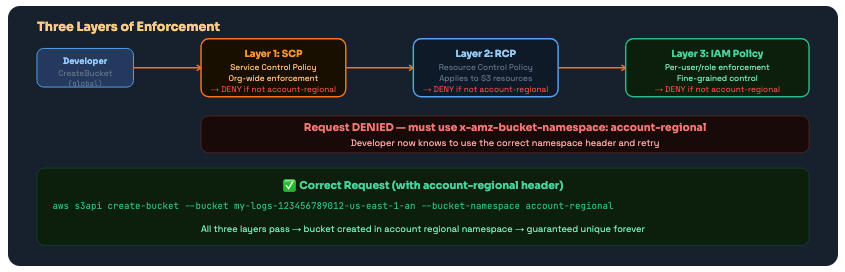
Three enforcement layers: SCP (org-wide), RCP (resource-level), and IAM (user/role-level). Use whichever matches your governance model - or all three.
IAM Policy - Per-User or Role Enforcement
{
  "Version": "2012-10-17",
  "Statement": [
    {
      "Sid": "RequireAccountRegionalBucketCreation",
      "Effect": "Deny",
      "Action": "s3:CreateBucket",
      "Resource": "*",
      "Condition": {
        "StringNotEquals": {
          "s3:x-amz-bucket-namespace": "account-regional"
        }
      }
    }
  ]
}
Service Control Policy (SCP) - Org-Wide
{
  "Version": "2012-10-17",
  "Statement": [
    {
      "Sid": "RequireAccountRegionalBucketCreation",
      "Effect": "Deny",
      "Action": "s3:CreateBucket",
      "Resource": "*",
      "Condition": {
        "StringNotEquals": {
          "s3:x-amz-bucket-namespace": "account-regional"
        }
      }
    }
  ]
}
// Apply to your root OU to cover all accounts in the organisation
// New accounts added later are automatically covered
Resource Control Policy (RCP)
{
  "Version": "2012-10-17",
  "Statement": [
    {
      "Sid": "OnlyCreateBucketsInAccountRegionalNamespace",
      "Effect": "Deny",
      "Principal": "*",
      "Action": "s3:CreateBucket",
      "Resource": "*",
      "Condition": {
        "StringNotEquals": {
          "s3:x-amz-bucket-namespace": "account-regional"
        }
      }
    }
  ]
}
⚠️ Enforcement Rollout Warning Applying an SCP that denies global bucket creation will break any existing automation that creates buckets without the namespace header. Audit your Lambda functions, CI/CD pipelines, and CDK/CloudFormation templates before applying the SCP. Roll out per-team via IAM policies first, then elevate to SCP once you've confirmed everything is updated.
Restrictions & Gotchas
The things AWS didn’t put in the headline - read before you migrate
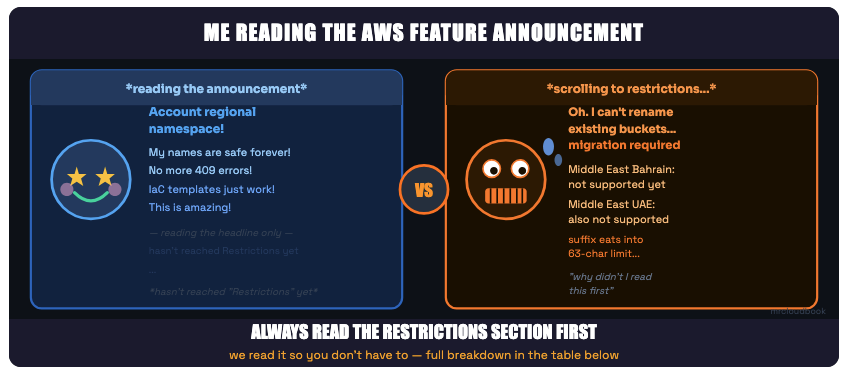
Every AWS feature announcement: the announcement vs the restrictions section
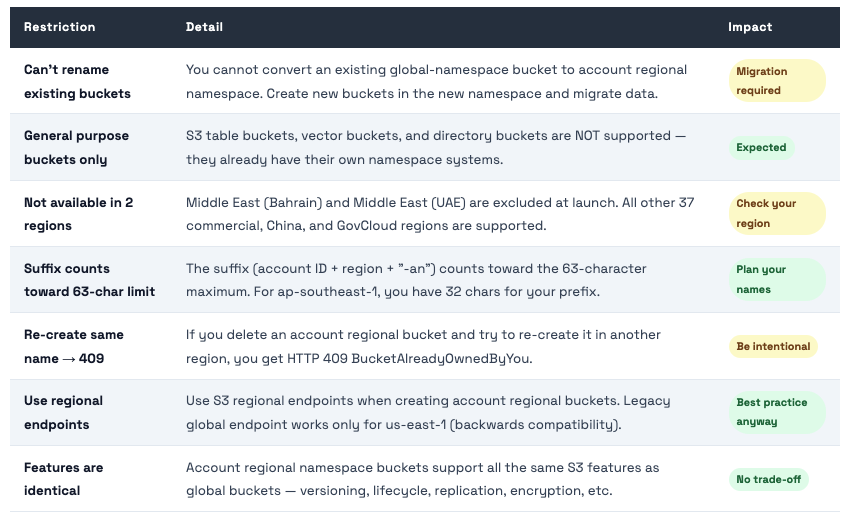
💡 Table Buckets, Vector Buckets, Directory Buckets Wondering why this only covers general purpose buckets? Because the others already have account-scoped namespaces built in. S3 Table Buckets and Vector Buckets exist in an account-level namespace already. Directory Buckets use a zonal namespace. This feature specifically closes the gap for the most common bucket type - general purpose.
Migration Strategy
You can’t rename existing buckets - here’s the safest path to adopt account regional namespaces for your org
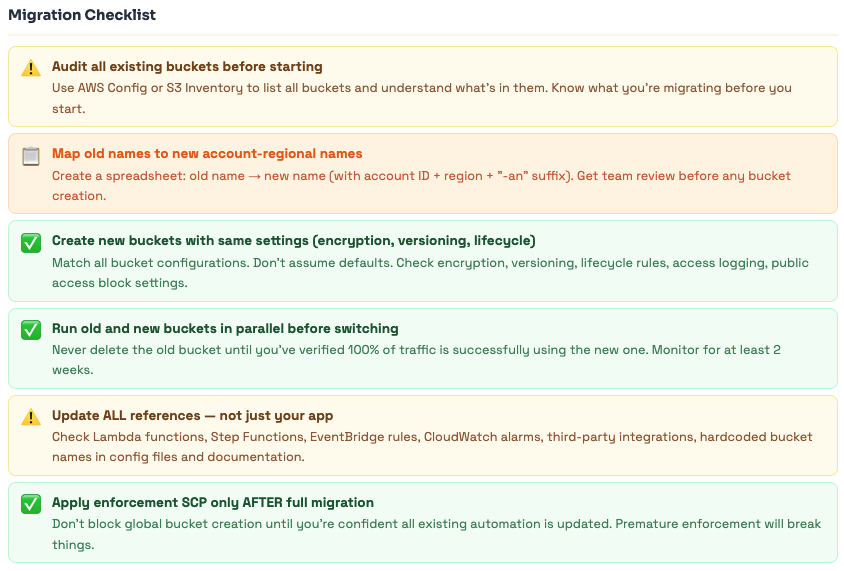
The migration question is the first thing engineers ask: how do I move my existing buckets? The honest answer is: you don’t move buckets - S3 doesn’t rename them. You create new buckets in the account regional namespace and migrate data. Here’s how to do that safely.
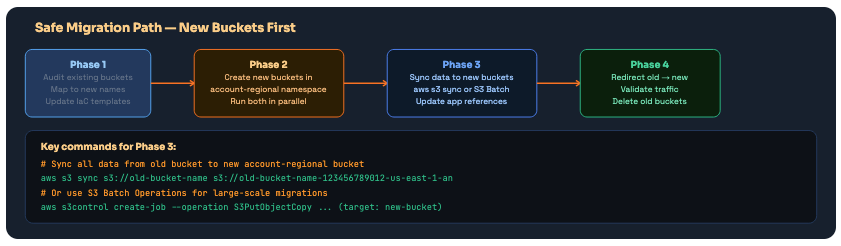
Four-phase migration. Never skip the parallel running phase - running old and new simultaneously validates everything before you delete the original bucket.
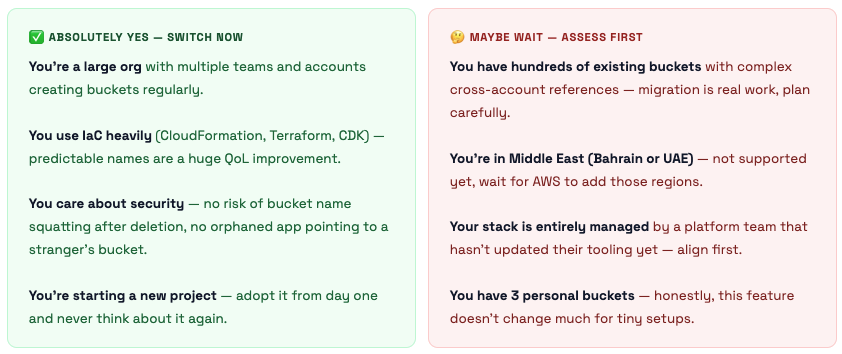
Should You Switch? The Honest Take.
When this is a must-do, when it’s a nice-to-have, and when it doesn’t matter at all
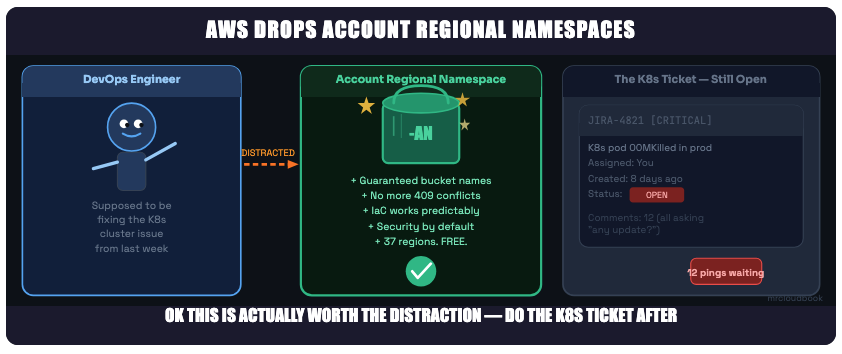
We’ve all been here. But this one genuinely is worth your attention - migrate buckets on Friday though, not production hours
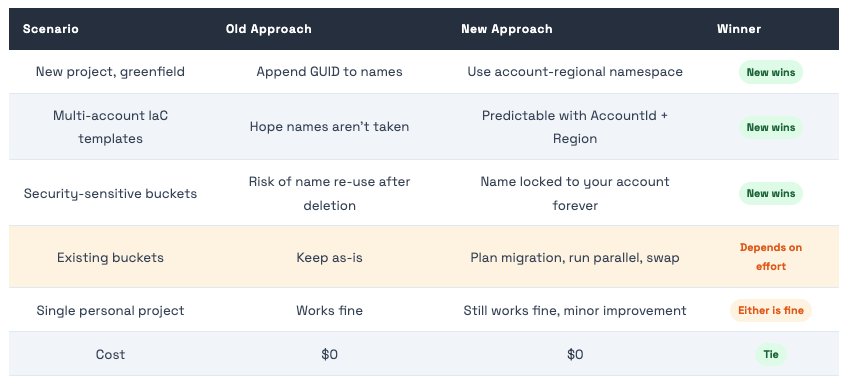
The Quick Summary Table
References
- https://docs.aws.amazon.com/AmazonS3/latest/userguide/gpbucketnamespaces.html
- https://aws.amazon.com/about-aws/whats-new/2026/03/amazon-s3-account-regional-namespaces/
- https://aws.amazon.com/blogs/aws/introducing-account-regional-namespaces-for-amazon-s3-general-purpose-buckets/
The Bottom Line
AWS just fixed a 19-year-old problem with S3 bucket naming. The solution is elegant: your AWS account ID + region = your own reserved corner of the global namespace. Nobody can touch it, nobody can squatter it, and nobody can accidentally re-create your deleted buckets and start receiving your data.
New feature, March 2026.Account regional namespace lets you create S3 general purpose buckets that only your account can ever use, in any of 37 regions (not Bahrain or UAE yet).
The name format is fixed: your-prefix-{accountId}-{region}-an. The console builds it automatically; the API needs the full name.
Zero extra cost.Same features as regular S3 buckets. No changes needed in your applications - just the bucket name changes.
IaC becomes beautiful:CloudFormation !Sub “name-${AWS::AccountId}-${AWS::Region}-an” or BucketNamePrefix - deploy to any account and region with zero collision risk.
Security teams: Use s3:x-amz-bucket-namespacein IAM/SCP/RCP to enforce org-wide adoption. Start with IAM policies per team, elevate to SCP once migration is done.
Migration is manual- you can’t rename existing buckets. Create new, sync data, update references, validate, delete old. Take your time.
Start using it today for any new bucket you create. There is genuinely no downside for new infrastructure.
Comments (0)
No comments yet. Be the first to share your thoughts.
Leave a comment