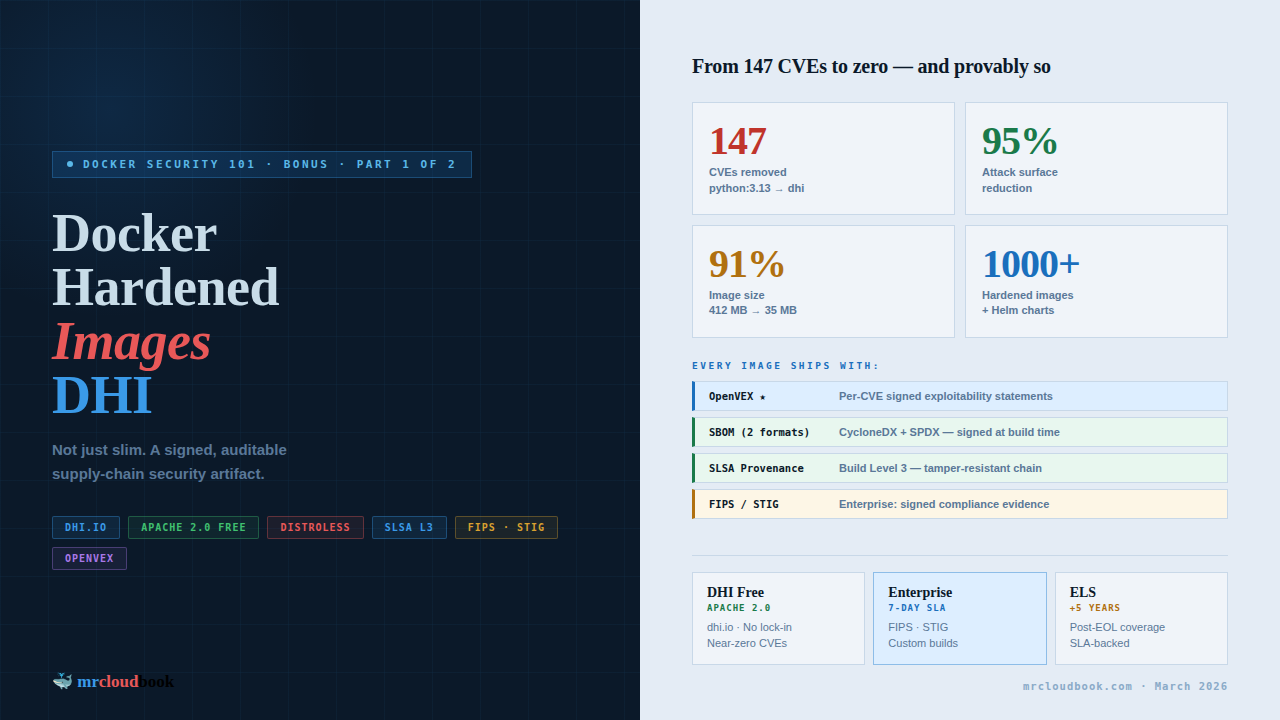
On December 17, 2025, Docker open-sourced 1,000+ hardened container images under Apache 2.0 - free, no lock-in, no subscription required. But what exactly is a Docker Hardened Image, and how is it different from a plain Alpine slim image? This guide covers it all: the three tiers, the seven attestation types, the image naming convention, the distroless philosophy, and complete migration Dockerfiles from DOI, Ubuntu, and Wolfi. CVE scanning and VEX is Part 2.
Supply Chain Attacks Cost $60 Billion in 2025. Your Base Image Is the Foundation.
Every container you ship is built on a base image. That base image carries packages. Those packages carry CVEs. Not your CVEs - you didn’t write glibc, apt, bash, or tar. But when a scanner fires and flags 147 CVEs in your production Python container, they’re yours to triage, document, and explain at 11pm before a release. Every. Single. One.
Docker launched Hardened Images in May 2025, then made the entire 1,000+ image catalog free and open source under Apache 2.0 on December 17, 2025. Docker’s framing was deliberate: “a fundamental reset of the container security market.” Not because minimal images are new - they aren’t - but because DHI combines minimal packaging with a complete, cryptographically signed, machine-readable security artifact stack that no slim image has ever shipped as standard.

Those 147 CVEs - 1 High, 5 Medium, 141 Low - are not in your application code. They live in packages you never chose: package managers, shells, curl, gzip, tar, debugging utilities. The entire attack surface reduction comes from one principle: include only what the runtime needs, nothing else.
Not “Slim Images.” A Signed, Auditable Security Artifact.
Docker Hardened Images (DHIs) are minimal, secure, and production-ready container base and application images maintained by Docker. They cover container images, Helm charts for Kubernetes deployments, and hardened system packages. The key distinction from “slim” or “alpine” variants of standard images is not just package count - it is the full compliance artifact stack that every single DHI ships with as standard.
Every DHI image includes cryptographically signed metadata. As the official docs put it, DHI is "secure by default, minimal by design, and maintained so you don't have to." The distroless approach removes shells, package managers, and debugging tools entirely. The attestation stack makes those security properties verifiable - not just claimed in documentation, but inspectable via docker scout or cosign by anyone.
Three Foundational Principles of Every DHI
-
Minimal by architecture, not by accident. Each image is engineered with the minimum packages required to run its specific application. The dhi.io/node:22-debian13 production image delivers a complete Node.js 22 runtime in 19 packages. The official Node.js image ships hundreds. This reduction is systematic, not cosmetic. -
Transparent - never opaque. Docker’s explicit commitment: all CVE data is visible using public data. No suppressed vulnerability feeds, no proprietary scoring that hides real exposure. When a CVE is found and not yet patched, you see it. This is a deliberate contrast to vendors who suppress CVEs in their feed to - maintain a “green” scanner result. -
Secure supply chain by default. Every image ships with SLSA Build Level 3 provenance - a tamper-resistant, verifiable build record that cryptographically links the image to its exact source definition in a public GitHub repository. Any modification to the build pipeline would break the provenance attestation signature.
Info. 🐳
DHI went free and open source - December 17, 2025
The base tier is Apache 2.0 licensed - free to pull from dhi.io, no subscription, no usage restrictions, no vendor lock-in. All 26M+ developers in the container ecosystem. Free images: docker pull dhi.io/python:3.13. Enterprise images mirror to your org namespace on Docker Hub and pull from docker.io/
DHI Free, Enterprise, and ELS: What You Get at Each Level

Info. ⚠️
Enterprise images use a different registry path
Free images: docker pull dhi.io/python:3.13. Enterprise images must be mirrored to your org namespace first, then pulled from docker.io/
Reading a DHI Tag: Everything Encoded in One String
DHI deliberately has no latest tag. This is not an omission - it enforces version pinning across your entire fleet. Every tag encodes three things: application version, base distribution, and variant type. Read the tag and you know exactly what you’re getting before the pull.
dhi.io / [image] : [app-version] - [distribution] - [variant]
         ^^^^^^^   ^^^^^^^^^^^   ^^^^^^^^^^^^   ^^^^^^^

app-version:   exact upstream version of the application
distribution:  alpine3.21 | alpine3.22 | debian12 | debian13
variant:        (none = minimal runtime) | -dev | -sdk | -fips | -stig | -compat

─── Real tag examples ────────────────────────────────────────────────
dhi.io/node:22-debian13                 # minimal runtime - distroless
dhi.io/node:22-debian13-dev             # dev - bash + apt included
dhi.io/python:3.13-alpine3.21           # minimal Alpine runtime
dhi.io/python:3.13-alpine3.21-dev       # Alpine dev - apk included
dhi.io/golang:1-alpine3.21-dev          # build stage for Go apps (Alpine)
dhi.io/golang:1.25-debian12-dev         # build stage for Go apps (Debian)
dhi.io/python:3.13-debian13-fips        # FIPS 140-2/3 (enterprise only)
dhi.io/nginx:1-debian13-stig            # STIG-ready (enterprise only)

─── Pin to digest for fully reproducible builds ──────────────────────
dhi.io/python:3.13@sha256:a1b2c3d4...   # digest-pinned, immutable

Runtime, Dev, SDK, FIPS, STIG: Which Variant Goes in Which Stage
The most common DHI migration mistake is using the wrong variant in the final stage. The rule is simple: any variant with -dev or -sdk in the tag has a shell and package manager - it must never be the production final stage. Production final stages always use the minimal runtime (no suffix).

Alpine vs Debian - Match Your Existing Distribution

The official docs are explicit: migrate to the distribution that matches your existing setup. Alpine → Alpine DHI. Debian/Ubuntu → Debian DHI. This keeps package management commands identical and avoids musl/glibc compatibility surprises in C-extension-heavy workloads.
What Travels With Every Image: Seven Signed, Verifiable Documents
The real gap between a DHI and a slim image is not package count - it is this attestation stack. Every DHI ships signed, machine-readable security metadata as OCI attestation layers attached to the image manifest. They travel with the image. Your scanner reads them automatically. No separate report portal, no manual downloads, no trust-me-bro documentation claims.
All DHIs and charts are built using SLSA Build Level 3 practices. Each image variant is published with a full set of signed attestations that allow you to verify the image was built from trusted sources in a secure environment, and view SBOMs in multiple formats to understand component-level details.

# Authenticate once
docker login dhi.io

# List all attestation predicates attached to this image
docker scout attest list dhi.io/python:3.13

# Retrieve and verify the CycloneDX SBOM
docker scout attest get \
  --predicate-type https://cyclonedx.org/bom/v1.6 \
  --verify \
  dhi.io/python:3.13
# ✓ SBOM obtained from attestation, 101 packages found
# ✓ Provenance obtained from attestation
# ✓ cosign verify ...

# Export the OpenVEX document (every CVE decision, signed + timestamped)
docker scout vex get dhi.io/python:3.13 --output vex.json

# Read VEX decisions - status + justification per CVE
cat vex.json | jq '.statements[] | {
  cve:           .vulnerability.id,
  status:        .status,
  justification: .justification,
  timestamp:     .timestamp
}'

# Retrieve SLSA provenance - links image to exact source commit
docker scout attest get dhi.io/python:3.13 \
  --predicate-type https://slsa.dev/provenance/v0.2

Finding Your Image: The Catalog Metadata You Need to Know
The DHI catalog is browsable via Docker Hub (My Hub → Hardened Images → Catalog for paid subscribers) and via CLI for free images. Every repository page in the catalog shows columns that tell you everything about an image variant before you pull it.
Unlike most images on Docker Hub, Docker Hardened Images do not use the latest tag. Each variant is published with a full semantic version tag and kept current. If you need to pin to a specific release for reproducibility, reference the image by its digest.

# Pull and run - works exactly like any other Docker image
docker login dhi.io
docker run --rm dhi.io/python:3.13 python -c "print('Hello from DHI')"

# Compare DHI vs DOI - see the security improvement quantified
docker scout compare dhi.io/python:3.13 \
  --to python:3.13 \
  --platform linux/amd64 \
  --ignore-unchanged \
  2>/dev/null | sed -n '/## Overview/,/^ ## /p' | head -n -1

# │ Analyzed Image       │ Comparison Image
# ├──────────────────────┼─────────────────
# │ dhi.io/python:3.13   │ python:3.13
# │ vulnerabilities 0C 0H 0M 0L │ 0C 1H 5M 141L 2?
# │ size  35 MB (-377 MB)       │ 412 MB
# │ packages  80 (-530)         │ 610

# Scan the free hardened image directly
docker scout cves dhi.io/python:3.13
# ✓ SBOM obtained from attestation, 101 packages found
# ✓ VEX statements obtained from attestation
# ✓ No vulnerable package detected

Migrating to DHI: One Pattern That Covers All Source Bases
Migration to DHI follows one universal pattern regardless of source base: multi-stage build, all package installation in -dev or -sdk stages, minimal runtime image as the final stage. Match the distribution, replace the registry, keep your package commands unchanged.
Info. ✅ Let Gordon do it automatically Docker's AI assistant Gordon (Docker Desktop → Toolbox → ensure Developer MCP Toolkit is enabled) can scan your existing Dockerfiles and apply DHI migration automatically. As with all AI tooling, verify the output and test before shipping. Gordon is especially useful for catching shell-script entrypoints and package installation in runtime stages that would break silently after migration.
Migrate from Docker Official Images (DOI) - Alpine or Debian
The simplest migration. If you’re on Debian DOI, go to Debian DHI. Alpine DOI → Alpine DHI. Package commands stay identical. The structural change is adding a multi-stage build so the runtime stage stays minimal. Remember: DHI has no latest tag - always specify the full version.
- FROM golang:1.25
- WORKDIR /app
- COPY . .
- RUN go build -o myapp

  # Build stage: dev image has compilers, shell, tools
+ FROM dhi.io/golang:1.25-debian12-dev AS builder
  WORKDIR /app
  COPY . .
  RUN go build -o myapp

  # Runtime stage: distroless, no shell, no package manager
+ FROM dhi.io/golang:1.25-debian12
+ WORKDIR /app
+ COPY --from=builder /app/myapp .
+ ENTRYPOINT ["/app/myapp"]

- FROM golang:1.25-alpine
- WORKDIR /app
- COPY . .
- RUN CGO_ENABLED=0 GOOS=linux go build -a -ldflags="-s -w" -o main .

  # apk commands stay identical - same Alpine package ecosystem
+ FROM dhi.io/golang:1-alpine3.21-dev AS builder
  WORKDIR /app
  COPY . .
  # RUN apk add --no-cache git  ← same syntax, same package names
  RUN CGO_ENABLED=0 GOOS=linux go build -a -ldflags="-s -w" --installsuffix cgo -o main .

+ FROM dhi.io/golang:1-alpine3.21
+ WORKDIR /app
+ COPY --from=builder /app/main /app/main
+ ENTRYPOINT ["/app/main"]

Migrate from Ubuntu
Ubuntu → Debian DHI. Both use APT, most package names are identical. The official docs confirm: since Ubuntu and Debian both use APT for package management, most package installation commands remain similar. Key constraint: all apt-get install must happen inside -dev or -sdk stages - runtime images have no package manager.
- FROM ubuntu/go:1.22-24.04
- RUN apt-get update && apt-get install -y git && rm -rf /var/lib/apt/lists/*
- COPY . .
- RUN go build -o main .

  # Ubuntu → Debian is safe: both use apt, most package names identical
+ FROM dhi.io/golang:1-debian13-dev AS builder
  WORKDIR /app
  # Package installs only in -dev stages - runtime has no apt
  RUN apt-get update && apt-get install -y \
      git \
      && rm -rf /var/lib/apt/lists/*
  COPY go.mod go.sum ./
  RUN go mod download
  COPY . .
  RUN CGO_ENABLED=0 GOOS=linux go build -a -ldflags="-s -w" -o main .

+ FROM dhi.io/golang:1-debian13
+ WORKDIR /app
+ COPY --from=builder /app/main /app/main
+ ENTRYPOINT ["/app/main"]

Migrate from Wolfi / Chainguard
Wolfi → Alpine DHI. Both are Alpine-like. The official docs describe this as “straightforward since Wolfi is Alpine-like and DHI provides an Alpine-based hardened image.” Package names and apk management commands stay identical. The main changes are registry, tag format, and ensuring the multi-stage structure separates build from runtime.
- FROM cgr.dev/chainguard/go:latest-dev
- WORKDIR /app
- COPY . .
- RUN go build -o myapp

  # Alpine DHI - same apk ecosystem, same package names, no latest tag
+ FROM dhi.io/golang:1.25-alpine3.22-dev AS builder
  WORKDIR /app
  COPY . .
  # RUN apk add --no-cache git  ← identical apk syntax
  RUN go build -o myapp

+ FROM dhi.io/golang:1.25-alpine3.22
+ WORKDIR /app
+ COPY --from=builder /app/myapp .
+ ENTRYPOINT ["/app/myapp"]

Python - Full Multi-Stage Production Example
Python apps need a build stage to install pip dependencies into a virtualenv, then a clean runtime stage with only the interpreter and the venv. This is the exact pattern from the official DHI migration examples docs.
# syntax=docker/dockerfile:1

# === Build stage: Install dependencies into a venv ===
FROM dhi.io/python:3.13-alpine3.21-dev AS builder
ENV LANG=C.UTF-8
ENV PYTHONDONTWRITEBYTECODE=1
ENV PYTHONUNBUFFERED=1
ENV PATH="/app/venv/bin:$PATH"
WORKDIR /app
RUN python -m venv /app/venv
COPY requirements.txt .
# Add build-time system deps here only - not in runtime:
# RUN apk add --no-cache gcc musl-dev libffi-dev
RUN pip install --no-cache-dir -r requirements.txt

# === Final stage: Minimal runtime - no shell, no pip, no apk ===
FROM dhi.io/python:3.13-alpine3.21
WORKDIR /app
ENV PYTHONUNBUFFERED=1
ENV PATH="/app/venv/bin:$PATH"
COPY app.py ./
COPY --from=builder /app/venv /app/venv
ENTRYPOINT [ "python", "/app/app.py" ]

Node.js - Full Multi-Stage Production Example
This is the exact multi-stage pattern from the official DHI Node.js migration examples docs.
# syntax=docker/dockerfile:1

# === Build stage: Install all dependencies ===
FROM dhi.io/node:23-alpine3.21-dev AS builder
WORKDIR /usr/src/app
COPY package*.json ./
# Install any additional packages if needed using apk:
# RUN apk add --no-cache python3 make g++
RUN npm install
COPY . .

# === Final stage: Minimal runtime - no shell, no npm ===
FROM dhi.io/node:23-alpine3.21
ENV PATH=/app/node_modules/.bin:$PATH
COPY --from=builder --chown=node:node /usr/src/app /app
WORKDIR /app
CMD ["index.js"]
Before You Merge: The Complete DHI Migration Checklist
Image Selection
- Chose the correct distribution: Debian if migrating from Ubuntu/Debian, Alpine if from Alpine/Wolfi
- Used an explicit version tag - never used latest (DHI does not publish a latest tag by design)
- Verified the image exists in the DHI catalog for the target application and version
- Enterprise only: confirmed image is mirrored to org namespace, pulling from docker.io/[your-org]/dhi-[image] not dhi.io
Dockerfile Structure
- Used a multi-stage build: -dev or -sdk for build stages, minimal runtime for the final FROM stage
- All apt-get install, apk add, pip install, npm install happen only inside build stages
- Final stage uses COPY --from=builder to bring only compiled artifacts and runtime deps
- Shell-script entrypoints replaced with exec-form binary entrypoints (no /bin/sh -c in final stage)
- Application runs as non-root user - verified COPY --chown and WORKDIR permissions match DHI default user
Build and Test
- Built the new Dockerfile locally - image builds cleanly, no missing package errors
- Application starts correctly and responds to health checks against the hardened image
- Ran docker scout compare dhi.io/[image] --to [original] and confirmed CVE reduction
- Full test suite passes against the hardened image
- Tested graceful shutdown, liveness/readiness probes, and any debug workflows requiring docker exec
Security and Compliance
- Ran vulnerability scan - confirmed near-zero CVEs on the final production image
- Verified SBOM is accessible: docker scout attest get --predicate-type https://cyclonedx.org/bom/v1.6 dhi.io/[image]
- Verified provenance attestation is present: docker scout attest list dhi.io/[image]
- FIPS environments: confirmed -fips Enterprise variant in use, not the standard free variant
- CI/CD scanner configured for DHI VEX - Part 2 covers the Trivy 3-step setup for correct CVE counts
What Breaks and How to Fix It
Shell-dependent entrypoints - the most common failure
If your Dockerfile uses ENTRYPOINT [“/bin/sh”, “-c”, “…”] or a shell script as the entrypoint, it will fail silently or with a cryptic error in the distroless production image because there is no /bin/sh. Convert to exec-form binary entrypoints.
# ✗ BREAKS in distroless - no /bin/sh in production image
ENTRYPOINT ["/bin/sh", "-c", "exec myapp --config /etc/myapp.yaml"]

# ✓ Exec form - no shell needed, correct for distroless
ENTRYPOINT ["/app/myapp"]
CMD ["--config", "/etc/myapp.yaml"]
Missing shared libraries in the runtime stage
If your application dynamically links against a shared library not present in the minimal runtime image, copy the specific library from the build stage. Alternatively, use the -compat variant which includes additional runtime libraries without the full dev toolset.
FROM dhi.io/python:3.13-alpine3.21-dev AS builder
RUN apk add --no-cache libpq-dev postgresql-dev
RUN pip install psycopg2

FROM dhi.io/python:3.13-alpine3.21
# Copy the shared library from builder - not the entire dev image
COPY --from=builder /usr/lib/libpq.so.5 /usr/lib/libpq.so.5
COPY --from=builder /app/venv /app/venv
Debugging in production - there is no shell
You cannot docker exec -it
DHI as a Compliance Foundation for CRA, FedRAMP, and SSCS
Supply chain attacks cost more than $60 billion globally in 2025, tripling from 2021. The base image layer is the most neglected component of supply chain security because historically it came with no verifiable evidence - just a name and a tag. DHI changes this by making the base image itself a compliance artifact.
For organizations subject to the EU Cyber Resilience Act (CRA), US Executive Orders on software supply chain security, FedRAMP, FISMA, or NIST SP 800-218, DHI provides the evidence layer most programs currently lack: machine-readable SBOMs in standardized formats, SLSA Level 3 build provenance, per-CVE exploitability documentation, and cryptographic signing - all as standard OCI attestations, not a separate portal or PDF report.

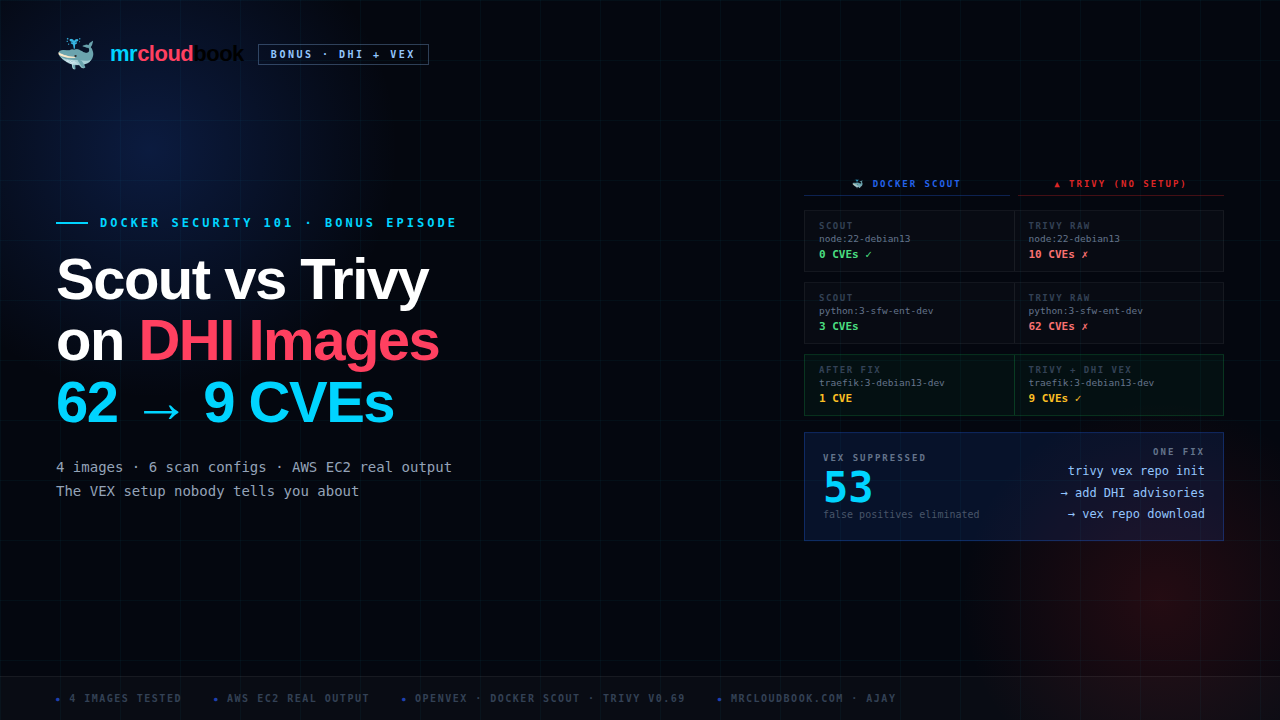
Part 2: CVE Scanning DHI - Scout vs Trivy, VEX Setup, Every Real Finding
DHI is not just a slim image. It is a complete supply chain security artifact: minimal distroless runtime, SLSA Build Level 3 cryptographic provenance, CycloneDX and SPDX SBOMs, per-CVE OpenVEX exploitability statements, and optionally FIPS and STIG evidence - all in every image, accessible via standard OCI attestations.
The base tier is free, Apache 2.0, no vendor lock-in. Pull from dhi.io today with just docker login dhi.io. The enterprise tier adds the 7-day CVE remediation SLA, FIPS/STIG variants, custom image builds, and Extended Lifecycle Support for up to 5 years beyond upstream EOL.
Migration is one Dockerfile change. Match the distribution (Debian → Debian DHI, Alpine/Wolfi → Alpine DHI), structure the build as multi-stage, move all package installations to build stages only. The runtime image becomes distroless. The tag naming convention - [image]:[ver]-[distrib]-[variant] - encodes everything you need before pulling.
Part 2 is the scanning story. After migrating, you will run Docker Scout, Trivy, and Grype against the new images. Scout reads the OCI VEX attestation automatically - near-zero CVEs. Trivy reports 10 to 62 CVEs without configuration. The one-time 3-step setup that reconciles both tools, and every CVE in the remaining 9 post-VEX findings explained in full, is in Part 2.
Comments (0)
No comments yet. Be the first to share your thoughts.
Leave a comment