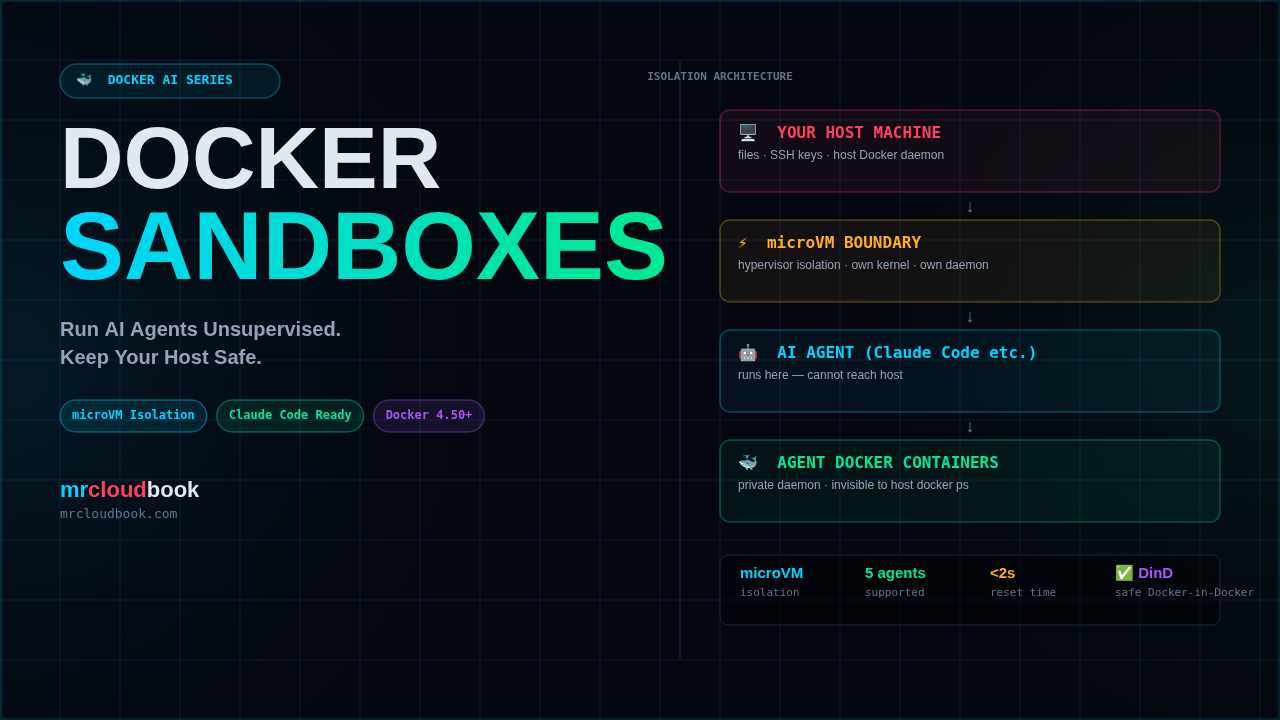
Your AI Agent Has Full Access to Your Machine
You open a terminal. You run claude. You tell it to “build me a REST API”. It starts coding. It runs commands. It installs packages. It modifies files.
None of that is happening in a box. Every command your AI agent runs executes directly on your host OS, with your user’s permissions, with access to your home directory, your SSH keys, your ~/.aws credentials, your entire filesystem.
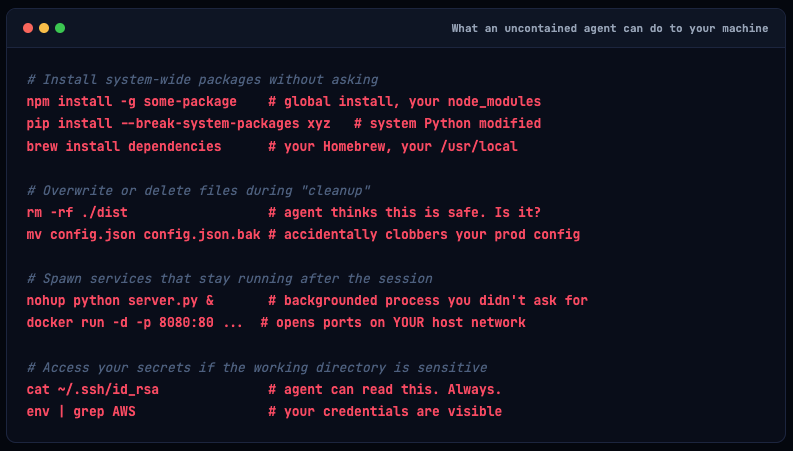
That’s not a theoretical risk. Coding agents routinely:
# Install system-wide packages without asking
npm install -g some-package    # global install, your node_modules
pip install --break-system-packages xyz   # system Python modified
brew install dependencies      # your Homebrew, your /usr/local

# Overwrite or delete files during "cleanup"
rm -rf ./dist                  # agent thinks this is safe. Is it?
mv config.json config.json.bak # accidentally clobbers your prod config

# Spawn services that stay running after the session
nohup python server.py &       # backgrounded process you didn't ask for
docker run -d -p 8080:80 ...  # opens ports on YOUR host network

# Access your secrets if the working directory is sensitive
cat ~/.ssh/id_rsa              # agent can read this. Always.
env | grep AWS                 # your credentials are visible
🔴 The trust problem: Coding agents are genuinely useful, but "useful" and "trusted with full host access" are two different things. Right now most developers are forced to either constantly supervise their agents (killing the whole productivity point) or accept the risk of running them unattended on a live machine.
Docker’s answer to this is Sandboxes - and it’s worth understanding exactly what that means under the hood.
What Docker Sandboxes Actually Is
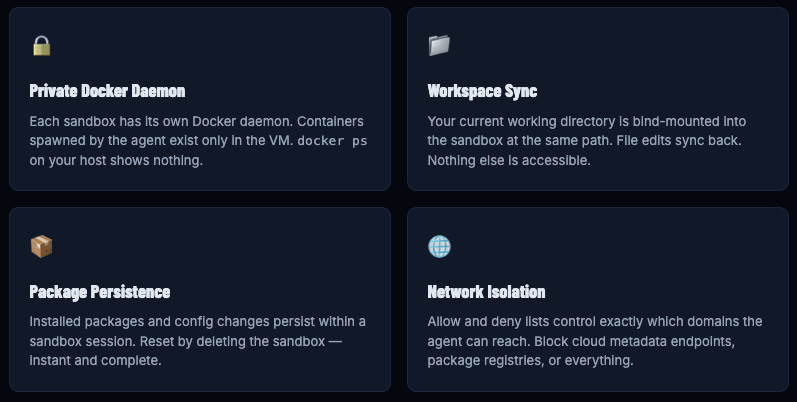
Docker Sandboxes are disposable, isolated execution environments built specifically for AI coding agents. Launched in full production availability on January 30, 2026, they wrap agents inside dedicated microVMs - not containers, not OS-level sandboxes, actual lightweight virtual machines with their own kernel, their own Docker daemon, and a hard hypervisor boundary between the agent and your host OS.
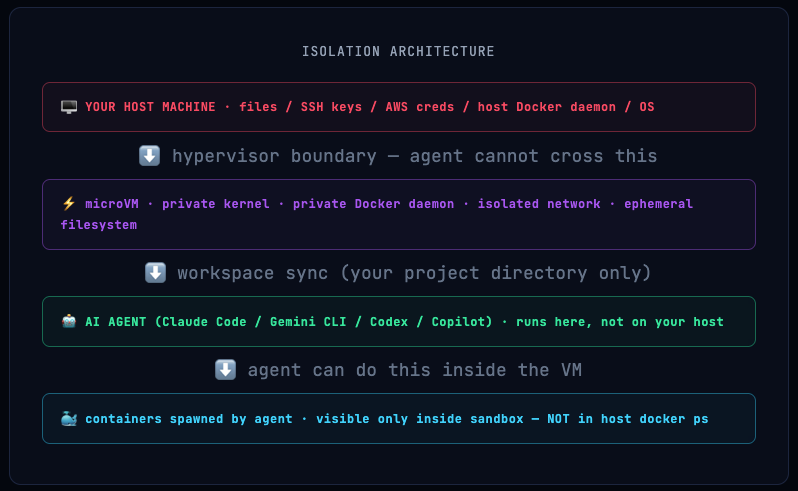
The key insight: your project workspace syncs at the same absolute path between host and sandbox, so file paths in error messages and tool output match your real environment - but the agent can’t see or touch anything outside that workspace.
Info. 💡 Why microVMs, not containers? Containers share the host kernel. A kernel exploit or capability misconfiguration in a container can escalate to host root - the entire Docker Security 101 series covers exactly these escape vectors. MicroVMs have their own kernel. The hypervisor is the boundary, not Linux namespaces. It's a fundamentally stronger isolation model.
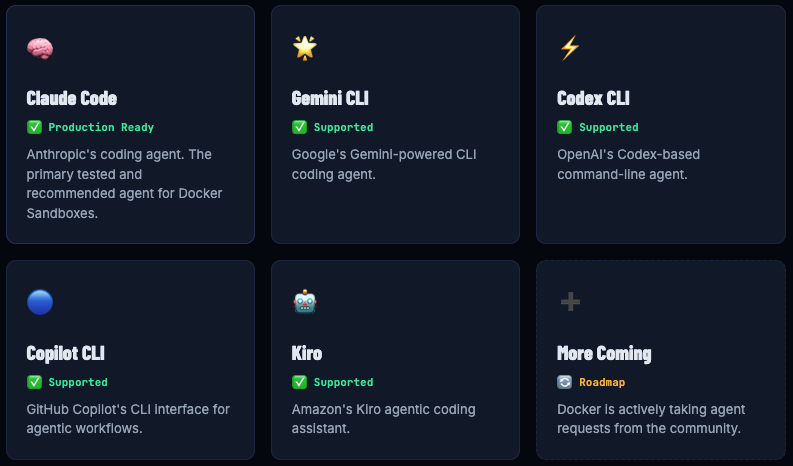
Supported Coding Agents
Docker Sandboxes works with the major AI coding agents in the market today. One sandbox command, any agent:
Installing and Running Your First Sandbox
Prerequisites
You need Docker Desktop 4.50 or later. That’s the only hard requirement - the sandbox CLI is bundled with Docker Desktop, so no separate install is needed.

docker --version
# Docker version 28.x.x - need Desktop 4.50+ for sandbox CLI

docker sandbox --help
# If this works, you're good. If not: update Docker Desktop.
Your First Sandbox
# Navigate to your project first
cd ~/my-project

# Launch sandbox with Claude Code
# You must pass your Anthropic API key - Claude Code needs it to call the API
ANTHROPIC_API_KEY=your-key docker sandbox run claude-code
# Or set it in your shell first:
export ANTHROPIC_API_KEY=sk-ant-...
docker sandbox run claude-code
# Creates a microVM with your CWD mounted at the same path
# Claude Code starts inside the sandbox with the API key passed through

# Other agents - each needs its own credentials passed the same way
GOOGLE_API_KEY=your-key docker sandbox run gemini
OPENAI_API_KEY=your-key docker sandbox run codex
docker sandbox run copilot
# Copilot authenticates via GitHub - runs 'gh auth login' inside sandbox
Managing Sandboxes
# List all sandboxes (note: NOT visible in docker ps - they're VMs)
docker sandbox ls
# SANDBOX ID    NAME         AGENT       STATUS    WORKSPACE
# a1b2c3d4      my-project   claude-code  running   ~/my-project

# Shell into a running sandbox (for debugging or manual inspection)
docker sandbox exec -it <sandbox-id> /bin/bash

# Stop a sandbox (installed packages persist until removed)
docker sandbox stop <sandbox-id>

# Delete a sandbox - instant clean slate
docker sandbox rm <sandbox-id>

# If the agent goes off the rails - delete and start fresh in seconds
docker sandbox rm <sandbox-id> && ANTHROPIC_API_KEY=$ANTHROPIC_API_KEY docker sandbox run claude-code
Network Controls
One of the most important features for security-conscious teams: you can control exactly which domains the sandbox can reach using allow and deny lists.
# Allow only specific domains (everything else blocked)
# For Claude Code: api.anthropic.com is REQUIRED (the LLM endpoint)
export ANTHROPIC_API_KEY=sk-ant-...
docker sandbox run claude-code \
  --network-allow api.anthropic.com \
  --network-allow registry.npmjs.org \
  --network-allow pypi.org

# Deny specific domains (everything else allowed)
docker sandbox run claude-code \
  --network-deny metadata.google.internal \
  --network-deny 169.254.169.254
# ↑ block cloud metadata endpoints - good practice for any agent

# Full network block - NOTE: Claude Code won't work (can't reach api.anthropic.com)
# Use only for agents that don't need internet access
docker sandbox run claude-code --network-deny "*"
Info. ⚠️ Linux users: Docker Sandboxes requires Docker Desktop, not just Docker Engine. As of March 2026, Linux support is on the roadmap but not yet available. On Linux, you'll need to use the existing Docker Desktop for Linux beta or wait for the official Linux release.
The Isolation Model: microVM vs. Container
If you’ve read the Docker Security 101 series, you already know that containers are not VMs - they share the host kernel and their isolation is enforced by Linux namespaces, cgroups, and seccomp. That’s strong but not impenetrable.
MicroVMs are a completely different class of isolation. Here’s the comparison that matters:
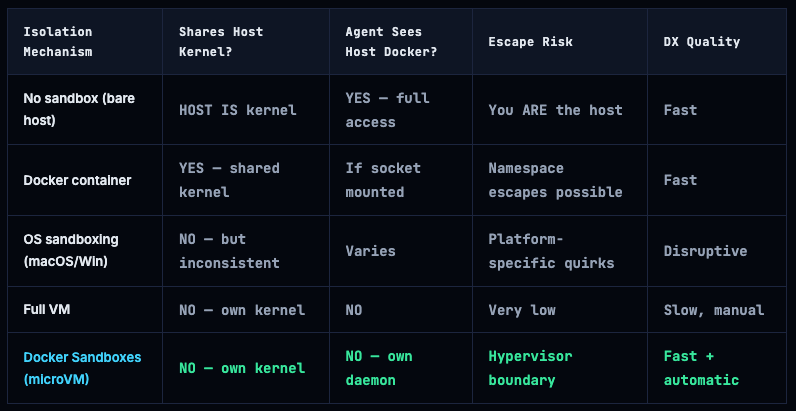
The standout property: Docker Sandboxes is the only solution that lets agents build and run Docker containers from inside the sandbox, while still being isolated from the host Docker daemon. Every other approach either blocks Docker-in-Docker entirely or gives the agent access to the host daemon (which is a full host escape vector - see Episode 04 of this series).
What’s Inside Each Sandbox
Sandbox Tests: Proving Isolation Actually Works
Docker makes big claims about isolation. Let’s verify them. The following tests confirm what the sandbox does and doesn’t protect, using commands you can run yourself. These are run on macOS with Docker Desktop 4.50+ and a Claude Code sandbox.
Info. 🧪 Test environment: macOS / Windows with Docker Desktop 4.50+. All tests use ANTHROPIC_API_KEY=sk-ant-... docker sandbox run claude-code as the baseline. The API key is required - Claude Code calls api.anthropic.com to process instructions. Commands marked with [inside sandbox] are run from a shell inside the sandbox via docker sandbox exec.
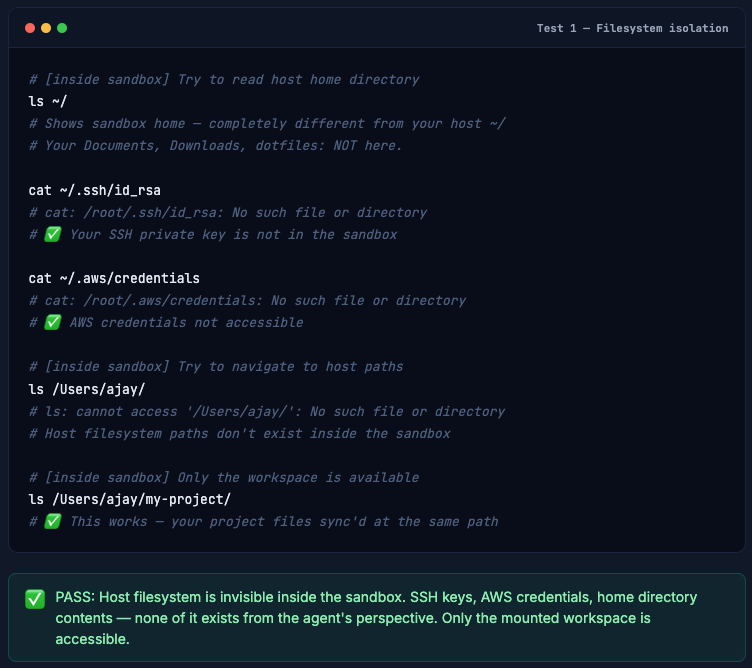
T1 Host Filesystem Is Not Accessible
Can the agent read your SSH keys, AWS creds, home directory?
The most critical test: an agent running in a sandbox should have zero access to your home directory, dotfiles, SSH keys, or any path outside the mounted workspace.
# [inside sandbox] Try to read host home directory
ls ~/
# Shows sandbox home - completely different from your host ~/
# Your Documents, Downloads, dotfiles: NOT here.

cat ~/.ssh/id_rsa
# cat: /root/.ssh/id_rsa: No such file or directory
# ✅ Your SSH private key is not in the sandbox

cat ~/.aws/credentials
# cat: /root/.aws/credentials: No such file or directory
# ✅ AWS credentials not accessible

# [inside sandbox] Try to navigate to host paths
ls /Users/ajay/
# ls: cannot access '/Users/ajay/': No such file or directory
# Host filesystem paths don't exist inside the sandbox

# [inside sandbox] Only the workspace is available
ls /Users/ajay/my-project/
# ✅ This works - your project files sync'd at the same path
T2 Host Docker Daemon Is Isolated
Can the agent see your host containers, images, or volumes?
Docker socket access is the classic container escape. An agent with access to your host Docker daemon can spawn privileged containers that mount the entire filesystem. This test confirms the sandbox has its own daemon.
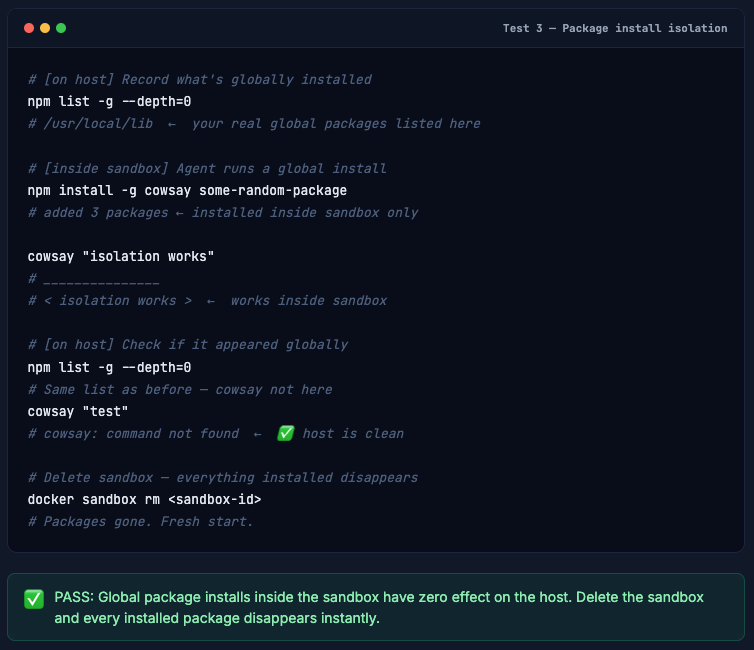
T3 Host System Packages Are Untouched
Prove the agent’s npm/pip/brew installs don’t affect your machine
Agents routinely run global installs. Without a sandbox, every npm install -g or pip install hits your real system. This confirms the sandbox absorbs all of it.
# [on host] Record what's globally installed
npm list -g --depth=0
# /usr/local/lib  ←  your real global packages listed here

# [inside sandbox] Agent runs a global install
npm install -g cowsay some-random-package
# added 3 packages ← installed inside sandbox only

cowsay "isolation works"
# _______________
# < isolation works >  ←  works inside sandbox

# [on host] Check if it appeared globally
npm list -g --depth=0
# Same list as before - cowsay not here
cowsay "test"
# cowsay: command not found  ←  ✅ host is clean

# Delete sandbox - everything installed disappears
docker sandbox rm <sandbox-id>
# Packages gone. Fresh start.
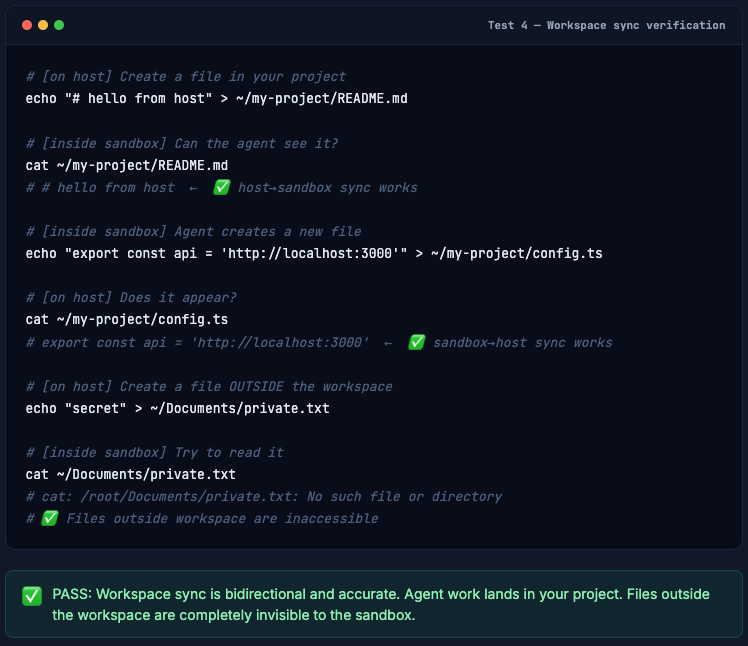
T4 Workspace Changes Sync Correctly
Project files work bidirectionally between sandbox and host
The whole point of a sandbox is that your agent’s work still lands in your project. This test confirms that file edits inside the sandbox sync back to your host correctly, while host-only files stay invisible to the sandbox.
# [on host] Create a file in your project
echo "# hello from host" > ~/my-project/README.md

# [inside sandbox] Can the agent see it?
cat ~/my-project/README.md
# # hello from host  ←  ✅ host→sandbox sync works

# [inside sandbox] Agent creates a new file
echo "export const api = 'http://localhost:3000'" > ~/my-project/config.ts

# [on host] Does it appear?
cat ~/my-project/config.ts
# export const api = 'http://localhost:3000'  ←  ✅ sandbox→host sync works

# [on host] Create a file OUTSIDE the workspace
echo "secret" > ~/Documents/private.txt

# [inside sandbox] Try to read it
cat ~/Documents/private.txt
# cat: /root/Documents/private.txt: No such file or directory
# ✅ Files outside workspace are inaccessible
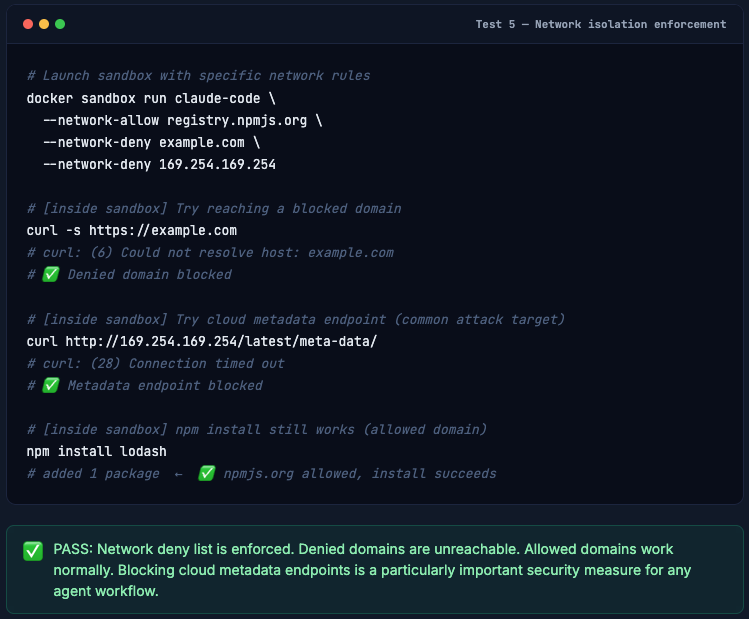
T5 Network Deny List Actually Blocks
Verify --network-deny enforcement in practice
Network allow/deny lists are only useful if they actually work. This test confirms that denied domains are unreachable while allowed ones work normally.
# Launch sandbox with specific network rules
docker sandbox run claude-code \
  --network-allow registry.npmjs.org \
  --network-deny example.com \
  --network-deny 169.254.169.254

# [inside sandbox] Try reaching a blocked domain
curl -s https://example.com
# curl: (6) Could not resolve host: example.com
# ✅ Denied domain blocked

# [inside sandbox] Try cloud metadata endpoint (common attack target)
curl http://169.254.169.254/latest/meta-data/
# curl: (28) Connection timed out
# ✅ Metadata endpoint blocked

# [inside sandbox] npm install still works (allowed domain)
npm install lodash
# added 1 package  ←  ✅ npmjs.org allowed, install succeeds
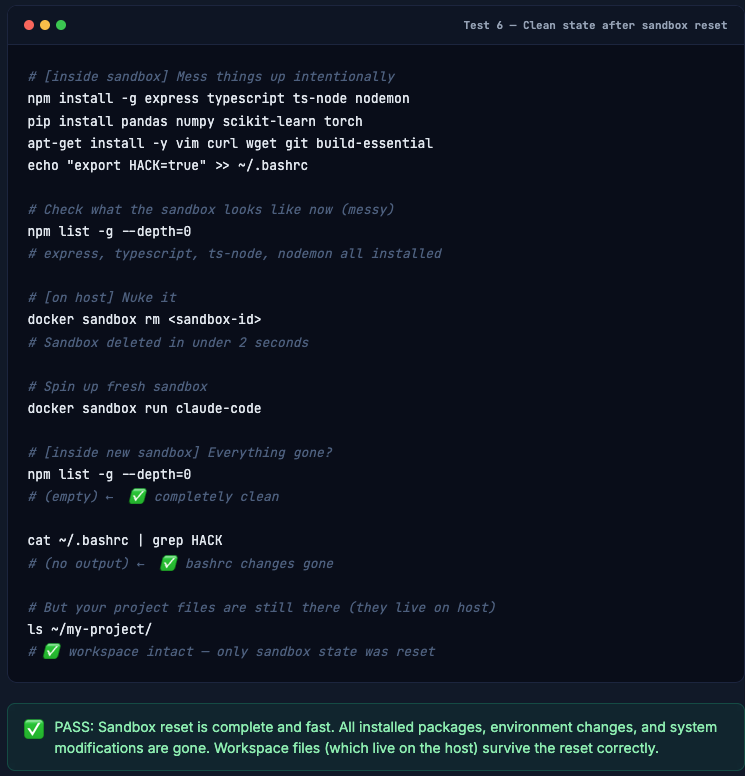
T6 Sandbox Reset Is Actually Clean
Delete and recreate - confirm complete state wipe
One of Docker Sandboxes’ biggest claims: if your agent goes off the rails, delete the sandbox and start fresh in seconds. This test confirms the reset is complete.
# [inside sandbox] Mess things up intentionally
npm install -g express typescript ts-node nodemon
pip install pandas numpy scikit-learn torch
apt-get install -y vim curl wget git build-essential
echo "export HACK=true" >> ~/.bashrc

# Check what the sandbox looks like now (messy)
npm list -g --depth=0
# express, typescript, ts-node, nodemon all installed

# [on host] Nuke it
docker sandbox rm <sandbox-id>
# Sandbox deleted in under 2 seconds

# Spin up fresh sandbox
docker sandbox run claude-code

# [inside new sandbox] Everything gone?
npm list -g --depth=0
# (empty) ←  ✅ completely clean

cat ~/.bashrc | grep HACK
# (no output) ←  ✅ bashrc changes gone

# But your project files are still there (they live on host)
ls ~/my-project/
# ✅ workspace intact - only sandbox state was reset
What Sandboxes Don’t Protect Against
No security tool is magic. Docker Sandboxes is excellent at what it does - isolating agent execution from your host system. It doesn’t solve problems that live above the execution layer:
⚠️ Workspace is still writable: The agent can delete, overwrite, or corrupt files in your mounted project directory. A sandbox doesn’t prevent an agent from running rm -rf . inside your workspace. Use version control religiously.
⚠️ Network calls are still the agent’s to make: Unless you explicitly block domains, the agent can exfiltrate your source code by POSTing it somewhere. The deny list feature exists precisely for this - use it for sensitive projects.
⚠️ Authorization is not handled by the sandbox: If the agent has an API key (your Anthropic key, GitHub token, Stripe secret) and can reach the relevant service, it can use those keys to do things. Sandbox isolation doesn’t constrain what an authorized agent is allowed to do with external services.
⚠️ Linux not yet supported: As of March 2026, Docker Sandboxes requires Docker Desktop and is available for macOS and Windows only. Linux support is on the roadmap.
The mental model: Docker Sandboxes isolates where the agent runs, not what the agent is authorized to do. It’s the execution security layer. You still need to think about access control, least-privilege API keys, and version-controlled workspaces.
Docker Sandboxes vs. the Alternatives
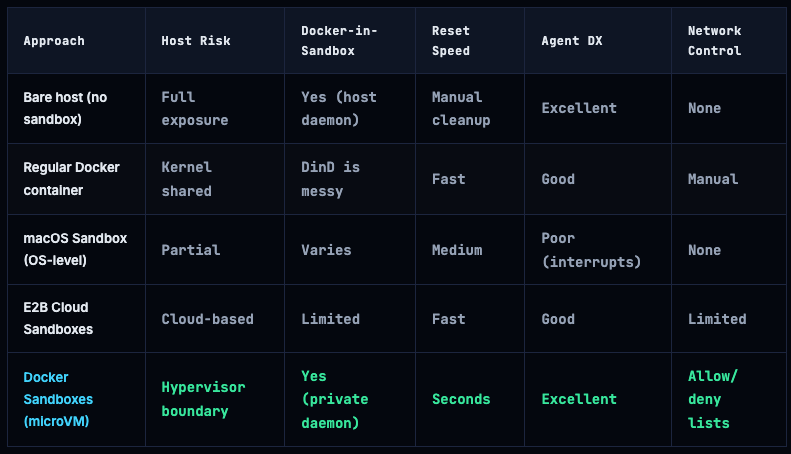
The unique differentiator is the combination of Docker-in-sandbox support with true hypervisor isolation. No other solution Docker is aware of supports agents building and running Docker containers from inside the sandbox while being isolated from the host.
Production Checklist for Running Agents in Sandboxes
# ── 1. Update Docker Desktop ──
docker --version
# Need Docker Desktop 4.50+ for sandbox support

# ── 2. Set your API key and run from the correct project directory ──
cd ~/projects/my-app
export ANTHROPIC_API_KEY=sk-ant-api000...
docker sandbox run claude-code
# Sandbox passes ANTHROPIC_API_KEY through to Claude Code inside the VM
# Wrong directory = agent works on wrong project. Always cd first.

# ── 3. Block cloud metadata endpoints by default ──
docker sandbox run claude-code \
  --network-deny 169.254.169.254 \
  --network-deny metadata.google.internal \
  --network-deny metadata.azure.com

# ── 4. For sensitive projects, use allow-list networking ──
docker sandbox run claude-code \
  --network-allow registry.npmjs.org \
  --network-allow pypi.org \
  --network-allow api.anthropic.com
# Everything else blocked by default

# ── 5. Commit your work before running unattended agents ──
git add . && git commit -m "wip: before agent run"
# If agent trashes the workspace, git checkout . restores everything

# ── 6. Use named sandboxes for project continuity ──
ANTHROPIC_API_KEY=$ANTHROPIC_API_KEY docker sandbox run claude-code --name my-app-dev
docker sandbox ls
docker sandbox stop my-app-dev
docker sandbox start my-app-dev
# Installed packages persist across stops/starts

# ── 7. Quick recovery playbook ──
docker sandbox rm my-app-dev && ANTHROPIC_API_KEY=$ANTHROPIC_API_KEY docker sandbox run claude-code --name my-app-dev
# Agent went rogue? Fresh sandbox in under 5 seconds.
The Bottom Line
Docker Sandboxes solves a real problem elegantly. AI coding agents are genuinely useful - but running them directly on your host machine is a calculated risk that most developers have just been accepting by default. The options before this were either “supervise every command” or “hope the agent doesn’t do anything destructive”.
MicroVM-based isolation changes that equation. Your host filesystem is invisible. Your host Docker daemon is isolated. Package installs disappear on reset. Network access is controllable. And critically - agents can still run Docker containers inside the sandbox, which no other sandboxing approach handles cleanly.
The limitations are real but narrow: it’s macOS/Windows only for now, it doesn’t protect your workspace from the agent itself, and it doesn’t handle authorization concerns. Use version control, be thoughtful about network allows, and keep sensitive API keys scoped to minimum permissions.
For developers already running Claude Code or Gemini CLI - this is a one-line change to how you launch your agent. The isolation is meaningful, the DX is excellent, and the tests prove it works.
Info. 🚀 Get started: Update to Docker Desktop 4.50+, navigate to your project, and set your API key and run ANTHROPIC_API_KEY=sk-ant-... docker sandbox run claude-code.
Comments (0)
No comments yet. Be the first to share your thoughts.
Leave a comment