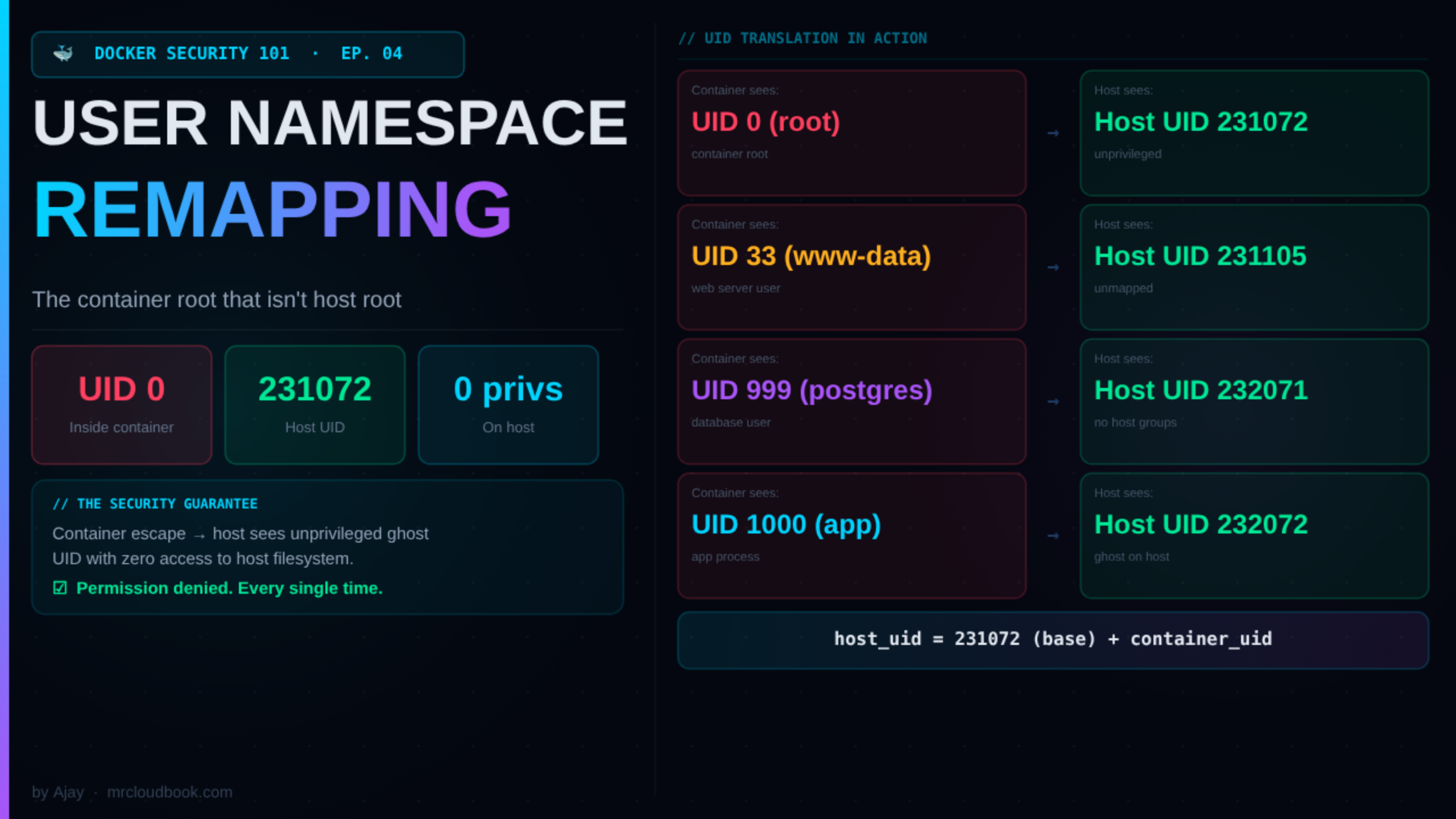
☕ You've been running containers as root for years. Every tutorial does it. Every base image starts as root. It works great - until a container escape drops an attacker into your host as actual uid=0. Today we fix that permanently. User namespace remapping is one of the most powerful container security features that almost nobody has turned on. Let's change that.
The Root Problem Nobody Talks About
Here’s a fact that should make you uncomfortable: when you run docker run -it ubuntu bash and get a shell, that shell is running as UID 0. Real root. The same UID as /etc/shadow. The same UID as /var/run/docker.sock.
Containers isolate process trees, filesystems, and networks. But without user namespace remapping, they do not isolate the user identity. A process that is UID 0 inside a container is also UID 0 on the host kernel. The only thing standing between that container root and full host compromise is the container runtime’s security controls - seccomp, capabilities, AppArmor. All of which can be bypassed if there’s a bug in any one of them.
🚨 Real Attack Chain - I've Seen This in Production Misconfigured container mounts the Docker socket (-v /var/run/docker.sock:/var/run/docker.sock). Container process is UID 0. Attacker in container spawns a new privileged container with --pid=host --net=host -v /:/hostfs. In the new container: chroot /hostfs /bin/bash. Congratulations, you're now root on the host. The entire sequence takes about 30 seconds. User namespace remapping breaks this chain at the first step - because the UID 0 inside the container is NOT UID 0 on the host.
I’ve spent a years doing container security assessments. The number of production Docker deployments I’ve found with --privileged containers, mounted Docker sockets, or overly permissive volume mounts is depressing. User namespace remapping is the single configuration change that most dramatically improves your container escape blast radius - and most teams have never turned it on.
What userns-remap Actually Is
User namespace remapping tells Docker: “When a container process thinks it’s running as UID X, actually run it on the host as a completely different, unprivileged UID.”
The magic is that the container doesn’t know this is happening. A process inside the container calls getuid() and sees 0. It can read root-owned files inside the container filesystem. It can write to root-owned directories. Everything works normally inside the sandbox.
But the host kernel knows the truth. That process is actually UID 231072 (or 100000, or whatever base you configured). It has zero privileges on the host filesystem. It cannot read /etc/shadow. It cannot write to /var/run/docker.sock. It cannot escalate to anything - because on the host, it’s just an unprivileged high-numbered user ID that doesn’t even exist in /etc/passwd.
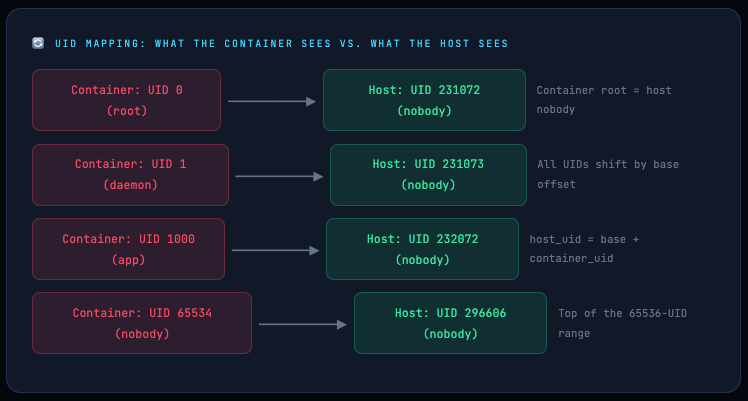
The formula is simple: host_uid = base_uid + container_uid. With a base of 231072, container root maps to host UID 231072. Container UID 1000 maps to host UID 232072. None of these host UIDs have any special privileges. They’re not in any groups. They can’t sudo. They’re effectively ghosts on the host system.
🛡️ The security guarantee: If a container escape bug is ever exploited - a kernel vulnerability, a runtime bug, a misconfigured mount - the escaped process runs as an unprivileged, unmapped host UID. It has no credentials, no group memberships, no access to host files. The blast radius of a container escape drops from "full host compromise" to "process dies with permission denied."
Linux User Namespaces: What’s Happening in the Kernel
User namespaces are a Linux kernel feature (available since kernel 3.8, stable in 3.12). They allow a process to have its own independent view of UID and GID space. Inside a user namespace, a process can be UID 0. Outside it (in the parent namespace), that same process is a completely different UID with no special privileges.
Docker creates a new user namespace for each container and then sets up the UID/GID mapping between the container namespace and the host namespace. The kernel enforces this mapping at every privilege check.
# Start a container and grab its PID
docker run -d --name uid-test alpine sleep 3600
CPID=$(docker inspect --format '{{.State.Pid}}' uid-test)

# Read the kernel's UID mapping for this process
cat /proc/$CPID/uid_map
#         0     231072      65536
# ^ container_uid  ^ host_uid  ^ count
# "UID 0 in the container = UID 231072 on the host, for 65536 UIDs"

cat /proc/$CPID/gid_map
#         0     231072      65536

# Verify: what does the host think this process's UID is?
ps -o pid,user,uid -p $CPID
#   PID   USER       UID
# 12345   231072   231072   ← host sees an unmapped high UID, not root
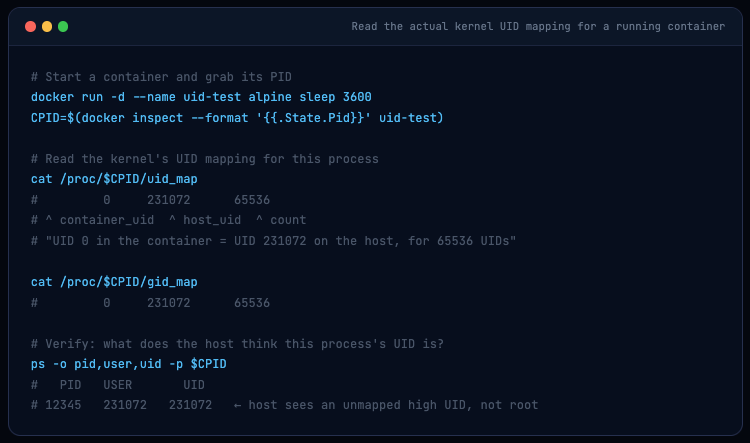
The /proc/[pid]/uid_map file is the ground truth. Three columns: the starting UID in the container namespace, the starting UID in the parent namespace (host), and the count. When the kernel processes a system call from this process, it translates between the two spaces automatically. The container process has no idea this translation is happening.
💡 Kernel limit to know: The kernel only supports up to 5 UID mapping entries per namespace (the /proc/self/uid_map file can have at most 5 lines). Docker enforces this by using only the first 5 entries from /etc/subuid if you configure multiple ranges.
How Docker Orchestrates This
When userns-remap is enabled in Docker’s daemon config:
✓ The Docker daemon reads /etc/subuid and /etc/subgid to get the UID/GID range for the remapping user
✓ For each container start, the OCI runtime (runc) creates a new user namespace and writes the UID/GID mapping into /proc/[pid]/uid_map and /proc/[pid]/gid_map
✓ The container’s entire filesystem namespace is owned by the remapped UIDs - files that appear root-owned inside the container are actually owned by the high-numbered host UIDs on disk
✓ Docker stores container layers in a separate directory: /var/lib/docker/[uid].[gid]/ - this is completely isolated from the non-remapped storage
The UID Math: /etc/subuid and /etc/subgid Explained
These two files are the heart of user namespace remapping. Every line has the same format:
# Format: username:start_uid:count
dockremap:231072:65536
#   ^           ^         ^
# user    base UID   # of UIDs available
#
# This means:
# - Container UID 0  → Host UID 231072
# - Container UID 1  → Host UID 231073
# - Container UID 999 → Host UID 232071
# - Container UID 65535 → Host UID 296607  (last in range)
The range of 65536 UIDs is Docker’s default - enough to cover UID 0 through 65535, which maps all standard Unix UIDs. The base UID (231072 in this example) is chosen to not overlap with any real users on the system. Non-overlapping ranges are critical: if two different container users’ ranges overlap, processes in different containers could access each other’s files.
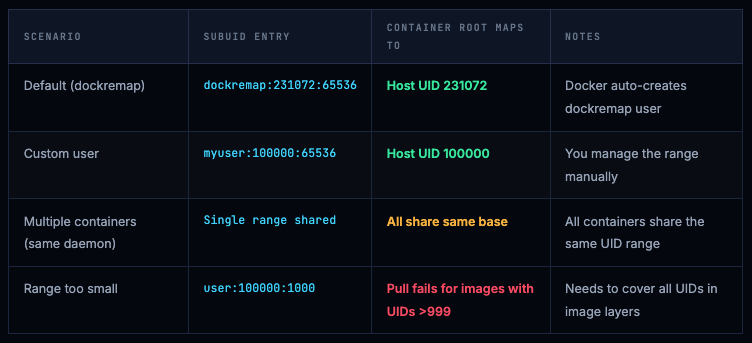
⚠️ Range size matters for image pulls. If an image has files owned by UID 33 (www-data), UID 999 (postgres), or any other UID, that UID must fit within your configured range. If your range is only 1000 UIDs wide and an image has a file owned by UID 1001, the pull will fail with: container id xxx cannot be mapped to a host id. Always use at least 65536. Using 65536 is the standard and covers all standard Unix UIDs.
Full Setup Guide: Default and Custom User ( Id may differ )
Option A: Let Docker Do It (Recommended for Most Teams)
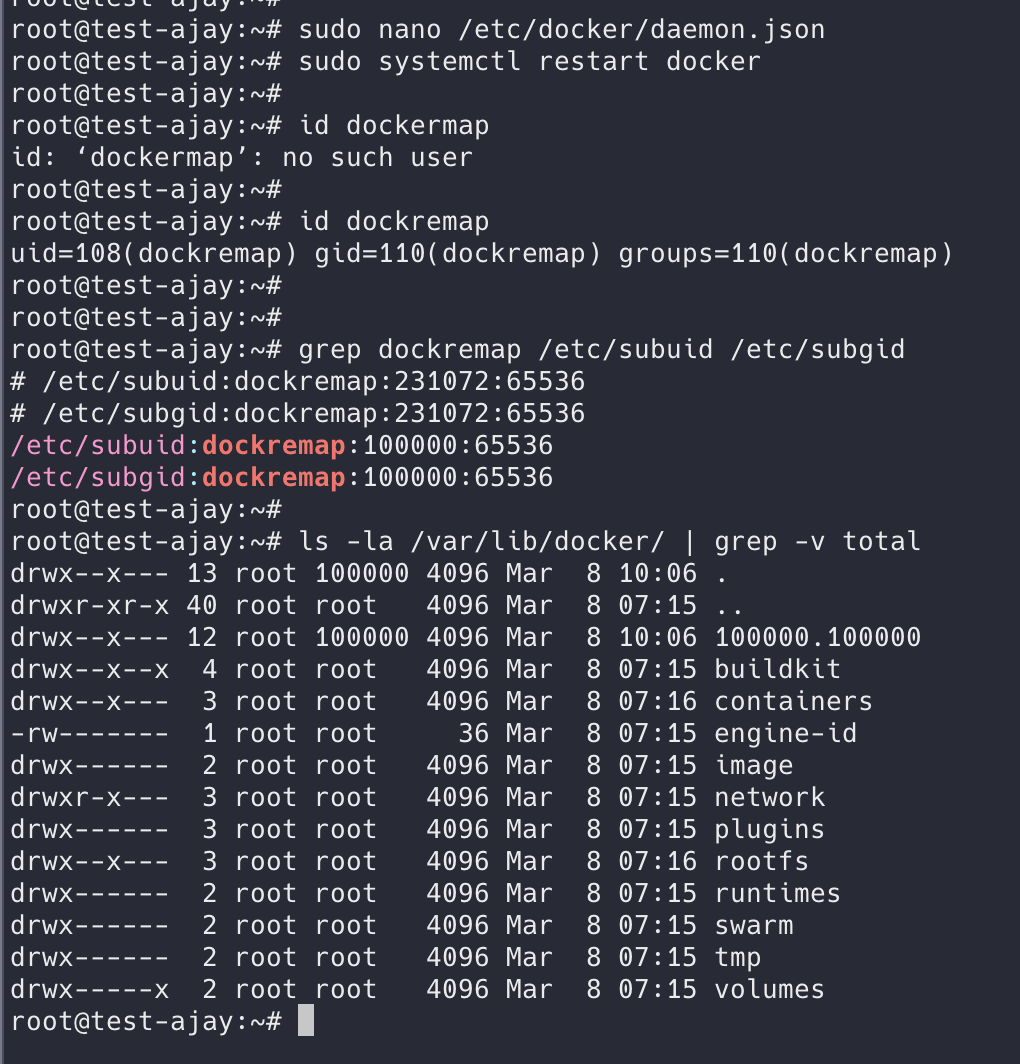
Set "userns-remap": "default" in your daemon config. Docker creates the dockremap user and group automatically and populates /etc/subuid and /etc/subgid.
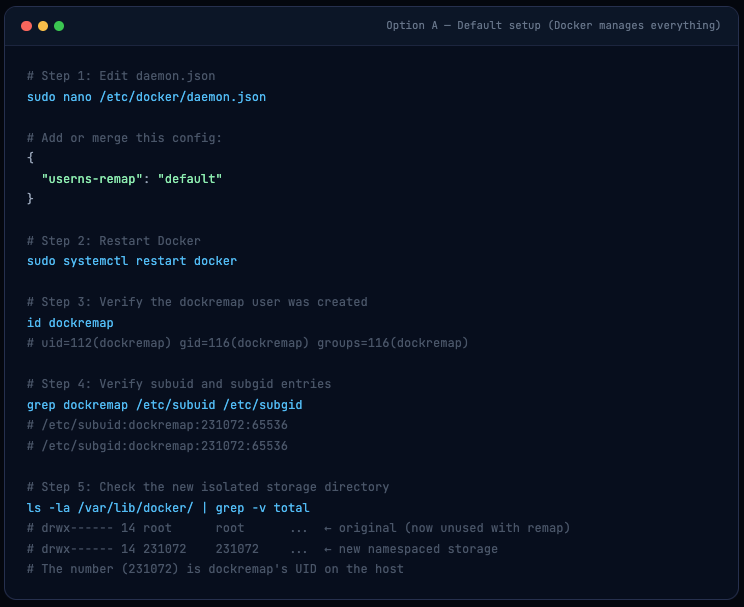
# Step 1: Edit daemon.json
sudo nano /etc/docker/daemon.json

# Add or merge this config:
{
  "userns-remap": "default"
}

# Step 2: Restart Docker
sudo systemctl restart docker

# Step 3: Verify the dockremap user was created
id dockremap
# uid=112(dockremap) gid=116(dockremap) groups=116(dockremap)

# Step 4: Verify subuid and subgid entries
grep dockremap /etc/subuid /etc/subgid
# /etc/subuid:dockremap:231072:65536
# /etc/subgid:dockremap:231072:65536

# Step 5: Check the new isolated storage directory
ls -la /var/lib/docker/ | grep -v total
# drwx------ 14 root      root      ...  ← original (now unused with remap)
# drwx------ 14 231072    231072    ...  ← new namespaced storage
# The number (231072) is dockremap's UID on the host
Option B: Custom Mapping User (More Control)
Use this when you want to control which UID range containers map to - for example, if you need to pre-own specific directories on shared storage with known UIDs.
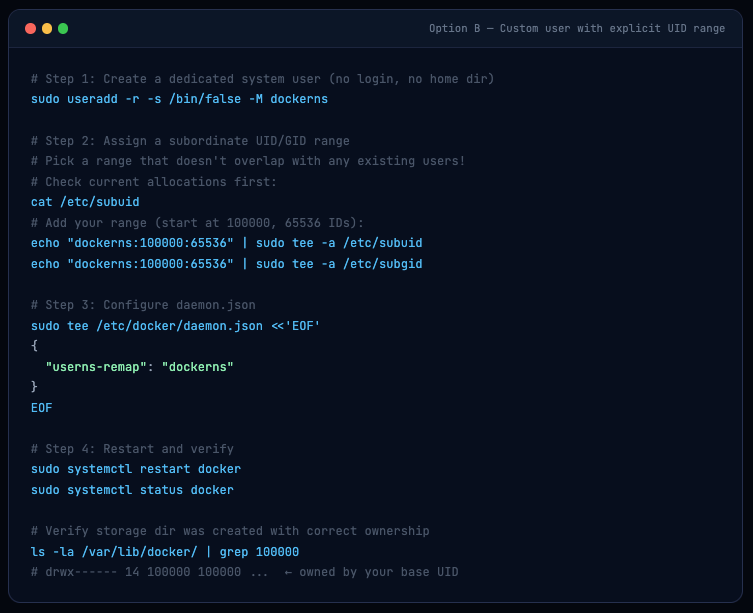
# Step 1: Create a dedicated system user (no login, no home dir)
sudo useradd -r -s /bin/false -M dockerns

# Step 2: Assign a subordinate UID/GID range
# Pick a range that doesn't overlap with any existing users!
# Check current allocations first:
cat /etc/subuid
# Add your range (start at 100000, 65536 IDs):
echo "dockerns:100000:65536" | sudo tee -a /etc/subuid
echo "dockerns:100000:65536" | sudo tee -a /etc/subgid

# Step 3: Configure daemon.json
sudo tee /etc/docker/daemon.json <<'EOF'
{
  "userns-remap": "dockerns"
}
EOF

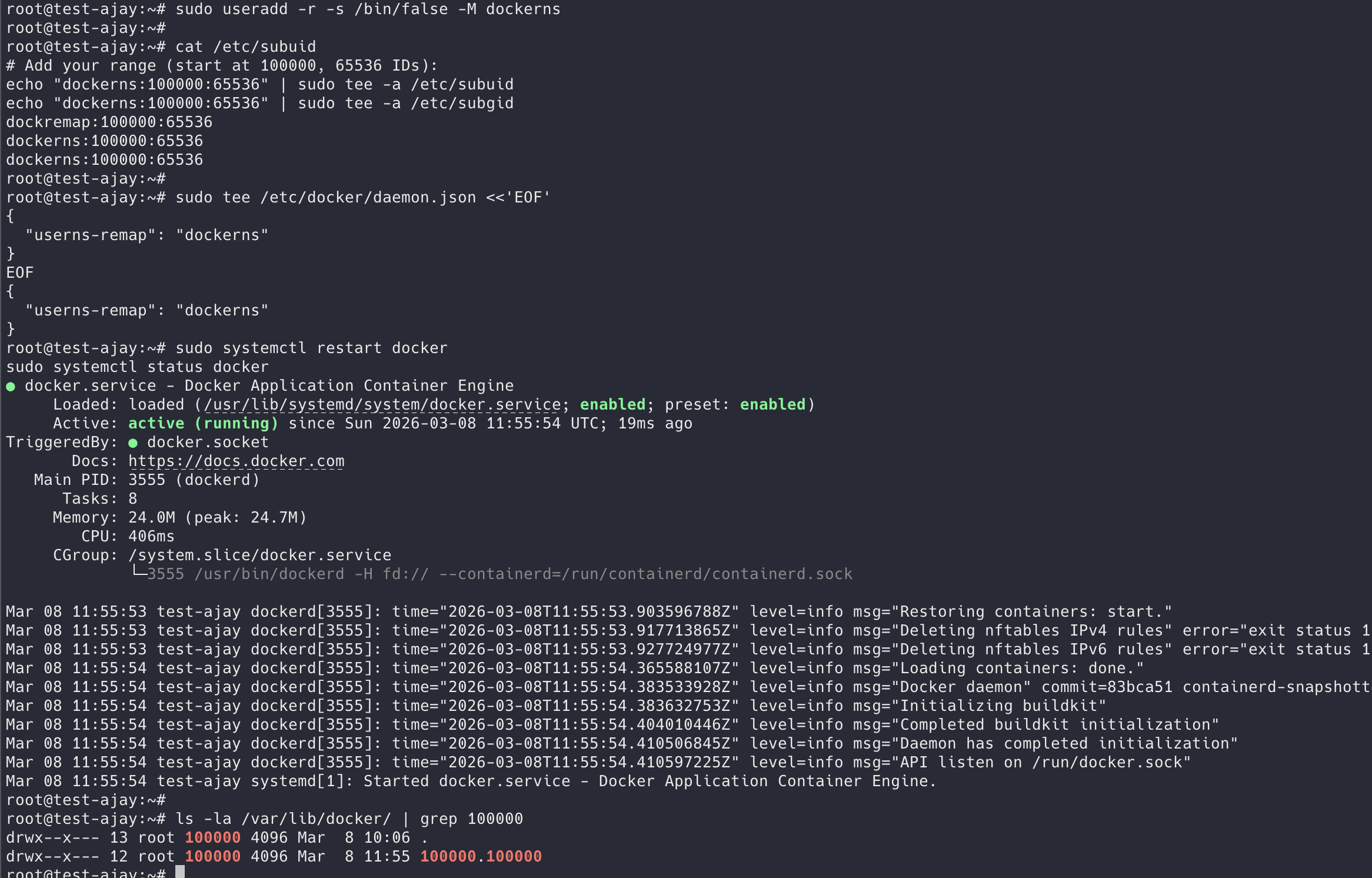
# Step 4: Restart and verify
sudo systemctl restart docker
sudo systemctl status docker

# Verify storage dir was created with correct ownership
ls -la /var/lib/docker/ | grep 100000
# drwx------ 14 100000 100000 ...  ← owned by your base UID
ℹ️ Existing images and containers are masked after enabling remapping. Docker creates a completely new storage hierarchy at /var/lib/docker/[uid].[gid]/. Your existing images in /var/lib/docker/overlay2/ are still on disk but not visible to the remapped daemon. You'll need to re-pull images. To go back, remove the userns-remap key and restart - your original images will reappear.
7 Tests That Prove userns-remap Is Working
Trust but verify. Don’t just enable this feature and assume it works. Run these seven tests - they cover the most important security properties of user namespace remapping and will catch any misconfiguration.
🚨 Run these tests ONLY after enabling userns-remap. If you haven't enabled it yet, running the commands below will show uid_map: 0 0 4294967295 - that's the host root namespace with remapping OFF. Every test will give a false result. Enable it first (Section 04), restart Docker, confirm the uid_map below, then proceed to T1-T7.
Step 0 - Enable userns-remap Before Running Any Tests
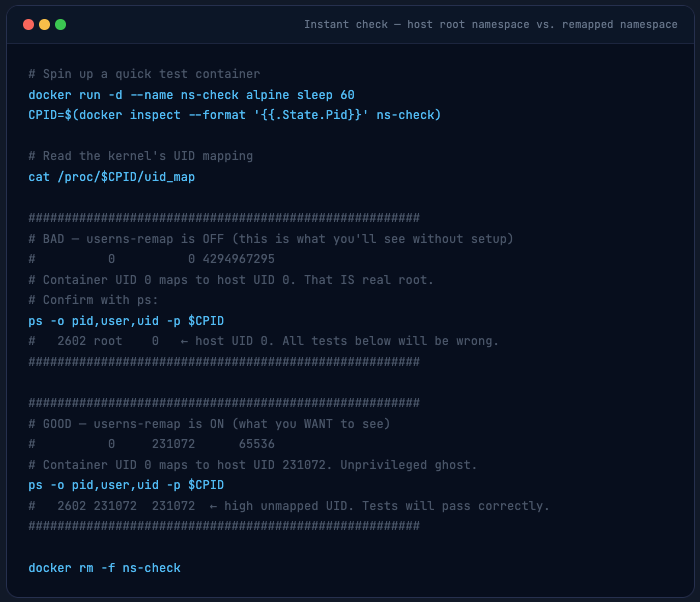
Before anything, check your current state. This one command tells you whether remapping is active or not:
# Spin up a quick test container
docker run -d --name ns-check alpine sleep 60
CPID=$(docker inspect --format '{{.State.Pid}}' ns-check)

# Read the kernel's UID mapping
cat /proc/$CPID/uid_map

######################################################
# BAD - userns-remap is OFF (this is what you'll see without setup)
#          0          0 4294967295
# Container UID 0 maps to host UID 0. That IS real root.
# Confirm with ps:
ps -o pid,user,uid -p $CPID
#   2602 root    0   ← host UID 0. All tests below will be wrong.
######################################################

######################################################
# GOOD - userns-remap is ON (what you WANT to see)
#          0     231072      65536
# Container UID 0 maps to host UID 231072. Unprivileged ghost.
ps -o pid,user,uid -p $CPID
#   2602 231072  231072  ← high unmapped UID. Tests will pass correctly.
######################################################

docker rm -f ns-check
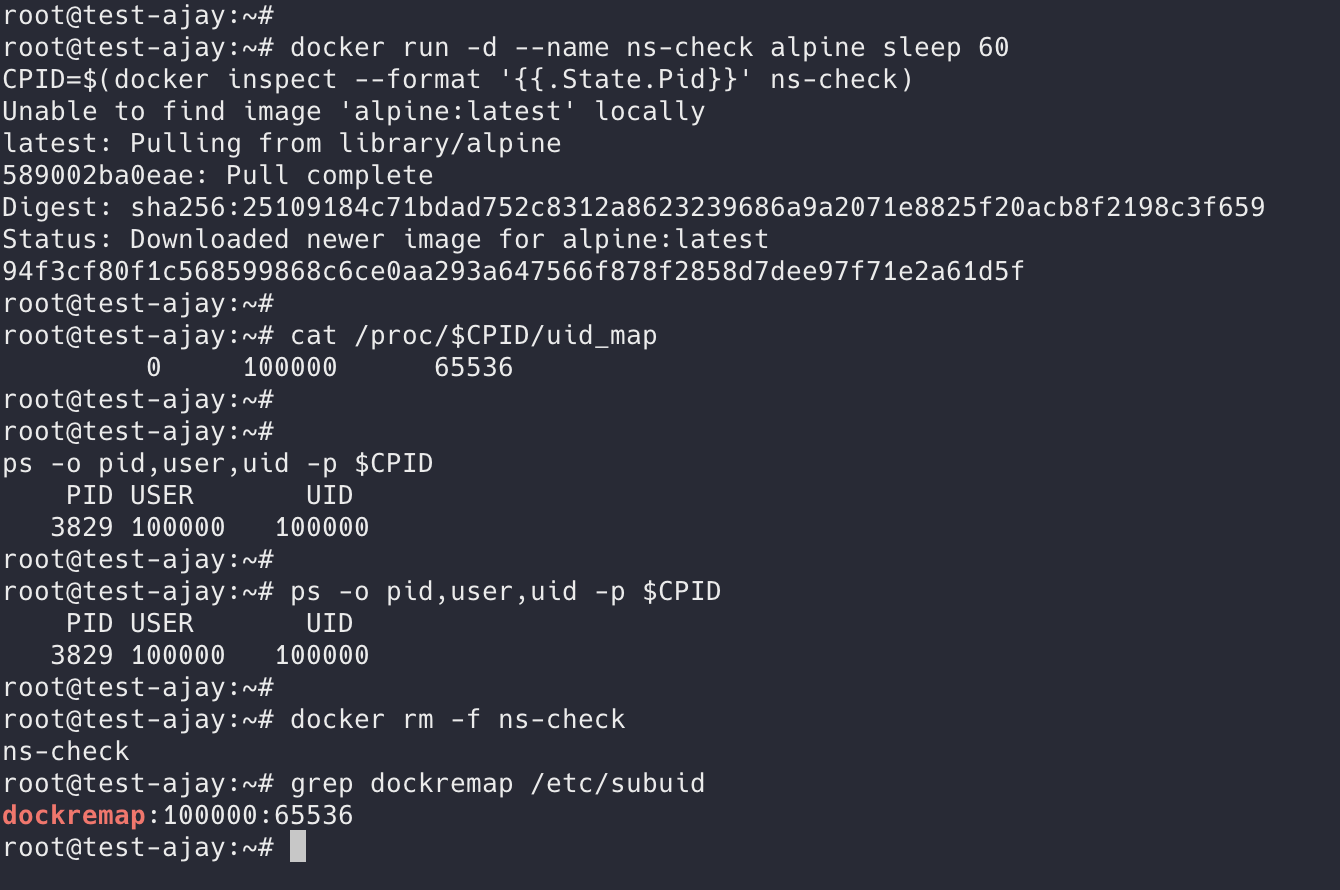
container UID 0 → host UID 100000. Remapping is active and working perfectly.
The blog uses 231072 as the example throughout because that’s the typical default Docker assigns. Your system chose 100000 ( may get different ) - both are valid, just different base allocations in /etc/subuid.
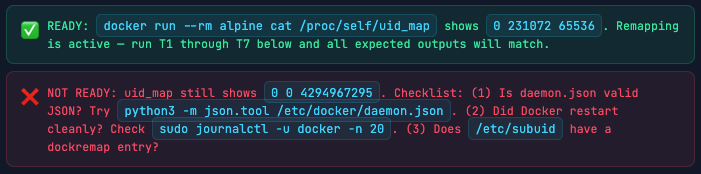
If your output showed 0 0 4294967295 (the BAD case), enable userns-remap now:
Enabling userns
# 1. Create / update daemon config
sudo tee /etc/docker/daemon.json <<'EOF'
{
  "userns-remap": "default"
}
EOF

# 2. Restart Docker daemon
sudo systemctl restart docker
sudo systemctl status docker   # confirm it's running

# 3. Verify dockremap user + subuid entries were auto-created
id dockremap
# uid=112(dockremap) gid=116(dockremap) groups=116(dockremap)

grep dockremap /etc/subuid /etc/subgid
# /etc/subuid:dockremap:231072:65536
# /etc/subgid:dockremap:231072:65536

# 4. Re-pull alpine - existing images are hidden in remapped mode
#    (they still exist on disk, just not visible to the remapped daemon)
docker pull alpine

# 5. The one-liner confirmation - run this before every test session
docker run --rm alpine cat /proc/self/uid_map
#          0     231072      65536
# ✅ If you see this → userns-remap is active. Proceed to T1.
# ❌ If you see 0 0 4294967295 → restart Docker and check systemd logs.
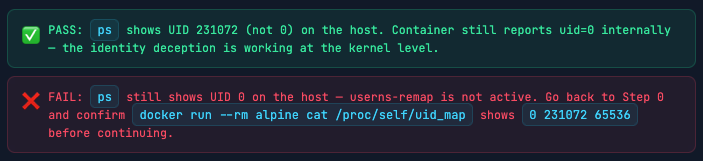
T1 Container Root ≠ Host Root
The most basic test: container thinks it’s root, host knows it isn’t. This is the foundation - if this test passes, the mapping is active.

Warning. THE UID MAY DIFFER ( Below image is example UID )
T2 Cannot Read Host Root Files
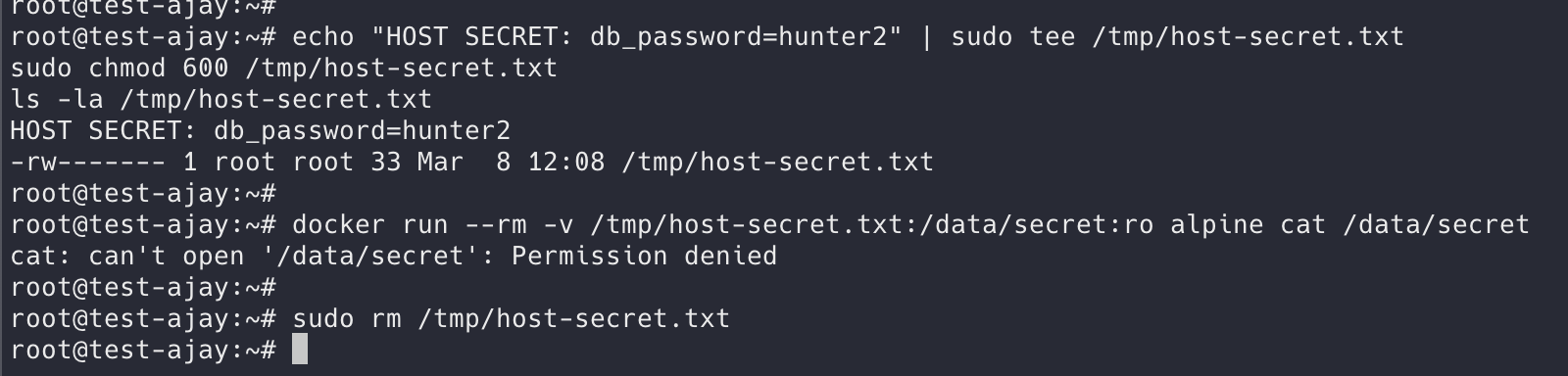
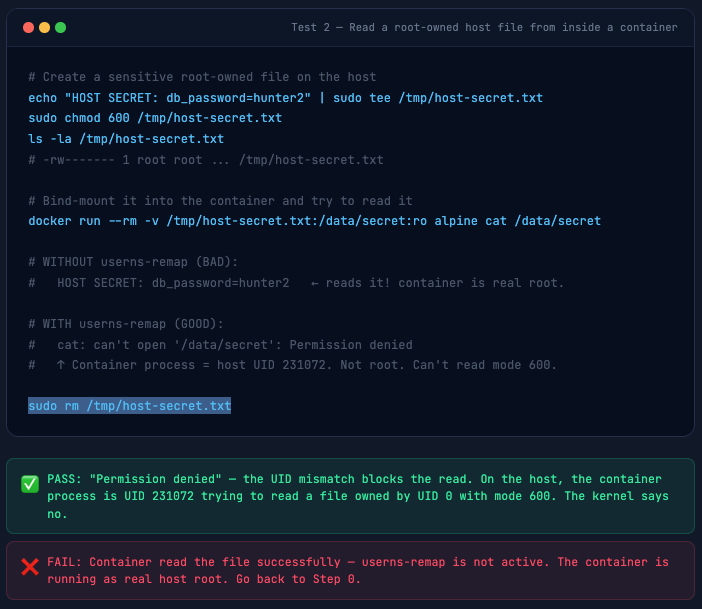
Even with a bind mount, a container escape that gets a shell in a remapped container cannot read root-owned host files - because on the host, that process is UID 231072, not root.
# Create a sensitive root-owned file on the host
echo "HOST SECRET: db_password=hunter2" | sudo tee /tmp/host-secret.txt
sudo chmod 600 /tmp/host-secret.txt
ls -la /tmp/host-secret.txt
# -rw------- 1 root root ... /tmp/host-secret.txt

# Bind-mount it into the container and try to read it
docker run --rm -v /tmp/host-secret.txt:/data/secret:ro alpine cat /data/secret

# WITHOUT userns-remap (BAD):
#   HOST SECRET: db_password=hunter2   ← reads it! container is real root.

# WITH userns-remap (GOOD):
#   cat: can't open '/data/secret': Permission denied
#   ↑ Container process = host UID 231072. Not root. Can't read mode 600.

sudo rm /tmp/host-secret.txt
T3 Cannot Write to Host Root Directories
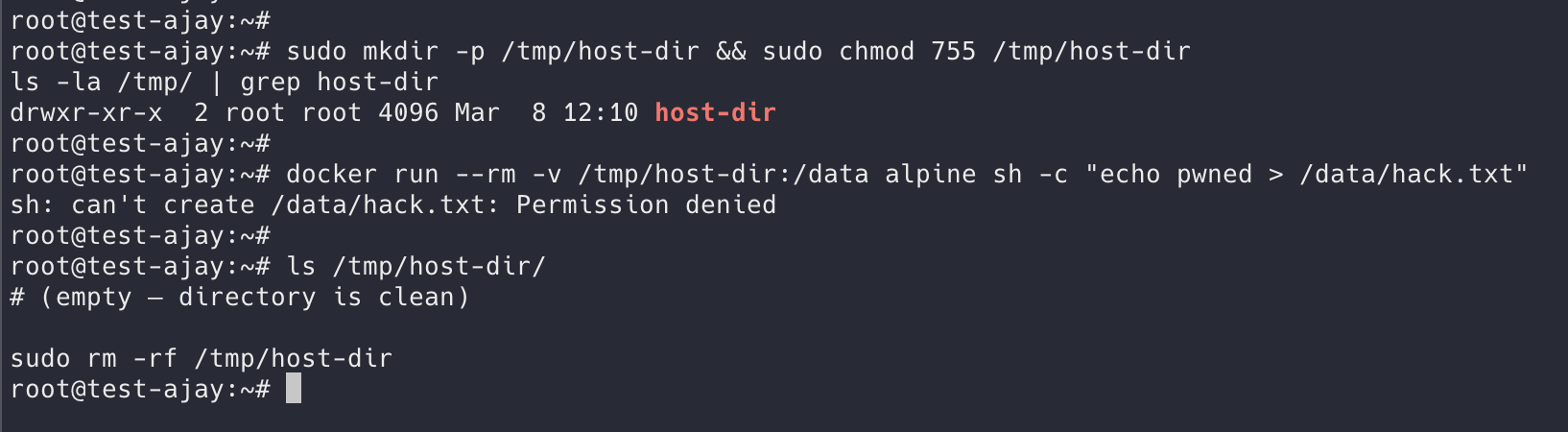
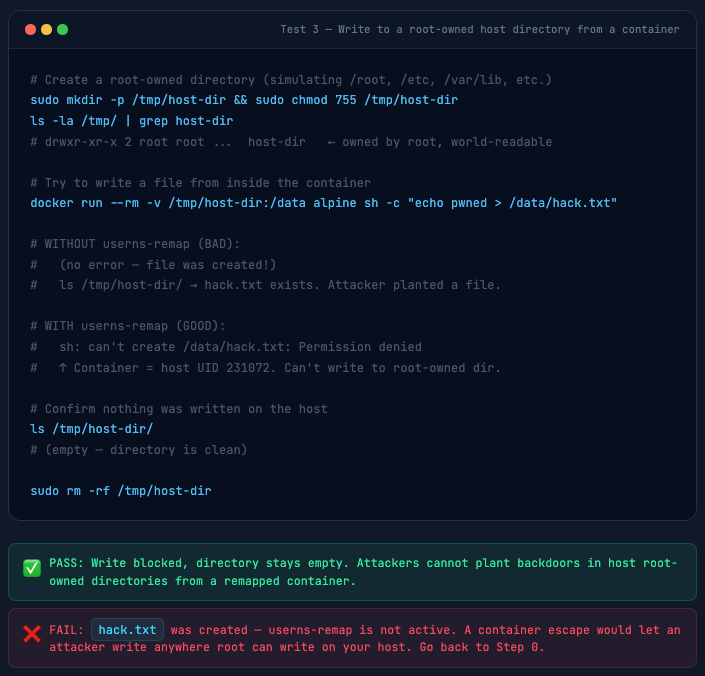
Classic post-escape move: write an SSH key to /root/.ssh/, drop a cron backdoor, modify /etc/passwd. This test confirms the container cannot write to any root-owned host directory.
sudo mkdir -p /tmp/host-dir && sudo chmod 755 /tmp/host-dir
ls -la /tmp/ | grep host-dir
# drwxr-xr-x 2 root root ...  host-dir   ← owned by root, world-readable

# Try to write a file from inside the container
docker run --rm -v /tmp/host-dir:/data alpine sh -c "echo pwned > /data/hack.txt"

# WITHOUT userns-remap (BAD):
#   (no error - file was created!)
#   ls /tmp/host-dir/ → hack.txt exists. Attacker planted a file.

# WITH userns-remap (GOOD):
#   sh: can't create /data/hack.txt: Permission denied
#   ↑ Container = host UID 231072. Can't write to root-owned dir.

# Confirm nothing was written on the host
ls /tmp/host-dir/
# (empty - directory is clean)

sudo rm -rf /tmp/host-dir
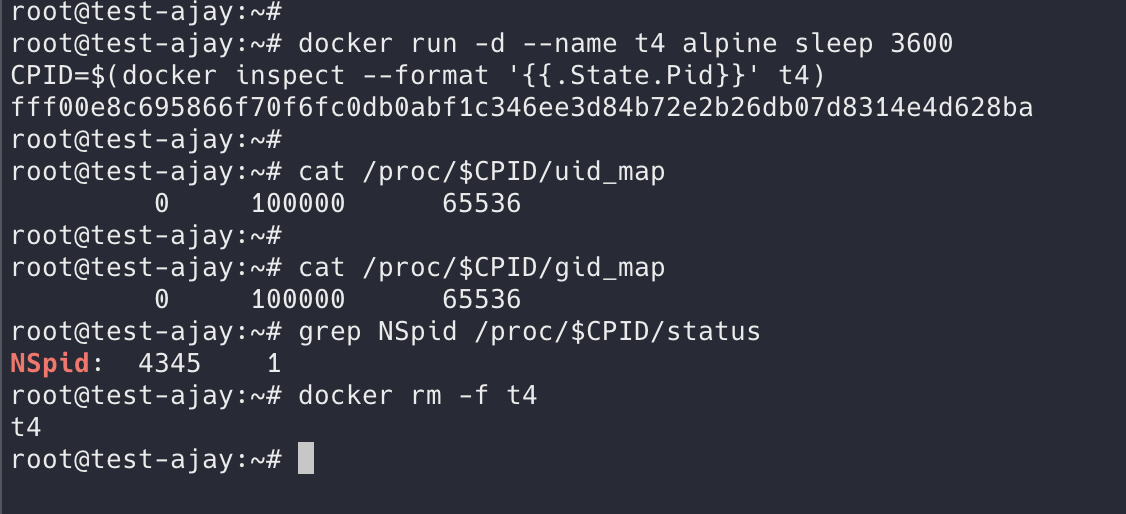
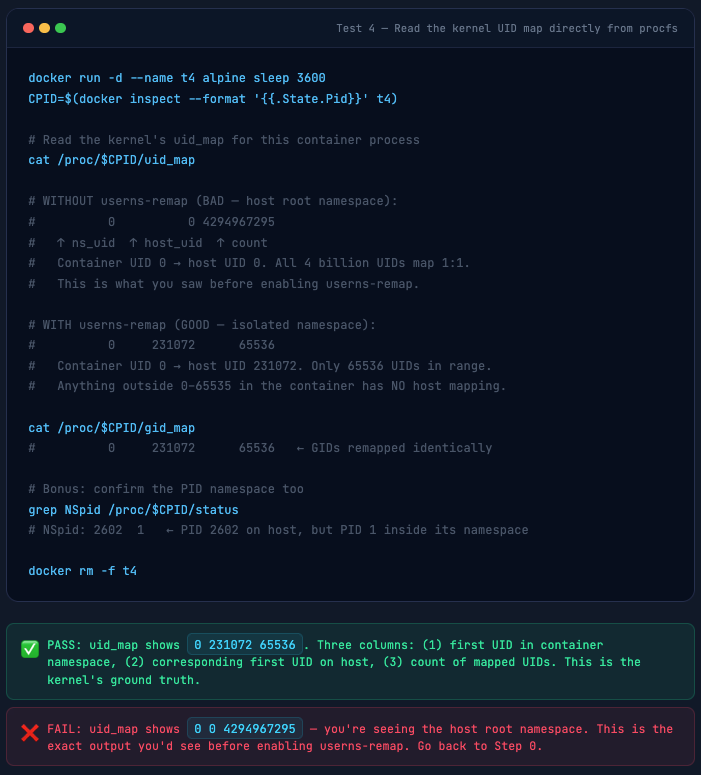
T4 Verify the Kernel UID Map
Skip the abstraction - go directly to the kernel’s source of truth in procfs. This is the three-column table the kernel uses for every single UID syscall inside the container. This is exactly what you’d have seen on your test machine before enabling userns-remap.
docker run -d --name t4 alpine sleep 3600
CPID=$(docker inspect --format '{{.State.Pid}}' t4)

# Read the kernel's uid_map for this container process
cat /proc/$CPID/uid_map

# WITHOUT userns-remap (BAD - host root namespace):
#          0          0 4294967295
#   ↑ ns_uid  ↑ host_uid  ↑ count
#   Container UID 0 → host UID 0. All 4 billion UIDs map 1:1.
#   This is what you saw before enabling userns-remap.

# WITH userns-remap (GOOD - isolated namespace):
#          0     231072      65536
#   Container UID 0 → host UID 231072. Only 65536 UIDs in range.
#   Anything outside 0-65535 in the container has NO host mapping.

cat /proc/$CPID/gid_map
#          0     231072      65536   ← GIDs remapped identically

# Bonus: confirm the PID namespace too
grep NSpid /proc/$CPID/status
# NSpid: 2602  1   ← PID 2602 on host, but PID 1 inside its namespace

docker rm -f t4
T5 Docker Socket Is Inaccessible
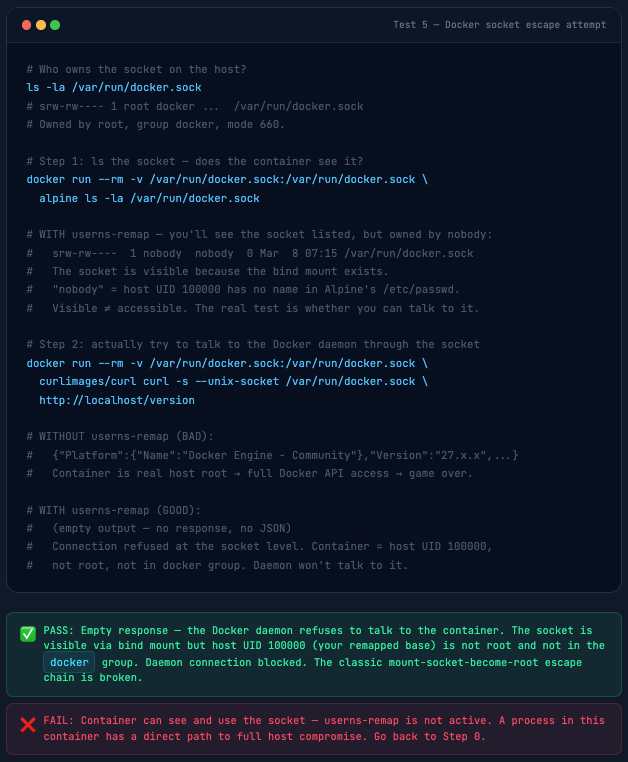
The Docker socket is the keys to the kingdom - access it and you can spawn privileged containers that mount the entire host filesystem. This is the most common real-world container escape vector. Mounting the socket into CI/CD containers “for convenience” is how breaches happen.
# Who owns the socket on the host?
ls -la /var/run/docker.sock
# srw-rw---- 1 root docker ...  /var/run/docker.sock
# Owned by root, group docker, mode 660.

# Step 1: ls the socket - does the container see it?
docker run --rm -v /var/run/docker.sock:/var/run/docker.sock \
  alpine ls -la /var/run/docker.sock

# WITH userns-remap - you'll see the socket listed, but owned by nobody:
#   srw-rw----  1 nobody  nobody  0 Mar  8 07:15 /var/run/docker.sock
#   The socket is visible because the bind mount exists.
#   "nobody" = host UID 100000 has no name in Alpine's /etc/passwd.
#   Visible ≠ accessible. The real test is whether you can talk to it.

# Step 2: actually try to talk to the Docker daemon through the socket
docker run --rm -v /var/run/docker.sock:/var/run/docker.sock \
  curlimages/curl curl -s --unix-socket /var/run/docker.sock \
  http://localhost/version

# WITHOUT userns-remap (BAD):
#   {"Platform":{"Name":"Docker Engine - Community"},"Version":"27.x.x",...}
#   Container is real host root → full Docker API access → game over.

# WITH userns-remap (GOOD):
#   (empty output - no response, no JSON)
#   Connection refused at the socket level. Container = host UID 100000,
#   not root, not in docker group. Daemon won't talk to it.
T6 Files Created in Container Have Remapped Ownership
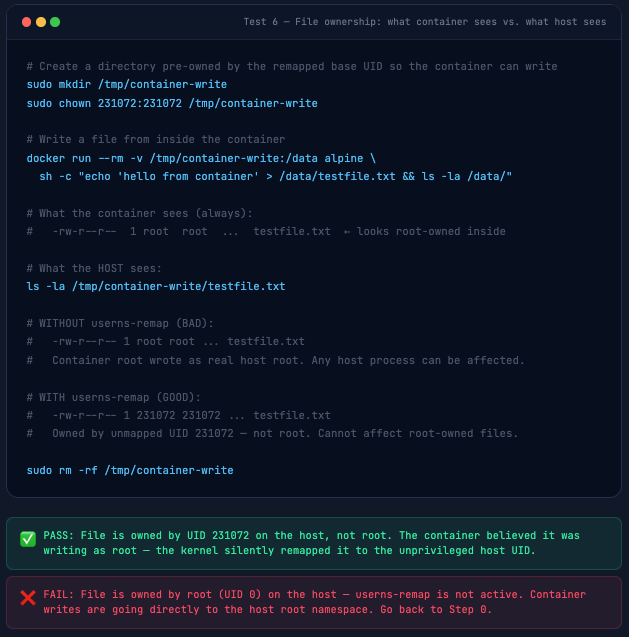
This test makes the UID translation visible and tangible. Inside the container, files look root-owned. On the host, those exact same files carry the remapped UID. This is also the test that reveals why bind mounts need the chown treatment from Section 06.
# Create a directory pre-owned by the remapped base UID so the container can write
sudo mkdir /tmp/container-write
sudo chown 231072:231072 /tmp/container-write ( Please Update to your UID )

# Write a file from inside the container
docker run --rm -v /tmp/container-write:/data alpine \
  sh -c "echo 'hello from container' > /data/testfile.txt && ls -la /data/"

# What the container sees (always):
#   -rw-r--r--  1 root  root  ...  testfile.txt  ← looks root-owned inside

# What the HOST sees:
ls -la /tmp/container-write/testfile.txt

# WITHOUT userns-remap (BAD):
#   -rw-r--r-- 1 root root ... testfile.txt
#   Container root wrote as real host root. Any host process can be affected.

# WITH userns-remap (GOOD):
#   -rw-r--r-- 1 231072 231072 ... testfile.txt
#   Owned by unmapped UID 231072 - not root. Cannot affect root-owned files.

sudo rm -rf /tmp/container-write
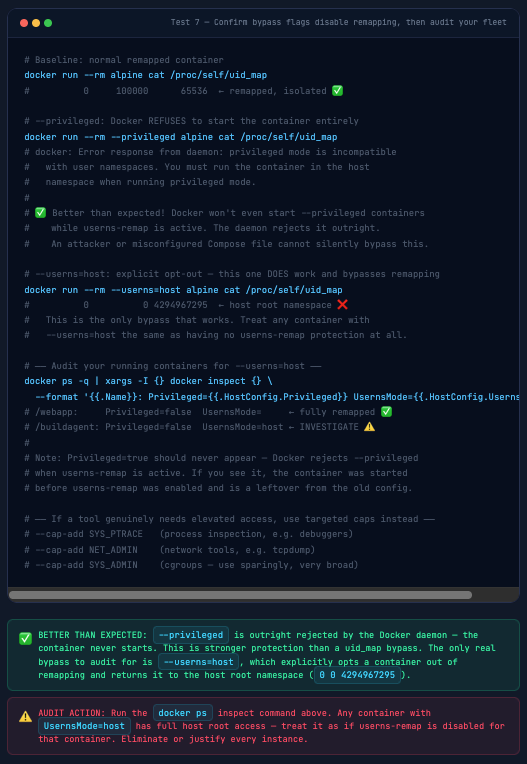
T7 Privileged Container Bypass Check
--privileged and --userns=host are the two explicit bypass flags for userns-remap. Every container that uses them is back to running as real host root. This is the same 0 0 4294967295 uid_map output you saw on your test machine before you enabled remapping - because it is exactly the same state: no user namespace, no isolation.
# Baseline: normal remapped container
docker run --rm alpine cat /proc/self/uid_map
#          0     100000      65536  ← remapped, isolated ✅

# --privileged: Docker REFUSES to start the container entirely
docker run --rm --privileged alpine cat /proc/self/uid_map
# docker: Error response from daemon: privileged mode is incompatible
#   with user namespaces. You must run the container in the host
#   namespace when running privileged mode.
#
# ✅ Better than expected! Docker won't even start --privileged containers
#    while userns-remap is active. The daemon rejects it outright.
#    An attacker or misconfigured Compose file cannot silently bypass this.

# --userns=host: explicit opt-out - this one DOES work and bypasses remapping
docker run --rm --userns=host alpine cat /proc/self/uid_map
#          0          0 4294967295  ← host root namespace ❌
#   This is the only bypass that works. Treat any container with
#   --userns=host the same as having no userns-remap protection at all.

# ── Audit your running containers for --userns=host ──
docker ps -q | xargs -I {} docker inspect {} \
  --format '{{.Name}}: Privileged={{.HostConfig.Privileged}} UsernsMode={{.HostConfig.UsernsMode}}'
# /webapp:     Privileged=false  UsernsMode=     ← fully remapped ✅
# /buildagent: Privileged=false  UsernsMode=host ← INVESTIGATE ⚠️
#
# Note: Privileged=true should never appear - Docker rejects --privileged
# when userns-remap is active. If you see it, the container was started
# before userns-remap was enabled and is a leftover from the old config.

# ── If a tool genuinely needs elevated access, use targeted caps instead ──
# --cap-add SYS_PTRACE   (process inspection, e.g. debuggers)
# --cap-add NET_ADMIN    (network tools, e.g. tcpdump)
# --cap-add SYS_ADMIN    (cgroups - use sparingly, very broad)
Volume Permissions: The Gotcha Everyone Hits
This is the #1 operational challenge with userns-remap. I’ve watched teams enable it and immediately get flooded with permission errors. Here’s the complete picture.
The problem: When a container tries to write to a bind-mounted host directory, that directory is owned by root (or some other host user). The container process is host UID 231072. Permission denied. Every time.
The solution: Pre-own directories that containers need to write to with the remapped base UID.
grep dockremap /etc/subuid
# dockremap:100000:65536  ← 100000 is the base (your system may differ)

# ── Option 1: chown the host directory to the base UID ──
# nginx runs as root (UID 0) inside the container → maps to base UID on host
sudo mkdir -p /data/app-logs
sudo chown 100000:100000 /data/app-logs
docker run -d --name nginx-test -v /data/app-logs:/var/log/nginx nginx:alpine
# nginx can now write logs - its root (UID 0) = host UID 100000 = directory owner
ls -la /data/app-logs/
# -rw-r--r-- 1 100000 100000 ... access.log
# -rw-r--r-- 1 100000 100000 ... error.log
docker rm -f nginx-test

# ── Option 2: If a specific container user writes (e.g. www-data = UID 33) ──
# Container UID 33 maps to host UID = base(100000) + 33 = 100033
sudo mkdir -p /data/nginx-logs
sudo chown 100033:100033 /data/nginx-logs
docker run -d --name nginx-www -v /data/nginx-logs:/var/log/nginx nginx:alpine
ls -la /data/nginx-logs/
# -rw-r--r-- 1 100033 100033 ... access.log  ← owned by remapped www-data
docker rm -f nginx-www

# ── Option 3: Use named Docker volumes (no permission headache) ──
docker volume create nginx-data
docker run -d --name nginx-vol -v nginx-data:/var/log/nginx nginx:alpine
# Docker manages the volume; ownership is handled automatically - no chown needed
docker rm -f nginx-vol
⚠️ Quick formula for bind mount ownership: host_uid = base_uid + container_uid. Your base is in /etc/subuid. Container root (UID 0) → base_uid. Container www-data (UID 33) → base_uid + 33. Container postgres (UID 999) → base_uid + 999. Set the host directory ownership to the calculated host UID before the container starts.
The Named Volume Recommendation
My strong recommendation for production: use named Docker volumes instead of bind mounts wherever possible. Named volumes are managed entirely by Docker, ownership is handled automatically by the daemon, and you never deal with UID translation math. Bind mounts are for config files (read-only), source code (development), and cases where the data genuinely needs to be accessible directly from the host OS.
Docker Compose & Per-Container userns Override
The daemon-wide userns-remap setting applies to all containers by default. But some containers legitimately need host namespace access - Prometheus node exporter, for example, needs to read /proc and /sys from the host perspective. Docker provides a per-container override.
version: '3.8'

services:
  # Normal app - uses daemon's remapping ✅
  api:
    image: myapi:latest
    ports: ["8080:8080"]
    volumes:
      - api-data:/app/data

  # Node exporter - needs real host namespace for metrics ⚠️
  # Legitimate exception. Document why it's here.
  node-exporter:
    image: prom/node-exporter:latest
    userns_mode: "host"   # ← bypasses remapping for this container only
    pid: "host"
    network_mode: "host"
    volumes:
      - /proc:/host/proc:ro
      - /sys:/host/sys:ro
    command:
      - '--path.procfs=/host/proc'
      - '--path.sysfs=/host/sys'

volumes:
  api-data:
🚨 Audit your userns_mode: "host" usage. Every container with userns_mode: "host" is operating outside the remapping protection. This is a legitimate necessity for some monitoring tools - but it should be the exception, documented, and reviewed. Running docker ps -q | xargs -I{} docker inspect {} --format '{{.Name}}: {{.HostConfig.UsernsMode}}' gives you a full audit list instantly.
Limitations & What userns-remap Doesn’t Fix
I’ll be honest here - this feature is not a silver bullet. Here’s what it does not protect against, and where you still need other controls:
✗ --privileged containers: This flag disables user namespace remapping entirely. A privileged container is host root regardless of daemon config. Eliminate privileged containers from your environment - use specific capabilities instead.
✗ Docker-in-Docker (DinD): DinD requires real root and is incompatible with user namespace remapping. Use --userns=host for DinD containers - and treat them as trusted infrastructure, not arbitrary workloads.
✗Network-based attacks: User namespace remapping only addresses UID/GID isolation. Network-based container attacks (exploiting exposed services, SSRF hitting host metadata, etc.) are unaffected. Combine with network policies.
✗ Kernel vulnerabilities that target user namespaces: Some CVEs specifically exploit user namespace implementations. A known-vulnerable kernel with userns-remap enabled can be worse than one without it, because userns creates more kernel attack surface. Keep your kernel patched.
✗ Seccomp/AppArmor bypass: userns-remap reduces the impact of a container escape but doesn’t prevent the escape itself. seccomp and AppArmor profiles are still needed to prevent the escape in the first place.
⚠ Performance overhead: User namespace creation adds a small overhead per container start (typically <50ms). Negligible for long-running services, measurable for container-per-request workloads.
Production Hardening Checklist
✓ Confirm userns-remap is set in /etc/docker/daemon.json
✓ Verify /etc/subuid and /etc/subgid have non-overlapping ranges
✓ Range size is at least 65536 (to cover all standard Unix UIDs)
✓ New storage directory exists: /var/lib/docker/[uid].[gid]/
✓ Run T1 and T4 tests after every Docker daemon upgrade
Container Audit
✓ Audit all containers for --privileged flag - eliminate unless absolutely necessary
✓ Document every container using userns_mode: “host” with a justification comment
✓ Review all bind mounts - if a container needs write access, pre-chown the host directory to the remapped UID
✓ Prefer named volumes over bind mounts for writable data
✓ Never mount /var/run/docker.sock into containers - if you must, combine with userns-remap and a read-only socket proxy
CI/CD Pipeline Integration
✓ Add a pipeline step that runs docker inspect on all deployed containers and fails on any with Privileged=true
✓ Block images that run as root (UID 0) at the registry level if your security policy requires non-root containers
✓ Test UID mapping in staging before production - run T1 through T6 as part of your security smoke tests
The Bottom Line
User namespace remapping is the most impactful container security feature you probably haven’t turned on. One line in daemon.json. No application code changes. No performance cliff. The tradeoffs are real but manageable - volume permissions require planning, privileged containers need audit, and DinD workflows need special handling.
In return, you get a dramatically reduced blast radius from container escapes. That container root process? It becomes a ghost on the host - an unmapped UID with no credentials, no group memberships, no access to anything that matters. The attacker who just found a kernel zero-day stares at “Permission denied” on every host path they try.
That’s the defense-in-depth story. AppArmor blocks the syscalls. seccomp filters the dangerous ones. Capability dropping removes root powers. And userns-remap ensures that even if all three fail, the escaped process runs as nobody. Multiple overlapping controls, each one a fallback for the others.
Subscribe so you don’t miss it. 🐳
Comments (0)
No comments yet. Be the first to share your thoughts.
Leave a comment