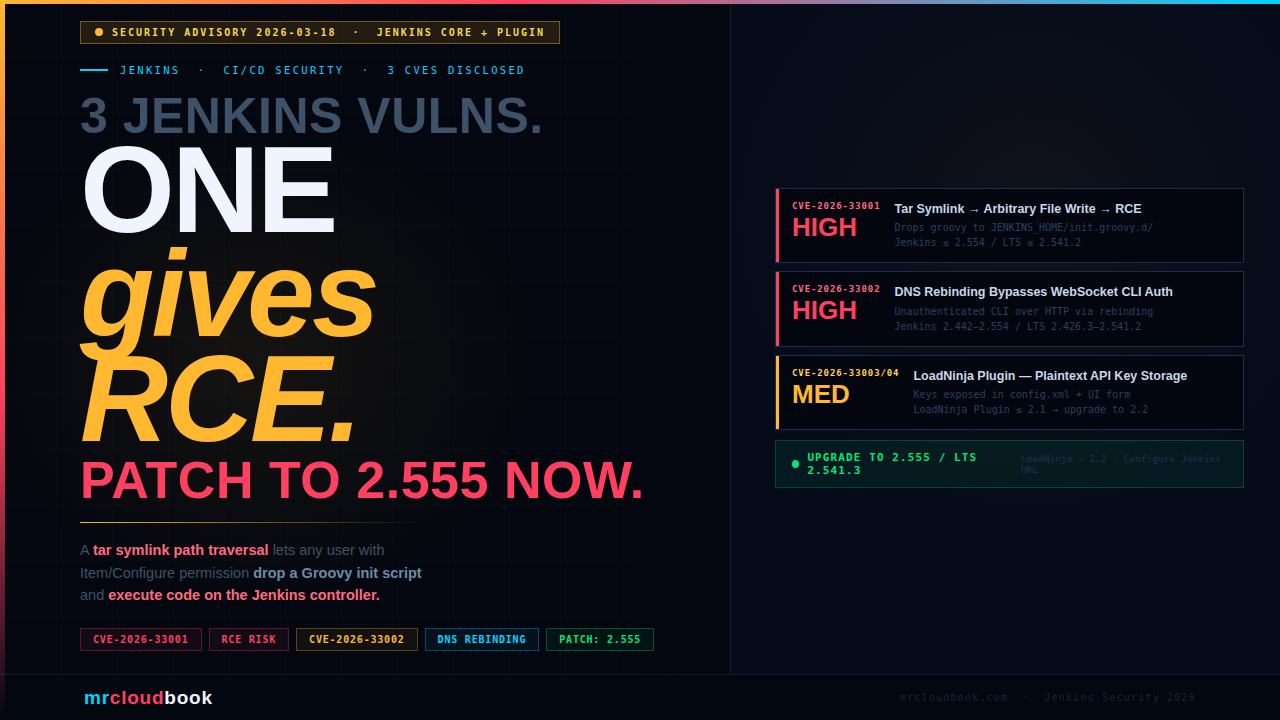
A symlink path traversal in tar extraction, a DNS rebinding attack on the WebSocket CLI, and plaintext API key storage in the LoadNinja plugin - all fixed in Jenkins 2.555 / LTS 2.541.3.
The Jenkins project released a security advisory on March 18, 2026, addressing three vulnerabilities - two rated High and one Medium. The most critical, CVE-2026-33001, allows an attacker with Item/Configure permission to write arbitrary files anywhere on the Jenkins controller filesystem and achieve Remote Code Execution by planting a malicious Groovy init script. If your Jenkins instance is not yet on 2.555 or LTS 2.541.3, it is vulnerable right now.
What Was Disclosed
On March 18, 2026, the Jenkins security team released an advisory covering three separate vulnerabilities - two in Jenkins core and one in the LoadNinja plugin. Two are rated High severity. The first can lead directly to Remote Code Execution on the controller.
Jenkins controllers sit at the heart of most enterprise CI/CD pipelines. They hold credentials, have network access to internal systems, can trigger builds across agents, and typically run with elevated permissions. A compromised Jenkins controller is not a minor incident - it is a full pipeline breach and a potential foothold into the entire development and deployment infrastructure.
These vulnerabilities were discovered by multiple independent researchers and reported through the Jenkins Bug Bounty Program (co-sponsored by the European Commission) and via direct disclosure. The Jenkins security team has released fixes for all three.
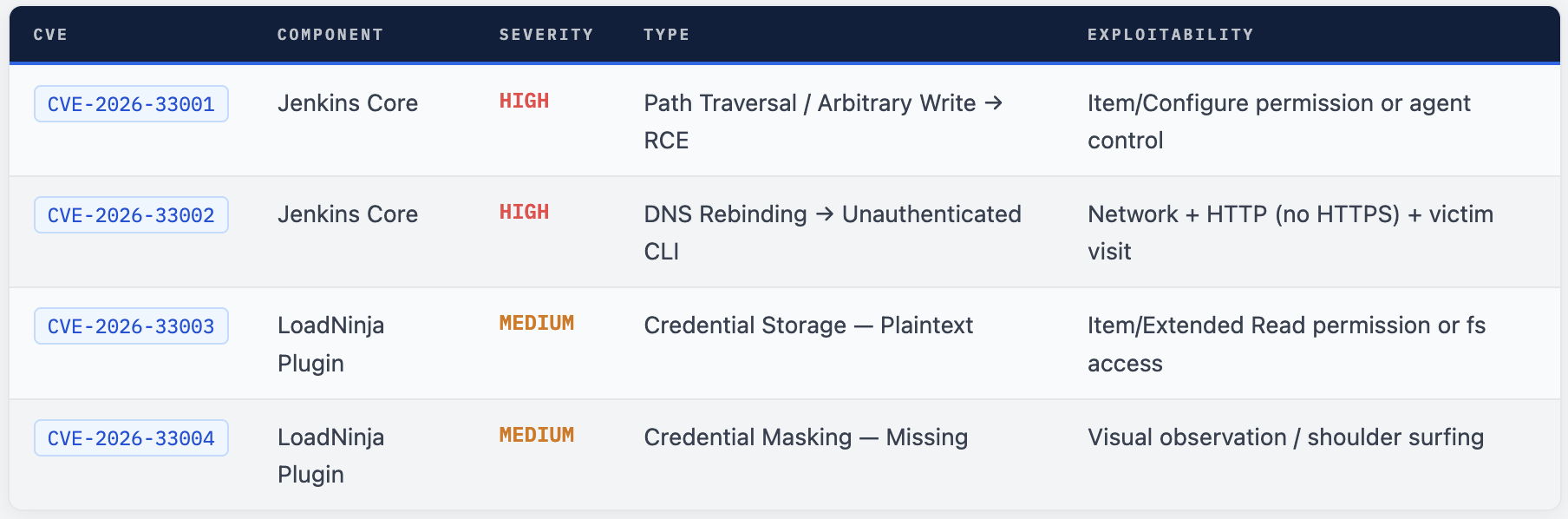
CVE-2026-33001 - Symlink Tar Extraction to RCE
SECURITY-3657 / CVE-2026-33001
Link Following Vulnerability Allows Arbitrary File Creation
Jenkins 2.554 and earlier, LTS 2.541.2 and earlier does not safely handle symbolic links during extraction of .tar and .tar.gz archives - allowing a crafted archive to write files to arbitrary locations on the controller filesystem.
The Root Cause
When Jenkins extracts a .tar or .tar.gz archive - for example, when archiving build artifacts on the controller filesystem - it does not validate whether entries in the archive resolve to paths outside the intended extraction directory. An attacker can craft an archive that contains a symlink pointing outside the target directory, and Jenkins will follow that symlink and write a file to the attacker-chosen location.
This is a classic path traversal via symlink (also called a zip/tar slip) vulnerability. The file write is constrained only by the OS-level filesystem permissions of the user running the Jenkins process - which in many deployments is a service account with broad access to the controller filesystem.
Why This Leads to RCE
Jenkins has several well-known locations where files placed on the controller filesystem will be automatically executed:
JENKINS_HOME/init.groovy.d/- any.groovyfile placed here is executed automatically by Jenkins on startup (and on reload). This is full Groovy scripting capability - equivalent to running code in the Script Console.JENKINS_HOME/plugins/- placing a malicious.jpior.hpiplugin file here will cause Jenkins to load it on next restart.
An attacker who can trigger archive extraction - either by having Item/Configure permission (to create a job that archives malicious artifacts) or by controlling an agent process - can write a Groovy script to the init directory and achieve RCE on the controller with the privileges of the Jenkins service account.
Attack Path - From Item/Configure to Controller RCE
Craft a malicious tar archive
Create a .tar.gz that contains a symlink entry pointing outside the extraction target - for example, resolving to JENKINS_HOME/init.groovy.d/backdoor.groovy. The archive content is the Groovy script you want executed.
Trigger archive extraction on the controller
Configure a Jenkins job to archive the malicious artifact using the standard “Archive the artifacts” post-build action, or the archiveArtifacts / archive Pipeline steps with the default artifact manager (controller filesystem). Run the job.
Jenkins follows the symlink and writes the payload
Jenkins extracts the archive without validating that the resolved path stays within the target directory. The Groovy script is written to JENKINS_HOME/init.groovy.d/backdoor.groovy on the controller filesystem.
Jenkins reloads - Groovy executes as Jenkins service account
On next Jenkins restart or configuration reload, the init hook script executes automatically with full Jenkins API access and the privileges of the Jenkins service account. The attacker now has full control of the Jenkins controller.
Who Is At Risk
Any Jenkins controller running 2.554 or LTS 2.541.2 or earlier where any of these is true:
- Users have Item/Configure permission (can create/modify jobs)
- Any agent process could be compromised (supply chain, lateral movement)
- Jobs use
archiveArtifacts,archive, or “Archive the artifacts” with the default controller-side artifact manager
The Fix
Jenkins 2.555 and LTS 2.541.3 now refuse to extract any file from a .tar or .tar.gz archive whose resolved real path falls outside the target directory. Extraction through symbolic links in the path or at the target location is also blocked entirely.
CVE-2026-33002 - DNS Rebinding Bypasses WebSocket CLI Origin Validation
SECURITY-3674 / CVE-2026-33002
DNS Rebinding Vulnerability in WebSocket CLI Origin Validation
Jenkins 2.442-2.554 and LTS 2.426.3-2.541.2 validates the origin of WebSocket CLI connections using the Host or X-Forwarded-Host HTTP headers - both of which an attacker can manipulate via a DNS rebinding attack to bypass the validation entirely.
Background - The WebSocket CLI
Since Jenkins 2.217, one way to interact with the Jenkins CLI is through a WebSocket endpoint. This endpoint uses the same authentication as regular Jenkins web requests - API tokens, session cookies, HTTP Basic auth. The WebSocket CLI was given origin validation in 2024 (Jenkins 2.442) specifically to prevent Cross-Site WebSocket Hijacking (CSWSH) attacks.
The validation is meant to ensure that only requests genuinely originating from the Jenkins web interface itself can reach the CLI endpoint - preventing malicious third-party websites from silently sending CLI commands on behalf of a logged-in user.
Why the Validation Fails
The flaw is in how the expected origin is computed. Jenkins calculates the expected origin by reading the Host or X-Forwarded-Host HTTP headers from the incoming request. An attacker can manipulate these headers through a DNS rebinding attack:
Attacker sets up a malicious website with short-TTL DNS
The attacker registers a domain and configures it with a very short DNS TTL. Initially, the domain resolves to the attacker’s own server. A victim visits the malicious page.
DNS record is rebinded to the Jenkins controller's IP
After the victim’s browser has cached the initial DNS response and the TTL expires, the attacker changes the DNS record to resolve to the Jenkins controller’s internal IP address. The victim’s browser now sends requests to the attacker’s domain - which resolve to Jenkins.
WebSocket connection established to Jenkins CLI
The malicious page opens a WebSocket connection to the CLI endpoint. The Host header in the request contains the attacker’s domain - but since that now resolves to Jenkins’ IP, the connection reaches the Jenkins controller.
Origin validation is bypassed - CLI commands execute
Jenkins computes the expected origin using the Host header value - which the attacker controls. The origin check passes. CLI commands execute as the anonymous user (or the authenticated user if they are logged in). With permissive anonymous permissions or Groovy access, this can lead to full RCE.
Prerequisites and Impact
Exploitation requires all three conditions to be true:
- Jenkins is accessible over plain HTTP (not HTTPS) - DNS rebinding doesn’t work against HTTPS due to certificate validation
- The CLI WebSocket endpoint is accessible (default in standard installs)
- A victim visits the attacker’s malicious page while the DNS TTL expires
If the anonymous user has no permissions, this leaks only minimal information (who-am-i output). But with permissive authorization strategies or Groovy scripting access for anonymous users, this leads to arbitrary code execution on the controller.
⚠ "Anyone Can Do Anything" Authorization = Instant RCE Some internal Jenkins instances use the "Anyone can do anything" authorization strategy because they're assumed to be on a private network. CVE-2026-33002 breaks that assumption. Any Jenkins controller on HTTP with this authorization strategy is trivially exploitable from any malicious website a user on the same network visits.
The Fix
Jenkins 2.555 and LTS 2.541.3 now compute the expected WebSocket origin using the configured Jenkins URL from Manage Jenkins → System, rather than the Host or X-Forwarded-Host headers. If the configured URL doesn’t match or is not set, WebSocket CLI connections are refused entirely.
If you cannot upgrade immediately, the workaround is to set up authentication and remove all permissions from the anonymous user.
CVE-2026-33003/04 - LoadNinja Plugin Plaintext Credential Storage
SECURITY-3642 / CVE-2026-33003 + CVE-2026-33004
API Keys Stored and Displayed in Plain Text by LoadNinja Plugin
LoadNinja Plugin 2.1 and earlier stores LoadNinja API keys unencrypted in job config.xml files on the Jenkins controller, and does not mask them in the job configuration form - making them trivially readable to anyone with file or extended read access.
The Problem
The LoadNinja plugin stores the LoadNinja API key as plaintext in each job’s config.xml configuration file. Anyone with Item/Extended Read permission can read this file through the Jenkins API. Anyone with direct filesystem access to the Jenkins controller can read it by simply opening the file. In addition, the job configuration form shows the API key in plain text, making it visible to anyone watching a screen during configuration - including via screen recording or over-the-shoulder observation.
The Fix
LoadNinja Plugin version 2.2 stores API keys using Jenkins’ built-in encrypted credential storage (the same Secret type used by other credentials in Jenkins). The job configuration form now properly masks the key as a password field.
💡 Pattern - Always Use Jenkins Credential Store This is a recurring problem in Jenkins plugins. Any plugin that stores secrets (API keys, tokens, passwords) should use the Jenkins Credentials Plugin and the Secret type - never raw strings in config.xml. If you maintain any Jenkins plugins, audit all credential storage against this pattern. If you use plugins that store credentials, check whether they use Secret or plaintext storage by inspecting the raw config.xml.
Affected and Fixed Versions
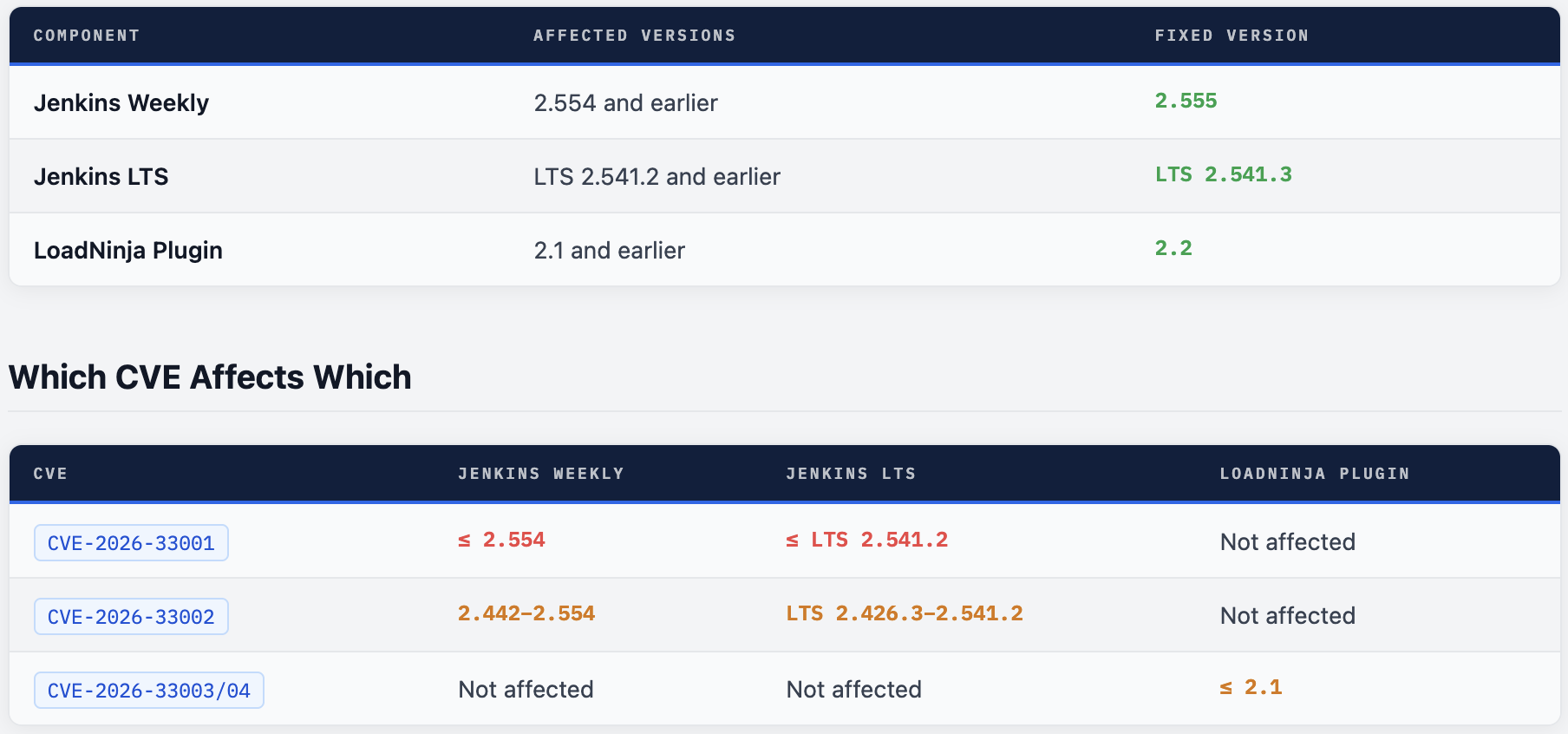
💡 Note on CVE-2026-33002 Range CVE-2026-33002 only affects Jenkins 2.442 through 2.554 because origin validation for the WebSocket CLI was introduced in 2.442. Versions older than 2.442 had no origin validation at all and were already vulnerable to CSWSH - a separate issue fixed in 2024.
How to Patch
Jenkins Core - Weekly
# Check current version
java -jar jenkins.war --version

# Download latest weekly (2.555+)
wget https://updates.jenkins.io/latest/jenkins.war -O jenkins.war

# If using the Debian/Ubuntu package
sudo apt update && sudo apt install --only-upgrade jenkins

# Verify after upgrade
java -jar jenkins.war --version
Jenkins LTS
# Download LTS 2.541.3
wget https://updates.jenkins.io/stable/jenkins.war -O jenkins.war

# Debian/Ubuntu LTS package
sudo apt update && sudo apt install --only-upgrade jenkins

# Red Hat / CentOS / Fedora
sudo yum update jenkins
# or
sudo dnf update jenkins
Jenkins Docker
# Pull the updated image
docker pull jenkins/jenkins:lts    # LTS 2.541.3+
docker pull jenkins/jenkins:latest # Weekly 2.555+

# Restart your container with the new image
docker stop jenkins
docker rm jenkins
docker run -d --name jenkins \
  -p 8080:8080 -p 50000:50000 \
  -v jenkins_home:/var/jenkins_home \
  jenkins/jenkins:lts
LoadNinja Plugin
# Via Jenkins CLI
java -jar jenkins-cli.jar -s http://localhost:8080/ install-plugin loadninja

# Or via the Jenkins UI:
# Manage Jenkins → Plugins → Updates → LoadNinja → Update

# Verify plugin version
java -jar jenkins-cli.jar -s http://localhost:8080/ list-plugins | grep loadninja
If You Cannot Patch Immediately - Mitigations
! CVE-2026-33001:
Restrict Item/Configure permission to fully trusted users only. Avoid running untrusted agent processes on the same network as the controller.! CVE-2026-33002:
Enable HTTPS on your Jenkins controller - DNS rebinding cannot bypass HTTPS certificate validation. Remove all permissions from the anonymous user.! CVE-2026-33003/04:
Rotate all LoadNinja API keys that have been configured in Jenkins jobs. Treat previously stored keys as compromised.
Detecting Exploitation Attempts
Detect init.groovy.d Drops (CVE-2026-33001)
# Check for unexpected files in init.groovy.d
ls -la $JENKINS_HOME/init.groovy.d/

# Watch for new .groovy files written there via auditd
sudo auditctl -w $JENKINS_HOME/init.groovy.d -p wxa -k jenkins_init_groovy

# Search audit logs
sudo ausearch -k jenkins_init_groovy

# Check for symlinks in archived artifacts
find $JENKINS_HOME/jobs -name "*.tar.gz" -newer /tmp/reference_time \
  -exec sh -c 'tar -tzf "$1" | grep "^l"' _ {} \; 2>/dev/null
Detect WebSocket CLI Abuse (CVE-2026-33002)
# Check Jenkins access logs for WebSocket upgrade requests
# from unexpected origins or hosts
grep "GET /cli" $JENKINS_HOME/logs/access_log.* \
  | grep "Upgrade: websocket" \
  | grep -v "your-jenkins-url.internal"

# Look for anonymous CLI command execution in Jenkins audit log
grep "anonymous" $JENKINS_HOME/logs/audit.log | grep "CLI"
Falco Rule - Groovy Script Drop in Jenkins
- rule: Jenkins init.groovy.d Unexpected Write
  desc: |
    File written to JENKINS_HOME/init.groovy.d - possible CVE-2026-33001
    path traversal exploitation leading to RCE via Groovy init hook.
  condition: |
    (evt.type in (open, openat, creat))
    and evt.arg.flags contains O_WRONLY
    and fd.name contains "init.groovy.d"
    and fd.name endswith ".groovy"
    and not proc.name in (jenkins, java)
  output: |
    Suspicious groovy write to Jenkins init dir
    (proc=%proc.name file=%fd.name user=%user.name)
  priority: CRITICAL
  tags: [filesystem, rce, CVE-2026-33001, jenkins]
Harden Your Jenkins Instance
1. Enable HTTPS - Always
CVE-2026-33002 is not exploitable over HTTPS. TLS certificate validation prevents DNS rebinding. If your Jenkins controller is accessible over plain HTTP - even on an internal network - this is a misconfiguration that needs to be fixed independently of this advisory.
2. Use Matrix Authorization - Restrict Anonymous Access
// Disable "Anyone can do anything" - use Matrix-based security
import jenkins.model.*
import hudson.security.*

def instance = Jenkins.getInstance()
def strategy = new GlobalMatrixAuthorizationStrategy()

// Grant admin access only to specific users
strategy.add(Jenkins.ADMINISTER, "your-admin-user")

// Do NOT grant anything to anonymous (hudson.model.Hudson.READ = false)
instance.setAuthorizationStrategy(strategy)
instance.save()
3. Restrict Item/Configure Permission
CVE-2026-33001 requires Item/Configure permission to exploit via the archive job route. Audit which users and groups have this permission. In most security-conscious setups, only administrators and senior developers should have configure access. Use Project-based Matrix Authorization to restrict this per project rather than globally.
4. Configure the Jenkins URL - Required for the CVE-2026-33002 Fix to Work
⚠ The Fix Requires a Configured Jenkins URL After upgrading, Jenkins 2.555/LTS 2.541.3 refuses WebSocket CLI connections if the configured Jenkins URL is not set. Go to Manage Jenkins → System → Jenkins URL and ensure the correct URL is configured. If this is blank after upgrading, the CLI WebSocket endpoint will be entirely disabled - which is safe but will break CLI-dependent workflows.
5. Audit All Plugin Credential Storage
# Find job config.xml files that may contain plaintext credentials
# Look for fields that should be encrypted but aren't
find $JENKINS_HOME/jobs -name "config.xml" \
  -exec grep -l "apiKey\|password\|token\|secret" {} \; \
  | xargs grep -H "apiKey\|password\|token" \
  | grep -v "{AQ" # {AQ... prefix = Jenkins encrypted value

# Any match that doesn't start with {AQ is likely plaintext - investigate
6. Enable Audit Trail Plugin
Install the Audit Trail plugin and configure it to log all Jenkins operations. This provides a forensic record of what CLI commands were run, which jobs were configured, and who made changes - essential for detecting exploitation of these vulnerabilities after the fact.
Upgrade. Lock Down. Verify.
Jenkins 2.555 / LTS 2.541.3 fixes all three vulnerabilities. The patch is straightforward - a standard upgrade. Every day you run 2.554 or earlier is a day CVE-2026-33001 is a live RCE path into your CI/CD pipeline.
Comments (0)
No comments yet. Be the first to share your thoughts.
Leave a comment