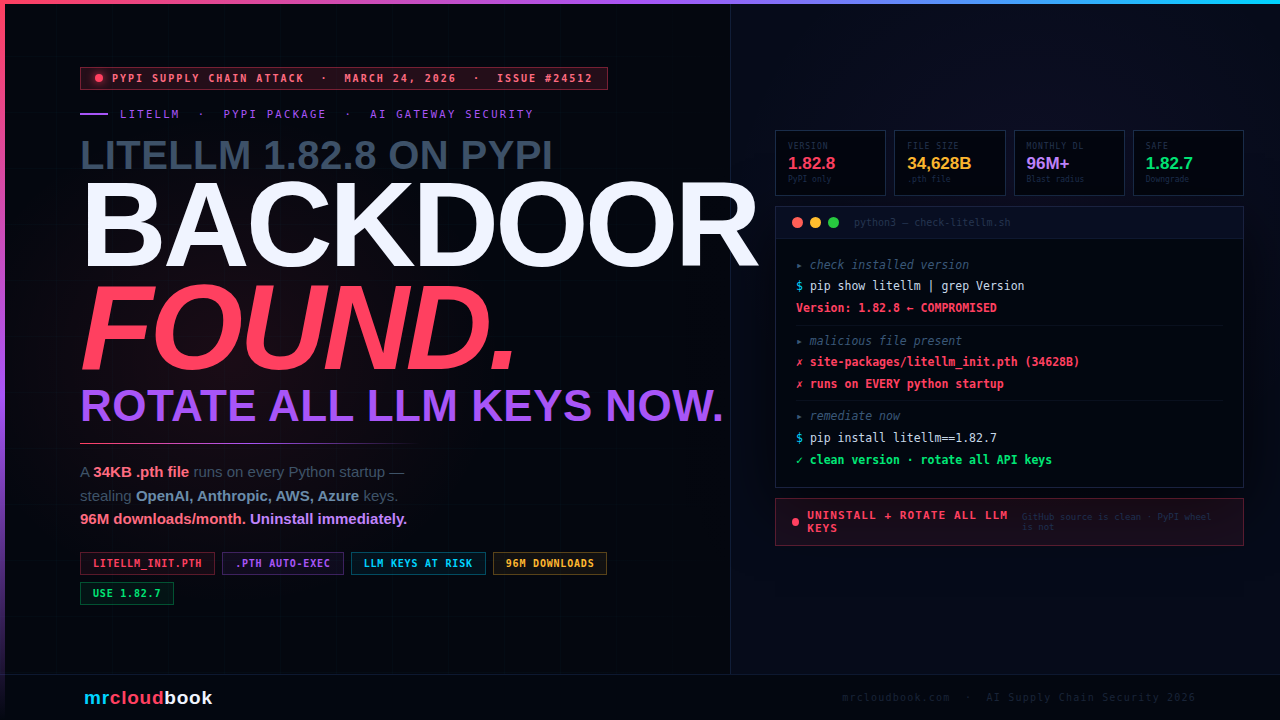
litellm 1.82.8 on PyPI Contains a Credential Stealer. Remove It Now.
A malicious litellm_init.pth file in the litellm 1.82.8 wheel silently executes a credential-stealing script every time Python starts - no import needed. Your LLM API keys, cloud credentials, and environment variables are at risk.
On March 24, 2026, a security researcher discovered that litellm==1.82.8 on PyPI ships a 34,628-byte malicious .pth file that Python’s site-packages mechanism executes automatically on every interpreter startup. LiteLLM is the AI gateway used by teams to route calls to OpenAI, Anthropic, Bedrock, VertexAI, and 100+ other LLM providers - meaning affected environments almost certainly hold high-value API keys. With 96 million downloads per month, the blast radius of this compromise is enormous.
What Is litellm - and Why This Is High-Stakes
LiteLLM is the most widely used open-source Python SDK and AI gateway for calling LLM APIs. It provides a unified OpenAI-compatible interface to 100+ model providers - OpenAI, Anthropic, AWS Bedrock, Google VertexAI, Azure OpenAI, Cohere, HuggingFace, and dozens more. It is the standard abstraction layer in AI application stacks.
A typical litellm integration holds some of the most sensitive credentials in any AI-powered system:
Python - typical litellm environment
import os
from litellm import completion

# These are EXACTLY what the stealer targets
os.environ["OPENAI_API_KEY"]      = "sk-proj-..."        # $20+/mo access
os.environ["ANTHROPIC_API_KEY"]   = "sk-ant-..."         # Claude API
os.environ["AWS_ACCESS_KEY_ID"]    = "AKIA..."           # Full AWS access
os.environ["AWS_SECRET_ACCESS_KEY"]= "..."               # Bedrock + more
os.environ["AZURE_API_KEY"]        = "..."               # Azure OpenAI
os.environ["VERTEX_PROJECT"]       = "my-gcp-project"    # GCP
os.environ["COHERE_API_KEY"]        = "..."               # Cohere
Any team that uses litellm in production almost certainly has multiple high-value API keys in their environment. This is precisely why litellm is an attractive supply chain target: compromising this one package gives an attacker access to credentials for every LLM provider that team uses. The scale compounds this: 96 million downloads per month and over 40,000 GitHub stars make litellm one of the most widely installed AI infrastructure packages in existence.
💡 litellm Deployment Context litellm is deployed in three main ways, all affected by this attack: **`Python SDK - pip install litellm`** in application code directly. **`Proxy / AI Gateway - pip install 'litellm[proxy]'`** as a self-hosted LLM gateway with a master key and credentials for all providers. **`Docker container - ghcr.io/berriai/litellm`** - if the base image is built from the compromised PyPI package, the malware is embedded in the image.
What Was Found - Issue #24512
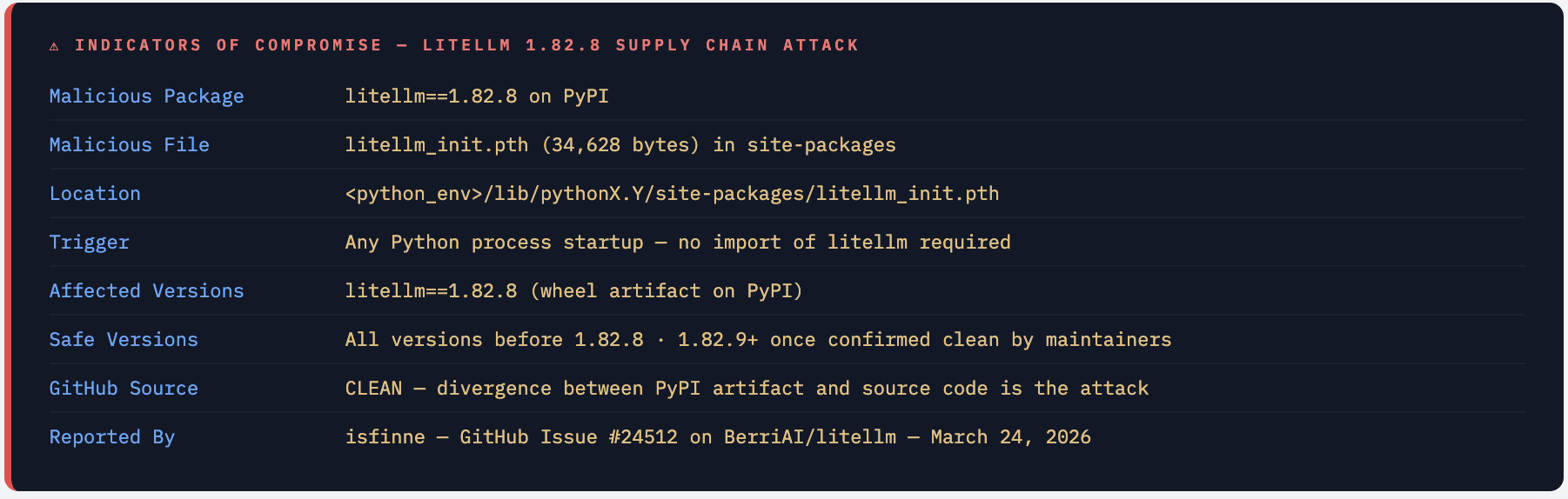
On March 24, 2026, GitHub user isfinne opened security issue #24512 on the BerriAI/litellm repository reporting that the litellm==1.82.8 wheel on PyPI contains a malicious litellm_init.pth file - a 34,628-byte credential stealer that activates on every Python interpreter startup.
The key finding: the malicious file was present in the distributed wheel (.whl) on PyPI but not in the source code on GitHub. This is a classic supply chain injection - the attacker gained access to the PyPI publishing pipeline and modified the wheel artifact at distribution time, leaving the GitHub source repository untouched. Anyone auditing the GitHub source would see nothing suspicious.
The Critical Detail - The Source Code Is Clean, The PyPI Package Is Not This is the most dangerous type of supply chain attack: a divergence between the source repository and the distributed artifact. GitHub shows clean code. `pip install litellm==1.82.8` installs malware. Standard code review, dependency scanning against source, and GitHub advisory monitoring would all miss this - because the attack happens in the build and publish pipeline, not in the committed code.
Attacker Gains Access to litellm's PyPI Publishing Pipeline
The exact method has not been confirmed, but the attacker either compromised a maintainer’s PyPI account, intercepted the CI/CD pipeline that publishes litellm wheels, or injected the malicious file during the build process. The result: the published .whl artifact for version 1.82.8 contains a file that is not present in the source code.
Malicious litellm_init.pth Injected into the Wheel
A .pth file named litellm_init.pth is included in the wheel’s site-packages directory. This file is 34,628 bytes - far larger than any legitimate .pth file should be (legitimate ones contain only a few path entries). The size alone is a clear red flag.
pip install Places the .pth File in site-packages
When any user runs pip install litellm==1.82.8, pip extracts the wheel and places all files including litellm_init.pth into the Python environment’s site-packages directory. The malware is now installed silently alongside the legitimate litellm library.
Python Executes the Stealer on Every Startup - No Import Required
Python’s site module processes all .pth files in site-packages on interpreter startup. Any line beginning with import is executed as Python code. The stealer activates automatically - even in scripts that never import litellm. Any Python process on the system is affected.
Credentials Exfiltrated to Attacker-Controlled Infrastructure
The stealer harvests environment variables, configuration files, and secrets from the running Python environment and exfiltrates them to the attacker’s server. Every LLM API key, cloud credential, and token accessible in that environment is captured.
Why .pth Files Are a Perfect Attack Vector
The .pth (path configuration) file mechanism is one of Python’s oldest and most powerful - and most under-scrutinised - features. Understanding exactly how it works explains why this attack is so dangerous and so hard to detect.
How .pth Files Normally Work
Legitimate .pth files contain directory paths, one per line, that Python adds to sys.path at startup. They’re used by packages to add their directories to the Python module search path:
# A normal legitimate .pth file - just a few path entries
/usr/lib/python3/dist-packages/some-package
/home/user/.local/lib/python3.11/dist-packages
The Code Execution Trick - import Lines
Python’s site.py module has a special behaviour: if a line in a .pth file starts with the string import, the entire line is passed to exec() and executed as Python code. This is documented, intentional behaviour originally designed for packages that need to perform initialisation at startup.
# Simplified from CPython's Lib/site.py
def addpackage(sitedir, name, known_paths):
    with open(os.path.join(sitedir, name)) as f:
        for n, line in enumerate(f):
            line = line.rstrip()
            if line.startswith("import"):
                # ← THIS executes ANY Python code in the .pth file
                exec(line)   # attacker puts their stealer here
            elif line and not line.startswith("#"):
                addsitedir(line, known_paths)  # normal path addition
Why This Is Especially Dangerous
The attack surface of a malicious .pth file is broader than any malicious import or setup.py trick:
- No import required - the stealer runs even if no code in the program ever imports litellm. Any Python script on the machine triggers it.
- Survives virtual environments - if installed into the system Python or a shared virtualenv, it affects all Python processes using that environment.
- Processed before user code - the
sitemodule runs before any user code executes, giving the stealer first access to the process environment. - Invisible in normal inspection - most developers and security tools look at
.pyfiles andimportstatements. A.pthfile insite-packagesrarely gets audited. - Difficult to detect - the file has the same name prefix as the package (
litellm_init.pth), making it appear like a legitimate package initialisation file.
The 34,628-Byte Size Is the Immediate Red Flag Legitimate .pth files are tiny - typically under 200 bytes, just a few path strings. A .pth file that is 34,628 bytes is not a path configuration file - it is a complete Python program hidden in a file type most developers never inspect. If you see any .pth file in your site-packages that is more than a few hundred bytes, treat it as suspicious immediately.
What the Credential Stealer Does
The malicious litellm_init.pth runs on every Python startup and harvests credentials from the execution environment. Given that litellm is an AI gateway, the attacker specifically targets the credentials that litellm users are most likely to have configured.
Primary Targets - LLM API Keys
LiteLLM environments by definition contain API keys for LLM providers. These are extremely high-value credentials - they provide immediate billable access to expensive AI APIs and may have no spending limits set:
OPENAI_API_KEY- OpenAI GPT-4, GPT-4o, DALL-E accessANTHROPIC_API_KEY- Claude API accessAZURE_API_KEY/AZURE_OPENAI_API_KEY- Azure OpenAI endpointsCOHERE_API_KEY,GEMINI_API_KEY,REPLICATE_API_KEY, and all other provider keys supported by litellm
Secondary Targets - Cloud Infrastructure Credentials
Teams running litellm as an AI gateway typically use cloud provider credentials to access managed LLM services:
AWS_ACCESS_KEY_IDandAWS_SECRET_ACCESS_KEY- AWS Bedrock access, plus full AWS account access if the key has broad permissionsGOOGLE_APPLICATION_CREDENTIALSandVERTEX_PROJECT- GCP VertexAI access- Azure service principal credentials for Azure OpenAI
Tertiary Targets - Environment-Wide Secrets
Because the stealer runs at Python startup and reads the full process environment, it can capture anything set as an environment variable or present in common configuration files: database connection strings, JWT secrets, webhook tokens, CI/CD secrets, SSH key paths, and any other credentials passed through environment variables.
detect-malicious-pth.sh
# Check if you have the malicious .pth file installed
find $(python3 -c "import site; print(':'.join(site.getsitepackages()))") \
  -name "litellm_init.pth" 2>/dev/null

# If found, check the file size - legitimate .pth files are tiny
# Anything over 1000 bytes should be treated as suspicious
wc -c $(find $(python3 -c "import site; print(':'.join(site.getsitepackages()))") \
  -name "*.pth" 2>/dev/null)

# Check all .pth files for import/exec lines (malicious indicator)
for pth in $(find $(python3 -c "import site; print(':'.join(site.getsitepackages()))") \
  -name "*.pth" 2>/dev/null); do
  if grep -q "^import " "$pth"; then
    echo "SUSPICIOUS: $pth contains import line:"
    grep "^import " "$pth" | head -3
  fi
done
IOCs - What to Hunt For
full-ioc-hunt.sh
# 1. Check installed litellm version
pip show litellm | grep Version
# If output is: Version: 1.82.8 → you are affected

# 2. Find the malicious .pth file in all Python environments
find /usr /home ~/.local ~/.venv /opt \
  -name "litellm_init.pth" 2>/dev/null | while read f; do
  echo "FOUND: $f ($(wc -c < "$f") bytes)"
done

# 3. Check all virtual environments
find . -name "site-packages" -type d 2>/dev/null | while read sp; do
  if ls "$sp"/litellm_init.pth 2>/dev/null; then
    echo "MALICIOUS PTH FOUND IN: $sp"
  fi
done

# 4. Check Docker images for the malicious file
docker images --format "{{.Repository}}:{{.Tag}}" | while read img; do
  docker run --rm --entrypoint="" "$img" \
    find /usr -name "litellm_init.pth" 2>/dev/null \
    | grep -q "." && echo "MALICIOUS in: $img"
done

# 5. Check pip-audit for the affected version
pip-audit --require-hashes -r requirements.txt 2>/dev/null | grep litellm
Who Is Affected
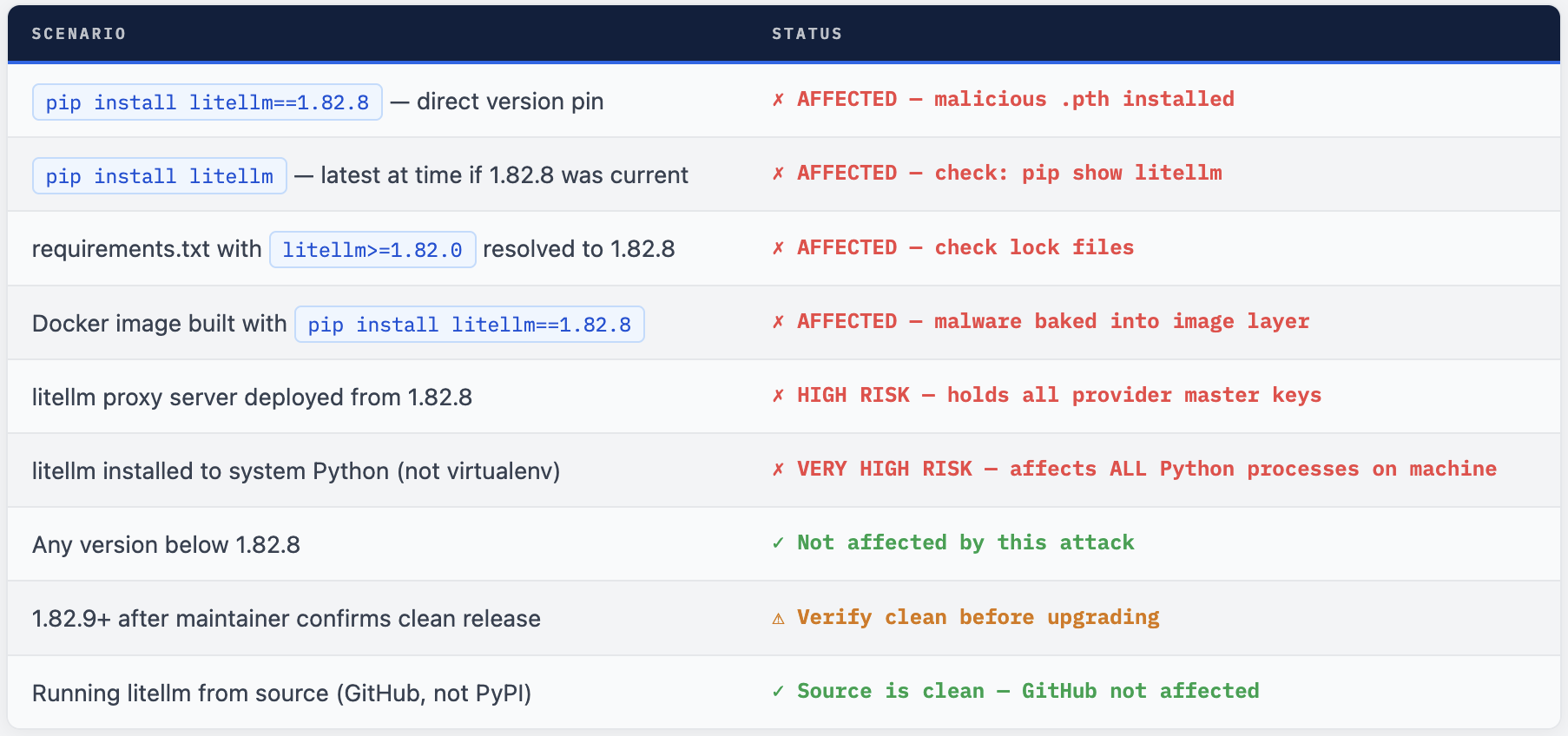
litellm Proxy Users Are at Highest Risk Teams running the litellm proxy server have the most exposure: the proxy holds a master key plus API keys for every LLM provider it routes to. A single compromised proxy deployment can expose credentials for OpenAI, Anthropic, AWS Bedrock, Azure, GCP, and all other configured providers simultaneously. If your litellm proxy was running version 1.82.8, treat every credential it had access to as compromised.
What to Do Right Now
- Run
pip show litellm | grep Versionin every Python environment. If it shows1.82.8, you are affected - proceed with all steps below. - Remove the package immediately:
pip uninstall litellm. Then physically delete the.pthfile:find / -name "litellm_init.pth" -delete 2>/dev/null. - Rotate every
LLM APIkey that was in the environment:OpenAI,Anthropic,Azure OpenAI,Cohere,Replicate, and all others. Do this before reinstalling any version oflitellm. - Rotate all cloud credentials :
AWS access keys,GCP service account keys,Azure service principals. Any credentials that could have been in environment variables. - If
litellmwas installed to system Python (not avirtualenv), assume every Python process on the machine triggered the stealer. This includes cron jobs, background services, and other applications that use Python. - Audit Docker images built from
1.82.8. Rebuild from a clean base with a safe litellm version. Rotate all credentials those containers had access to. - Downgrade to a
pre-1.82.8version that you know is clean: pip installlitellm==1.82.7. Wait for official confirmation from BerriAI that 1.82.9+ is clean before upgrading. - Add
litellm==1.82.8to your organisation’s blocked package list in Artifactory, pip config, or your private package mirror immediately.
remediate.sh
# Step 1: Remove the malicious package
pip uninstall litellm -y

# Step 2: Delete the .pth file manually (pip uninstall may not remove it)
find $(python3 -c "import site; print(':'.join(site.getsitepackages()))") \
  -name "litellm_init.pth" -delete 2>/dev/null
echo "Verifying removal:"
find / -name "litellm_init.pth" 2>/dev/null | grep -q "." \
  && echo "WARNING: .pth file still found - manual removal needed" \
  || echo "✓ litellm_init.pth removed"

# Step 3: Install known-clean version
pip install litellm==1.82.7

# Step 4: Verify no .pth file from the new install
find $(python3 -c "import site; print(':'.join(site.getsitepackages()))") \
  -name "*litellm*.pth" 2>/dev/null \
  && echo "WARNING: litellm .pth file still present" \
  || echo "✓ No litellm .pth files found"

# Step 5: Verify Python starts cleanly with no unexpected network activity
strace -e trace=network python3 -c "print('hello')" 2>&1 | grep connect
Detecting the Compromise
Audit All .pth Files for Suspicious Content
audit.sh
# Audit every .pth file across all Python environments
# Flag: large files + files containing import/exec lines

python3 -c "
import site, os, pathlib

for sp in site.getsitepackages() + [site.getusersitepackages()]:
    for pth in pathlib.Path(sp).glob('*.pth'):
        size = pth.stat().st_size
        content = pth.read_text(errors='replace')
        has_import = any(line.startswith('import')
                         for line in content.splitlines())
        if size > 500 or has_import:
            print(f'SUSPICIOUS: {pth} ({size} bytes, import={has_import})')
            print(f'  First line: {content.splitlines()[0][:100]}')
"
Falco Rule - Unexpected Network Activity from Python
- rule: Python Process Unexpected Outbound - Possible Stealer
  desc: |
    Python making outbound connection to unknown host at startup.
    May indicate malicious .pth file execution (e.g. litellm 1.82.8).
  condition: |
    evt.type = connect
    and proc.name in (python, python3, python3.11, python3.12)
    and fd.typechar = 4
    and not fd.sip.name in (
      "pypi.org", "files.pythonhosted.org",
      "api.openai.com", "api.anthropic.com",
      "bedrock.amazonaws.com"
    )
    and not proc.cmdline contains "pip"
  output: |
    Suspicious Python outbound connection - possible stealer
    (proc=%proc.cmdline dest=%fd.sip.name container=%container.id)
  priority: CRITICAL
  tags: [network, supply_chain, pypi_stealer, litellm]
pip-audit Integration
# Add to CI - reject litellm 1.82.8 explicitly
pip-audit --require-hashes --vulnerability-service osv -r requirements.txt

# Or use a constraints file to block the bad version
echo "litellm!=1.82.8" >> constraints.txt
pip install -c constraints.txt -r requirements.txt

# In GitHub Actions - add to all Python jobs
- name: Audit Python packages for known-malicious versions
  run: |
    pip install pip-audit
    pip-audit --require-hashes --vulnerability-service osv
    # Also check for suspicious .pth files
    python3 -c "
    import site, pathlib
    for sp in site.getsitepackages():
      for p in pathlib.Path(sp).glob('*.pth'):
        if p.stat().st_size > 1000:
          print(f'LARGE PTH FILE DETECTED: {p} ({p.stat().st_size} bytes)')
          exit(1)
    print('No suspicious .pth files found')
    "
Hardening Your Python Supply Chain
1 - Pin All Dependencies with Hashes
# Generate requirements with hashes - any tampered package fails to install
pip-compile --generate-hashes requirements.in > requirements.txt

# Install with hash verification - will REJECT litellm 1.82.8 if hash differs
pip install --require-hashes -r requirements.txt

# requirements.txt with hash looks like:
# litellm==1.82.7 \
#     --hash=sha256:abc123... \
#     --hash=sha256:def456...
# Any wheel that doesn't match the hash is rejected
2 - Use a Private Package Mirror with Allowlisting
Tools like Artifactory, Nexus, or AWS CodeArtifact let you proxy PyPI through a controlled mirror. You can blocklist specific versions (litellm==1.82.8) and require security scanning before packages enter your internal mirror.
3 - Scan Installed Packages for Malicious .pth Files in CI
- name: Scan for malicious .pth files post-install
  run: |
    python3 - << 'EOF'
    import site, pathlib, sys

    SUSPICIOUS_THRESHOLD_BYTES = 1000
    found = []

    for sp in site.getsitepackages() + [site.getusersitepackages()]:
        for pth in pathlib.Path(sp).glob("*.pth"):
            size = pth.stat().st_size
            content = pth.read_text(errors="replace")
            lines = content.splitlines()
            has_exec_line = any(l.startswith("import") for l in lines)
            if size > SUSPICIOUS_THRESHOLD_BYTES or has_exec_line:
                found.append(f"{pth} ({size}B, import_line={has_exec_line})")

    if found:
        print("SECURITY FAILURE: Suspicious .pth files found:")
        for f in found:
            print(f"  {f}")
        sys.exit(1)
    print("No suspicious .pth files detected")
    EOF
4 - Rotate LLM API Keys Regularly and Use Short-Lived Tokens
The damage from this attack scales with the lifetime of stolen credentials. For LLM API keys, consider using short-lived tokens where providers support them. For AWS Bedrock access, prefer OIDC-based temporary credentials over long-lived access keys. For CI environments, ensure secrets are scoped to the minimum required permissions and rotated after every deployment cycle.
The Broader Lesson
The litellm 1.82.8 compromise highlights a critical blind spot in how most teams think about Python supply chain security: the assumption that source code review is equivalent to artifact review. The GitHub source repository was clean. The PyPI artifact was malicious. Any automated or manual review of the GitHub codebase would have missed this entirely.
The .pth file mechanism is not exotic - it is documented Python behaviour, decades old. What makes this attack effective is that almost no one audits .pth files. They are invisible in normal development workflows, below the radar of most dependency scanners, and trusted implicitly because they sit alongside legitimate package files.
With 96 million monthly downloads and usage across AI application stacks that hold the most sensitive API credentials in an organisation, litellm is precisely the kind of high-value target that sophisticated supply chain attackers seek. This attack class - malicious artifacts that diverge from clean source - will continue to grow as AI tooling becomes more central to infrastructure.
Audit Artifacts. Not Just Source. Not Just Imports.
Hash-pinned requirements, .pth file auditing in CI, and a private package mirror are the three controls that stop this class of attack. None require significant investment. All three pay dividends against every future PyPI supply chain incident.
Comments (1)
https://love-hindi.com/impress-shayari-2/ My family members always say that I am wasting my time here at web, except I know I am getting know-how all the time by reading such nice articles.
Leave a comment