I’ve seen this exact incident play out three times in different companies. A UGC platform launches, user growth is good, someone on the team says “we’ll add content moderation later” - and then the support queue explodes with reports of explicit images in what was supposed to be a family-friendly app. The scramble to retroactively moderate tens of thousands of images already in S3 is not fun.
NSFW detection is one of those infrastructure problems that looks simple from the outside - just run a model on images, right? - and turns into a minefield the moment you hit production. False positive rates that ban legitimate content. Models that perform differently on dark-skinned subjects. Thresholds that need to be tuned differently for a children’s education platform versus a professional social network. Edge cases that no paper ever benchmarked.
This guide covers the real production picture: model selection, self-hosted pipelines, threshold strategy, Docker deployment, video handling, and the bias traps that will burn you if you’re not looking for them.
Why This Problem Is Harder Than It Looks
Every platform that accepts user-uploaded images or videos eventually needs NSFW detection. The naive approach - a binary “safe/unsafe” classifier with a fixed threshold - breaks in production within days. Here’s why:
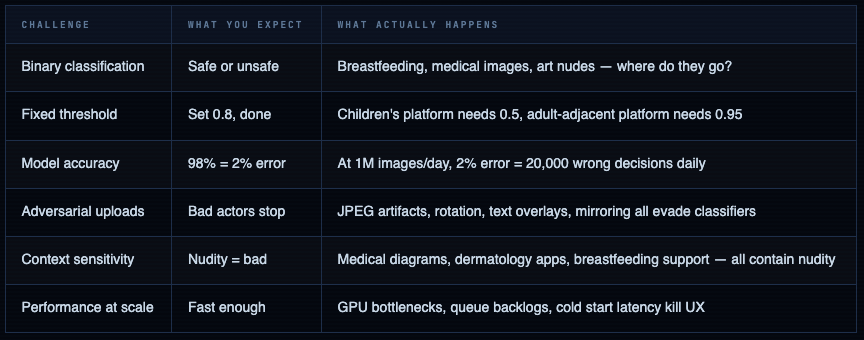
The 1% false positive trap: A classifier with 99% accuracy sounds excellent. At 100,000 uploads per day, that's 1,000 false positives - 1,000 legitimate users whose content gets incorrectly flagged. You need a human review queue, an appeals process, and clear policies before you ship this to production. The model is the easy part.
What “NSFW” Actually Means - Category Breakdown
The term NSFW is vague. Every model, every platform, and every moderation policy defines it differently. You need to be explicit about which categories you’re targeting before choosing a model - because models are trained on specific category definitions that may or may not match your use case.
Standard NSFW Category Taxonomy
| Category | Examples | Context-dependent? | Which models detect |
|---|---|---|---|
| Explicit Nudity | Exposed genitalia, explicit sexual acts | No - block everywhere | All major models |
| Partial Nudity | Exposed breasts (non-breastfeeding), bare buttocks | Yes - context matters heavily | NudeNet, NSFWJS |
| Suggestive / Sexy | Lingerie, swimwear, revealing clothing | Yes - platform-specific | NSFWJS (sexy class), ViT models |
| Hentai / Drawn | Explicit anime/cartoon content | Usually block | NSFWJS, GantMan model |
| Violence / Gore | Blood, wounds, graphic injury | Yes - news vs. entertainment | Separate violence models needed |
| Hate Symbols | Nazi imagery, extremist symbols | No - block everywhere | Text + image OCR models |
| Drug / Weapon | Drug paraphernalia, weapons | Yes - firearms retailer vs. school | Specialized models or cloud APIs |
Model mismatch is the silent killer. If your platform is a dermatology app and you deploy a model trained on Reddit NSFW data, it will flag legitimate medical images constantly. The training distribution of your model must match the operational context of your platform. This is not optional.
LIVE DEMO
NSFW Detection Tool
Upload an image or paste a URL to run live content classification. Detects nudity, violence, explicit content, and more.
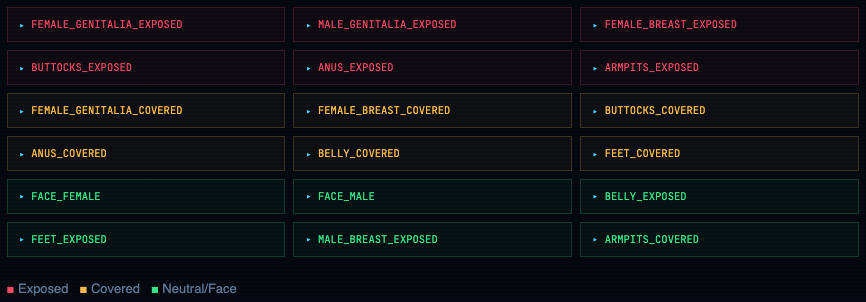
NudeNet’s 18-Label Taxonomy
NudeNet goes beyond binary classification - it detects specific body regions, separated by exposed vs. covered. This granularity lets you write per-platform logic:
Model Landscape - Open Source vs. Paid APIs
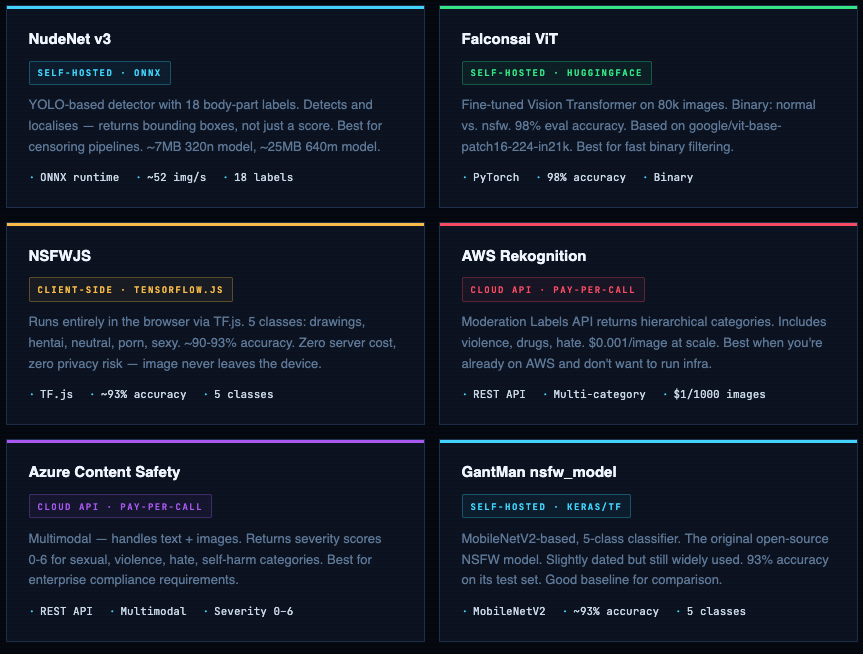
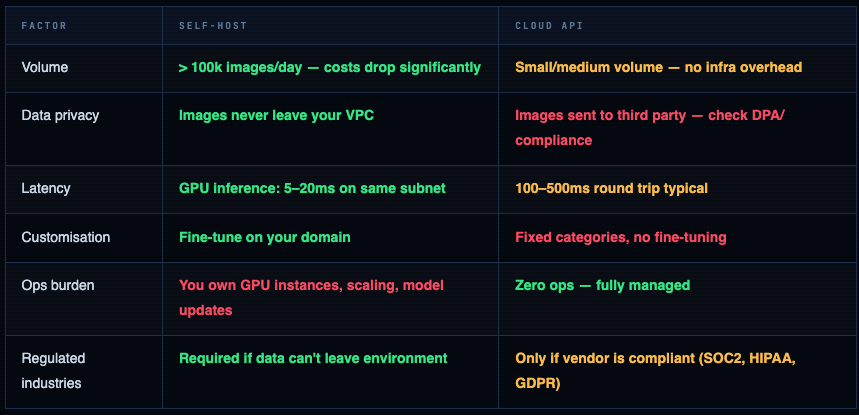
You have three buckets: open-source models you self-host, cloud APIs you pay per-call, and client-side models that run in the browser. Each has a different cost profile, latency curve, and privacy posture.
When to Self-Host vs. Pay for an API
NudeNet - The Production Workhorse
NudeNet is the most capable open-source option for anything requiring granular body-part detection. Version 3 moved to ONNX runtime - no TensorFlow dependency, much lighter, faster cold start. The v3 API is cleaner than the original.
Install NudeNet v3
# NudeNet v3 - Python 3.8+, no TensorFlow required
pip install nudenet

# Comes with 320n model by default (~7MB)
# 640m model is more accurate but 25MB - download separately:
# https://github.com/notai-tech/NudeNet/releases

python -c "from nudenet import NudeDetector; print('NudeNet ready')"
# NudeNet ready
Basic Detection - Single Image
from nudenet import NudeDetector

# Load once at startup - ONNX model stays in memory
detector = NudeDetector()  # uses 320n model by default

# For higher accuracy (slower), use the 640m model:
# detector = NudeDetector(model_path='best.onnx', inference_resolution=640)

results = detector.detect('image.jpg')
# [
#   {
#     'class': 'FEMALE_BREAST_EXPOSED',
#     'score': 0.82,
#     'box': [120, 80, 240, 200]   # [x1, y1, x2, y2]
#   },
#   {
#     'class': 'FACE_FEMALE',
#     'score': 0.94,
#     'box': [300, 30, 420, 150]
#   }
# ]

# Batch processing - faster than calling detect() in a loop
batch_results = detector.detect_batch(['img1.jpg', 'img2.jpg', 'img3.jpg'])

# Built-in censoring - draws black rectangles over detected regions
detector.censor('input.jpg', output_path='censored.jpg')
Production-Grade Detection Function with Scoring Logic
from nudenet import NudeDetector
from dataclasses import dataclass
from typing import List, Tuple
import io, requests
from PIL import Image

# ── Labels by severity ──────────────────────────────────────────
EXPLICIT_LABELS = {
    "FEMALE_GENITALIA_EXPOSED",
    "MALE_GENITALIA_EXPOSED",
    "ANUS_EXPOSED",
}

PARTIAL_NUDITY_LABELS = {
    "FEMALE_BREAST_EXPOSED",
    "BUTTOCKS_EXPOSED",
}

COVERED_LABELS = {
    "FEMALE_BREAST_COVERED",
    "FEMALE_GENITALIA_COVERED",
    "BUTTOCKS_COVERED",
}

# ── Result dataclass ────────────────────────────────────────────
@dataclass
class ModerationResult:
    is_explicit:      bool
    is_partial_nudity: bool
    max_score:        float
    detections:       list
    action:           str   # "block" | "review" | "allow"

# ── Detector singleton ──────────────────────────────────────────
_detector = NudeDetector()

def moderate_image(
    image_source: str | bytes,
    explicit_threshold: float = 0.6,
    partial_threshold:  float = 0.7,
) -> ModerationResult:
    """
    Returns a ModerationResult with action: block / review / allow.

    block  → explicit content above threshold
    review → partial nudity above threshold (human queue)
    allow  → nothing detected above thresholds
    """
    # Accept file path, URL, or bytes
    if isinstance(image_source, str) and image_source.startswith('http'):
        resp = requests.get(image_source, timeout=10)
        image_source = io.BytesIO(resp.content)

    detections = _detector.detect(image_source)

    explicit_hits    = [d for d in detections if d['class'] in EXPLICIT_LABELS
                        and d['score'] >= explicit_threshold]
    partial_hits     = [d for d in detections if d['class'] in PARTIAL_NUDITY_LABELS
                        and d['score'] >= partial_threshold]
    max_score        = max((d['score'] for d in detections), default=0.0)

    if explicit_hits:
        action = "block"
    elif partial_hits:
        action = "review"
    else:
        action = "allow"

    return ModerationResult(
        is_explicit       = bool(explicit_hits),
        is_partial_nudity = bool(partial_hits),
        max_score         = max_score,
        detections        = detections,
        action            = action,
    )

# ── Usage ───────────────────────────────────────────────────────
result = moderate_image("upload.jpg")
# ModerationResult(is_explicit=False, is_partial_nudity=True,
#   max_score=0.74, action='review', detections=[...])

if result.action == "block":
    reject_upload(reason="Explicit content detected")
elif result.action == "review":
    queue_for_human_review(image_id, result.detections)
else:
    accept_upload()
Run via Docker (Zero Python Setup)
# Pull and run the official REST API container
docker run -it -p 8080:8080 ghcr.io/notai-tech/nudenet:latest

# Test with a local image:
curl -X POST http://localhost:8080/infer \
  -F "image=@test.jpg"

# Response:
# {
#   "detections": [
#     {"class": "FACE_FEMALE", "score": 0.91, "box": [100, 50, 200, 150]},
#     {"class": "FEMALE_BREAST_COVERED", "score": 0.76, "box": [90, 160, 210, 280]}
#   ]
# }

# Run with GPU (NVIDIA runtime required):
docker run --gpus all -p 8080:8080 ghcr.io/notai-tech/nudenet:latest
Falconsai ViT - Fast Binary Classifier
When you need a fast binary gate - “is this image safe or not” - without needing bounding boxes or label granularity, the Falconsai Vision Transformer is your best open-source option. 98% eval accuracy on its 80,000-image proprietary dataset. Fine-tuned from Google’s ViT-base-patch16-224-in21k.
Install and Run - 10 Lines
from transformers import pipeline
from PIL import Image

# Load once - downloads ~330MB on first run, cached afterwards
classifier = pipeline(
    "image-classification",
    model="Falconsai/nsfw_image_detection",
    device=0       # GPU device 0. Use -1 for CPU.
)

# Classify a single image
result = classifier("image.jpg")
# [{'label': 'normal', 'score': 0.9972}, {'label': 'nsfw', 'score': 0.0028}]

# Classify from URL
result = classifier("https://example.com/upload.jpg")

# Batch (much faster than looping)
images = ["img1.jpg", "img2.jpg", "img3.jpg"]
results = classifier(images, batch_size=8)

# Extract the NSFW probability for thresholding
def nsfw_score(result: list) -> float:
    return next(r['score'] for r in result if r['label'] == 'nsfw')

score = nsfw_score(classifier("test.jpg"))
if score > 0.75:
    flag_for_review()
Manual Loading for Production (Faster, More Control)
import torch
from transformers import AutoModelForImageClassification, ViTImageProcessor
from PIL import Image
import io

MODEL_NAME = "Falconsai/nsfw_image_detection"

# ── Load model + processor once at app startup ──────────────────
processor = ViTImageProcessor.from_pretrained(MODEL_NAME)
model     = AutoModelForImageClassification.from_pretrained(MODEL_NAME)
model.eval()

device = torch.device("cuda" if torch.cuda.is_available() else "cpu")
model  = model.to(device)

# ── Inference function ──────────────────────────────────────────
@torch.no_grad()
def classify_image(image_bytes: bytes) -> dict:
    image = Image.open(io.BytesIO(image_bytes)).convert("RGB")
    inputs = processor(images=image, return_tensors="pt").to(device)
    logits = model(**inputs).logits

    probs  = torch.softmax(logits, dim=-1)[0]
    labels = model.config.id2label

    return {
        labels[i]: round(probs[i].item(), 4)
        for i in range(len(labels))
    }

# ── Usage ───────────────────────────────────────────────────────
with open("upload.jpg", "rb") as f:
    scores = classify_image(f.read())
# {'normal': 0.9971, 'nsfw': 0.0029}

# Batch inference - process 8 images simultaneously on GPU
@torch.no_grad()
def classify_batch(image_bytes_list: list[bytes]) -> list[dict]:
    images  = [Image.open(io.BytesIO(b)).convert("RGB") for b in image_bytes_list]
    inputs  = processor(images=images, return_tensors="pt", padding=True).to(device)
    logits  = model(**inputs).logits
    probs   = torch.softmax(logits, dim=-1)
    labels  = model.config.id2label
    return [{labels[i]: round(p[i].item(), 4) for i in range(len(labels))} for p in probs]
NSFWJS - Client-Side Detection (Zero Server Cost)
NSFWJS runs entirely in the browser via TensorFlow.js. The image never leaves the user’s device. This has three significant implications: zero server compute cost, zero privacy risk from image transmission, and reduced latency for rejecting obvious uploads before they hit your backend.
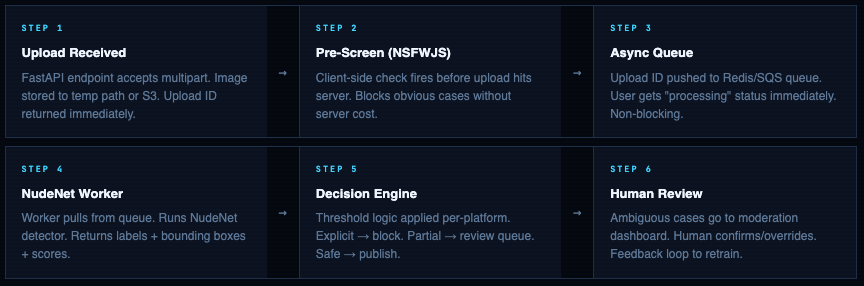
Use NSFWJS as a first gate, not your only gate. Client-side detection can be bypassed by a determined bad actor with DevTools. Use it to reduce server load from accidental/casual uploads (the majority of cases), then run a server-side model as the authoritative check for everything that passes.
import * as tf    from '@tensorflow/tfjs';
import * as nsfwjs from 'nsfwjs';

// Enable production mode - disables debug overhead
tf.enableProdMode();

// Load model once (self-host the model files in production)
const model = await nsfwjs.load('/models/nsfw_model/');

async function checkImageBeforeUpload(imgElement) {
  const predictions = await model.classify(imgElement);
  // [
  //   { className: 'Drawing',  probability: 0.002 },
  //   { className: 'Hentai',   probability: 0.001 },
  //   { className: 'Neutral',  probability: 0.976 },
  //   { className: 'Porn',     probability: 0.010 },
  //   { className: 'Sexy',     probability: 0.011 },
  // ]

  const pornScore  = predictions.find(p => p.className === 'Porn').probability;
  const hentaiScore = predictions.find(p => p.className === 'Hentai').probability;

  if (pornScore > 0.7 || hentaiScore > 0.6) {
    showError('This image appears to violate our content policy.');
    return false;
  }
  return true;
}

// Wire it to the file input
document.getElementById('upload').addEventListener('change', async (e) => {
  const file = e.target.files[0];
  const img  = new Image();
  img.src = URL.createObjectURL(file);
  img.onload = async () => {
    const safe = await checkImageBeforeUpload(img);
    if (safe) submitForm();
  };
});
** Backend usage**
import * as tf    from '@tensorflow/tfjs-node';  // native Node binding
import * as nsfwjs from 'nsfwjs';
import Jimp from 'jimp';

tf.enableProdMode();
const model = await nsfwjs.load('file://./models/nsfw_model/');

export async function moderateBuffer(buffer: Buffer): Promise<boolean> {
  const jimpImage  = await Jimp.read(buffer);
  const tfImage    = tf.browser.fromPixels({
    data:   new Uint8Array(jimpImage.bitmap.data),
    width:  jimpImage.bitmap.width,
    height: jimpImage.bitmap.height,
  });
  const predictions = await model.classify(tfImage as any);
  tfImage.dispose();

  const unsafe = predictions
    .filter(p => ['Porn', 'Hentai'].includes(p.className))
    .some(p => p.probability > 0.65);

  return !unsafe;  // true = safe to accept
}
Building a Production Pipeline - FastAPI + Docker
This is the pipeline I’d build for a UGC platform expecting 10k-500k image uploads per day. NudeNet for granular detection + Falconsai ViT as secondary confirmation + async queue to avoid blocking the upload response.
Architecture Flow
FastAPI Service - Complete Implementation
main.py
from fastapi import FastAPI, File, UploadFile, HTTPException, BackgroundTasks
from fastapi.responses import JSONResponse
from pydantic import BaseModel
from nudenet import NudeDetector
from transformers import pipeline as hf_pipeline
import torch, io, logging, time
from PIL import Image

logger   = logging.getLogger(__name__)
app      = FastAPI(title="NSFW Detection API", version="1.0.0")

# ── Model initialisation (startup, not per-request) ─────────────
nude_detector    = NudeDetector()
vit_classifier   = hf_pipeline(
    "image-classification",
    model="Falconsai/nsfw_image_detection",
    device=0 if torch.cuda.is_available() else -1,
)

# ── Threshold config - override per deployment ───────────────────
EXPLICIT_THRESHOLD = 0.60   # NudeNet explicit labels
PARTIAL_THRESHOLD  = 0.70   # NudeNet partial nudity
VIT_NSFW_THRESHOLD = 0.80   # Falconsai ViT NSFW score

EXPLICIT_LABELS = {
    "FEMALE_GENITALIA_EXPOSED", "MALE_GENITALIA_EXPOSED", "ANUS_EXPOSED"
}
PARTIAL_LABELS = {
    "FEMALE_BREAST_EXPOSED", "BUTTOCKS_EXPOSED"
}

# ── Response schema ─────────────────────────────────────────────
class ModerationResponse(BaseModel):
    action:           str          # block | review | allow
    nsfw_score:       float        # ViT NSFW probability
    is_explicit:      bool
    is_partial_nudity: bool
    detections:       list
    latency_ms:       float

# ── Main endpoint ────────────────────────────────────────────────
@app.post("/moderate", response_model=ModerationResponse)
async def moderate_image(file: UploadFile = File(...)):
    t0 = time.perf_counter()

    # Validate MIME type
    if file.content_type not in {"image/jpeg", "image/png", "image/webp"}:
        raise HTTPException(400, "Unsupported image format")

    # Read and validate image
    content = await file.read()
    if len(content) > 20 * 1024 * 1024:  # 20MB limit
        raise HTTPException(413, "Image too large (max 20MB)")

    try:
        img = Image.open(io.BytesIO(content)).convert("RGB")
    except Exception:
        raise HTTPException(422, "Cannot parse image")

    # ── Run NudeNet (bounding box detector) ─────────────────────
    detections    = nude_detector.detect(io.BytesIO(content))
    explicit_hits = [d for d in detections
                     if d['class'] in EXPLICIT_LABELS and d['score'] >= EXPLICIT_THRESHOLD]
    partial_hits  = [d for d in detections
                     if d['class'] in PARTIAL_LABELS  and d['score'] >= PARTIAL_THRESHOLD]

    # ── Run ViT classifier (second opinion) ─────────────────────
    vit_result  = vit_classifier(img)
    nsfw_score  = next(r['score'] for r in vit_result if r['label'] == 'nsfw')

    # ── Decision logic ────────────────────────────────────────────
    if explicit_hits or nsfw_score >= VIT_NSFW_THRESHOLD:
        action = "block"
    elif partial_hits or nsfw_score >= 0.50:
        action = "review"
    else:
        action = "allow"

    latency = (time.perf_counter() - t0) * 1000
    logger.info(f"action={action} nsfw={nsfw_score:.3f} latency={latency:.1f}ms")

    return ModerationResponse(
        action            = action,
        nsfw_score        = round(nsfw_score, 4),
        is_explicit       = bool(explicit_hits),
        is_partial_nudity = bool(partial_hits),
        detections        = detections,
        latency_ms        = round(latency, 2),
    )

@app.get("/health")
def health(): return {"status": "ok"}
Dockerfile
FROM python:3.11-slim

WORKDIR /app

# System deps for OpenCV + ONNX
RUN apt-get update && apt-get install -y \
    libgl1 libglib2.0-0 libsm6 libxrender1 libxext6 \
    && rm -rf /var/lib/apt/lists/*

COPY requirements.txt .
RUN pip install --no-cache-dir -r requirements.txt

# Pre-download models at build time (not at startup)
RUN python -c "from nudenet import NudeDetector; NudeDetector()"
RUN python -c "from transformers import pipeline; pipeline('image-classification', model='Falconsai/nsfw_image_detection')"

COPY app/ ./app/

EXPOSE 8000
CMD ["uvicorn", "app.main:app", "--host", "0.0.0.0", "--port", "8000", "--workers", "2"]
Requirements.txt
fastapi==0.111.0
uvicorn[standard]==0.30.1
nudenet==3.4.2
transformers==4.42.4
torch==2.3.1
torchvision==0.18.1
Pillow==10.4.0
pydantic==2.8.2
requests==2.32.3
Build & Test
docker build -t nsfw-api .
docker run -p 8000:8000 nsfw-api

# Test it:
curl -X POST http://localhost:8000/moderate \
  -F "file=@test-image.jpg"

# {
#   "action": "allow",
#   "nsfw_score": 0.0031,
#   "is_explicit": false,
#   "is_partial_nudity": false,
#   "detections": [{"class": "FACE_FEMALE", "score": 0.88, "box": [...]}],
#   "latency_ms": 142.3
# }

# Health check:
curl http://localhost:8000/health
# {"status": "ok"}
Threshold Tuning - Where Most Systems Break
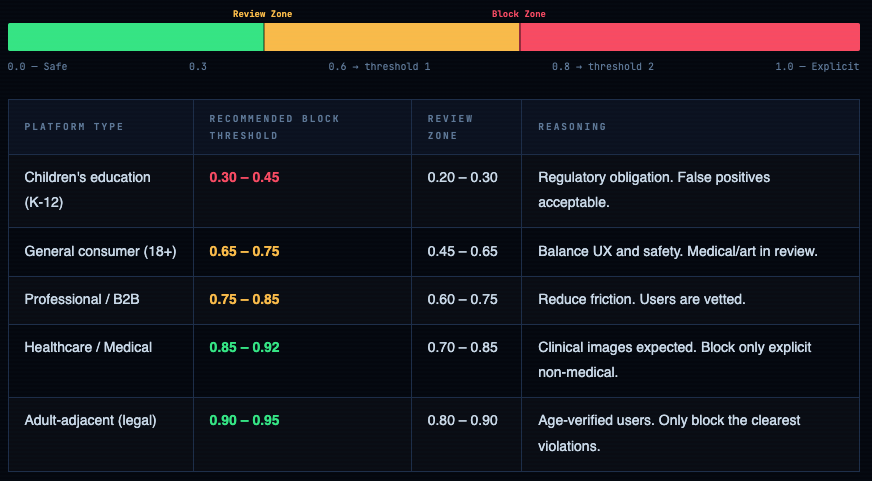
The default threshold everyone copies from tutorials is 0.8. It is wrong for almost every real-world use case. Threshold selection is the most consequential engineering decision in any content moderation system, and it cannot be made without understanding your platform’s specific risk tolerance.
Visualising the Threshold Spectrum
How to Find Your Threshold - Empirical Method
Never pick thresholds from a table. This is the correct process:
threshold.py
import numpy as np
import matplotlib.pyplot as plt
from sklearn.metrics import precision_recall_curve, roc_auc_score
from your_pipeline import classify_image

# Step 1: Collect a labelled test set representative of YOUR platform.
# Minimum: 1000 safe + 500 borderline + 500 explicit images.
# Label them manually with your moderation team first.

# Step 2: Score every image with your model
scores = [classify_image(img)['nsfw'] for img in test_images]
labels = [1 if img.is_nsfw else 0 for img in test_images]

# Step 3: Plot precision-recall curve
precision, recall, thresholds = precision_recall_curve(labels, scores)
f1_scores = 2 * (precision * recall) / (precision + recall + 1e-8)
optimal_threshold = thresholds[np.argmax(f1_scores)]
# optimal_threshold ≈ 0.72 (example)

# Step 4: Look at the confusion matrix at your chosen threshold
predicted = [1 if s >= optimal_threshold else 0 for s in scores]
fp_rate = sum(1 for p, l in zip(predicted, labels) if p==1 and l==0) / labels.count(0)
fn_rate = sum(1 for p, l in zip(predicted, labels) if p==0 and l==1) / labels.count(1)

print(f"False Positive Rate: {fp_rate:.2%}")   # legit content wrongly flagged
print(f"False Negative Rate: {fn_rate:.2%}")   # NSFW that slipped through

# Step 5: Decide which error costs more for your platform.
# Children's app: FN rate drives legal risk. Push threshold down.
# E-commerce: FP rate drives user friction. Push threshold up.
Never validate on the model's own test set. Falconsai reports 98% accuracy - on their proprietary 80k-image dataset. Your platform's upload distribution is not that dataset. Always build a labelled validation set from your actual user uploads. Accuracy on someone else's test set tells you almost nothing about accuracy on yours.
Video & Real-Time Stream Detection
Video moderation is not “run image detection on every frame.” That will cost you 25x-60x more compute and latency than necessary. The correct approaches are frame sampling and keyframe extraction.
Strategy 1 - Frame Sampling (Fast, Cheap)
moderation.py
import cv2
from nudenet import NudeDetector

detector = NudeDetector()

def moderate_video(
    video_path: str,
    sample_fps: int = 1,           # 1 frame per second
    explicit_threshold: float = 0.6,
    early_stop: bool = True,       # stop on first violation
) -> dict:
    cap      = cv2.VideoCapture(video_path)
    fps      = cap.get(cv2.CAP_PROP_FPS) or 30
    interval = int(fps / sample_fps)   # sample every N frames
    frame_n  = 0
    violations = []

    EXPLICIT_LABELS = {
        "FEMALE_GENITALIA_EXPOSED", "MALE_GENITALIA_EXPOSED", "ANUS_EXPOSED"
    }

    while cap.isOpened():
        ret, frame = cap.read()
        if not ret: break

        if frame_n % interval == 0:
            # Convert BGR → RGB, encode to bytes for NudeNet
            rgb     = cv2.cvtColor(frame, cv2.COLOR_BGR2RGB)
            results = detector.detect(rgb)
            hits    = [r for r in results
                       if r['class'] in EXPLICIT_LABELS
                       and r['score'] >= explicit_threshold]
            if hits:
                violations.append({
                    'timestamp_s': frame_n / fps,
                    'frame': frame_n,
                    'detections': hits,
                })
                if early_stop:
                    break   # first violation found - no need to scan the rest
        frame_n += 1

    cap.release()
    return {
        'action':     'block' if violations else 'allow',
        'violations': violations,
        'frames_checked': frame_n // interval,
    }

# 60-second video at 30fps → 1800 frames → sample 1/30 → 60 frames checked
result = moderate_video("upload.mp4", sample_fps=1)
Strategy 2 - Scene-Change / Keyframe Extraction (More Accurate)
keyframe_extractor.py
import cv2, numpy as np

def extract_keyframes(video_path: str, threshold: float = 30.0) -> list:
    """
    Extract frames where the scene changes significantly.
    threshold: mean absolute difference between consecutive frames.
    Lower = more frames extracted. Typical: 20-40.
    """
    cap       = cv2.VideoCapture(video_path)
    fps       = cap.get(cv2.CAP_PROP_FPS) or 30
    prev      = None
    keyframes = []
    frame_n   = 0

    while cap.isOpened():
        ret, frame = cap.read()
        if not ret: break

        gray = cv2.cvtColor(frame, cv2.COLOR_BGR2GRAY)
        if prev is not None:
            diff = np.mean(np.abs(gray.astype('float') - prev.astype('float')))
            if diff > threshold:
                keyframes.append({
                    'frame': frame,
                    'timestamp_s': frame_n / fps,
                    'scene_diff': round(diff, 2),
                })
        prev = gray
        frame_n += 1

    cap.release()
    return keyframes

# Run NSFW detection only on keyframes (typically 2-8 per minute of video)
keyframes = extract_keyframes("video.mp4")
detector  = NudeDetector()
for kf in keyframes:
    results = detector.detect(kf['frame'])
    # ... process results
Bias, False Positives & Ethical Failure Modes
This is the section most NSFW detection tutorials skip entirely. It shouldn’t be an afterthought - bias in content moderation systems causes direct, measurable harm to real users.
Known Bias Failure Modes
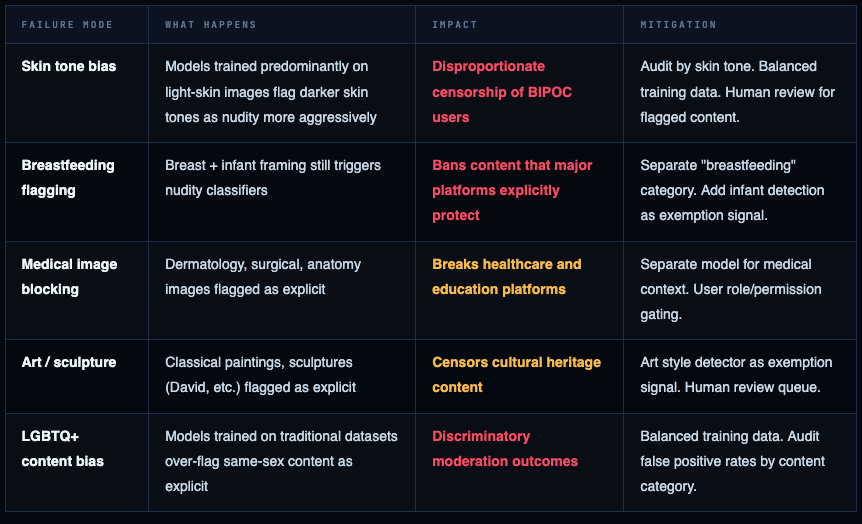
You must audit your false positive rate by demographic. A model that reports 98% overall accuracy can still have a 15% false positive rate on images of Black users' skin and a 2% false positive rate on white users' skin. Overall accuracy obscures this. Disaggregated metrics are not optional - they're the only way to know if your system is discriminatory.
Cloud APIs - When to Pay Instead of Self-Host
Cloud APIs make sense when you’re early-stage, don’t have GPU infrastructure, need multi-category detection beyond nudity, or are in a regulated industry with specific compliance requirements your vendor already covers.
aws_rekognition_moderation.py
import boto3

rekognition = boto3.client('rekognition', region_name='us-east-1')

def moderate_with_rekognition(image_bytes: bytes, min_confidence: int = 70) -> dict:
    response = rekognition.detect_moderation_labels(
        Image={'Bytes': image_bytes},
        MinConfidence=min_confidence
    )

    labels = response['ModerationLabels']
    # [
    #   {'Name': 'Explicit Nudity', 'Confidence': 98.2, 'ParentName': ''},
    #   {'Name': 'Nudity', 'Confidence': 98.2, 'ParentName': 'Explicit Nudity'},
    #   {'Name': 'Graphic Violence', 'Confidence': 71.0, 'ParentName': ''},
    # ]

    # Top-level categories (no ParentName) are the high-level buckets
    top_level = [l for l in labels if not l['ParentName']]
    is_explicit = any(l['Name'] == 'Explicit Nudity' for l in top_level)

    return {
        'action':      'block' if is_explicit else 'allow',
        'labels':      labels,
        'is_explicit': is_explicit,
    }
azure_content_safety.py
from azure.ai.contentsafety import ContentSafetyClient
from azure.ai.contentsafety.models import AnalyzeImageOptions, ImageData
from azure.core.credentials import AzureKeyCredential
import base64

client = ContentSafetyClient(
    endpoint="https://YOUR_RESOURCE.cognitiveservices.azure.com/",
    credential=AzureKeyCredential("YOUR_KEY")
)

def moderate_with_azure(image_bytes: bytes) -> dict:
    b64 = base64.b64encode(image_bytes).decode()
    request = AnalyzeImageOptions(image=ImageData(content=b64))
    response = client.analyze_image(request)

    # Response includes severity 0-6 for each category:
    # sexual_result.severity, violence_result.severity,
    # hate_result.severity, self_harm_result.severity

    sexual_severity = response.sexual_result.severity  # 0 = clean, 6 = extreme
    violence_severity = response.violence_result.severity

    action = "allow"
    if sexual_severity >= 4:    action = "block"
    elif sexual_severity >= 2: action = "review"

    return {
        'action':           action,
        'sexual_severity':  sexual_severity,
        'violence_severity': violence_severity,
    }
Pick the right model. Tune the threshold. Build the review queue.
NSFW detection is not a solved problem you drop into production and forget. It’s a system - one that requires a labelled calibration dataset from your own platform, empirically tuned thresholds, a human review queue for edge cases, and ongoing monitoring for drift and bias. The model is the easy part. The operational decisions around it are where production systems succeed or fail.

Comments (0)
No comments yet. Be the first to share your thoughts.
Leave a comment