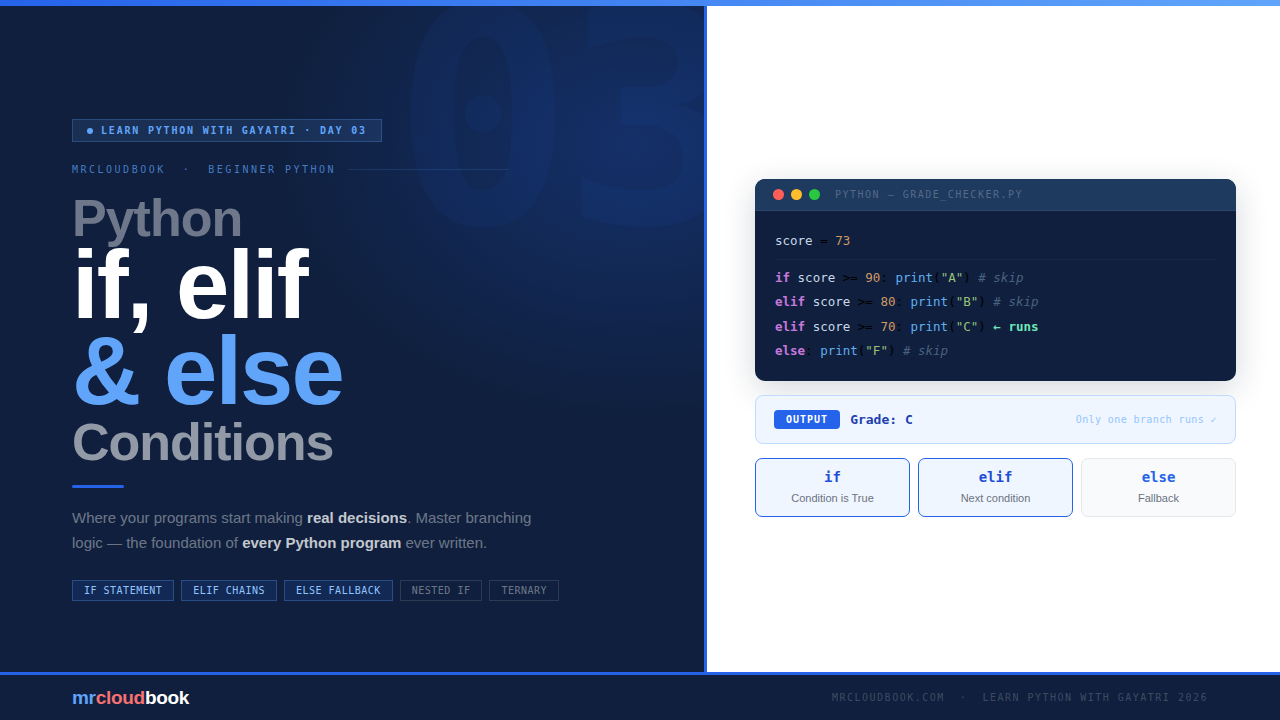
Where Your Programs Start Making Real Decisions
🔁 Quick Recap - Day 2 In Day 2, we explored Python Operators and Expressions - arithmetic (+, -, *, /), comparison (==, !=, <, >), logical (and, or, not), and assignment operators. We saw how Python evaluates expressions using operator precedence. If you missed it, check it out at mrcloudbook.com before continuing here.
Decisions Everywhere
Before we write a single line of code, let’s understand what a condition actually is. You make conditional decisions dozens of times a day without thinking about it - Python just gives you a way to write them down.
Imagine you’re at a coffee shop. If they have oat milk, you’ll get a latte. Otherwise, you’ll just go with black coffee. That tiny decision - "if this, then that, otherwise this" - is exactly what Python’s conditional statements do.
Every program worth writing needs to make decisions. Should the user be allowed to log in? Is a number even or odd? Did the form get filled out correctly? Is there enough balance in the account? All of that comes down to conditions - evaluating whether something is True or False and choosing what to do next.
In Python, all of this is done with just three keywords: if, elif, and else. That’s it. Let’s dig in.
💡 What You Built in Day 2 Every conditional statement depends on an expression that produces True or False. In Day 2, you learned exactly those expressions - comparison operators like age >= 18 or score == 100, and logical operators like and, or, not. Day 3 is where those expressions get put to work.
The if Statement
The if statement is the simplest form of decision-making in Python. It says: “only run this block of code IF this condition is True.” If the condition is False, the block is skipped entirely.
Syntax
if condition:
    # this block runs ONLY if condition is True
    # everything indented here belongs to the if
A Simple Example
age = 20

if age >= 18:
    print("You are an adult.")

# Since 20 >= 18 is True → prints "You are an adult."
# If age were 15 → the condition is False → nothing happens at all
Since age = 20 and 20 >= 18 evaluates to True, the print statement runs. If age were 15, the condition would be False and the block would be completely skipped - no error, no output, just silence.\
📐 Indentation Matters - A Lot Python uses indentation (4 spaces, or a tab) to define what's inside an if block. There are no curly braces like in Java, C, or JavaScript. Get the indentation wrong and Python throws an IndentationError. The standard across all Python code is 4 spaces - not 2, not a tab mixed with spaces.
How Python Evaluates the Condition
The condition in an if statement is any expression that produces a boolean - True or False. Python also applies truthiness rules (which you saw in Day 2), so the condition doesn’t have to be an explicit True/False value.
# Comparison expression
if score > 50:
    print("Pass")

# Truthiness - non-empty string is truthy
name = "Gayatri"
if name:
    print(f"Hello, {name}")

# Logical expression combining two comparisons
if age >= 18 and has_id:
    print("Access granted")

# Membership check with 'in'
fruits = ["apple", "mango", "banana"]
if "mango" in fruits:
    print("We have mangoes!")
Adding an else
What if the condition is False and you still want something to happen? That’s where else comes in. It acts as the fallback - the block that runs when the if condition doesn’t match.
Syntax
if condition:
    # runs if condition is True
else:
    # runs if condition is False
    # no condition here - else is always the catch-all
Example - Even or Odd
number = 7

if number % 2 == 0:
    print("Even number")
else:
    print("Odd number")

# 7 % 2 = 1 (not 0), so condition is False → prints "Odd number"
The % operator gives the remainder after division. If the remainder is 0, the number divides evenly - so it’s even. Otherwise it’s odd. Clean and readable.
Example - Login Validation
user_input = input("Enter password: ")
correct_password = "python123"

if user_input == correct_password:
    print("✓ Access granted. Welcome!")
else:
    print("✗ Incorrect password. Try again.")
💡 else Has No Condition
Notice that else never has a condition after it - there’s nothing between else and the colon. It is the default path that runs when everything above it was False. You cannot write else x > 5: - that’s what elif is for.
elif - Checking Multiple Conditions
Sometimes you have more than two possibilities. You don’t want just true/false - you want to check a whole chain of conditions. That’s what elif (short for “else if”) does. It lets you add as many branches as you need between if and else.
Syntax
if condition_1:
    # runs if condition_1 is True
elif condition_2:
    # runs if condition_1 is False AND condition_2 is True
elif condition_3:
    # runs if the above are all False AND condition_3 is True
else:
    # runs if NONE of the above were True
Example - Grade Checker
score = 73

if score >= 90:
    print("Grade: A")
elif score >= 80:
    print("Grade: B")
elif score >= 70:
    print("Grade: C")   # ← this one runs
elif score >= 60:
    print("Grade: D")
else:
    print("Grade: F")

# Output: Grade: C
Python checks each condition top to bottom and stops at the first one that’s True. Even though score >= 70 is true, it never even checks the conditions below it - it already found its match and executed that block.
✓ Only One Branch Ever Runs With if / elif / else, Python evaluates conditions in order and executes exactly one matching block. As soon as a condition is True, the rest are skipped entirely - they are never evaluated. This makes elif chains both efficient and predictable.
How the elif Chain Flows
score = 73

# Python asks: is 73 >= 90?  No → skip
# Python asks: is 73 >= 80?  No → skip
# Python asks: is 73 >= 70?  Yes → run this block, stop checking
# The elif score >= 60 and else blocks are NEVER checked

# This is different from writing separate if statements:
if score >= 90: print("A")   # evaluated independently
if score >= 70: print("C")   # also evaluated - could print twice!
if score >= 60: print("D")   # also evaluated - would print 3 grades!
# Use elif, not separate ifs, when you want exclusive branches
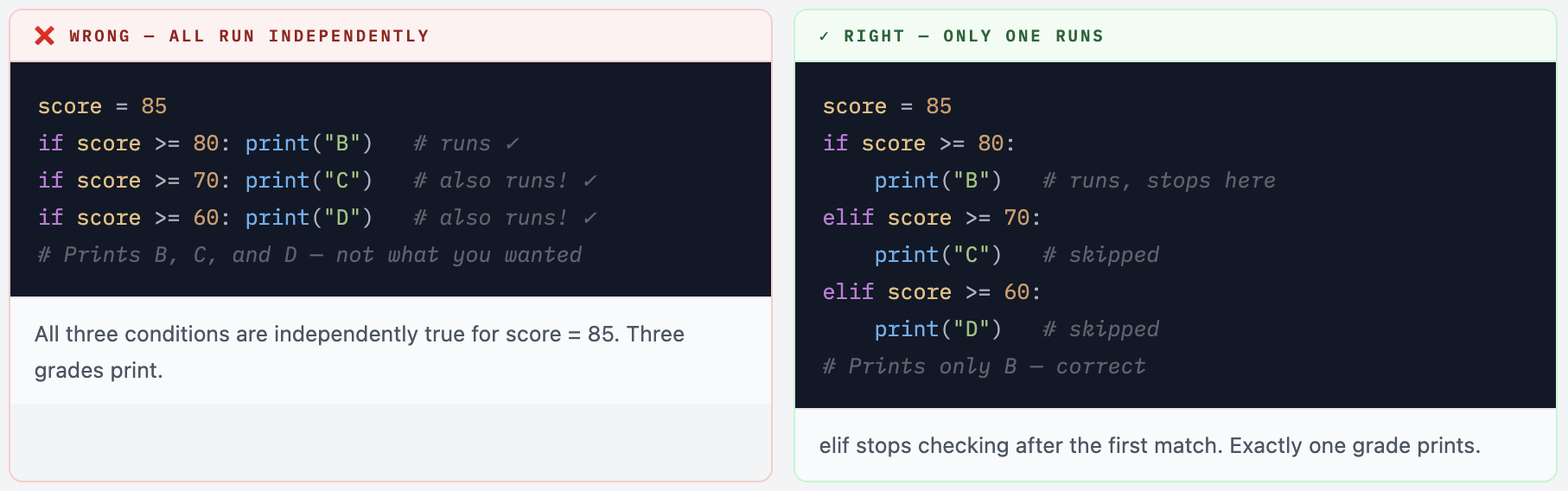
⚠ elif vs Separate if Statements This is one of the most common Day 3 mistakes. elif creates a chain where only one branch runs. Separate if statements are all evaluated independently - they can all run. For grade checking, login validation, or any exclusive-choice logic, always use elif, not multiple ifs.
Nested if Statements
You can place an if inside another if. These are called nested conditionals. Use them when one decision depends on another - when the second question only makes sense if the first one passed.
Example - Login Check
username = "admin"
password = "1234"

if username == "admin":
    # username passed - now check the password
    if password == "1234":
        print("Welcome! Access granted.")
    else:
        print("Wrong password.")
else:
    print("Unknown user.")
First we check the username. If that passes, we then check the password. Both conditions must be true - but we check them one at a time, which makes the error messages more specific and useful. “Wrong password” is far more helpful than a generic “Access denied.”
Another Example - Age and Membership
age       = 22
is_member = True

if age >= 18:
    if is_member:
        print("Member discount applied.")
    else:
        print("No discount - consider joining!")
else:
    print("Must be 18+ to purchase.")
⚠ Don't Go Too Deep Nesting is powerful, but nesting 3 or 4 levels deep gets hard to read fast. If you find yourself writing code indented far to the right, it's usually a sign to simplify the logic or combine conditions with and. As a general rule: if you need more than 2 levels of nesting, step back and rethink the structure. The nested login check above can often be written more cleanly as: if username == "admin" and password == "1234":
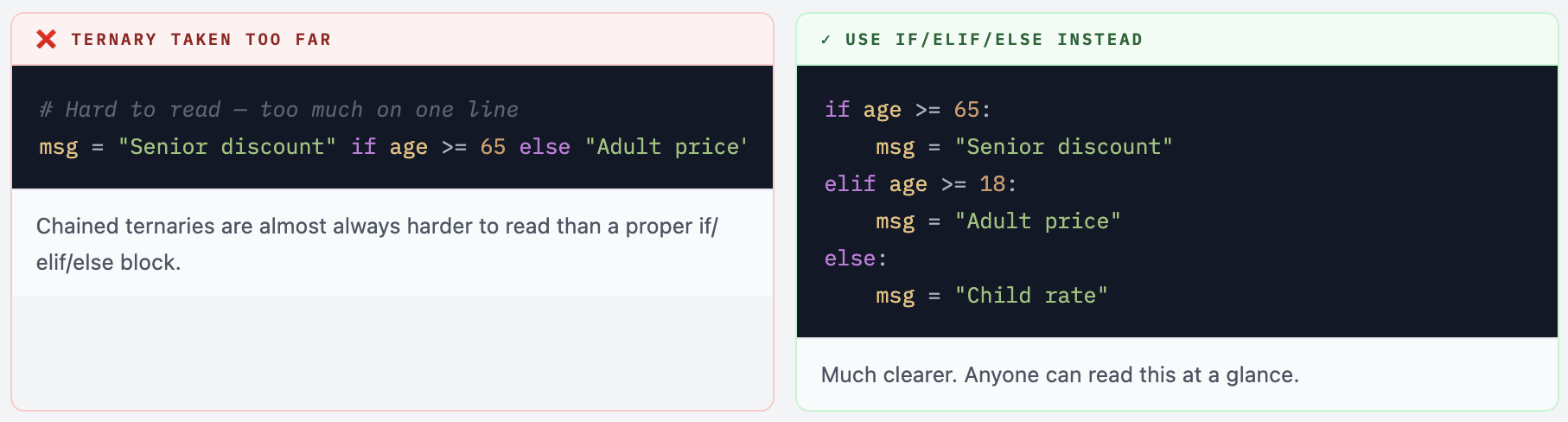
One-Liner Conditionals (the Ternary)
Python lets you write a simple if/else on a single line. This is called a ternary expression or conditional expression. It’s great for short, clean assignments - but only when both the condition and the result are simple.
Syntax
value = result_if_true if condition else result_if_false
Examples
# Basic ternary - age check
age    = 20
status = "adult" if age >= 18 else "minor"
print(status)   # adult

# Even/odd in one line
n      = 9
parity = "even" if n % 2 == 0 else "odd"
print(f"{n} is {parity}")   # 9 is odd

# Useful inside print or f-strings
temp = 35
print(f"Weather: {'hot' if temp > 30 else 'pleasant'}")   # Weather: hot
💡 Ternary vs Regular if/else - When to Use Which Use a ternary when: the condition is simple, both results are short values (a string, a number), and it fits naturally on one line. Use a regular if/else block when: the condition is complex, the blocks involve multiple lines, or readability matters more than brevity. Brevity is not always clarity.
Putting It Together - Real Examples
Here are three complete programs that use everything from today. Type these out - don’t paste. Typing forces you to read each line carefully.
Example 1 - Number Classifier
num = int(input("Enter a number: "))

if num > 0:
    print("Positive")
elif num < 0:
    print("Negative")
else:
    print("Zero")
Example 2 - Temperature Advice
temp = float(input("Enter temperature (°C): "))

if temp >= 40:
    print("🌡️  Extremely hot! Stay indoors.")
elif temp >= 30:
    print("☀️  Hot day. Stay hydrated.")
elif temp >= 20:
    print("😊  Lovely weather!")
elif temp >= 10:
    print("🧥  A bit chilly. Carry a jacket.")
else:
    print("🥶  Cold! Bundle up.")
Example 3 - Simple ATM Check
balance  = 5000
withdraw = int(input("How much to withdraw? ₹"))

if withdraw <= 0:
    print("Invalid amount.")
elif withdraw > balance:
    print("Insufficient funds.")
else:
    balance -= withdraw
    print(f"✓ Done! Remaining balance: ₹{balance}")
The ATM example is particularly instructive. Notice it validates the bad cases first (invalid amount, insufficient funds) and handles the success case last. This pattern - handling edge cases and errors at the top - is how professional Python code is typically structured.
Example 4 - Full Grade Report
name  = input("Student name: ")
score = int(input("Score (0-100): "))

# Validate score is in range first
if 0 <= score <= 100:
    if score >= 75:
        grade  = "Distinction"
        passed = True
    elif score >= 60:
        grade  = "First Class"
        passed = True
    elif score >= 50:
        grade  = "Second Class"
        passed = True
    elif score >= 35:
        grade  = "Pass"
        passed = True
    else:
        grade  = "Fail"
        passed = False

    print(f"\n--- Report for {name} ---")
    print(f"Score  : {score}/100")
    print(f"Grade  : {grade}")
    print(f"Result : {'PASS ✓' if passed else 'FAIL ✗'}")
else:
    print("Error: score must be between 0 and 100")
Common Mistakes Beginners Make
These are the mistakes that catch almost every Python beginner on Day 3. Read through all of them now so you can recognise them before they trip you up.
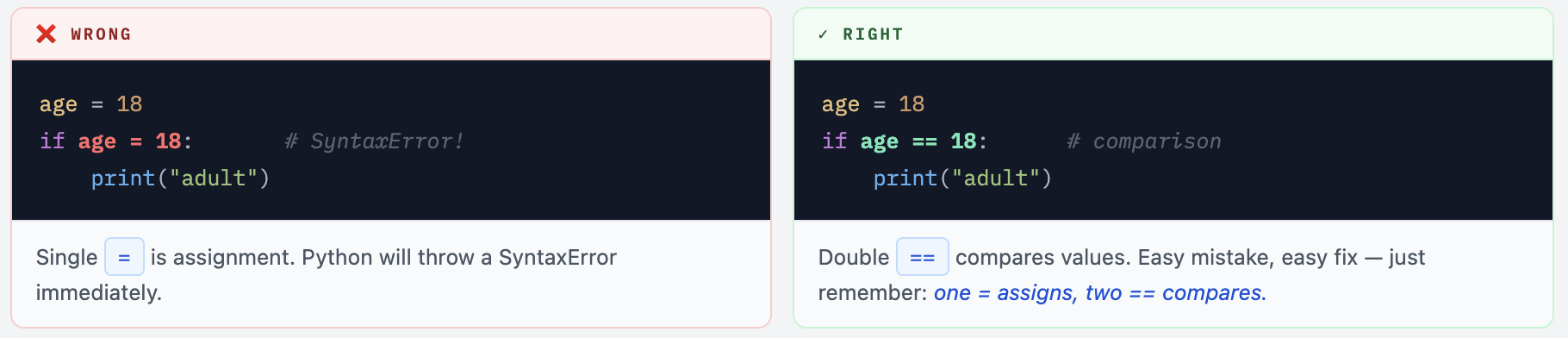
Mistake 1 - Using = Instead of ==
Mistake 2 - Forgetting the Colon

Mistake 3 - Wrong Indentation

Mistake 4 - Multiple if Instead of elif
Mistake 5 - else With a Condition
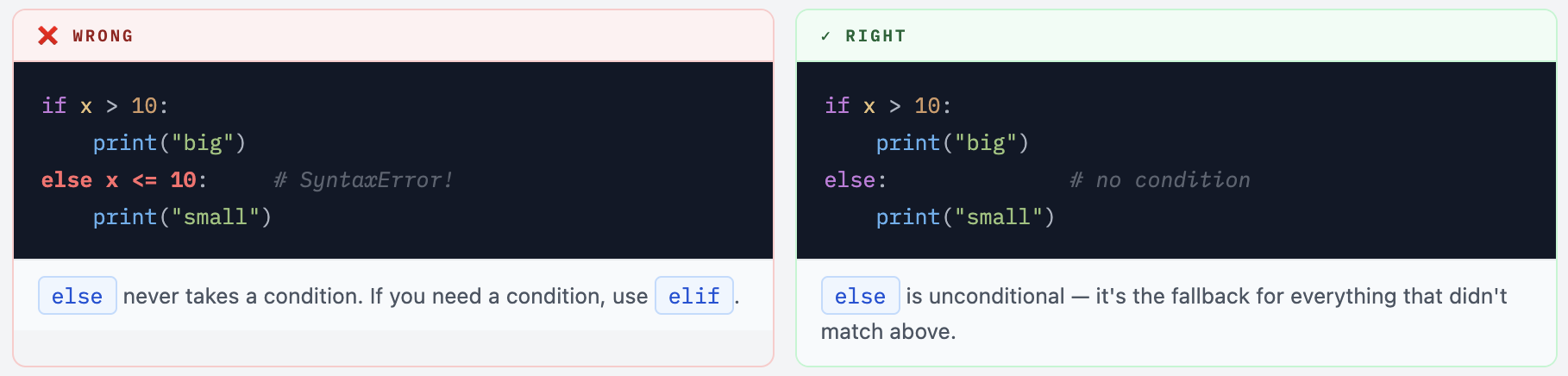
Quick Reference - if / elif / else

Why This Matters Beyond Day 3
Whether you’re writing Python yourself or using AI tools like Claude Code or GitHub Copilot to generate it, conditional logic appears in virtually every script they produce - for validation, error handling, access control, and flow control. AI tools write if/elif/else blocks constantly.
You don’t need to write it from scratch every time. But you do need to read it, understand it, and know when something’s off. That’s the real skill - and that’s exactly what you’re building here.
⚙ Pattern - Early Return / Guard Clauses In real Python scripts, a common professional pattern is to handle invalid/error cases first and return early, keeping the "happy path" at the bottom with less nesting: if not username: print("Username required"); exit() if not password: print("Password required"); exit() #happy path - only reached if both checks passed print("Welcome!") This is called a guard clause pattern. You'll see it everywhere in production code.
Build a Smart Electricity Bill Calculator
Create a program called electricity_bill.py that calculates a user’s monthly electricity bill based on units consumed, using a tiered pricing structure.
Pricing Tiers
- First 100 units: ₹1.50 per unit
- Units 101-200: ₹2.50 per unit
- Units 201-300: ₹4.00 per unit
- Above 300 units: ₹6.00 per unit
- Fixed charge: ₹50 per month
Requirements
- Ask for the customer’s name and units consumed (integer)
- Validate that units consumed is not negative
- Calculate the bill using the tiered pricing - not just one flat rate
- Add the ₹50 fixed charge
- If total bill exceeds ₹1000, print “High usage alert!”
- Print a formatted bill summary
Expected Output (for 250 units)
--- Electricity Bill ---
Customer : Riya Sharma
Units    : 250
Charges  :
  First 100 units  : ₹150.00
  Next  100 units  : ₹250.00
  Remaining 50 units: ₹200.00
  Fixed charge     : ₹50.00
  ─────────────────────────
  Total            : ₹650.00
💡 Hint For the tiered billing, you'll need nested conditions or multiple elif blocks. Think carefully about how to calculate partial tiers - for example, if the user consumed 250 units, they pay the tier 1 rate for the first 100, tier 2 rate for the next 100, and tier 3 rate for the remaining 50.
Your programs can think now.
You’ve given Python the ability to make decisions - the single most important capability any program has. From here, every concept builds on this. Loops use conditions. Functions use conditions. Data validation uses conditions. You’ll write if/elif/else for the rest of your Python career.
Comments (0)
No comments yet. Be the first to share your thoughts.
Leave a comment