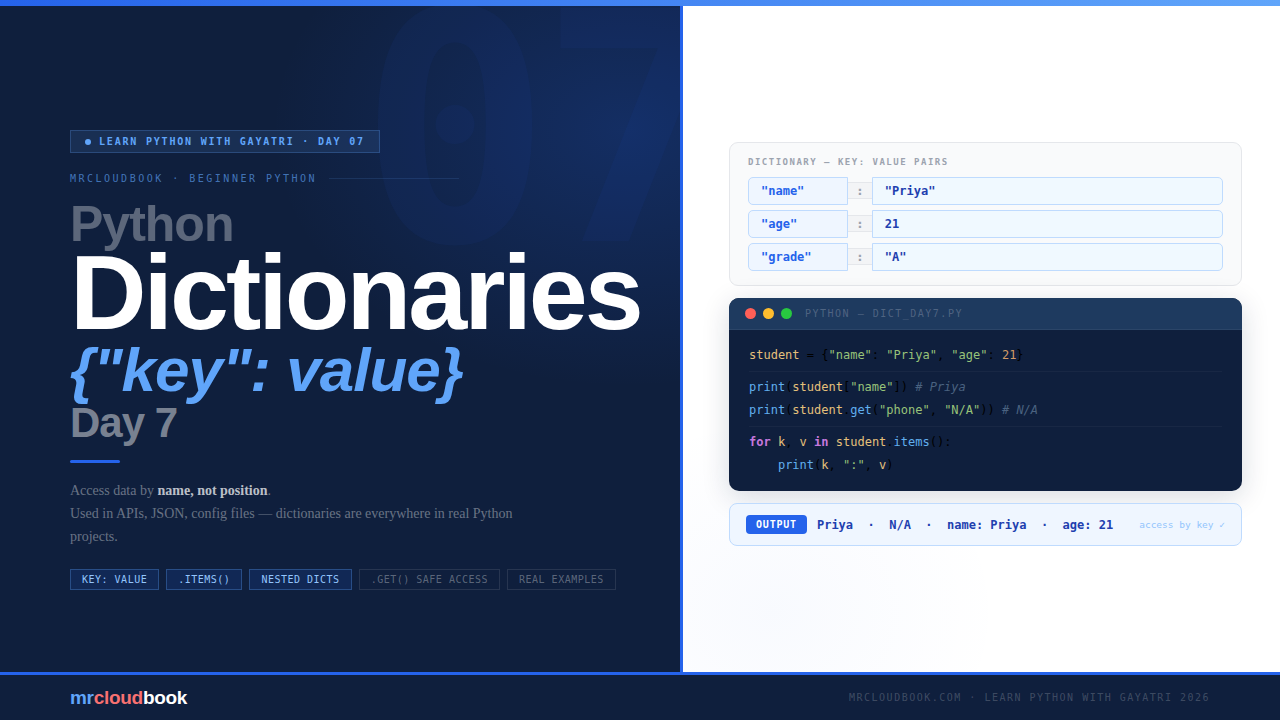
What Is a Dictionary? 🤔
Think about a real dictionary - the kind you used in school. You look up a word (the key) and it gives you the meaning (the value). Every word has exactly one entry. Python dictionaries work exactly the same way: they store data as key-value pairs.
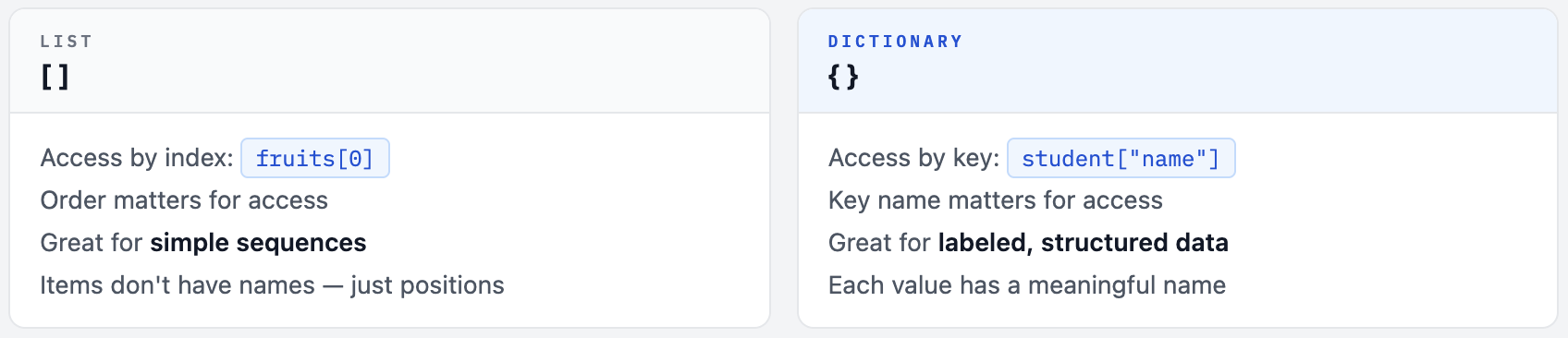
With a list, you access items by position. With a dictionary, you access items by name. Instead of asking “what is at index 0?” you ask “what is the name?” - and Python tells you “Priya”. Much more readable, much more natural.
# List - access by position (index)
student_list = ["Priya", 21, "Python", "A"]
print(student_list[0])   # Priya - but what is index 0?

# Dictionary - access by key (name)
student = {
    "name":   "Priya",
    "age":    21,
    "course": "Python",
    "grade":  "A"
}
print(student["name"])   # Priya - clear, readable, meaningful
List vs Dictionary - When to Use Which
Creating a Dictionary
A dictionary uses curly brackets { } with key: value pairs separated by commas. Keys are usually strings, but they can also be numbers. Values can be anything at all.
# Basic dictionary - person details
person = {
    "name": "Rahul",
    "age":  25,
    "city": "Bengaluru"
}

# Empty dictionary - add items later
empty_dict = {}

# Subject scores dictionary
scores = {
    "Maths":   95,
    "Science": 88,
    "English": 76
}

# Check type and size
print(type(person))   # <class 'dict'>
print(len(person))    # 3 - number of key-value pairs
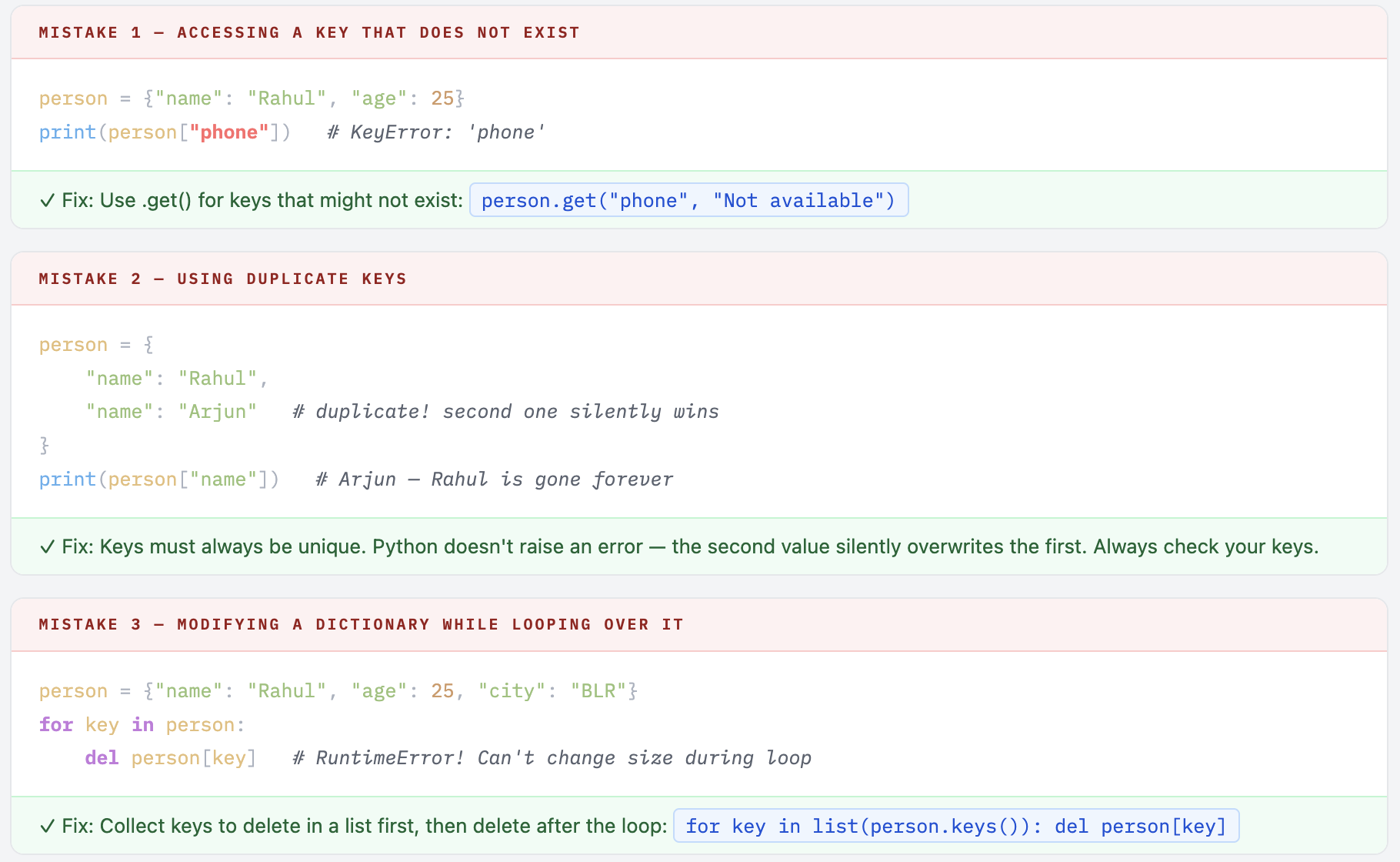
💡 Two Key Rules About Dictionaries Keys must be unique. No two keys can have the same name in one dictionary. If you use a duplicate key, the second value silently overwrites the first. Values can be anything. Strings, numbers, booleans, lists, or even another dictionary! There are no restrictions on what values can hold.
Accessing Values
Two ways to get a value out of a dictionary. One crashes if the key is missing. The other is safe. Know when to use each one.
Method 1 - Square Brackets [ ]
person = {"name": "Rahul", "age": 25, "city": "Bengaluru"}

print(person["name"])   # Rahul
print(person["age"])    # 25
print(person["city"])   # Bengaluru

# ❌ Key doesn't exist → KeyError crash
print(person["phone"])   # KeyError: 'phone'
Method 2 - .get() for Safe Access
person = {"name": "Rahul", "age": 25}

print(person.get("name"))              # Rahul
print(person.get("phone"))             # None  ← no crash!
print(person.get("phone", "Not found")) # Not found  ← custom default
✓ Which One to Use? Use dict["key"] when you are 100% sure the key exists - it's faster and more explicit. Use dict.get("key") when the key might not exist - it won't crash your program. You can also provide a default value as the second argument: dict.get("key", "default"). This is extremely useful when reading data from APIs or user input.
Adding and Updating Items
The syntax for adding a new key and updating an existing key is identical. Python figures out which one you’re doing based on whether the key already exists.
person = {"name": "Rahul", "age": 25}

# Add a new key-value pair
person["city"] = "Bengaluru"
print(person)
# {'name': 'Rahul', 'age': 25, 'city': 'Bengaluru'}

# Update an existing value
person["age"] = 26
print(person)
# {'name': 'Rahul', 'age': 26, 'city': 'Bengaluru'}

# Add multiple items at once using update()
person.update({"email": "rahul@email.com", "job": "Developer"})
print(person)
Removing Items 🗑️
Three ways to remove items from a dictionary - each with a different use case.
person = {"name": "Rahul", "age": 25, "city": "Bengaluru"}

# del - delete a specific key permanently
del person["city"]
print(person)   # {'name': 'Rahul', 'age': 25}

person = {"name": "Rahul", "age": 25, "city": "Bengaluru"}

# pop() - remove and GET the value back
removed = person.pop("city")
print("Removed:", removed)   # Removed: Bengaluru
print(person)                  # {'name': 'Rahul', 'age': 25}

# clear() - empty the entire dictionary
person.clear()
print(person)   # {}
del vs pop() - Which One? Use del dict["key"] when you just want to delete and don't need the value. Use dict.pop("key") when you want to delete and keep the value for further use. pop() also accepts a default: person.pop("phone", "Not found") - safe even if the key doesn't exist.
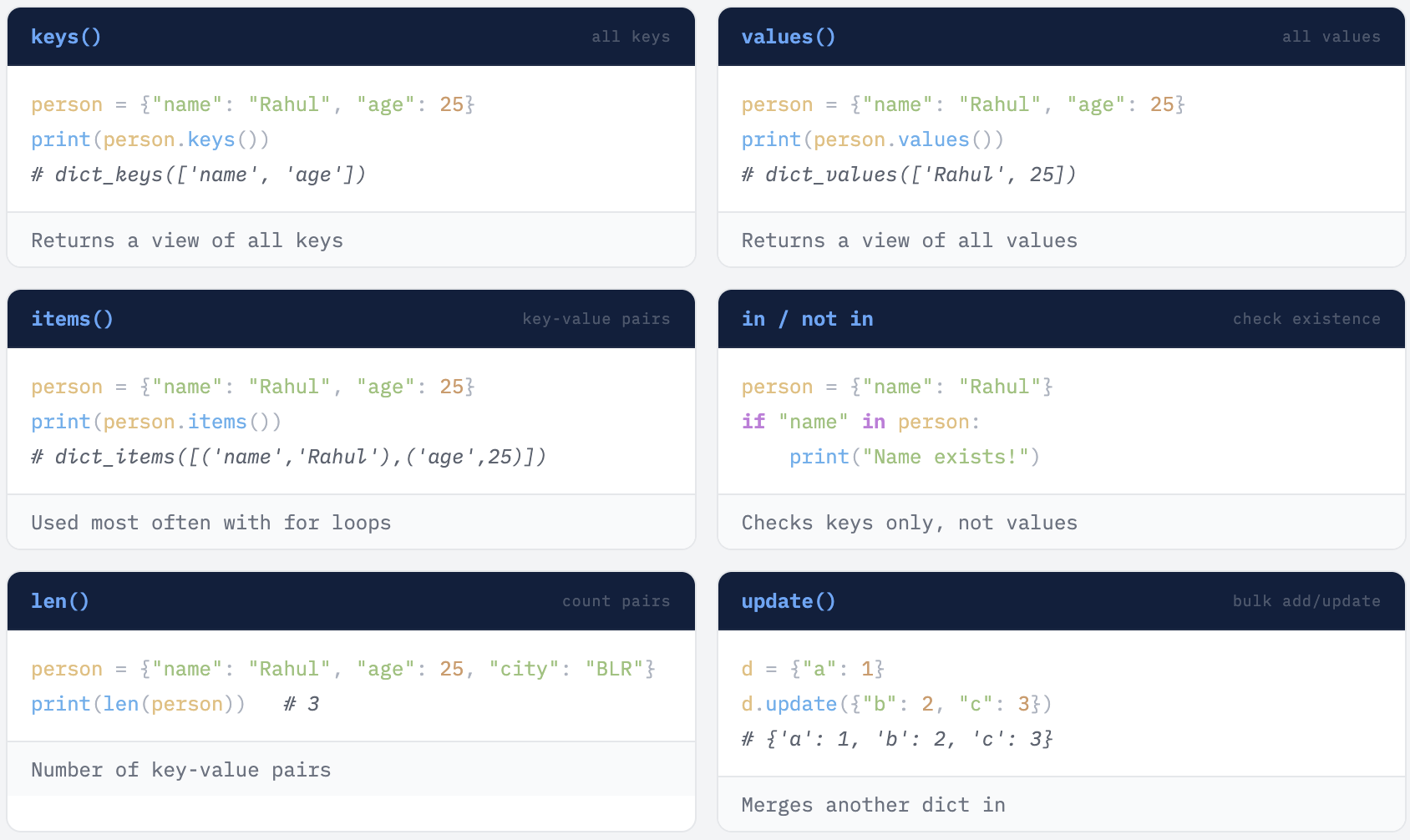
Super Useful Dictionary Methods 🛠️
Looping Through a Dictionary 🔁
There are three ways to loop - through keys only, values only, or both at once. Looping with .items() is the one you will use most in real projects.
person = {"name": "Rahul", "age": 25, "city": "Bengaluru"}

# Loop 1 - keys only (default)
for key in person:
    print(key)         # name  age  city

# Loop 2 - values only
for value in person.values():
    print(value)       # Rahul  25  Bengaluru

# Loop 3 - both key AND value (most useful!)
for key, value in person.items():
    print(key, ":", value)
# name : Rahul
# age : 25
# city : Bengaluru
✓ Pro Tip - .items() is the One You Will Always Use Looping with for key, value in dict.items() is how real Python code is written. You will see this pattern in every project that reads JSON from APIs, processes config files, or formats output. Once it becomes natural to you, you will reach for it automatically.
Nested Dictionaries
A dictionary can contain another dictionary as its value. This is called a nested dictionary - perfect for storing structured data like student records, employee details, or API responses (which are almost always nested).
students = {
    "student1": {"name": "Priya", "age": 21, "grade": "A"},
    "student2": {"name": "Arjun", "age": 22, "grade": "B"},
    "student3": {"name": "Meena", "age": 20, "grade": "A+"}
}

# Access a nested value - two square brackets
print(students["student1"]["name"])    # Priya
print(students["student2"]["grade"])   # B

# Loop through nested dictionary
for student_id, details in students.items():
    print(f"\nStudent ID: {student_id}")
    for key, value in details.items():
        print(f"  {key}: {value}")
💡 Nested Dicts Everywhere in the Real World When you call an API - a weather service, a payment gateway, a database - the response almost always comes back as a nested dictionary (JSON format). Learning to navigate nested dicts now means you will be ready to work with real APIs from Day 1. Example: response["weather"][0]["description"] - this kind of chained key access is everyday Python for any backend or automation work.
Real Life Examples 🌟
Example 1 - Phone Book
phonebook = {
    "Priya": "9876543210",
    "Rahul": "9123456789",
    "Meena": "9988776655"
}

name = "Rahul"
if name in phonebook:
    print(name, "'s number is:", phonebook[name])
else:
    print("Contact not found.")

# Output: Rahul's number is: 9123456789
Example 2 - Word Frequency Counter
This exact pattern is used in text analysis, search engines, and data processing - and it is a classic Python interview question.
sentence = "apple banana apple mango banana apple"
words = sentence.split()
word_count = {}

for word in words:
    if word in word_count:
        word_count[word] = word_count[word] + 1
    else:
        word_count[word] = 1

print(word_count)
# {'apple': 3, 'banana': 2, 'mango': 1}

# Shorter version using .get() with default
word_count2 = {}
for word in words:
    word_count2[word] = word_count2.get(word, 0) + 1
Example 3 - Student Report Card with Function
def print_report(student):
    print("\n--- Report Card ---")
    for subject, marks in student.items():
        print(f"{subject}: {marks}")
    print(f"Total:   {sum(student.values())}")
    print(f"Average: {sum(student.values()) / len(student):.1f}")

report = {
    "Maths":   92,
    "Science": 88,
    "English": 79,
    "History": 85
}
print_report(report)
# Maths: 92  Science: 88  English: 79  History: 85
# Total: 344  Average: 86.0
Common Mistakes to Avoid
Your Turn - 6 Exercises + 1 Challenge
- Create a dictionary with your own details - name, age, city, favourite language. Print each key and value using a loop with .items().
- Add a new key called hobby to your dictionary and print the updated dictionary.
- Write a function that takes a dictionary of subject marks and returns the average score.
- Create a phonebook with 3 contacts. Ask the user to enter a name and print their number - if not found, print a friendly message using.get().
- Count how many times each letter appears in the word “mississippi” using a dictionary.
- Create a nested dictionary with 3 students (name, age, grade). Loop through it and print each student’s full details.
🏆 Challenge - mississippi Letter Counter Exercise 5 with "mississippi" is a classic Python interview question. It combines loops, conditions, and dictionaries. If you can solve it without looking anything up, you are genuinely understanding Python - not just following along. Try it! Hint: The pattern is identical to the word frequency counter in Example 2. One loop, one dictionary, use .get(letter, 0) + 1.
Dictionaries are everywhere in Python.
JSON from APIs, config files, database results, automation scripts - all of them use dictionaries. You now have the tools to work with any structured data Python throws at you.
Comments (0)
No comments yet. Be the first to share your thoughts.
Leave a comment