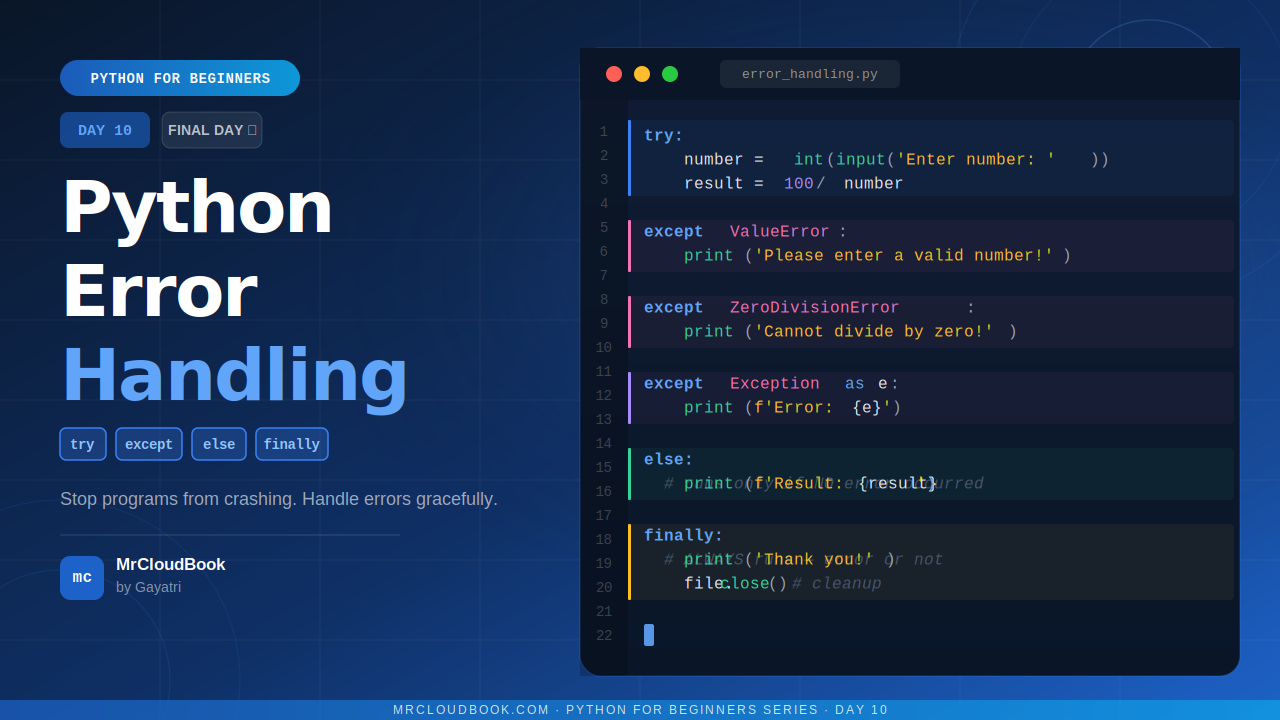
Day 10 - we are going to learn something that every real Python programmer must know:
Error Handling - using try, except, else, and finally.
This is what separates programs that crash the moment something goes wrong - from programs that handle problems gracefully and keep running.
What is an Error in Python? 🤔
No matter how carefully you write code, things can go wrong. A user might type text when you expected a number. A file might be missing. A network might be down.
When something goes wrong, Python raises an error (also called an Exception) and your program stops immediately. Like this:
number = int(input("Enter a number: "))
# User types: hello
# Python crashes with: ValueError: invalid literal for int()
Not great, right? You do not want your program to just die. You want it to handle the problem and continue - or at least give the user a friendly message.
That is exactly what Error Handling does.
Common Python Errors You Will Meet 🚨
| Error Type | When it happens |
|---|---|
| ValueError | User types “hello” when you expect a number - int("hello") |
| TypeError | You try to add a string and a number - "age" + 25 |
| FileNotFoundError | You try to open a file that does not exist |
| ZeroDivisionError | You divide a number by zero - 10 / 0 |
| IndexError | You access a list index that does not exist - list[99] |
| KeyError | You access a dictionary key that does not exist - dict["phone"] |
| NameError | You use a variable that has not been defined yet |
try and except - The Core of Error Handling 🛡️
The idea is simple:
- Put the risky code inside the try block
- If an error occurs, Python jumps to the except block instead of crashing
Basic Syntax
try:
    # risky code here
except:
    # what to do if something goes wrong
Simple Example
try:
    number = int(input("Enter a number: "))
    print(f"You entered: {number}")
except:
    print("That was not a valid number. Please try again.")
Now instead of crashing, the program gives a friendly message and continues.
Think of it like this: try is like saying - let me try this. except is saying - if something goes wrong, here is my backup plan.
Catching Specific Errors 🎯
Instead of catching every error with a general except, you can catch specific error types. This is better practice because you can handle each situation differently.
try:
    number = int(input("Enter a number: "))
    result = 100 / number
    print(f"Result: {result}")

except ValueError:
    print("Please enter a valid number, not text!")

except ZeroDivisionError:
    print("You cannot divide by zero!")
Now if the user types ‘hello’, they see the ValueError message. If they type 0, they see the ZeroDivisionError message. Each problem gets its own response.
Best practice: Always try to catch specific errors rather than a general except. It makes your code easier to understand and debug.
Catch multiple errors in one line
try:
    # some code
    pass
except (ValueError, TypeError):
    print("Invalid input type!")
The else Block - When Everything Goes Right ✅
The else block runs only when NO error occurred in the try block. It is the happy path!
try:
    number = int(input("Enter a number: "))
    result = 100 / number

except ValueError:
    print("That is not a number!")

except ZeroDivisionError:
    print("Cannot divide by zero!")

else:
    print(f"Success! Result is: {result}")
If no error happens, the else block runs. If any error happens, else is skipped.
When to use else: Use the else block for code that should only run when everything in try was successful. It keeps the try block clean - only risky code in try, success logic in else.
The finally Block - Always Runs No Matter What 🔁
The finally block runs no matter what - whether there was an error or not. It always executes.
This is perfect for cleanup tasks - like closing a file, closing a database connection, or printing a closing message.
try:
    file = open("data.txt", "r")
    content = file.read()
    print(content)

except FileNotFoundError:
    print("File not found!")

finally:
    print("Program finished.")
    # Close file if it was opened
Whether the file was found or not, “Program finished.” always gets printed.
Real world use: In automation scripts, the finally block is used to make sure resources are properly released - files are closed, database connections are ended - even when an error occurs.
The Full try-except-else-finally Structure
Here is everything together - the complete error handling structure:
try:
    # Code that might cause an error
    number = int(input('Enter a number: '))
    result = 100 / number

except ValueError:
    # Runs if user types text instead of number
    print('Please enter a valid number!')

except ZeroDivisionError:
    # Runs if user types 0
    print('Cannot divide by zero!')

except Exception as e:
    # Catches any other unexpected error
    print(f'Something went wrong: {e}')

else:
    # Runs only if NO error occurred
    print(f'Result: {result}')

finally:
    # ALWAYS runs, error or not
    print('Thank you for using this program!')
Exception as e: The ‘as e’ part captures the actual error message into a variable called e. You can print it to understand exactly what went wrong. Very useful for debugging!
raise - Trigger Your Own Errors 🚦
Sometimes you want to deliberately raise an error yourself - for example, when user input does not meet your rules.
def set_age(age):
    if age < 0:
        raise ValueError('Age cannot be negative!')
    if age > 150:
        raise ValueError('Age seems too high. Please check.')
    return age

try:
    set_age(-5)
except ValueError as e:
    print(f'Error: {e}')
Output:
Error: Age cannot be negative!
This is called validation - checking that the data makes sense before using it.
Real Life Examples 🌟
Example 1 - Safe number input (keep asking until valid)
def get_valid_number():
    while True:
        try:
            number = int(input('Enter a number: '))
            return number
        except ValueError:
            print('That is not a number. Try again!')

num = get_valid_number()
print(f'You entered: {num}')
This keeps asking until the user enters a valid number. No more crashes!
Example 2 - Safe file reader
def read_file_safe(filename):
    try:
        with open(filename, 'r') as f:
            return f.read()
    except FileNotFoundError:
        print(f'Sorry, {filename} was not found.')
        return None
    except PermissionError:
        print(f'No permission to read {filename}.')
        return None

content = read_file_safe('data.txt')
if content:
    print(content)
Example 3 - Safe division calculator
def safe_divide(a, b):
    try:
        result = a / b
    except ZeroDivisionError:
        print('Cannot divide by zero!')
        return None
    else:
        return result
    finally:
        print('Division attempted.')

print(safe_divide(10, 2))
print(safe_divide(10, 0))
Output:
Division attempted.
5.0
Cannot divide by zero!
Division attempted.
None
Common Mistakes to Avoid 🚨
Mistake 1 - Catching everything silently
try:
    risky_code()
except:
    pass   # Silent! You have no idea what went wrong
Never use a bare except with pass - it swallows the error silently and makes debugging a nightmare. Always at least print the error.
Mistake 2 - Too much code inside try
try:
    # 50 lines of code here - BAD!
    line1()
    line2()
    # ...and so on
except Exception:
    print('Something went wrong')  # But what? Where?
Keep the try block as small and focused as possible. Only put the specific risky line(s) inside try.
Mistake 3 - Forgetting that finally always runs
def get_value():
    try:
        return 10
    finally:
        print('This still runs even after return!')

get_value()
# Output: This still runs even after return!
Remember: finally ALWAYS runs - even if there is a return statement inside try. Plan your finally block accordingly.
Quick Reference 📋
| Keyword | Purpose | When it runs |
|---|---|---|
| try | Put risky code here | Always - first block to execute |
| except | Handle the error | Only when an error occurs in try |
| except ErrorType | Handle a specific error type | Only when that specific error occurs |
| except E as e | Capture the error message | When that error occurs, e holds message |
| else | Code for the success case | Only when NO error occurred in try |
| finally | Cleanup code | ALWAYS - error or not |
| raise | Trigger your own custom error | Whenever you call it manually |
Your Turn - Practice Time 💪
Try these:
- Write a program that asks for two numbers and divides them - handle both ValueError (non-number) and ZeroDivisionError
- Create a safe file reader that gives a friendly message if the file does not exist instead of crashing
- Write a function validate_age(age) that raises a ValueError if age is less than 0 or more than 120
- Make a calculator that keeps asking for input until the user gives valid numbers - use a while loop with try-except
- Go back to any code you wrote in Day 9 (file handling) and wrap the file operations in try-except blocks
Challenge: Build a mini login system - ask for username and password. If the username is not found in a dictionary, raise a KeyError. Handle it with a friendly message. Add a finally block that always prints ‘Login attempt recorded.’
Comments (0)
No comments yet. Be the first to share your thoughts.
Leave a comment