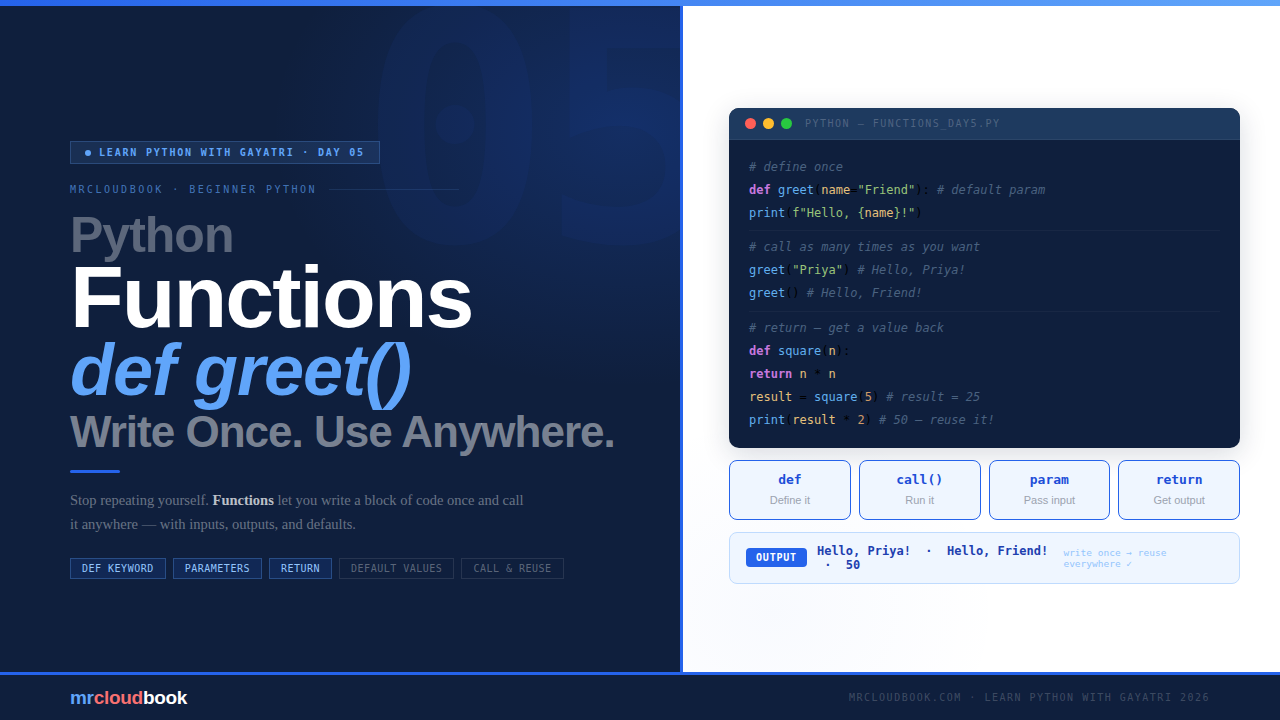
Why Do We Even Need Functions? 🤔
Before we write a single line of code, let’s understand what problem functions actually solve - because once you see it, you’ll never want to write Python without them.
The Chai Story Imagine you make chai every morning. You boil water, add tea leaves, add milk, add sugar, stir, and serve. You do this exact same thing every. single. day. Now imagine someone says: instead of going through all those steps every time, just write them down once on a card. And every morning, just follow that card. That card? That is a function.
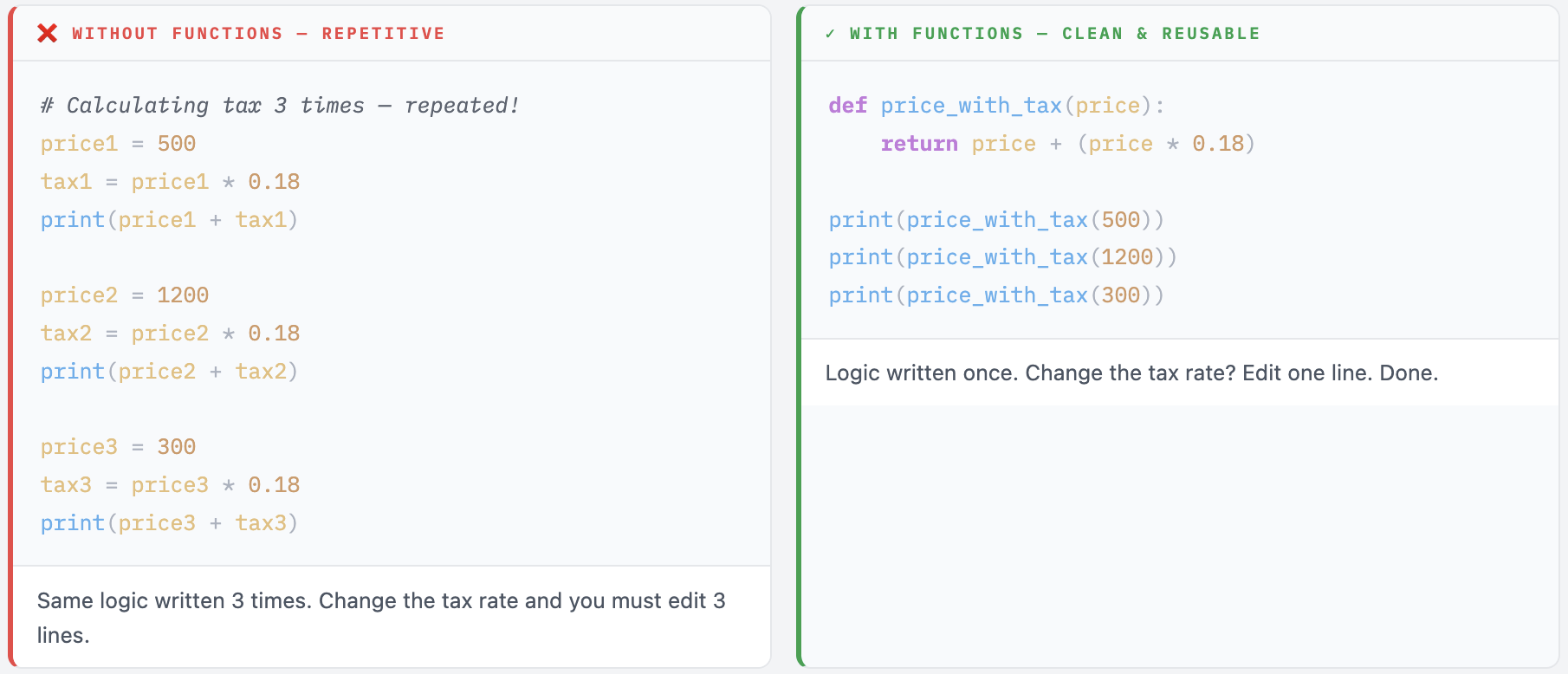
A function is a block of code you write once and can use again and again, wherever you need it. No copy-pasting. No repeating yourself. Just call the function and it does the work.
Here is what your code looks like without functions vs with functions:
How to Create a Function 🛠️
In Python you create - or define - a function using the def keyword. Defining a function is just writing the recipe. Calling it is actually making the dish.
Basic Syntax
def function_name():
    # your code goes here - must be indented
    # this block runs when the function is called
Your First Function
def say_hello():
    print("Hello! Welcome to Python.")

# Just writing def say_hello() doesn't run anything yet!
# You must CALL it to actually run the code.

say_hello()   # ← this calls the function

# Output: Hello! Welcome to Python.
⚠ Define ≠ Run Writing def say_hello(): only defines the function - it stores the recipe but does not cook the dish. You must explicitly call it by writing say_hello() to actually run the code inside.
The Magic - Call It As Many Times As You Want
def say_hello():
    print("Hello! Welcome to Python.")

say_hello()
say_hello()
say_hello()

# Output:
# Hello! Welcome to Python.
# Hello! Welcome to Python.
# Hello! Welcome to Python.
💡 That Is the Magic! Write once, use many times. That is the whole point of functions. One definition - unlimited calls. And if you ever need to change what the function does, you only change it in one place.
Functions with Parameters 📦
Right now our function says the same thing every time. What if we want it to greet different people? We can pass information into a function using parameters.
One Parameter
def greet(name):
    print("Hello,", name, "! Good to see you.")

greet("Priya")
greet("Rahul")
greet("Meena")

# Output:
# Hello, Priya ! Good to see you.
# Hello, Rahul ! Good to see you.
# Hello, Meena ! Good to see you.
Same function - three different names. Each time you call greet(), whatever you pass in becomes the value of name inside the function. That is the power of parameters.
Multiple Parameters
def add_numbers(a, b):
    result = a + b
    print("Sum is:", result)

add_numbers(10, 20)   # Sum is: 30
add_numbers(5, 7)    # Sum is: 12
💡 Parameters vs Arguments - Quick Note Parameter is the variable name inside def - like name in def greet(name): Argument is the actual value you pass when calling - like "Priya" in greet("Priya") People use these words interchangeably, and that is totally fine! The distinction matters more later when you go deeper into Python.
The return Statement 🔄
Sometimes you don’t want to just print something - you want the function to give you back a value so you can use it somewhere else in your program. That is exactly what return does.
Basic return Example
def square(number):
    return number * number

result = square(5)
print("Square of 5 is:", result)

# Output: Square of 5 is: 25

# You can also use the return value directly in expressions
print(square(4) + square(3))   # 16 + 9 = 25
return vs print - Understanding the Difference
# With print - only shows on screen, value is gone
def add_print(a, b):
    print(a + b)

# With return - gives the value back, you can use it
def add_return(a, b):
    return a + b

total = add_return(10, 5)
print("I can use this:", total * 2)   # I can use this: 30

# Can you do this with add_print? No - the value vanishes after printing
# total = add_print(10, 5)  →  total would be None!
⚙ Rule of Thumb Use print() inside a function when you just want to show something on screen and don't need the value later. Use return when you want to use the result somewhere else - store it in a variable, pass it into another function, or use it in a calculation. In real Python code, return is far more common than print inside functions. Functions that print are harder to reuse - functions that return are flexible.
Default Parameter Values ⭐
What if someone forgets to pass a value to your function? You can set a default so the function still works gracefully. This is one of the most practical Python features you will use every day.
def greet(name="Friend"):
    print("Hello,", name)

greet("Gayatri")   # Hello, Gayatri  - uses the given name
greet()            # Hello, Friend   - uses the default
If you pass a name, it uses that. If you don’t, it falls back to the default value "Friend". The function always works - no errors from missing arguments.
Multiple Defaults
def introduce(name, city="India", role="Learner"):
    print(f"Hi! I am {name} from {city}. I am a {role}.")

introduce("Priya")
introduce("Rahul", "Mumbai")
introduce("Meena", "Delhi", "Engineer")

# Output:
# Hi! I am Priya from India. I am a Learner.
# Hi! I am Rahul from Mumbai. I am a Learner.
# Hi! I am Meena from Delhi. I am an Engineer.
⚠ Default Parameters Must Come Last Parameters with default values must always appear after parameters without defaults in the function definition. `def greet(name="Friend", city):` ← ❌ Error - non-default after default `def greet(city, name="Friend"):` ← ✓ Correct - non-default first
Real Life Examples 🌟
Here are three complete, practical examples using everything you have learned. Type them out - don’t paste.
Example 1 - Even or Odd Checker
def even_or_odd(number):
    if number % 2 == 0:
        return "Even"
    else:
        return "Odd"

print(even_or_odd(4))    # Even
print(even_or_odd(7))    # Odd
print(even_or_odd(100))  # Even
Example 2 - Discount Calculator
def calculate_discount(price, discount_percent):
    discount    = (price * discount_percent) / 100
    final_price = price - discount
    return final_price

item_price = 1000
offer      = 20
payable    = calculate_discount(item_price, offer)
print("You pay: ₹", payable)   # You pay: ₹ 800.0

# Reuse it for other items easily
print(calculate_discount(500, 10))   # 450.0
print(calculate_discount(250, 50))   # 125.0
Example 3 - Find the Biggest Number
def find_max(a, b, c):
    if a >= b and a >= c:
        return a
    elif b >= a and b >= c:
        return b
    else:
        return c

print("Biggest:", find_max(10, 45, 30))   # Biggest: 45
print("Biggest:", find_max(99, 12, 57))   # Biggest: 99
Example 4 - Putting It All Together
def get_grade(score):
    if score >= 75:   return "Distinction"
    elif score >= 60: return "First Class"
    elif score >= 50: return "Pass"
    else:              return "Fail"

def print_result(name, score):
    grade = get_grade(score)   # functions can call other functions!
    print(f"{name}: {score}% → {grade}")

students = [("Priya", 82), ("Rahul", 55), ("Meena", 91), ("Arjun", 43)]

for name, score in students:
    print_result(name, score)

# Output:
# Priya: 82% → First Class
# Rahul: 55% → Pass
# Meena: 91% → Distinction
# Arjun: 43% → Fail
💡 Functions Can Call Other Functions Notice how print_result calls get_grade inside it? This is one of the most powerful patterns in Python - building small, focused functions and combining them to do bigger things. Each function does one thing well. Together they do everything.
Common Mistakes Beginners Make
These are the three mistakes that catch almost every beginner on Day 5. Read through them now - recognise them before they stop you.
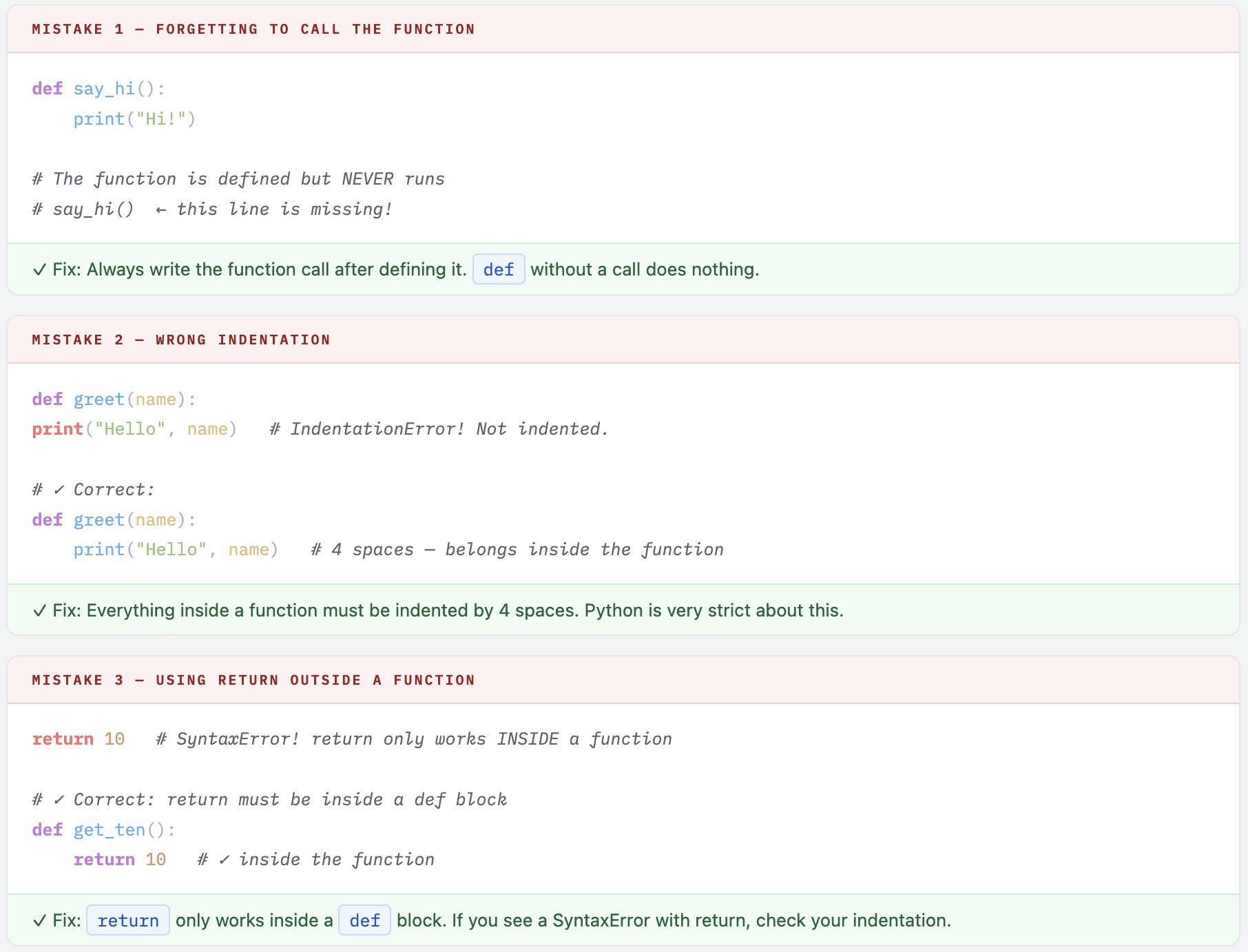
💡 Read the Error Message! When you get an error, read it carefully. Python usually tells you exactly what went wrong and on which line. The error message is your friend - not something to be scared of. Start at the line number it points to and work backwards.
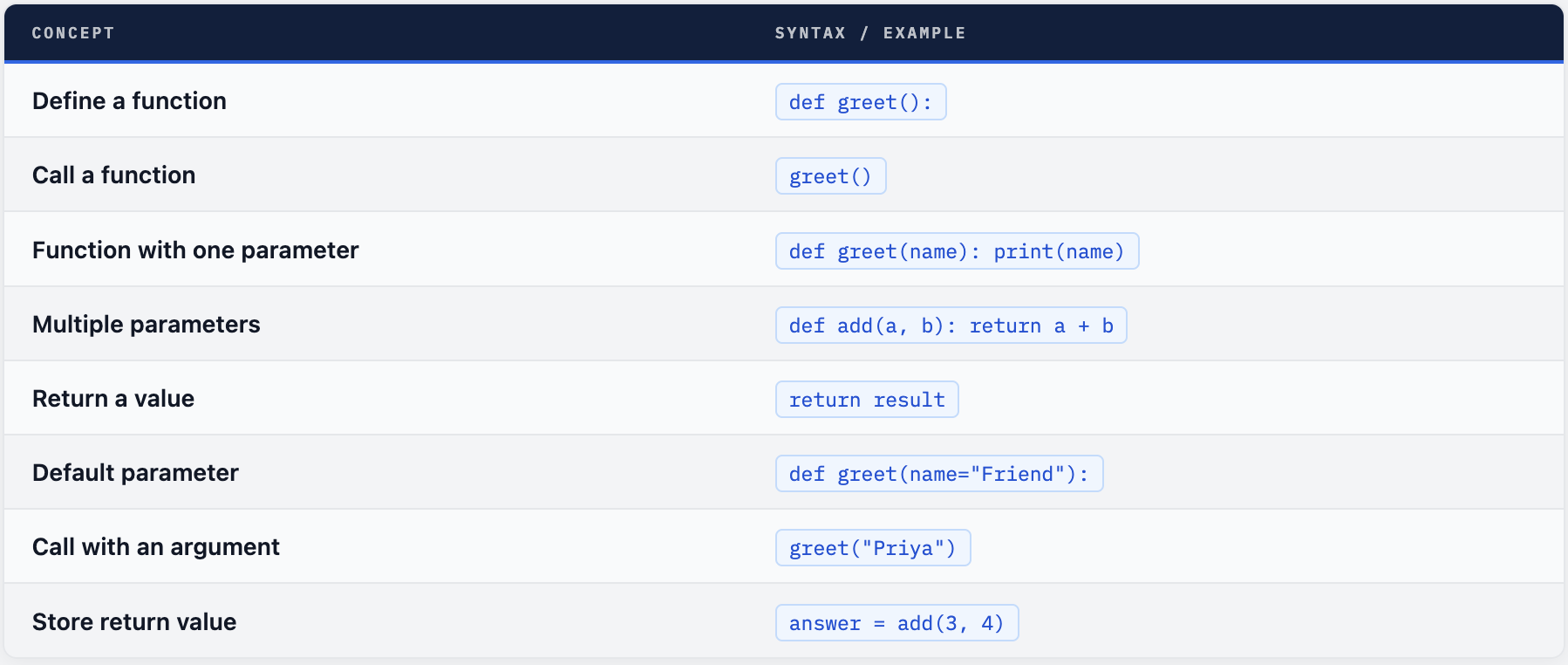
Quick Reference
Your Turn - 5 Functions to Build
Try building these yourself. Start small - just define, call, and print. Once that works, add parameters. Then try return. Build it step by step. You’ve got this!
- Write a function called say_goodbye() that prints a goodbye message of your choice
- Write a function called multiply(a, b) that returns a * b
- Write a function called is_adult(age) that returns True if age is 18 or above, else False
- Write a function called full_name(first, last) that returns the full name joined together with a space
- Write a function called circle_area(radius) that returns the area - use 3.14 * radius * radius
✓ Challenge - Combine Everything Write a function called bmi(weight_kg, height_m) that returns the BMI value (weight / height²) and a separate function bmi_category(bmi_value) that returns the category: Underweight, Normal, Overweight, or Obese. Then call them together for a few test cases.
Functions are the foundation of clean Python.
Every program you will ever write will use functions - from small scripts to large applications. Once you get comfortable writing them, your code becomes shorter, cleaner, and infinitely more reusable. Keep writing code, keep making mistakes, and keep learning. 🚀
Comments (0)
No comments yet. Be the first to share your thoughts.
Leave a comment