What Is a List?
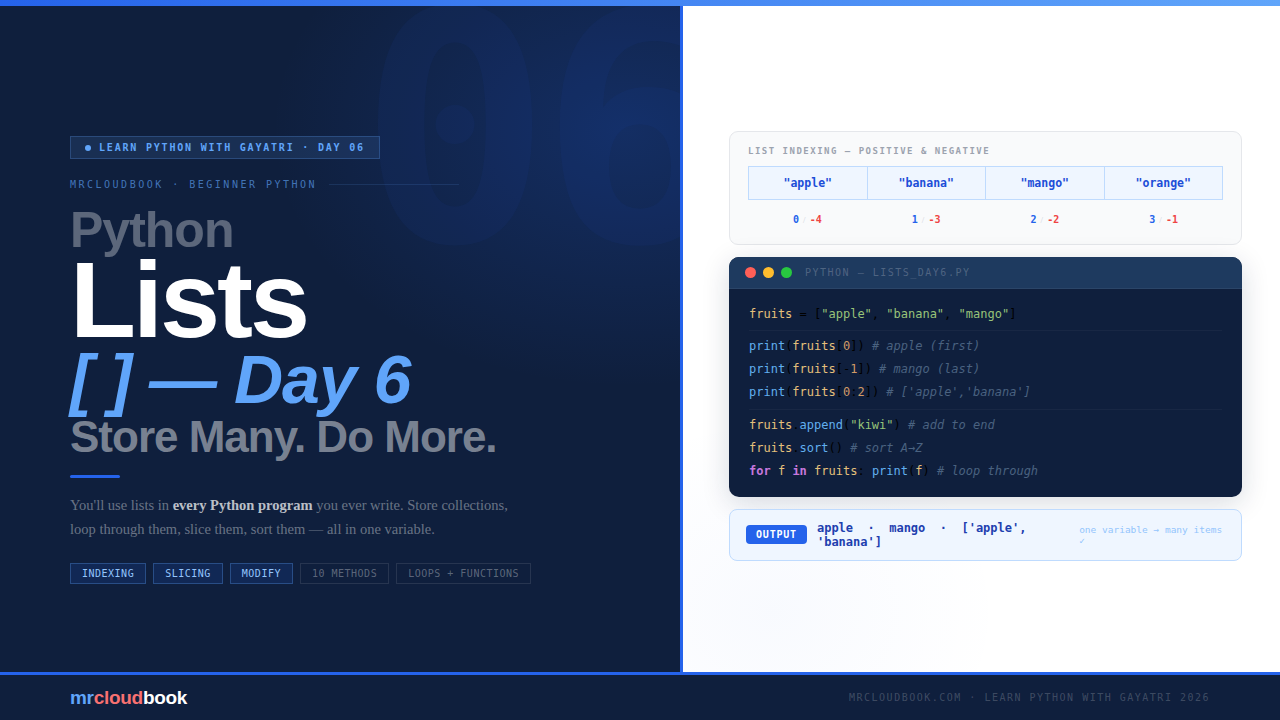
Think about your phone’s contact list. You have many names stored in one place. You can add a new contact, delete an old one, look someone up by their position - all in one list. In Python, a List is exactly that - a collection of multiple items stored in a single variable.
Instead of creating a separate variable for every item:
# ❌ Without a list - one variable per item, hard to manage
friend1 = "Priya"
friend2 = "Rahul"
friend3 = "Meena"

# ✓ With a list - all three in one place, easy to work with
friends = ["Priya", "Rahul", "Meena"]
One variable. All three names. Clean and simple. And when you have 100 names, the list still works just as cleanly - you just have more items inside it.
💡 Three Key Things About Lists **Ordered** - items stay in the exact order you put them. The first item you add stays first. **Allow duplicates** - you can have the same value more than once in a list. That is perfectly fine. **Changeable (mutable)** - you can add, remove, and edit items after the list is created. Lists are not fixed.
Creating a List
A list is created using square brackets [ ] with items separated by commas. That’s it - no special keyword, no complex syntax.
creating_lists.py
# A list of strings
fruits = ["apple", "banana", "mango", "orange"]

# A list of numbers
marks = [85, 90, 78, 92, 88]

# A mixed list - Python allows any types together!
mixed = ["Gayatri", 25, True, 99.5]

# An empty list - add items to it later
empty = []

# Check how many items are in a list
print(len(fruits))   # 4
print(type(fruits))  # <class 'list'>
✓ Fun Fact Python lists can hold any type of data - strings, numbers, booleans, even other lists! You can mix them all in one list. In real code you usually keep lists to one type, but Python doesn't enforce that.
Accessing Items - Indexing
Every item in a list has a position called an index. Here is the crucial part - Python starts counting from 0, not 1. The first item is at index 0, the second at index 1, and so on.

indexing.py
fruits = ["apple", "banana", "mango", "orange"]

# Positive indexing - from the front
print(fruits[0])   # apple   ← first item
print(fruits[1])   # banana
print(fruits[3])   # orange  ← last item

# Negative indexing - from the end
print(fruits[-1])  # orange  ← last item (same as fruits[3])
print(fruits[-2])  # mango   ← second from last
💡 When to Use Negative Indexing Negative indexing is super useful when you want the last item but don't know the length of the list. list[-1] always gives you the last item - whether the list has 3 items or 3000. You will use fruits[-1] constantly in real code.
Slicing - Getting a Portion of a List
What if you want not just one item, but a range of items from a list? That is called slicing. Use list[start:stop] - start is included, stop is NOT included.
slicing.py
fruits = ["apple", "banana", "mango", "orange", "grapes"]
#           0          1          2          3          4

print(fruits[1:3])   # ['banana', 'mango']     - index 1 and 2 (not 3)
print(fruits[0:2])   # ['apple', 'banana']     - index 0 and 1
print(fruits[2:])    # ['mango', 'orange', 'grapes'] - from index 2 to end
print(fruits[:3])    # ['apple', 'banana', 'mango']  - from start to index 2
print(fruits[:])     # full copy of the list
⚠ Remember - stop is NOT Included `fruits[1:3]` gives you index 1 and 2 - it does not include index 3. The same rule as `range()`: the end value is always excluded. Think of it as "from 1, up to but not including 3."
Modifying a List
Lists are mutable - you can change them after creation. Change individual items, add new ones, or remove existing ones. This is what makes lists so flexible and powerful.
Change an Item
fruits = ["apple", "banana", "mango"]
fruits[1] = "kiwi"   # replace banana with kiwi
print(fruits)         # ['apple', 'kiwi', 'mango']
Add an Item - append() and insert()
fruits = ["apple", "banana"]

# append() - adds to the END
fruits.append("mango")
print(fruits)   # ['apple', 'banana', 'mango']

# insert() - adds at a SPECIFIC position
fruits.insert(1, "kiwi")   # add kiwi at index 1
print(fruits)               # ['apple', 'kiwi', 'banana', 'mango']
Remove an Item - remove() and pop()
fruits = ["apple", "banana", "mango", "banana"]

# remove() - removes first matching VALUE
fruits.remove("banana")   # removes first "banana" only
print(fruits)              # ['apple', 'mango', 'banana']

fruits = ["apple", "banana", "mango"]

# pop() - removes by INDEX (or last item if no index given)
fruits.pop(1)    # removes banana (index 1)
print(fruits)    # ['apple', 'mango']

fruits.pop()     # removes last item (mango)
print(fruits)    # ['apple']
💡 remove() vs pop() - Which One? Use remove("value") when you know the value you want to delete but not its position. Use pop(index) when you know the position of what you want to remove. pop() with no argument always removes the last item - very useful.
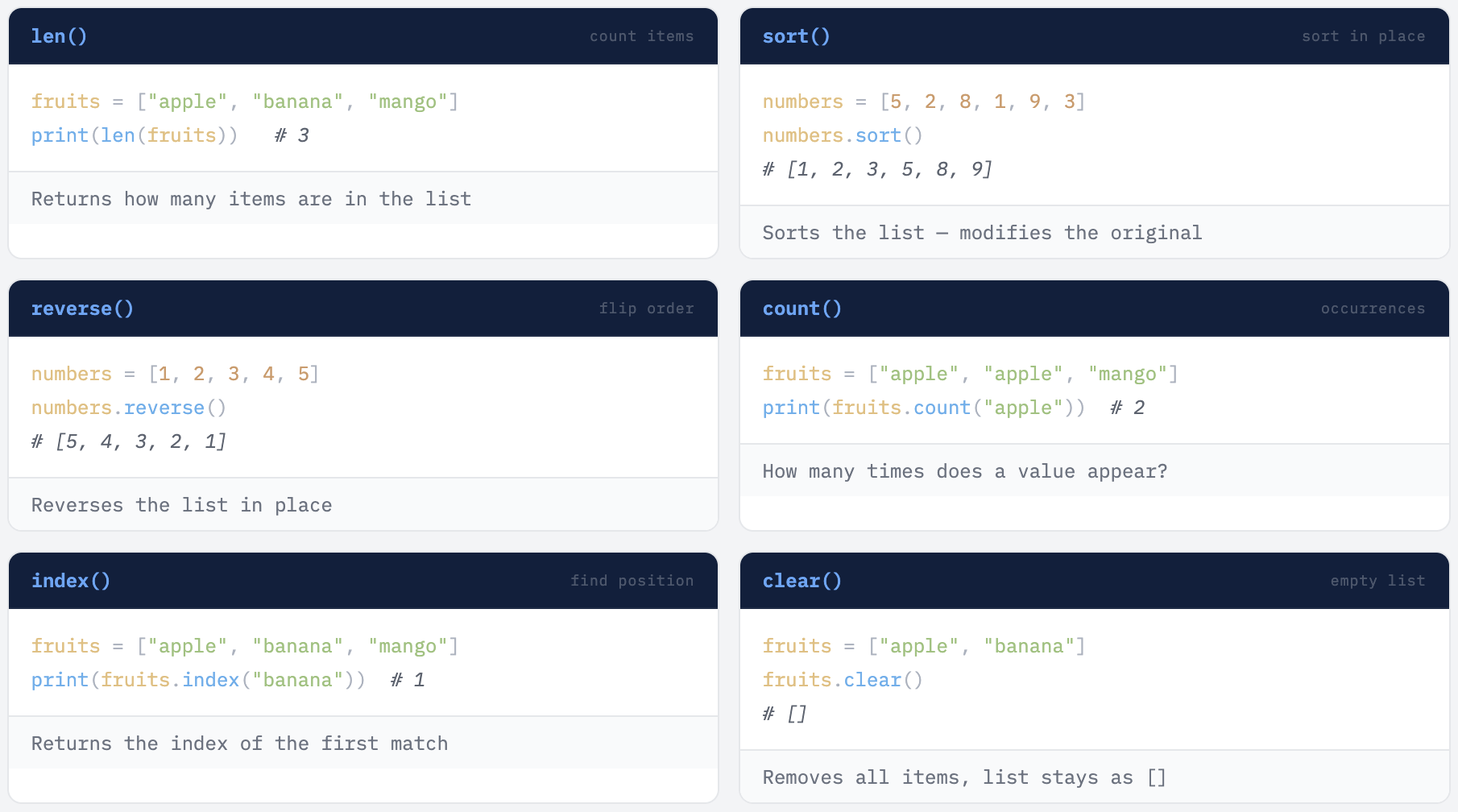
Super Useful List Methods
Python gives you many built-in methods to work with lists. These are the ones you will use most often - learn them once, use them forever.
Checking If an Item Exists - the in Keyword
fruits = ["apple", "banana", "mango"]

if "banana" in fruits:
    print("Yes, banana is in the list!")   # ← prints this
else:
    print("Not found.")

# Also works with not in
if "kiwi" not in fruits:
    print("Kiwi is not here - let us add it!")
    fruits.append("kiwi")
Looping Through a List
Remember Day 4 loops? Lists and loops are best friends. You will almost always use them together. A for loop over a list is one of the most common patterns in all of Python.
Example 1 - Print All Items
fruits = ["apple", "banana", "mango", "orange"]

for fruit in fruits:
    print(fruit)

# Output: apple  banana  mango  orange  (each on own line)
Example 2 - Print with Index Number
fruits = ["apple", "banana", "mango"]

# Using range(len()) - classic approach
for i in range(len(fruits)):
    print(i, "-", fruits[i])

# Output: 0 - apple  /  1 - banana  /  2 - mango

# Using enumerate() - cleaner approach (from Day 4)
for index, fruit in enumerate(fruits, 1):
    print(f"{index}. {fruit}")

# Output: 1. apple  /  2. banana  /  3. mango
Example 3 - Find Total Marks
marks = [85, 90, 78, 92, 88]
total = 0

for mark in marks:
    total = total + mark

print("Total marks:", total)              # 433
print("Average:", total / len(marks))   # 86.6
Lists + Functions Together 🌟
Remember functions from Day 5? Combine them with lists and things get really powerful. You can pass an entire list into a function, do work on it inside, and return the result. This is exactly how real Python programs are written.
def find_highest(marks):
    marks.sort()
    return marks[-1]   # last item after sorting = highest

def find_lowest(marks):
    marks.sort()
    return marks[0]    # first item after sorting = lowest

def get_average(marks):
    return sum(marks) / len(marks)

student_marks = [72, 88, 95, 60, 78]

print("Highest:", find_highest(student_marks))   # 95
print("Lowest: ", find_lowest(student_marks))    # 60
print("Average:", get_average(student_marks))   # 78.6
✓ See What Happened? We passed the entire list into a function, did work on it inside, and returned a single result. Each function does one thing well. This is exactly how real Python programs are built - small focused functions working with lists of data. Days 4, 5, and 6 all coming together!
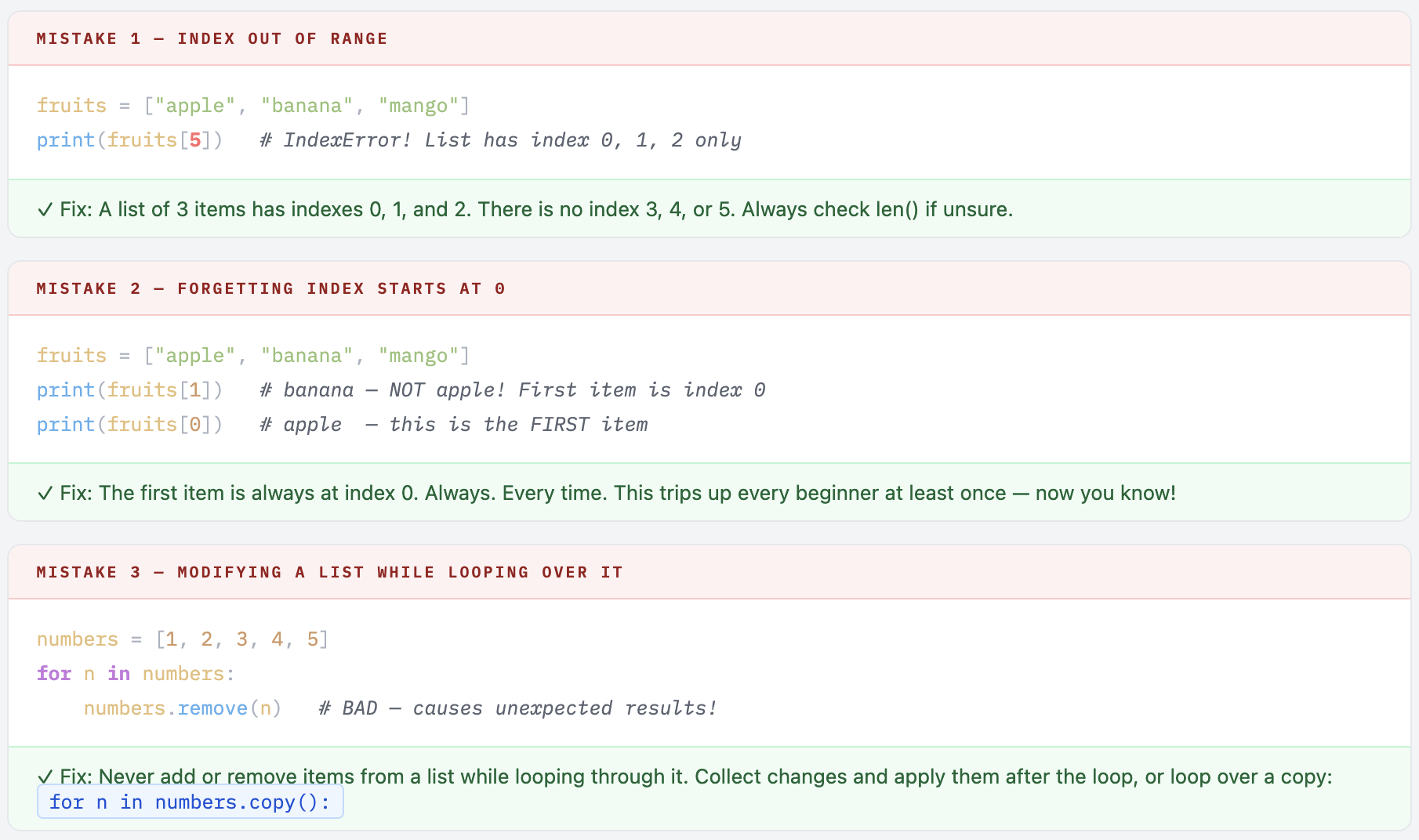
Common Mistakes to Avoid
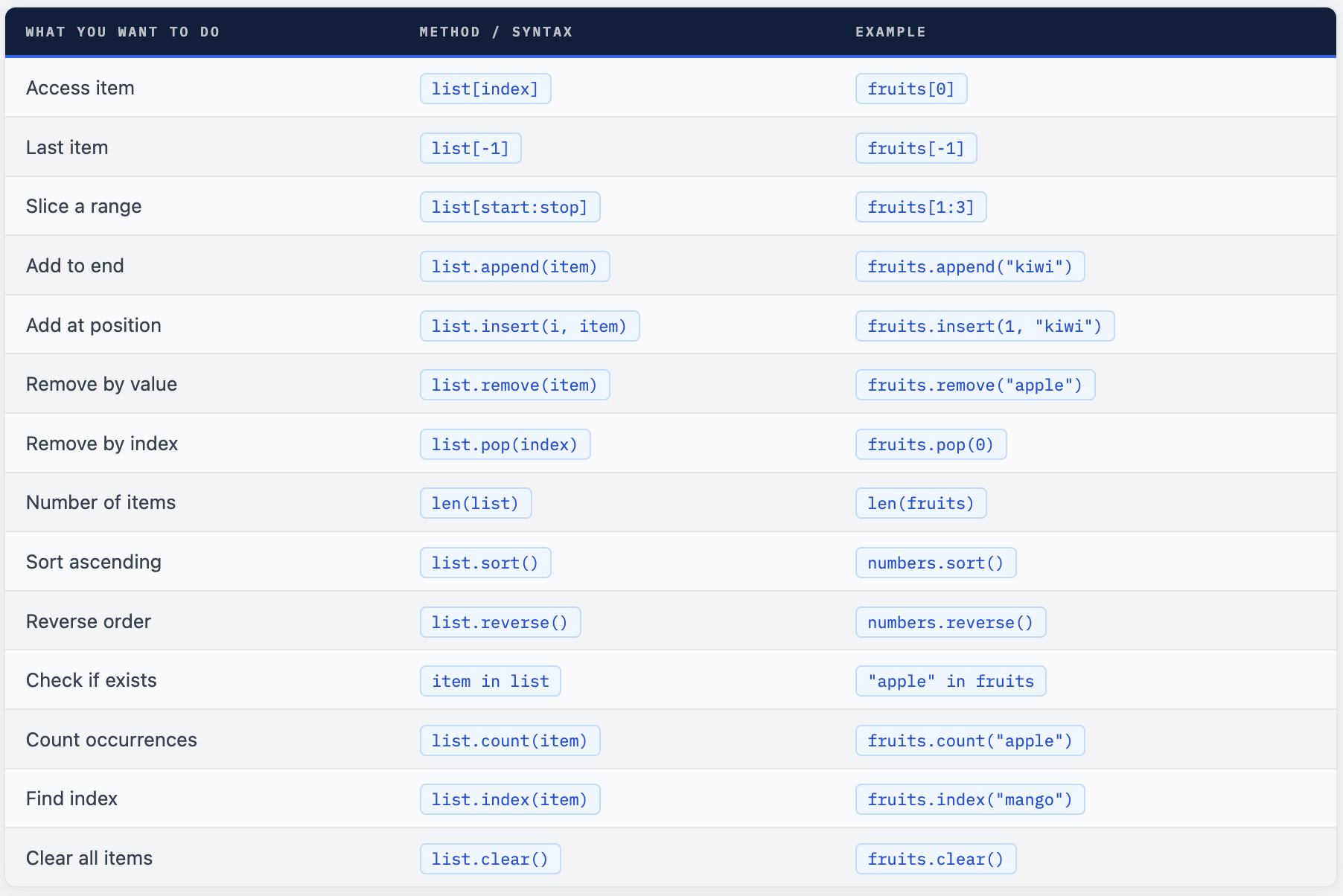
Quick Reference
Your Turn - 6 Exercises
Open your Python editor and type these out - don’t copy paste. The act of typing it yourself is what makes it stick. Make mistakes, fix them, learn. That is the real way!
- Create a list of 5 of your favourite movies and print each one using a loop
- Add a new movie using
append()and print the updated list - Remove one movie using
remove()and print the list again - Sort the list alphabetically using
sort()and print it - Write a function that takes a list of numbers and returns their sum (no
sum()built-in - use a loop!) - Check if your favourite fruit is in this list:
["apple", "banana", "mango", "grape"]
💡 Challenge - Combine Everything Write a program that asks the user to enter 5 numbers one by one (use a loop + input()), stores them in a list, then prints the total, average, highest, and lowest - all using functions you write yourself.
Lists are everywhere in Python.
Reading data from a file, processing database results, building automation scripts - lists will always be there. You now have the tools to work with collections of any size, in any order, any way you need.
Comments (1)
Thank you for sharing the doc helpful
Leave a comment