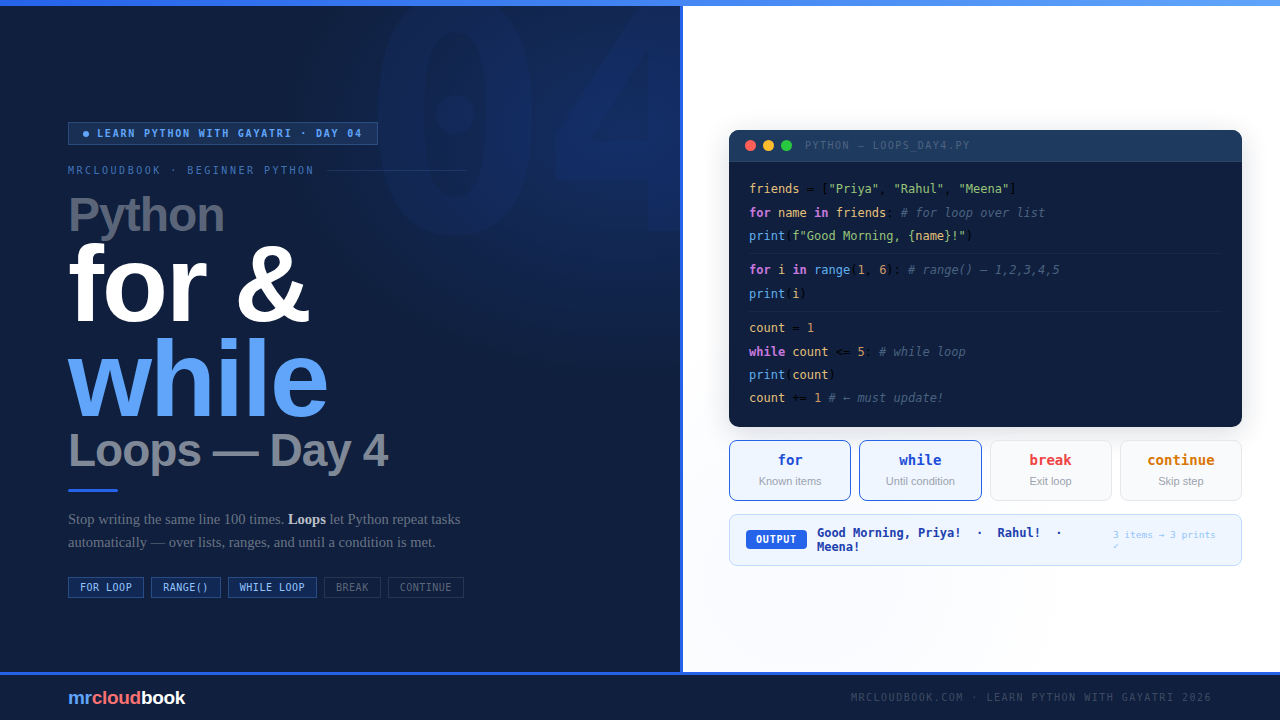
What Is a Loop? 🤔
A loop tells Python: keep doing this thing, again and again, until I say stop. Without loops, repetitive tasks mean writing the same line over and over. With loops, you write it once and Python handles all the repetitions automatically.
Imagine you want to say “Good Morning” to 5 friends. You could write five separate print statements. Now imagine 100 friends - would you really write 100 lines? That would be exhausting. That is exactly where loops save you.
# ❌ Without a loop - exhausting, doesn't scale
print("Good Morning, Priya!")
print("Good Morning, Rahul!")
print("Good Morning, Meena!")
print("Good Morning, Arjun!")
print("Good Morning, Sneha!")
# Imagine 100 of these... 😅
Python gives you two types of loops - each for a different situation:
for loop- when you know how many times to repeat, or what to loop overwhile loop- when you want to keep going until a condition is met
The for Loop 🔁
Think of a for loop like going through a list one by one - like checking your grocery list item by item. Python picks each value, runs your code block with it, then moves to the next.
Basic Syntax
for item in collection:
    # do something with item
    # runs once for each value in the collection
Printing Numbers from a List
for number in [1, 2, 3, 4, 5]:
    print(number)

# Output:
# 1
# 2
# 3
# 4
# 5
Python picked each number from the list one by one and ran print() for each. That is it - simple as that.
Example 1 - Print Names from a List
friends = ["Priya", "Rahul", "Meena"]

for name in friends:
    print("Good Morning,", name)

# Output:
# Good Morning, Priya
# Good Morning, Rahul
# Good Morning, Meena
💡 The Loop Variable Name Is Up to You The variable after `for` - `number`, `name`, `item` - is just a name you choose. It holds the current value on each round. Use a name that describes what each element is: `for name in names`:, `for price in prices`:. This makes your code read like plain English.
Using range()
Writing a list manually every time is boring. That is why Python has a built-in function called range(). It creates a sequence of numbers for you automatically - no need to type them all out.
range(5)          # 0, 1, 2, 3, 4   - starts at 0, stops before 5
range(2, 6)       # 2, 3, 4, 5      - starts at 2, stops before 6
range(1, 10, 2)   # 1, 3, 5, 7, 9   - step of 2

# Think of it as: range(start, stop, step)
# Start from where? Stop before where? Jump by how much?
⚠ range() Stops BEFORE the End Value `range(5)` gives you `0, 1, 2, 3, 4` - it does not include 5. `range(1, 6)` gives you `1, 2, 3, 4, 5`. The stop value is always excluded. This trips up almost every beginner at least once - now you know!
Example 2 - Say Hello 5 Times
for i in range(5):
    print("Hello!")

# Output: Hello! (printed 5 times)
Example 3 - Sum of Numbers
total = 0
for num in range(1, 6):
    total = total + num

print("Total:", total)   # Total: 15
Example 4 - Multiplication Table
n = 5
for i in range(1, 11):
    print(n, "x", i, "=", n * i)

# Output:
# 5 x 1 = 5
# 5 x 2 = 10
# ...and so on up to 5 x 10 = 50
The while Loop ⏳
A while loop keeps running as long as a condition is True. The moment the condition becomes False, it stops. Think of it like a traffic light - keep waiting while the light is red. When it turns green, go!
Basic Syntax
while condition:
    # do something
    # make sure something changes so condition eventually becomes False!
Example 1 - Count from 1 to 5
count = 1

while count <= 5:
    print(count)
    count = count + 1   # ← CRITICAL: update count or loop runs forever

# Output: 1  2  3  4  5
Always Give Your while Loop a Way Out Notice the `count = count + 1` inside the loop. Without it, `count` would always be 1, the condition would always be `True`, and the loop would run forever. **Always make sure something inside changes so the condition eventually becomes False.**
Example 2 - Guess the Number
secret = 7
guess  = 0

while guess != secret:
    guess = int(input("Guess the number: "))

    if guess == secret:
        print("You got it! 🎉")
    else:
        print("Try again!")

# Loop keeps running until guess == secret
# Once correct, guess != secret becomes False → loop ends
This is the classic while use case - when you don’t know in advance how many attempts it will take. You couldn’t do this cleanly with a for loop because you don’t know the count ahead of time.
Infinite Loops ♾️
If the condition in a while loop never becomes False, your loop runs forever - your program gets stuck, your terminal freezes, your CPU hits 100%. Every beginner creates one eventually. Here is how to deal with it.
# ❌ Infinite loop - count never changes!
count = 1
while count <= 5:
    print(count)
    # forgot count += 1 → runs forever

# ✓ while True - intentional infinite loop with a break
while True:
    answer = input("Type 'quit' to exit: ")
    if answer == "quit":
        break   # ← this is the intentional exit point
    print(f"You typed: {answer}")
⚠ Stuck in an Infinite Loop? Press Ctrl + C If your terminal freezes, press **Ctrl + C** on your keyboard. This sends a KeyboardInterrupt signal to Python and stops the program immediately. You will see an error message but your terminal will be freed. In VS Code, you can also click the Stop button in the terminal panel.
Bonus: break and continue
Two small keywords that give you fine-grained control over loop execution. You will use both of these constantly in real Python code.
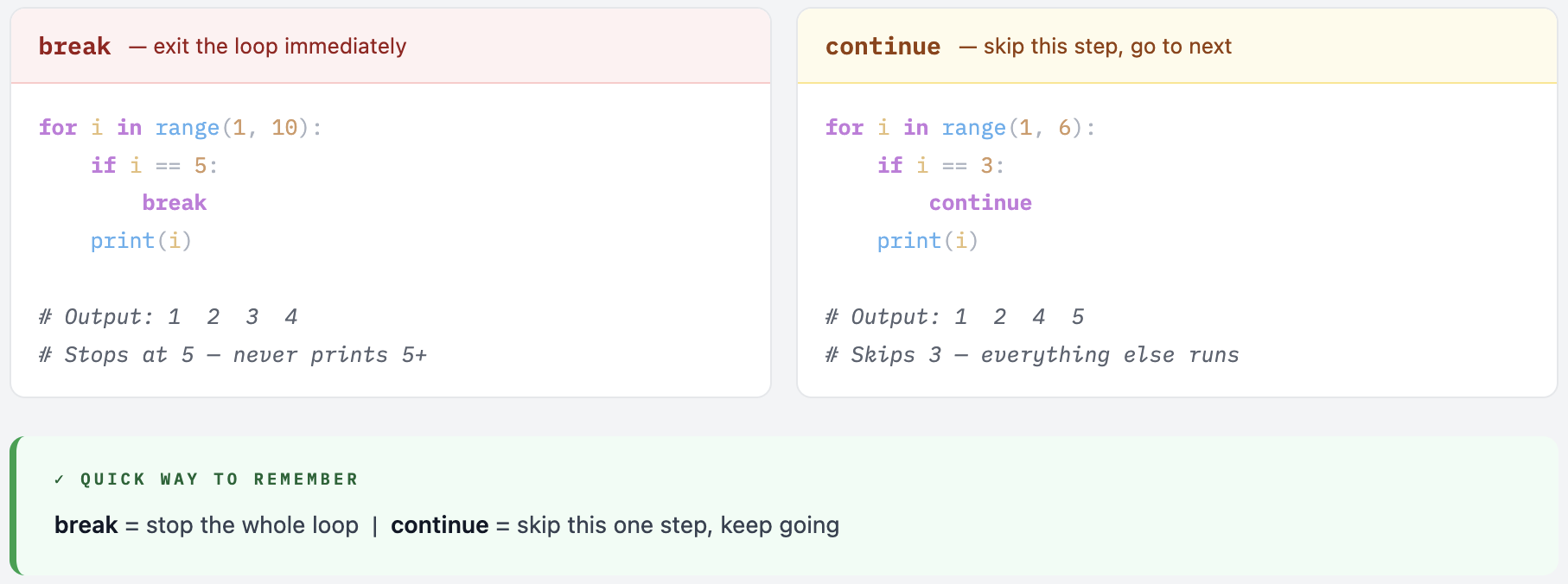
As soon as i becomes 5, break exits the loop completely - 5, 6, 7… are never printed. With continue, when i is 3, Python skips the print and goes straight to the next round - so 3 is never printed but the loop continues.
for vs while - Which One to Use?
One of the most common questions on Day 4. The answer is simpler than you think - there is a clear mental test that gives you the right answer almost every time.
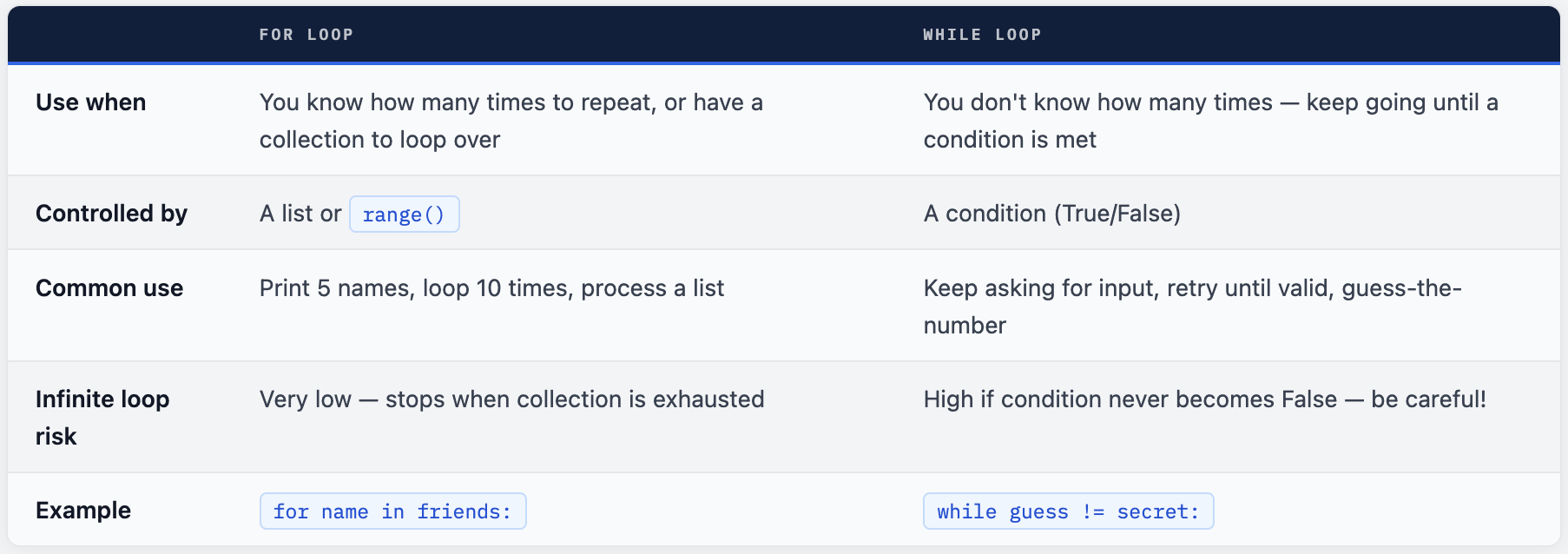
💡 The Simple Mental Test Ask yourself: "Do I know what I'm looping over, or how many times?" Yes - a list, a range, a known count → use for No - keep going until something happens → use while In practice, for is used far more often in real Python code. Reach for while specifically when the number of iterations is genuinely unknown at the start.
Your Turn - 4 Exercises
Try these exercises to make sure everything clicked. Don’t just read - actually type the code. Even if you make mistakes, that is how you learn Python the fastest!
- Print all even numbers from 1 to 20 using a for loop
- Use a while loop to keep asking someone to enter a password until they type the correct one
- Print a countdown from 10 to 1 using range(), then print “Go! 🚀”
- Loop through a list of your favourite movies and print each one with its number (1. Movie, 2. Movie…)
Loops are what make programs actually useful.
You can now process any list, repeat any action, and automate any repetitive task. From reading files to processing data to building automation scripts - loops are everywhere in real Python. Keep coding! 🚀
Comments (0)
No comments yet. Be the first to share your thoughts.
Leave a comment