What Is a String?
A string is simply a piece of text - any characters inside quotes. Single quotes, double quotes, or triple quotes - Python treats them all the same. Strings are one of the most used data types in Python, and you will work with them in almost every program you write.
name    = "Gayatri"          # double quotes
city    = 'Bengaluru'         # single quotes - both are fine!

# Triple quotes - for multi-line text
message = """Hello!
Welcome to Day 8.
Hope you are enjoying it!"""

print(type(name))    # <class 'str'>
print(len(name))     # 7
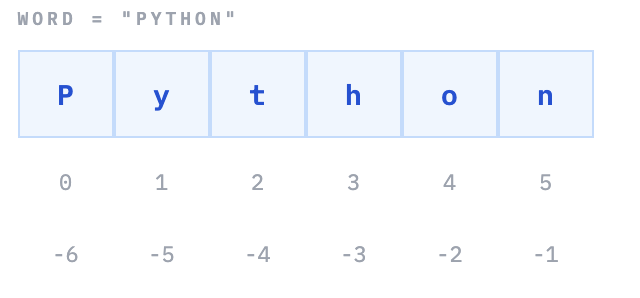
💡 Strings Are Sequences of Characters Just like a list has items at indexes 0, 1, 2... - each character in a string also has an index starting from 0. This means you can use all the same indexing and slicing tricks you learned with lists on strings too.
Indexing and Slicing Strings
Pick out a single character with an index, or grab a chunk of text with slicing. The rules are identical to lists - and there is a clever reverse trick too.
String Index Positions
word = "Python"

# Indexing - one character
print(word[0])     # P
print(word[3])     # h
print(word[-1])    # n  (last character)

# Slicing - a portion
print(word[0:3])   # Pyt   (0, 1, 2 - stop not included!)
print(word[2:])    # thon  (from index 2 to end)
print(word[:4])    # Pyth  (from start to index 3)
print(word[-3:])   # hon   (last 3 characters)

# Reverse trick - step of -1 reads backwards
print(word[::-1])  # nohtyP
💡 The Slicing Rule - start is included, stop is NOT string[start:stop] - always remember that the character at stop is excluded. So word[0:3] gives you characters at positions 0, 1, and 2 - not 3. This is the same rule as lists, and it is consistent throughout Python. The reverse trick [::-1] uses the optional step parameter: string[start:stop:step]. When step is -1, Python walks backwards through the string. It is one of the most popular Python interview questions!
Most Useful String Methods
Python’s string methods cover almost everything you’d want to do with text. Here are the ones you will reach for most often - with real examples for each.
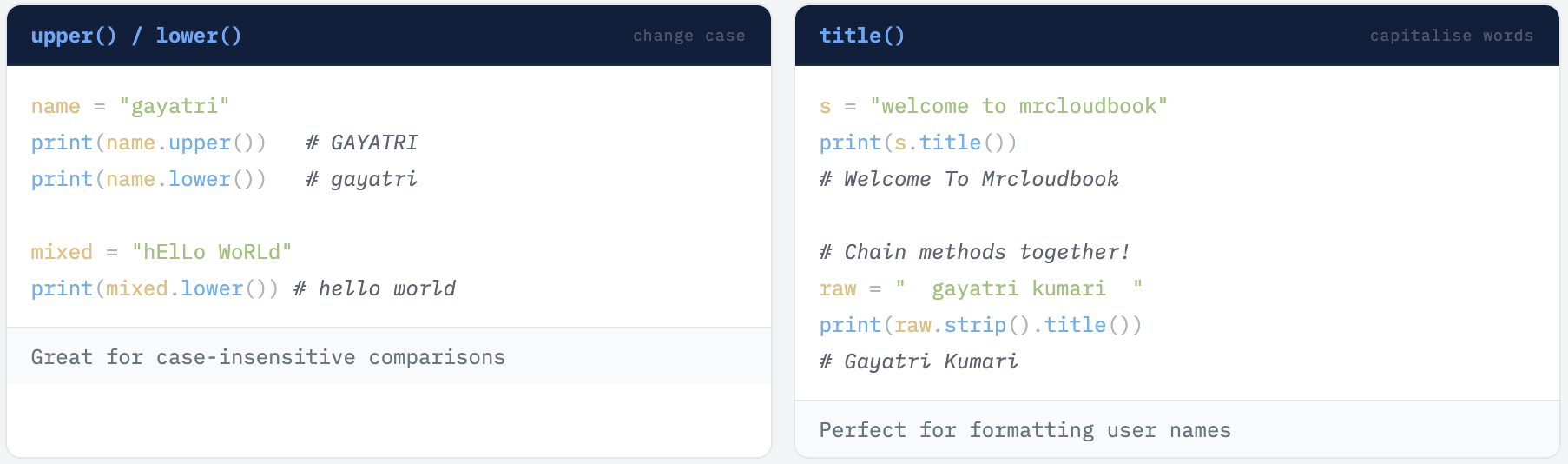
Case Methods
Cleaning Methods
# strip() - remove leading and trailing spaces
messy = "   hello world   "
print(messy.strip())    # "hello world"
print(messy.lstrip())   # "hello world   " (left side only)
print(messy.rstrip())   # "   hello world" (right side only)

# replace() - swap one chunk of text for another
sentence = "I love Java"
print(sentence.replace("Java", "Python"))   # I love Python

# replace() replaces ALL occurrences
text = "cat sat on a mat"
print(text.replace("at", "og"))   # cog sog on a mog
✓ strip() - Your Best Friend for Cleaning User Input When reading data from files, forms, or user input, extra whitespace is almost always present. Always call .strip() on user-supplied strings before using them in comparisons, lookups, or database queries.
split() and join() - Opposites That You’ll Use Together
# split() - break a string into a list
sentence = "apple banana mango orange"
words = sentence.split()
print(words)   # ['apple', 'banana', 'mango', 'orange']

# split() by a specific character
data = "Priya,21,Bengaluru"
parts = data.split(",")
print(parts)   # ['Priya', '21', 'Bengaluru']

# join() - combine a list back into a string
words = ["Python", "is", "awesome"]
sentence = " ".join(words)
print(sentence)   # Python is awesome

fruits = ["apple", "banana", "mango"]
print(", ".join(fruits))   # apple, banana, mango
💡 split() and join() Are Opposites - and You'll Use Both split() breaks a string into a list. join() combines a list back into a string. You will use this pair constantly when processing CSV data, API responses, log files, and any structured text. Note the syntax for join() - the separator string calls join on itself: " ".join(list). The separator goes on the left of the dot, not inside as an argument after the list.
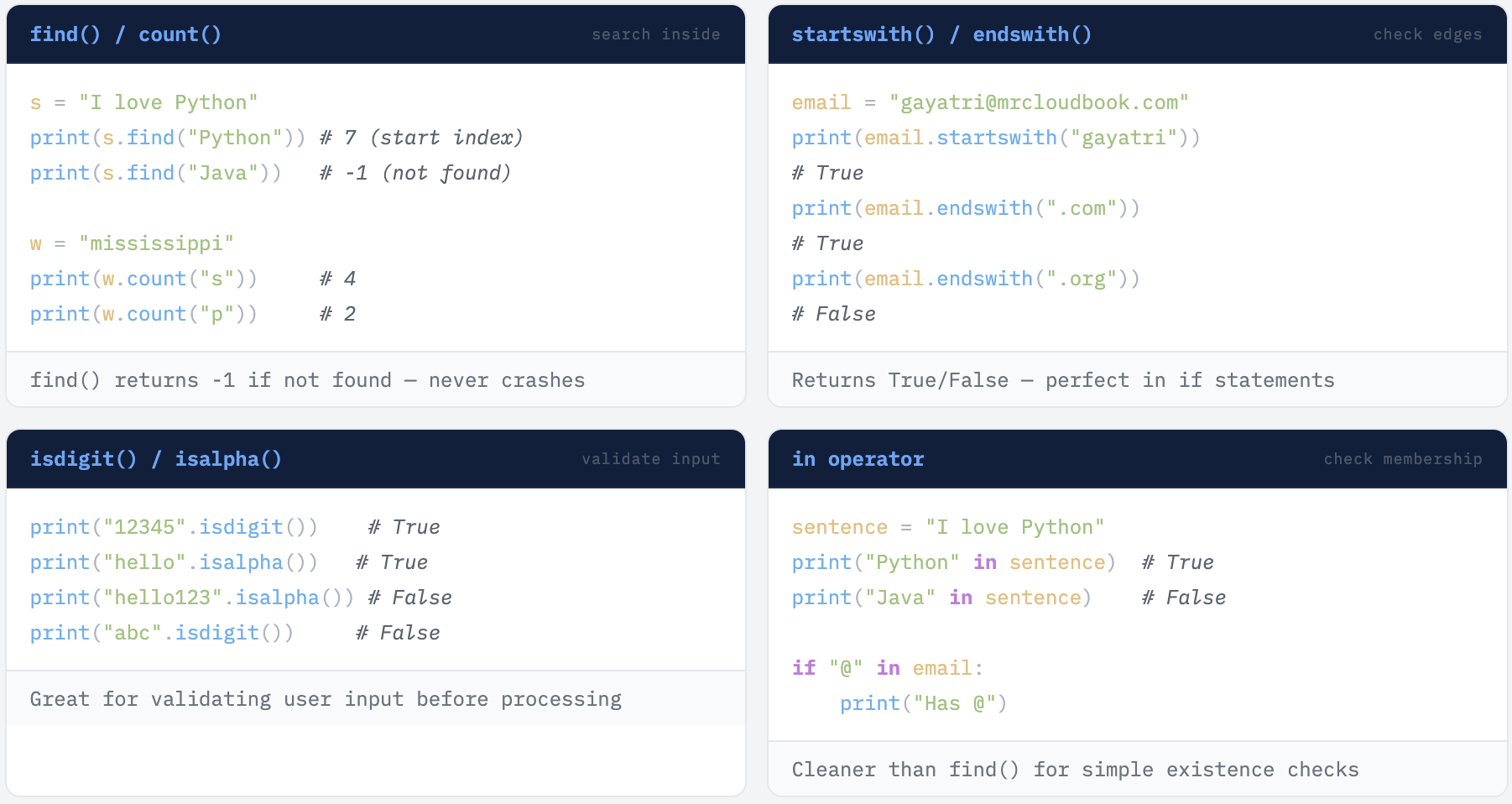
Searching and Checking Methods
f-Strings - The Modern Way to Format Text
Before f-strings, formatting strings in Python was messy and error-prone. Since Python 3.6, f-strings are the standard - and they are so clean and readable that once you use them, you will never go back.
Just put f before the opening quote, then use { } to drop any variable - or even a full expression - directly into the string.
# Basic f-string - variable inside { }
name = "Priya"
age  = 21
city = "Bengaluru"

print(f"Hello, my name is {name}.")   # Hello, my name is Priya.
print(f"I am {age} years old.")        # I am 21 years old.
print(f"I live in {city}.")            # I live in Bengaluru.

# Expressions work inside { } too!
price    = 500
discount = 20
print(f"After discount: {price - (price * discount / 100)}")
# After discount: 400.0

# Real example - student report
name   = "Arjun"
marks  = 87
total  = 100

print(f"Student:    {name}")
print(f"Marks:      {marks}/{total}")
print(f"Percentage: {marks/total*100}%")
# Student:    Arjun
# Marks:      87/100
# Percentage: 87.0%
✓ Always Use f-Strings f-strings are cleaner, faster, and less error-prone than the older % formatting or ".format()" method. If you are learning Python fresh, start with f-strings and use them everywhere. They are the modern standard. The only requirement: f-strings need Python 3.6 or later - which is essentially every Python environment you'll encounter today.
Real Life Examples
Example 1 - Clean and Format a User Name
raw_input  = "  gayatri kumari  "
clean_name = raw_input.strip().title()
print(f"Welcome, {clean_name}!")
# Welcome, Gayatri Kumari!
Example 2 - Basic Email Validator
email = "user@example.com"

if "@" in email and (email.endswith(".com") or email.endswith(".in")):
    print("Valid email!")
else:
    print("Invalid email.")
Example 3 - Count Vowels in a Word
def count_vowels(word):
    vowels = "aeiouAEIOU"
    count  = 0
    for char in word:
        if char in vowels:
            count += 1
    return count

print(count_vowels("Bengaluru"))   # 4 (e, a, u, u)
print(count_vowels("Python"))       # 1 (o)
Example 4 - Reverse a String
word = "Python"
print(word[::-1])   # nohtyP

# Step through how [::-1] works:
# start:stop:step = no start, no stop, step = -1
# step = -1 means "go backwards, one character at a time"
# So Python reads: n, o, h, t, y, P → "nohtyP"
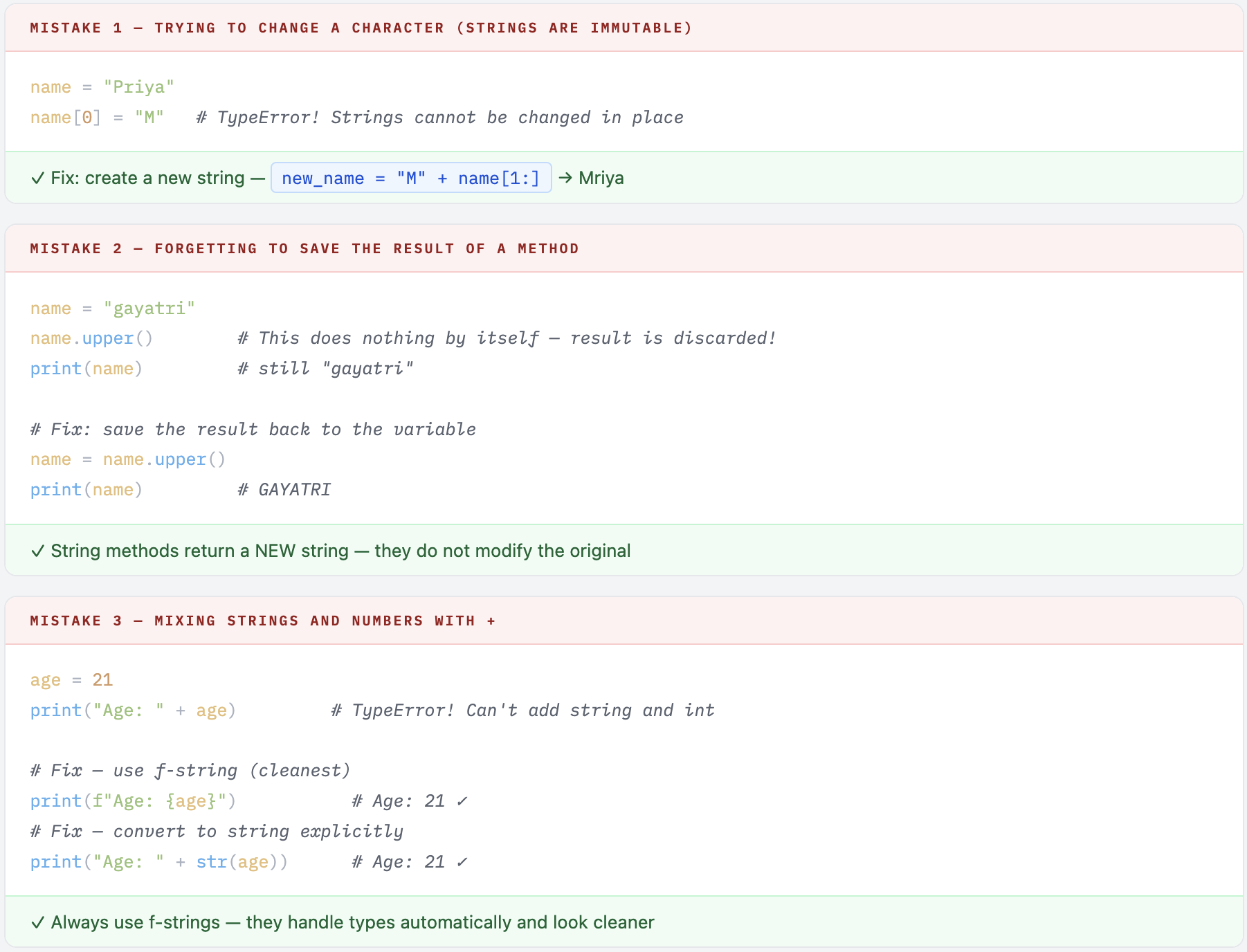
Common Mistakes to Avoid
Quick Reference
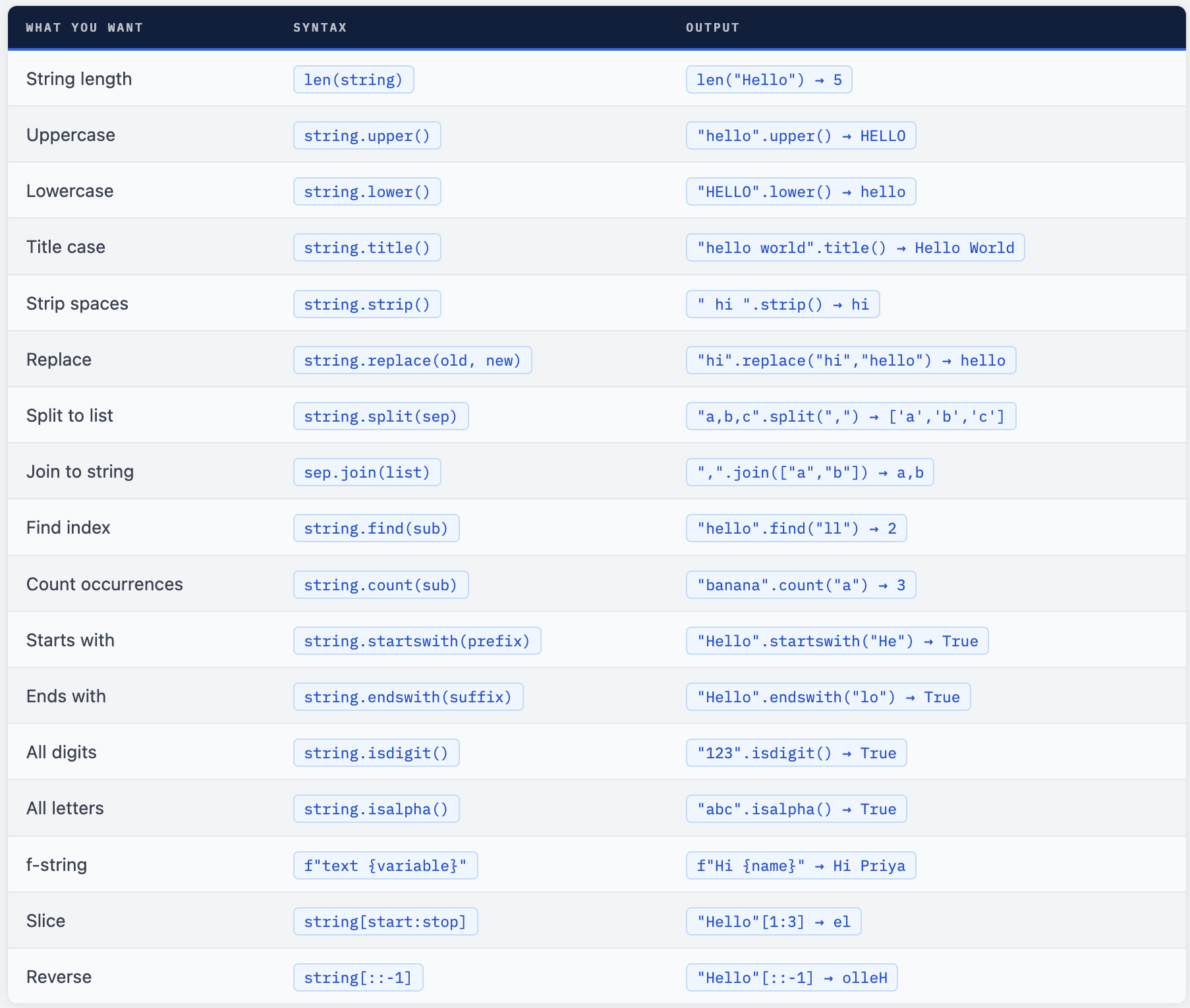
Your Turn - 6 Exercises + 1 Challenge
- Take any sentence and print it in UPPER, lower, and Title Case.
- Ask for a user’s full name with extra spaces - clean it with strip() and title(), then greet them with an f-string.
- Write a function that checks if an email is valid (has @ and ends with .com or .in ).
- Reverse any word using the [::-1] slicing trick.
- Count how many vowels are in your name using a loop and the in operator.
- Split the string “Monday,Tuesday,Wednesday,Thursday,Friday” into a list, then loop through and print each day.
🏆 Challenge - Word Length Printer Write a program that takes a sentence and prints each word on a new line along with its length. For example, "Python is fun" should print: Python → 6 is → 2 fun → 3 Hint: use split() to get the words, then loop through the list and use len() on each word with an f-string to format the output.
Strings are in every program you will ever write.
From cleaning user input to calling APIs to generating reports - you will use these methods constantly. They are worth memorising.
Comments (0)
No comments yet. Be the first to share your thoughts.
Leave a comment