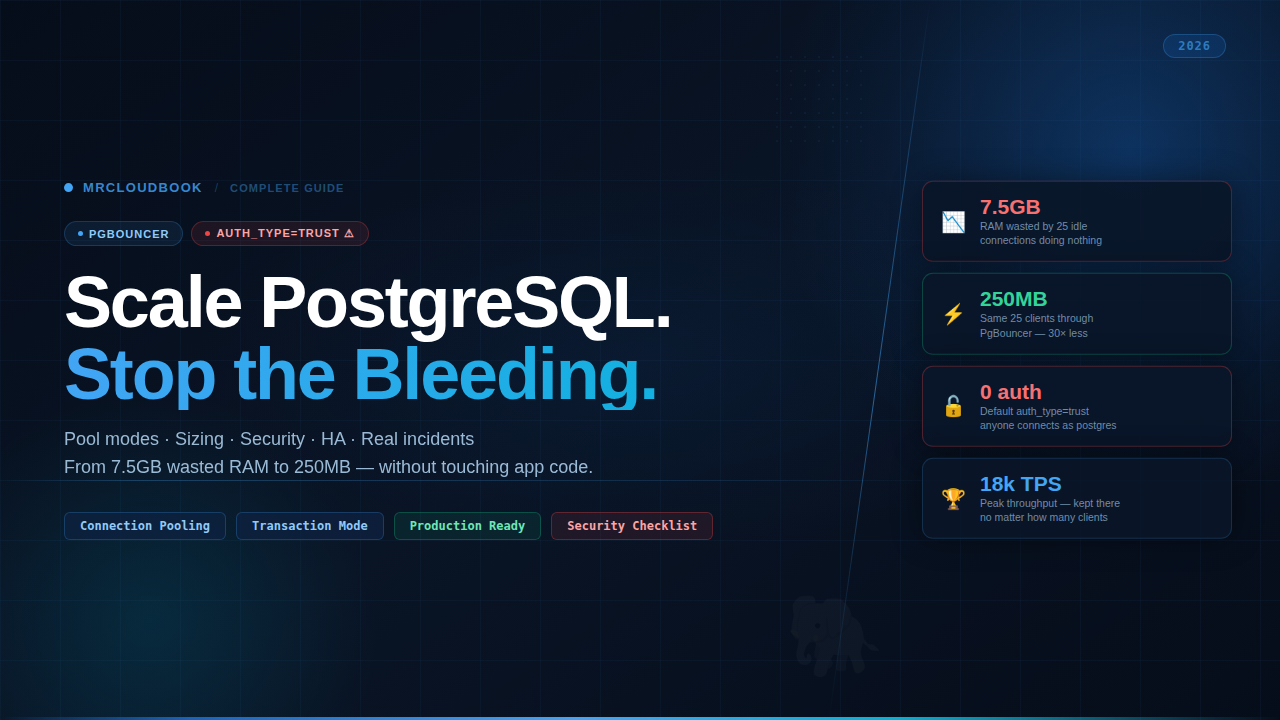
The Problem Nobody Talks About
Why idle connections eat gigabytes and why more connections make every query slower
Here’s a situation most backend engineers have experienced without understanding it. Your database server is running hot. Memory is high. Queries are mysteriously slow. You run ps aux | grep postgres and stare at what comes back.
Twenty-five connections. All marked idle. Each one holding between 300MB and 424MB of RSS. Doing. Absolutely. Nothing.
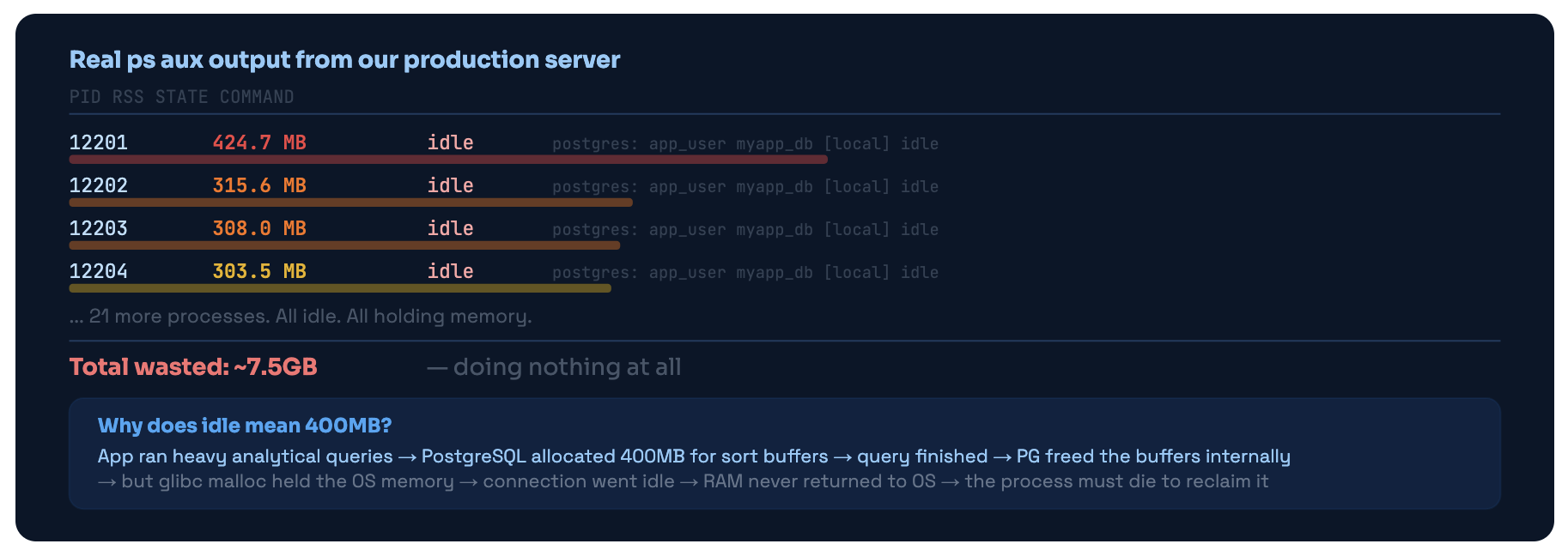
What ps aux showed on our server. 25 idle connections, each a full OS process, holding 300-424MB of RSS. This is the glibc malloc problem - memory freed internally by PostgreSQL but not returned to the OS.
This isn’t a PostgreSQL bug. Every connection to PostgreSQL is a full forked OS process. Not a thread. Not a socket handle. An entire OS process with its own address space, its own memory allocator, its own file descriptors. When glibc grabs heap memory for sort buffers, it doesn’t release it back to the OS when the query finishes - it keeps it for future allocations. The only way to get that memory back is to kill the process.
The Performance Cliff - More Connections Hurts Everyone
Memory is just one dimension of the problem. PostgreSQL has an internal snapshot mechanism - the ProcArray - that it has to scan on every single transaction start to determine MVCC visibility. The scan time grows with connection count. This creates a hard performance ceiling that has nothing to do with your query complexity.
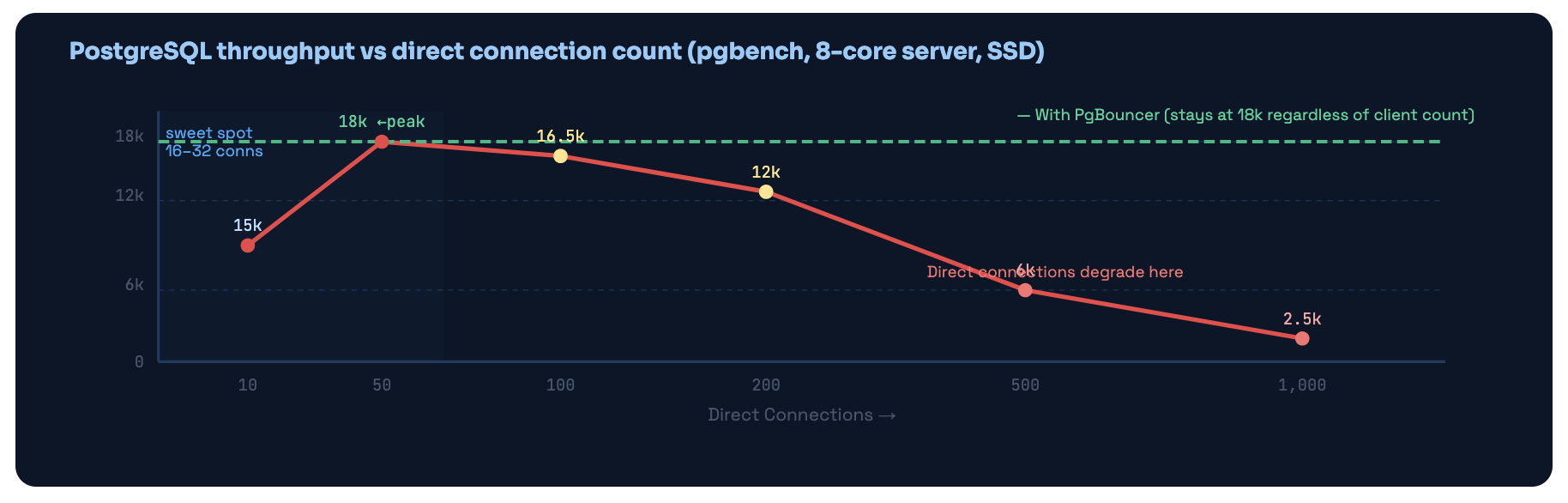
Going from 50 to 1,000 direct PostgreSQL connections dropped throughput from 18,000 TPS to 2,500 TPS - a 7× degradation. PgBouncer keeps the actual PG connection count in the optimal range no matter how many clients connect.

XID wraparound - the connection that never closed for 11 days
This is what finally forced us to actually fix our setup properly. A deployment had a bug - the app crashed, but the database connection stayed alive via TCP keepalive. That connection had issued a BEGIN before the crash. It was now sitting in idle in transaction state with an open transaction that would never commit or roll back.
PostgreSQL legally cannot freeze tuples newer than the oldest in-flight transaction XID. With that connection holding its transaction open for 11 days, autovacuum’s freeze operations were completely blocked. The XID age climbed to 1.6 billion. PostgreSQL started logging WARNING: database must be vacuumed within 400,000,000 transactions - warnings we weren’t monitoring.
At 1.8 billion, PostgreSQL entered emergency autovacuum mode - running aggressive freeze operations constantly. This caused severe I/O load that made all queries slow. We woke up to a 98% memory server, queuing queries, and an alert cascade. Took 90 minutes to diagnose and recover.
The 3-Part Fix Immediate: `SELECT pg_terminate_backend(pid) FROM pg_stat_activity WHERE xact_start < now() - interval '1 hour';` killed the blocking transaction. Short-term: `VACUUM FREEZE VERBOSE events;` on the biggest tables. Permanent: `idle_in_transaction_session_timeout = '5min'` in postgresql.conf AND `idle_transaction_timeout = 60` in pgbouncer.ini. One connection can never block the whole database again.
What PgBouncer Actually Is
A transparent proxy that speaks PostgreSQL’s own language - your app never knows it’s there
PgBouncer is a connection pooler - a lightweight proxy that sits between your application and PostgreSQL, maintaining a small pool of real database connections and sharing them among many app clients.
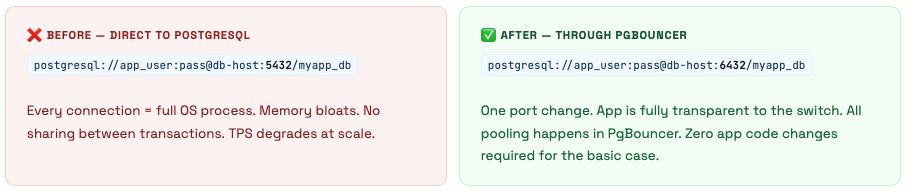
The critical thing to understand about PgBouncer: it speaks the PostgreSQL wire protocol natively. Your application thinks it’s talking directly to a PostgreSQL server. It connects, authenticates, sends queries, receives results. PgBouncer is completely transparent. The only visible difference is the port number: 5432 becomes 6432.
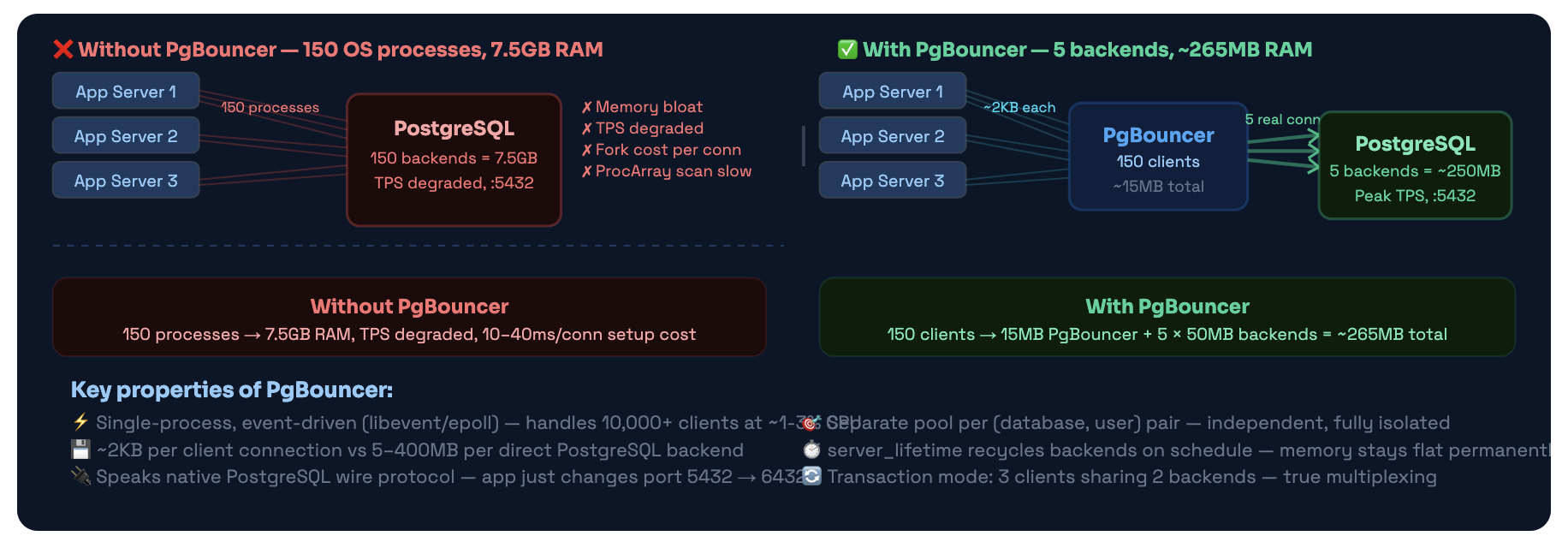
Same 150 app clients - completely different resource profile. PgBouncer multiplexes clients onto a handful of real backends. Client connections cost ~2KB instead of 5-400MB.
How PgBouncer Works Internally
The event loop, connection states, and exactly what happens when a query arrives
PgBouncer is a single OS process running an event loop. It uses libevent (which uses epoll on Linux) to watch thousands of file descriptors simultaneously without threads. One CPU core, one process, thousands of connections - all handled non-blocking.
Connection States - Clients and Servers
PgBouncer tracks two sets of connections: client connections (app → PgBouncer) and server connections (PgBouncer → PostgreSQL). Each has its own state machine:
| State | Client Side | Server Side |
|---|---|---|
| login | Just connected, authenticating with PgBouncer | PgBouncer connecting to PostgreSQL |
| waiting | Needs a server connection, none available - queued | - |
| active | Linked to a server connection, query executing | Linked to a client, executing query |
| idle | Authenticated, connected, no active transaction (2KB cost) | In the pool, ready for any client (no PG backend wasted) |
| used | - | Transaction just ended, running server_reset_query (DISCARD ALL) |
Transaction Pooling - The Complete Flow
In transaction mode (which you should be using), here is the exact sequence of events for a client running a transaction:
1 App connects to PgBouncer on port 6432
PgBouncer accepts the TCP connection and allocates ~2KB for the client struct. Client state: login. No PostgreSQL backend exists yet.
2 Client authenticates
PgBouncer checks the password against userlist.txt or auth_query. Client state: idle. Still no backend - PgBouncer holds the client at ~2KB total cost.
3 Client sends BEGIN (or any query)
PgBouncer needs a server connection. It checks the pool for an idle backend. Found one → link client↔server (instant). None available and pool not full → open new PG connection (10-40ms). Pool full → client state: waiting, enters the queue.
4 Query executes
PgBouncer forwards queries from client to server and results back. Both client and server state: active. PgBouncer is transparent - the client has no idea there’s a proxy.
5 Client sends COMMIT or ROLLBACK
PgBouncer forwards it to PostgreSQL. When PostgreSQL acknowledges: PgBouncer unlinks client and server. Server runs DISCARD ALL (server_reset_query), state goes to used, then idle back in the pool. Client state: idle. Server available for any other client instantly.
6 Client sits idle between transactions
Client holds ~2KB in PgBouncer. Zero PostgreSQL backends are dedicated to this client. The backend that just served this client may already be serving someone else. This is the entire point.
Pool Per (Database, User) Pair
PgBouncer creates a completely separate pool for each unique combination of database name and username. These pools are fully independent - they don’t share backends, don’t interfere with each other’s sizing, and can have different pool modes. This matters when you’re calculating how many total PostgreSQL connections PgBouncer might open.
Pool Math Example
You have 3 databases and 4 users → 12 pools. With default_pool_size=20, PgBouncer could theoretically open 12 × 20 = 240 PostgreSQL connections. If your max_connections=100, this immediately causes failures for connections 101+. This is why max_db_connections exists as a global hard cap - it limits total connections per database regardless of pool math.
The Three Pool Modes
Session, Transaction, Statement - only one of them actually gives you connection sharing
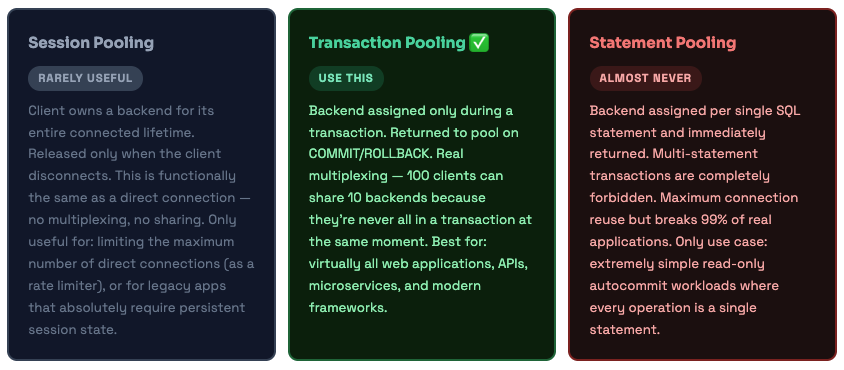
PgBouncer has three pooling modes. Most documentation presents them as roughly equivalent options. They’re not. Transaction mode is what you should use for virtually every modern application. The others exist for specific legacy use cases.
Transaction Mode - What the Sharing Actually Looks Like
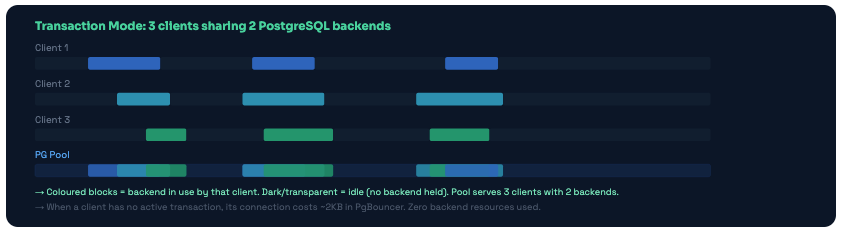
Three clients sharing two backends in transaction mode. Backends are only held during active transactions. Between transactions, the backend is immediately available for any other client.
What Breaks in Transaction Mode - and the Fix for Each
Transaction mode has a handful of restrictions. These come up less often than you’d think with modern frameworks, but you need to know them before switching your app over:
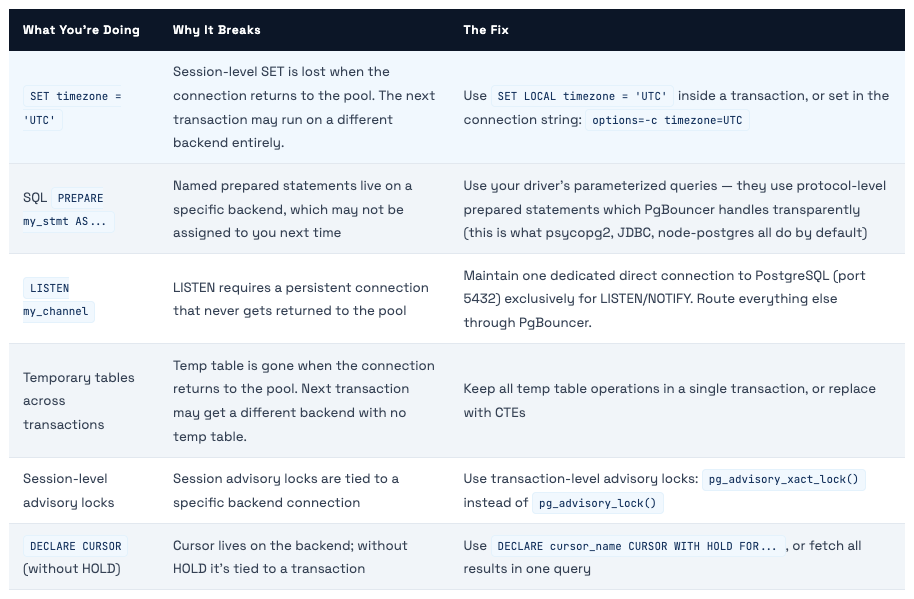
💡 The Rule of Thumb If it requires state to persist between transactions on the same backend, it won't work in transaction mode. If everything happens within a single transaction, it works fine. Most modern applications - especially those using ORMs that auto-manage transactions - don't hit these restrictions at all.
Architecture Patterns
Where to run PgBouncer - four patterns from simple to sophisticated
There’s no single correct place to put PgBouncer. The right choice depends on your scale, your team’s operational capacity, and what you’re optimizing for. Here are the four most common patterns, from simplest to most powerful.
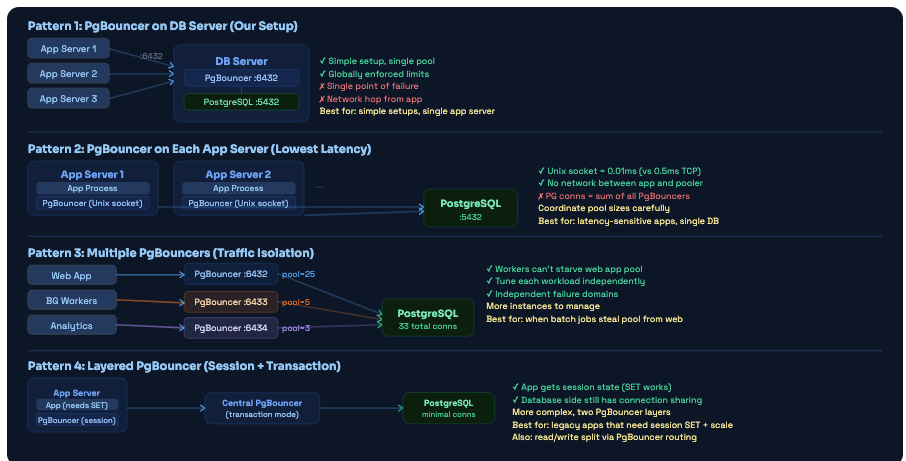
Four deployment patterns. Most teams start with Pattern 1. The jump to Pattern 3 (multiple PgBouncers) is often the highest-ROI improvement when you have distinct traffic types competing for pool slots.
Background workers silently killed our API latency every morning at 9am
We had a single PgBouncer with default_pool_size=20. Every morning at 9am, a data import batch job kicked off. It grabbed 12 connections and held them while it processed overnight data - about 15 minutes of work. During those 15 minutes, only 8 connections remained available for our web app.
Users experienced 3-4× slower page loads every morning, exactly during business-hours peak. We saw it in our latency metrics - this massive spike, every single day, same time. Took two weeks to diagnose because we were looking at the wrong things: slow query logs (queries weren’t slow - they were queuing), database CPU (fine), index usage (fine).
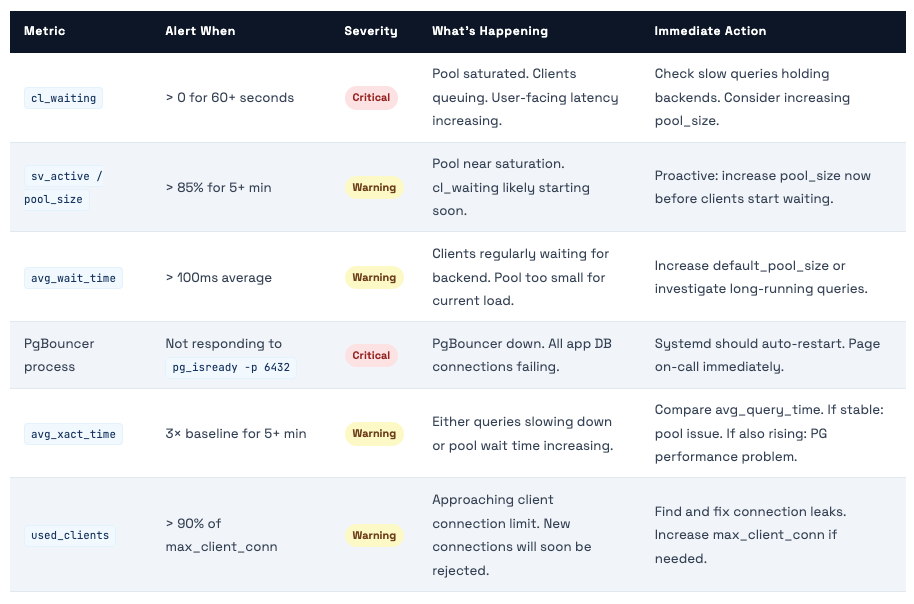
The answer only became obvious when we ran SHOW POOLS; in the PgBouncer admin console during the spike and saw cl_waiting = 85. Eighty-five clients waiting for a pool connection. The batch job had 12 of the 20 slots. The remaining 8 were serving all web app traffic for an app that normally needed 15-20 concurrent connections.
The Fix - Pattern 3 Implementation Created a second PgBouncer instance on port 6433. Web app connects to 6432 (pool_size=18). Batch workers connect to 6433 (pool_size=8). They draw from independent pools. Web app latency spike: gone from day one. Total PG connections actually went up slightly (26 instead of 20) but the latency problem completely disappeared.
Installation & Initial Setup
Getting PgBouncer running in 5 minutes - and the 3 files you actually need to understand
PgBouncer is in the standard package repositories for every major Linux distribution. Installation is straightforward. The complexity is entirely in the configuration - and that’s what the rest of this guide is about.
# Debian / Ubuntu
sudo apt update && sudo apt install -y pgbouncer

# RHEL / CentOS / Amazon Linux
sudo yum install pgbouncer
# Or with dnf:
sudo dnf install pgbouncer

# Verify install
pgbouncer --version
# PgBouncer 1.22.0

# Key files after install:
# /etc/pgbouncer/pgbouncer.ini   - main config
# /etc/pgbouncer/userlist.txt    - user passwords
# /var/log/postgresql/pgbouncer.log - logs
# /var/run/postgresql/pgbouncer.pid - PID file

# Start / enable
sudo systemctl enable --now pgbouncer
sudo systemctl status pgbouncer

# Test the connection (once configured)
psql -U your_user -h 127.0.0.1 -p 6432 -d your_database

# Connect to admin console
psql -U postgres -h 127.0.0.1 -p 6432 -d pgbouncer
The 5-Minute Setup for a New Server
1 Install PgBouncer and check the version
Verify you have 1.14+ for scram-sha-256 auth support. Earlier versions only support md5 which is fine but not ideal.
2 Generate userlist.txt from PostgreSQL
Get the hashed passwords directly from pg_shadow so you never store plaintext: sudo -u postgres psql -t -A -c "SELECT '\"' || usename || '\" \"' || passwd || '\"' FROM pg_shadow;" > /etc/pgbouncer/userlist.txt then chmod 600 /etc/pgbouncer/userlist.txt
3 Edit pgbouncer.ini with your settings
At minimum: set listen_addr, auth_type (never trust!), default_pool_size, and max_db_connections. The full annotated config is in §07.
4 Start and verify
Run sudo systemctl start pgbouncer, then connect to the admin console and run SHOW POOLS; to verify pools are configured correctly.
5 Update app connection strings
Change port 5432 to 6432 in all app connection strings. Test thoroughly in staging before production. Add a firewall rule to prevent direct port 5432 access from app servers.
Making Config Changes Without Downtime
# Most settings: RELOAD (no connection drops, instant)
psql -U postgres -h 127.0.0.1 -p 6432 pgbouncer -c "RELOAD;"
# Or via systemctl:
sudo systemctl reload pgbouncer

# A few settings require full restart (listen_addr, listen_port, unix_socket_dir)
# For restart with minimal disruption:
psql -U postgres -h 127.0.0.1 -p 6432 pgbouncer -c "SUSPEND;"
# SUSPEND drains existing connections gracefully, then pauses
sudo systemctl restart pgbouncer
# Connections resume automatically from client's perspective

# Verify changes took effect
psql -U postgres -h 127.0.0.1 -p 6432 pgbouncer -c "SHOW CONFIG;"
Configuration - Every Setting and Why
Not just what to set - what goes wrong if you don’t set it correctly
PgBouncer’s config file is organized into sections: [databases], [users], and [pgbouncer]. Most tutorials show you a config and tell you to copy it. We’re going to explain every relevant setting by its consequence - what breaks if you get it wrong.
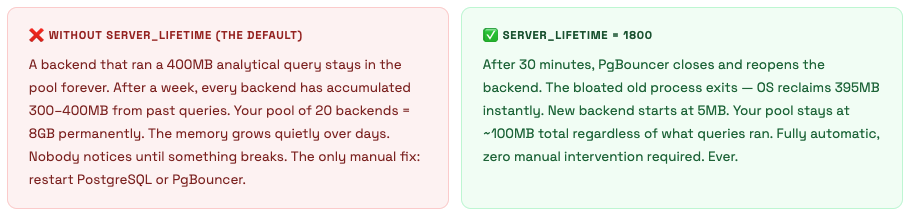
server_lifetime - The Memory Fix Nobody Mentions
max_db_connections - The Safety Valve That Saves You
default_pool_size sets connections per pool. The problem is you might have many pools. 3 databases × 4 users = 12 pools. At pool_size=25, PgBouncer could open 300 connections to PostgreSQL - which immediately exceeds any reasonable max_connections. max_db_connections is the global hard cap that prevents this regardless of pool math.
max_db_connections ≤ pg.max_connections − superuser_reserved − admin_headroom Typical: if max_connections = 100 → max_db_connections = 70-80 default_pool_size × num_pools ≈ max_db_connections (but capped by max_db_connections) Always leave 15-20 connections for direct admin access, monitoring tools, and replication
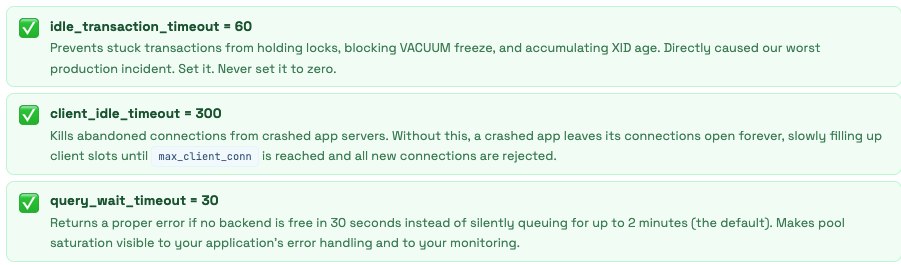
idle_transaction_timeout - The One That Prevents 2am Incidents
This setting in PgBouncer kills connections that are idle inside a transaction. Without it, a bug that opens a BEGIN and never commits can hold locks and block VACUUM freeze indefinitely - which is exactly what caused our 2:47am incident. Set it. Never set it to 0.
[databases]
# Route all databases to PostgreSQL
* = host=127.0.0.1 port=5432
# Use Unix socket if PgBouncer and PG are on the same server (faster):
# * = host=/var/run/postgresql port=5432

# Per-database overrides - analytics gets its own smaller pool:
# analytics = host=127.0.0.1 port=5432 pool_size=3

# Read/write split - separate pool pointing to replica:
# mydb_read = host=replica-server port=5432 dbname=mydb pool_size=10

[users]
# Per-user limits
# batch_worker = max_user_connections=5 pool_mode=session

[pgbouncer]

; ── LISTENING ──────────────────────────────────────────────────────
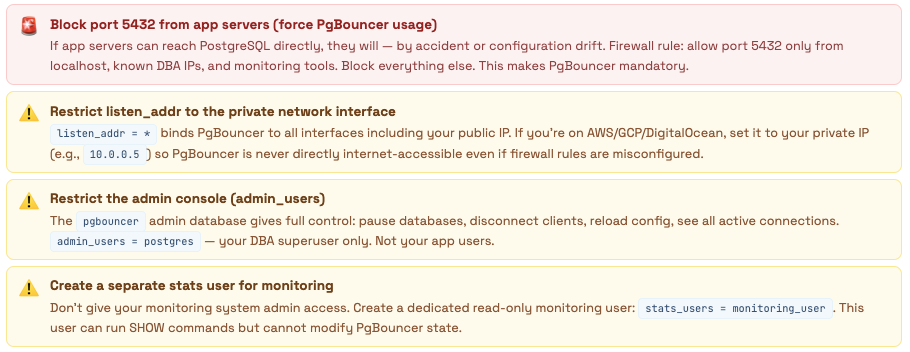
listen_addr = *             # Bind to all interfaces. Restrict to private IP if possible.
listen_port = 6432          # Standard PgBouncer port. App changes 5432 → 6432.
unix_socket_dir = /var/run/postgresql  # Unix socket for same-server connections

; ── POOLING ────────────────────────────────────────────────────────
pool_mode = transaction     # session | transaction | statement
                             # transaction = correct for 95% of applications

default_pool_size = 20      # PG connections per (database, user) pool
                             # Start at 2× CPU cores. 8-core server → 16-20.
                             # More connections don't help - they hurt PG throughput

min_pool_size = 5           # Keep 5 connections warm. Prevents cold-start latency
                             # after quiet periods (overnight, weekends).

reserve_pool_size = 5       # Extra emergency connections for traffic spikes
reserve_pool_timeout = 5    # Only use reserve if client waits > 5s (pool is saturated)

; ── CONNECTION LIMITS ──────────────────────────────────────────────
max_client_conn = 5000      # Max app clients PgBouncer accepts
                             # PgBouncer handles 10k+ - set this high, it's lightweight

max_db_connections = 70     # ← CRITICAL: Hard cap on actual PG connections per database
                             # Formula: pg max_connections - 15 (admin headroom)
                             # If max_connections=100 → set this to 70-80
                             # This prevents pool math from overwhelming PostgreSQL

max_user_connections = 50   # Per-user cap across all databases. 0 = unlimited

; ── SERVER LIFECYCLE ── Why memory stays low ───────────────────────
server_lifetime = 1800      # Close and reopen backend every 30 minutes
                             # Old bloated backend (400MB RSS) exits → OS reclaims it
                             # Fresh backend starts at 5MB. Without this: memory grows forever

server_idle_timeout = 300   # Close idle backends after 5 minutes
                             # Reduces PG backend count during overnight low traffic

server_connect_timeout = 15 # Give up connecting to PG after 15s (prevents hanging)
server_login_retry = 15     # Wait 15s before retrying after a connection failure

server_check_query = SELECT 1  # Verify backend is alive before assigning to a client
server_check_delay = 30     # Skip the check if backend was used < 30s ago (performance)

server_reset_query = DISCARD ALL  # Clean backend state when it returns to pool
                                  # Resets: SET parameters, prepared statements, temp tables
                                  # Essential for session mode. Less critical for transaction mode
                                  # but still good practice for safety

server_round_robin = 0      # 0 = LIFO (reuse most-recently-used connection)
                             # LIFO = better PG plan cache hit rate (same backend = warm cache)
                             # 1 = round-robin (distributes load more evenly)

; ── CLIENT TIMEOUTS ── Why you won't wake up at 2am ──────────────
client_idle_timeout = 300   # Kill clients idle for 5 minutes
                             # Reclaims client slots from crashed or abandoned app connections
                             # Without this: dead connections pile up until max_client_conn

client_login_timeout = 60   # Client must authenticate within 60 seconds

query_timeout = 300         # Kill server connection if query runs > 5 minutes
                             # Belt-and-suspenders alongside PG statement_timeout
                             # Note: kills the whole connection, not just the query

query_wait_timeout = 30     # Return error if client waits > 30s for a free backend
                             # Without this: default is 120s - clients silently queue
                             # for 2 full minutes during pool saturation. Set to 30s.

idle_transaction_timeout = 60  # CRITICAL: Kill connection idle inside a transaction after 60s
                              # Prevents the 11-day open transaction that caused our incident
                              # Also prevents lock accumulation, VACUUM blockage, and XID age growth
                              # This was 0 (disabled) on our server before we fixed it

; ── AUTHENTICATION ── Fix auth_type first ─────────────────────────
auth_type = scram-sha-256   # NEVER use 'trust' in production (see §09)
                             # Options: scram-sha-256 (best), md5, cert, hba, pam
auth_file = /etc/pgbouncer/userlist.txt
admin_users = postgres       # Who can run admin commands in the pgbouncer database
stats_users = monitoring_user  # Who can run SHOW commands (read-only admin)

; ── TLS ───────────────────────────────────────────────────────────
# Uncomment for production (any non-localhost connections):
# client_tls_sslmode = require
# client_tls_cert_file = /etc/ssl/certs/pgbouncer.crt
# client_tls_key_file = /etc/ssl/private/pgbouncer.key
# client_tls_protocols = secure     (TLSv1.2+)
# server_tls_sslmode = require      (PgBouncer → PostgreSQL)

; ── TCP KEEPALIVE ── Detect dead connections ──────────────────────
tcp_keepalive = 1
tcp_keepidle = 120          # Start probing after 2 minutes idle
tcp_keepintvl = 30          # Probe every 30 seconds
tcp_keepcnt = 3             # 3 failed probes = dead. Total detection: 120 + (30×3) = 3 min

; ── LOGGING ──────────────────────────────────────────────────────
logfile = /var/log/postgresql/pgbouncer.log
pidfile = /var/run/postgresql/pgbouncer.pid
log_connections = 1
log_disconnections = 1
log_pooler_errors = 1
log_stats = 1
stats_period = 60           # Log aggregate stats every 60 seconds
verbose = 0                 # 0=normal, 1=debug, 2=trace. Never 2 in production.

; ── DRIVER COMPATIBILITY ─────────────────────────────────────────
ignore_startup_parameters = extra_float_digits  # Needed for JDBC/psycopg2
Pool Sizing - The Real Math
Why more connections don’t help and exactly how to calculate the right numbers for your setup
This is where most engineers get PgBouncer wrong. They assume bigger pool = better performance. It’s the opposite. More PostgreSQL connections means more ProcArray scanning, more lock contention, more context switching. There’s an optimal range, and you want to stay in it.
The Formula
Optimal pool size ≈ 2 × CPU cores (for SSD storage)
On an 8-core server: pool_size = 16. That’s it. Not 50. Not 100. 16.
The pgbench benchmark shows peak TPS at 50 connections on an 8-core server, then degradation. The “correct” number for production is slightly lower - 16-20 - because real queries hold connections longer than pgbench’s simple transactions, so the contention effect hits earlier.
The Three Scenarios That Actually Matter
Scenario 1: Small server, single app (our postgres-stg situation)
1 database, 1 main app user, PostgreSQL max_connections=100. You sometimes have 200+ app servers connecting during peak load.
default_pool_size = 20   # 20 real PG connections for all 200+ app clients to share
max_db_connections = 75  # hard cap (leaves 25 for admin/monitoring/replication)
max_client_conn = 5000  # app clients (PgBouncer handles this cheaply)
# Result: 200+ clients → 20 real backends → peak TPS, low memory
Scenario 2: Large server, multiple services (web + workers + analytics)
3 app users, 1 database, PostgreSQL max_connections=200. Each service type has different characteristics:
# pgbouncer-web.ini (port 6432) - web app, latency sensitive
default_pool_size = 30
max_db_connections = 100

# pgbouncer-workers.ini (port 6433) - background jobs, can wait
default_pool_size = 10
max_db_connections = 30

# pgbouncer-analytics.ini (port 6434) - heavy queries, few conns
default_pool_size = 3
max_db_connections = 10

# Total maximum PG connections: 100 + 30 + 10 = 140 out of max_connections=200
# Remaining 60 for: superuser, monitoring, replication, emergency admin access
Scenario 3: Multi-tenant, 200 databases, 200 users (the pool math trap)
This is where pool math can destroy you. 200 pools × default_pool_size=10 = 2,000 potential PG connections. Completely unworkable.
default_pool_size = 2   # Only 2 PG connections per customer pool
max_db_connections = 2  # Hard cap per database - enforces the 2-conn limit
max_user_connections = 2 # Hard cap per user
# Result: 200 customers × 2 = 400 max PG connections
# Each customer can have 10s of app connections multiplexed through their 2 backends
# Total memory: very manageable
How to Actually Know If Your Pool Size Is Right
Don’t guess. Measure. These two queries tell you whether your pool is too small, too large, or just right:
-- Connect to admin console:
-- psql -U postgres -h 127.0.0.1 -p 6432 pgbouncer

SHOW POOLS;
-- cl_waiting > 0 for sustained periods → pool too small, increase default_pool_size
-- sv_idle is always 0 and cl_waiting > 0 → pool fully saturated, clients queuing
-- sv_idle is always high (> 50% of pool) → pool too large, wasting PG connections
-- sv_active is usually ≤ 70% of pool_size → healthy utilization

-- Log pool utilization over time:
SHOW STATS;
-- avg_xact_time increasing? Pool saturation is adding wait time to transactions
-- avg_query_time stable but avg_xact_time rising? Pure pool wait time = increase pool
Security - What the Defaults Will Do to You
PgBouncer ships with auth_type = trust. Here’s everything that means, and everything you need to fix.
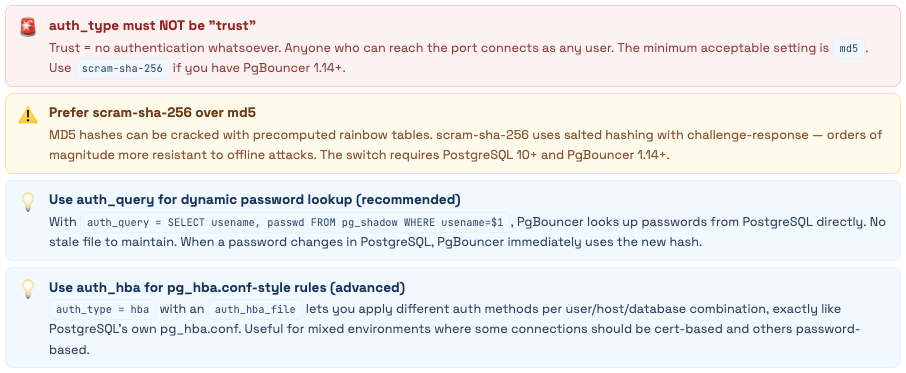
PgBouncer’s default configuration assumes you’re testing locally. In production - especially on a cloud server with a public IP - those defaults represent open doors into your database. The most dangerous is so quiet you might miss it: auth_type = trust.
Database had no authentication - anyone could connect as postgres
Found during a security audit after a teammate noticed the PgBouncer config looked “off.” Our setup: auth_type = trust, listen_addr = *, max_client_conn = 10000, public IP, port 6432 open in the firewall from a testing session that was never cleaned up.
What that combination means in practice: any person, anywhere in the world, who knows our server’s IP can run: psql -h our-server-ip -p 6432 -U postgres -d any_database and get in. No password. No challenge. The superuser. Every database. Every table. All data. Full DDL access.
They could: read user emails and passwords, exfiltrate billing data, drop all tables, create a backdoor user for later, or quietly siphon data for weeks without any obvious trace in normal query logs (PgBouncer with trust auth doesn’t log auth failures because there are none).
We got lucky. The server had been in this state for 6 months before we caught it.
Fix - 5 Minutes, Zero Downtime Change auth_type = trust to auth_type = scram-sha-256. Add auth_file = /etc/pgbouncer/userlist.txt. Generate the file from pg_shadow. Run RELOAD; in the admin console. Done. No connections dropped, no restart needed.
The Complete Security Checklist
🔐 Authentication - Fix These First
🌐 Network Access
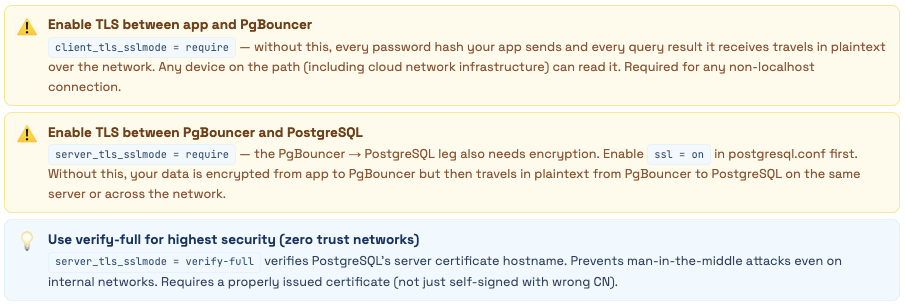
🔒 TLS Encryption
⏱️ Timeouts as Security Controls
📁 File and Process Permissions

Setting Up Authentication the Right Way
# ── Option A: Static userlist.txt ────────────────────────────────
# Generate hashed passwords from PostgreSQL
sudo -u postgres psql -t -A -c \
  "SELECT '\"' || usename || '\" \"' || passwd || '\"' FROM pg_shadow;" \
  > /etc/pgbouncer/userlist.txt
chmod 600 /etc/pgbouncer/userlist.txt
chown pgbouncer:pgbouncer /etc/pgbouncer/userlist.txt

# Entries look like:
# "app_user" "SCRAM-SHA-256$4096:salt=$storedkey:$serverkey"
# "postgres" "SCRAM-SHA-256$4096:..."

# ── Option B: auth_query (RECOMMENDED) ───────────────────────────
# Create a dedicated lookup user in PostgreSQL
CREATE ROLE pgb_auth LOGIN PASSWORD 'use-a-very-strong-password';
GRANT SELECT ON pg_shadow TO pgb_auth;

# userlist.txt only needs this one user
echo '"pgb_auth" "use-a-very-strong-password"' > /etc/pgbouncer/userlist.txt
chmod 600 /etc/pgbouncer/userlist.txt

# pgbouncer.ini additions:
# auth_type = scram-sha-256
# auth_file = /etc/pgbouncer/userlist.txt
# auth_user = pgb_auth
# auth_query = SELECT usename, passwd FROM pg_shadow WHERE usename=$1
# Now any PostgreSQL user can connect through PgBouncer
# without needing to be in userlist.txt separately

# Apply - no downtime:
psql -U postgres -h 127.0.0.1 -p 6432 pgbouncer -c "RELOAD;"
TLS Setup
# Generate self-signed certificate (replace with CA-signed cert for production)
openssl req -new -x509 -days 365 -nodes \
  -out /etc/ssl/certs/pgbouncer.crt \
  -keyout /etc/ssl/private/pgbouncer.key \
  -subj "/CN=pgbouncer-server"

chmod 600 /etc/ssl/private/pgbouncer.key
chown pgbouncer:pgbouncer /etc/ssl/private/pgbouncer.key /etc/ssl/certs/pgbouncer.crt

# pgbouncer.ini TLS settings:
# client_tls_sslmode = require          # app → PgBouncer must use TLS
# client_tls_cert_file = /etc/ssl/certs/pgbouncer.crt
# client_tls_key_file = /etc/ssl/private/pgbouncer.key
# client_tls_protocols = secure          # TLSv1.2+ only
# client_tls_ciphers = fast              # good cipher selection

# For PgBouncer → PostgreSQL TLS:
# server_tls_sslmode = require
# server_tls_ca_file = /etc/ssl/certs/postgresql-ca.crt  (if verify-ca/full)

# Also update postgresql.conf:
# ssl = on
# ssl_cert_file = server.crt
# ssl_key_file = server.key
The Fixed Production Config
[databases]
* = host=127.0.0.1 port=5432   # localhost (PgBouncer and PG on same server)

[pgbouncer]
listen_addr = *
listen_port = 6432
unix_socket_dir = /var/run/postgresql

# FIXED: was 'trust'
auth_type = scram-sha-256
auth_file = /etc/pgbouncer/userlist.txt
auth_user = pgb_auth
auth_query = 'SELECT usename, passwd FROM pg_shadow WHERE usename=$1'
admin_users = postgres
stats_users = monitoring_user

pool_mode = transaction
default_pool_size = 20         # FIXED: was 150 (exceeded max_connections)
min_pool_size = 5
reserve_pool_size = 5
reserve_pool_timeout = 5

max_client_conn = 5000
max_db_connections = 70        # FIXED: was 50, now aligned with max_connections=100
max_user_connections = 50

# Server lifecycle - ADDED: was missing entirely
server_lifetime = 1800
server_idle_timeout = 300
server_connect_timeout = 15
server_login_retry = 15
server_check_query = SELECT 1
server_check_delay = 30
server_reset_query = DISCARD ALL

# Client timeouts - FIXED: all were 0 or missing
client_idle_timeout = 300
client_login_timeout = 60
query_timeout = 300
query_wait_timeout = 30       # FIXED: was 120 (clients silently queued for 2 min)
idle_transaction_timeout = 60  # CRITICAL: was 0, caused our 2am incident

# TLS - ADDED: was completely absent
client_tls_sslmode = require
client_tls_cert_file = /etc/ssl/certs/pgbouncer.crt
client_tls_key_file = /etc/ssl/private/pgbouncer.key
client_tls_protocols = secure
server_tls_sslmode = require

tcp_keepalive = 1
tcp_keepidle = 120
tcp_keepintvl = 30
tcp_keepcnt = 3

logfile = /var/log/postgresql/pgbouncer.log
log_connections = 1
log_disconnections = 1
log_pooler_errors = 1
stats_period = 60

ignore_startup_parameters = extra_float_digits
App-Side Changes - Every Framework
What to update in Python, Django, Node.js, Java, and Go - and the common traps
Switching your app to PgBouncer is mostly just changing a port number. But transaction mode has a handful of restrictions, and some frameworks have their own connection pooling that conflicts with PgBouncer in non-obvious ways. Here’s the complete picture for every major stack.
The Universal Rules
-- ❌ BREAKS: Session-level SET (lost when connection returns to pool)
SET timezone = 'UTC';
SET search_path = myschema;

-- ✅ WORKS: SET LOCAL inside a transaction
BEGIN;
  SET LOCAL timezone = 'UTC';
  SET LOCAL search_path = myschema;
  -- ... your queries ...
COMMIT;

-- ✅ WORKS: Connection-string options (applied at connect time)
-- postgresql://user:pass@host:6432/db?options=-c%20timezone%3DUTC%20-c%20search_path%3Dmyschema

-- ❌ BREAKS: SQL-level named prepared statements
PREPARE get_user AS SELECT * FROM users WHERE id = $1;
EXECUTE get_user(42);

-- ✅ WORKS: Protocol-level parameterized queries (what drivers do automatically)
-- cursor.execute("SELECT * FROM users WHERE id = %s", [42])
-- Most ORMs and drivers use protocol-level prepared stmts by default - this works fine

-- ❌ BREAKS: Session advisory locks
SELECT pg_advisory_lock(12345);
-- Lock tied to backend session - different transaction may get different backend

-- ✅ WORKS: Transaction advisory locks
SELECT pg_advisory_xact_lock(12345);
-- Lock scoped to the current transaction - released on COMMIT/ROLLBACK

-- ❌ BREAKS: DECLARE CURSOR (without HOLD)
DECLARE mycursor CURSOR FOR SELECT * FROM large_table;

-- ✅ WORKS: DECLARE CURSOR WITH HOLD
DECLARE mycursor CURSOR WITH HOLD FOR SELECT * FROM large_table;

-- ❌ BREAKS: LISTEN/NOTIFY (needs persistent connection)
LISTEN events;
-- Use a dedicated direct connection to port 5432 for LISTEN only
-- Route everything else through PgBouncer on port 6432
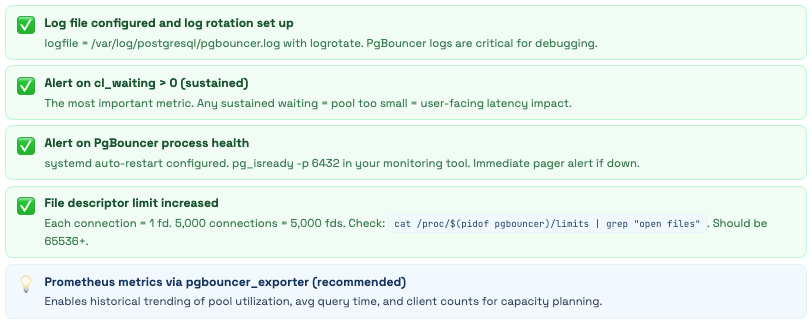
What to Alert On
Scaling Strategies
From tuning a single instance to running multiple PgBouncers, read replicas, and SO_REUSEPORT
PgBouncer is single-threaded - one process, one CPU core. For most workloads, one instance on modern hardware handles 20,000-30,000 client connections without breaking a sweat. But when you need to go further, or when you want to add read/write splitting, here are the patterns that work.
Strategy 1: Vertical Tuning First
Before running multiple instances, make sure you’ve extracted everything from a single instance. These settings are usually the bottleneck before the thread limit matters:
[pgbouncer]
;;; Connectivity ;;;
unix_socket_dir = /var/run/postgresql
unix_socket_mode = 0777
# Use a high-performance listen address
listen_addr = *
listen_port = 6432

;;; Performance Tuning ;;;
# LIFO (0) is better for cache hits; Round Robin (1) is better for balancing multi-node
server_round_robin = 0

# Health check optimization
server_check_delay = 30
server_check_query = select 1

# Buffer Management
# 4096 is standard. If you return huge rows, 8192 can reduce syscalls.
pkt_buf = 4096

# Memory & Connections
max_client_conn = 10000
default_pool_size = 20
# Allow short bursts above pool size
reserve_pool_size = 5

;;; Logging (Disable for max performance) ;;;
log_connections = 0
log_disconnections = 0
log_stats = 1
stats_period = 60
Strategy 2: Read/Write Splitting
Route write queries to the primary and read queries to replicas. PgBouncer itself doesn’t understand SQL enough to do automatic routing - you need to either use separate connection strings in your app or use database name routing:
[databases]
# Primary (Writes): Transaction pooling is best for high-concurrency web apps
mydb = host=primary-db.internal port=5432 dbname=mydb pool_mode=transaction max_db_connections=50

# Replica (Reads): Can handle more connections; great for heavy SELECTs
mydb_readonly = host=replica-db.internal port=5432 dbname=mydb pool_mode=transaction max_db_connections=100

[pgbouncer]
listen_addr = *
listen_port = 6432
auth_type = md5
auth_file = /etc/pgbouncer/userlist.txt

# Keep these low to prevent "Connection Starvation" on the Primary
default_pool_size = 20
reserve_pool_size = 10
Strategy 3: Multiple PgBouncer Instances (Scale Beyond One CPU Core)
PgBouncer is single-threaded. When you’re handling 20,000+ connections or your metrics show PgBouncer’s CPU pinned at 100% on one core, it’s time to run multiple instances. You have two options:
[databases]
;;; ROUTING: Split your traffic here ;;;
# Primary for Writes
mydb          = host=primary-db.internal port=5432 dbname=mydb pool_mode=transaction

# Replica for Reads
mydb_readonly = host=replica-db.internal port=5432 dbname=mydb pool_mode=transaction

[pgbouncer]
;;; CONNECTIVITY ;;;
listen_addr = *
listen_port = 6432
unix_socket_dir = /var/run/postgresql
unix_socket_mode = 0777
auth_type = md5
auth_file = /etc/pgbouncer/userlist.txt

;;; MULTI-CORE SCALING (Option B) ;;;
# Allows multiple processes to bind to port 6432
so_reuseport = 1

;;; PERFORMANCE TUNING ;;;
# LIFO: keeps the "hottest" Postgres backends active
server_round_robin = 0

# Health check optimization (shaves off unnecessary SELECT 1)
server_check_delay = 30
server_check_query = select 1

# Buffers: 4096 is standard; 8192 if you handle very wide rows
pkt_buf = 4096

;;; CONNECTION LIMITS ;;;
# Per-process limits. If you run 4 instances, total = 40k clients
max_client_conn = 10000
default_pool_size = 20
reserve_pool_size = 5

;;; LOGGING ;;;
# Set to 0 in production to save CPU cycles
log_connections = 0
log_disconnections = 0
log_stats = 1
stats_period = 60
Strategy 4: Per-Service Connection Limits
Once you have multiple PgBouncer instances or pools, you can enforce SLAs at the connection layer - preventing any one service from monopolizing database connections:
[databases]
;;; Application-Level Isolation ;;;
# Web app: High priority, large pool for low latency
mydb           = host=/var/run/postgresql port=5432 dbname=mydb pool_size=25 pool_mode=transaction

# Workers: Medium priority, smaller pool for background tasks
mydb_workers   = host=/var/run/postgresql port=5432 dbname=mydb pool_size=8 pool_mode=transaction

# Analytics: Low priority, tiny pool to prevent "connection hogging"
mydb_analytics = host=/var/run/postgresql port=5432 dbname=mydb pool_size=3 pool_mode=session

;;; Read/Write Splitting (Optional Replica) ;;;
# If you have a replica, route it here
mydb_readonly  = host=replica-db.internal port=5432 dbname=mydb pool_size=50

[users]
;;; User-Level Hard Limits ;;;
# Even if the app tries to scale, the kernel/PgBouncer will cap these users
analytics_user    = max_user_connections=3
background_worker = max_user_connections=8

[pgbouncer]
;;; Connectivity & Scaling ;;;
listen_addr = *
listen_port = 6432
unix_socket_dir = /var/run/postgresql
unix_socket_mode = 0777
auth_type = md5
auth_file = /etc/pgbouncer/userlist.txt

# Option B: Multi-process scaling (one process per CPU core)
so_reuseport = 1

;;; Performance Tuning ;;;
# LIFO: keeps the "hottest" Postgres backends active for cache hits
server_round_robin = 0
server_check_delay = 30
server_check_query = select 1
pkt_buf = 4096

;;; Global Limits (Per Process) ;;;
max_client_conn = 10000
default_pool_size = 20
log_connections = 0
log_disconnections = 0
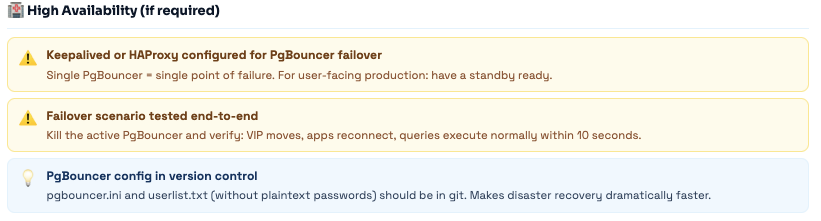
High Availability
PgBouncer is a single point of failure - here’s how to fix that with Keepalived, HAProxy, and Patroni
In a single-PgBouncer setup, if PgBouncer goes down, all application database connections fail immediately. For anything user-facing, this is unacceptable. Here are three approaches to PgBouncer HA, from simplest to most sophisticated.
Approach 1: Keepalived VIP Failover (Simplest)
Run two PgBouncer instances (active + standby). A virtual IP (VIP) floats between them. When the active fails, Keepalived moves the VIP to the standby within 2-5 seconds. Apps connect to the VIP and never need to know which physical server is active.
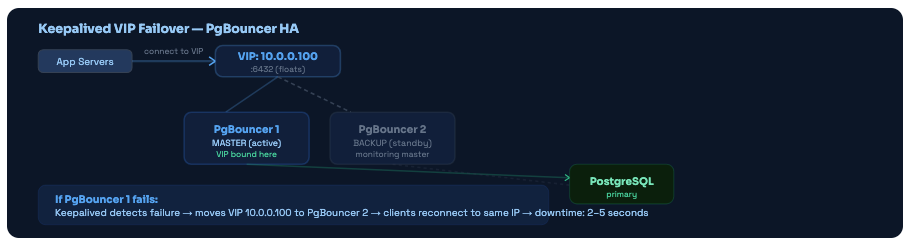
Keepalived VIP failover. Apps always connect to the VIP. When the master fails, the VIP moves to the backup within seconds. No app config changes required.
Approach 2: HAProxy Load Balancer (Active-Active)
Instead of active-passive failover, run multiple PgBouncer instances simultaneously and use HAProxy to distribute connections. Zero downtime when one PgBouncer fails - HAProxy simply stops sending connections to it.
Approach 3: Patroni Integration (Automatic Primary Failover)
Patroni manages PostgreSQL HA - when the primary PostgreSQL fails, Patroni promotes a replica and updates the cluster state. PgBouncer needs to know where the new primary is.
Troubleshooting - Every Error You’ll Actually See
The ten most common PgBouncer errors, why they happen, and exactly how to fix each one
PgBouncer errors are often cryptic the first time you see them. Here’s the full list of common errors, decoded - what they mean, what causes them, and the exact steps to resolve each.
ERROR: no more connections allowed (max_client_conn)
You’ve hit the max_client_conn limit. PgBouncer is rejecting all new client connections. This happens when: (1) a crashed app server is leaving its connections open, (2) a connection leak in your application (opening connections without closing them), or (3) max_client_conn is set too low for your actual workload.
Diagnose: SHOW LISTS → used_clients. If used_clients ≈ max_client_conn, check which clients are idle longest via SHOW CLIENTS sorted by connect_time. Fix: set client_idle_timeout = 300 to auto-clean abandoned connections. Short-term: increase max_client_conn. Long-term: find and fix the connection leak.
ERROR: query_wait_timeout - client waited too long for a server connection
The pool was fully saturated and the client had to wait longer than query_wait_timeout (default: 120 seconds) for a free backend. This is the clearest signal of pool saturation. It often manifests as “random” slow requests during peak traffic - not slow because the query is slow, but slow because the connection itself took 30-120 seconds to acquire.
Diagnose: SHOW POOLS → cl_waiting and sv_active. If sv_active = pool_size constantly, the pool is too small. Option A: increase default_pool_size. Option B: find long-running queries holding backends (check pg_stat_activity). Option C: use multiple PgBouncers to isolate workloads.
WARNING: server login failed - authentication failure connecting to PostgreSQL
PgBouncer can reach PostgreSQL on the network but can’t authenticate. Common causes: (1) password hash in userlist.txt doesn’t match what PostgreSQL expects, (2) pg_hba.conf is rejecting PgBouncer’s connection (wrong IP, wrong auth method), (3) auth_type in pgbouncer.ini doesn’t match PostgreSQL’s configured method, (4) the user doesn’t exist in PostgreSQL.
Step 1: Test direct connection: psql -U app_user -h 127.0.0.1 -p 5432 -d mydb. If this fails, it's a PG config issue - check pg_hba.conf. Step 2: Regenerate userlist.txt from pg_shadow. Step 3: Verify auth_type in pgbouncer.ini matches PostgreSQL's expected method. Step 4: Check PgBouncer logs for the specific error message.
ERROR: pgbouncer cannot connect to server - connection refused or timeout
PgBouncer can’t establish new connections to PostgreSQL at all. Causes: (1) PostgreSQL is down or not listening, (2) max_connections on PostgreSQL has been reached (all slots taken by existing connections plus superuser reserve), (3) network issue between PgBouncer and PostgreSQL, (4) wrong host/port in pgbouncer.ini [databases] section.
Step 1: pg_isready -h 127.0.0.1 -p 5432 - is PostgreSQL accepting connections? Step 2: psql -U postgres -c "SELECT count(*) FROM pg_stat_activity;" - is max_connections reached? Step 3: Check pg_hba.conf allows PgBouncer's IP. Step 4: Verify host in pgbouncer.ini [databases] section is correct.
ERROR: unsupported startup parameter: extra_float_digits (or application_name)
Your client is sending startup parameters in the connection handshake that PgBouncer doesn’t recognize. Common culprits: JDBC drivers (extra_float_digits), psycopg2 (various), and ORMs that add application_name. This causes the connection to fail entirely - the client gets an error and can’t connect.
Add the offending parameter to ignore_startup_parameters in pgbouncer.ini: ignore_startup_parameters = extra_float_digits,application_name. Then RELOAD. This tells PgBouncer to accept but ignore those parameters.
My SET statements aren’t working - values reset between transactions
This is expected behavior in transaction mode - not a bug. Session-level SET is applied to a specific backend. When your transaction ends and the backend returns to the pool, the SET is gone. Your next transaction may run on a completely different backend (or the same one after DISCARD ALL ran and cleared everything).
Three fixes depending on your situation: (1) Use SET LOCAL inside a transaction: BEGIN; SET LOCAL timezone='UTC'; ...; COMMIT; (2) Pass settings in connection string options: ?options=-c%20timezone%3DUTC (3) Use per-database connect_query in pgbouncer.ini: mydb = host=127.0.0.1 connect_query='SET timezone=UTC'
ERROR: prepared statement “s1” already exists - JDBC/Hibernate issue
JDBC drivers by default use named server-side prepared statements (prepareThreshold=5 means after 5 executions, it creates a named prepared statement on the backend). In transaction mode, if a different backend is assigned next time, it doesn’t know about “s1” and returns this error. Very common with Spring Boot + Hibernate setups.
In your JDBC connection string: add prepareThreshold=0 (never use named prepared statements) or preparedStatementCacheQueries=0. For HikariCP: config.addDataSourceProperty("prepareThreshold", "0");. For Spring Boot: add ?prepareThreshold=0 to the datasource URL.
Connections dropping every 30 minutes - server connection closed (age)
Not an error - this is server_lifetime working correctly. PgBouncer is recycling backends on schedule to prevent RSS memory bloat. When a backend is closed and reopened, any transaction in progress gets an error. Your application should handle this with connection retry logic.
If this is causing issues: (1) Ensure your app's database driver has reconnection/retry logic (most do automatically). (2) If the timing is causing problems, increase server_lifetime to 3600 (1 hour). (3) Set MaxConnLifetime in your app-side pool slightly below server_lifetime so the app proactively closes connections before PgBouncer does.
LISTEN/NOTIFY stops working after switching to PgBouncer
LISTEN requires a persistent connection that never returns to the pool. In transaction mode, the connection is shared - so LISTEN fires once but the next NOTIFY may go to a different backend that has no LISTEN registered. The connection pattern is fundamentally incompatible with transaction pooling.
Maintain one dedicated direct connection to PostgreSQL on port 5432 (bypassing PgBouncer) exclusively for LISTEN/NOTIFY. Route all other database operations through PgBouncer on port 6432. This is the standard production pattern.
High CPU on PgBouncer (100% on one core at scale)
PgBouncer is single-threaded. When you’re handling 20,000+ client connections or very high query volume (100,000+ queries/second), a single PgBouncer process can pin one CPU core at 100%. This isn’t a bug - it’s the architecture. The solution is horizontal scaling.
Run multiple PgBouncer instances. Option A: SO_REUSEPORT (add so_reuseport = 1 to pgbouncer.ini, start multiple processes on same port). Option B: Different ports with HAProxy distributing connections. Two PgBouncer instances on a modern server handle 40,000-60,000 connections.
PgBouncer vs Alternatives
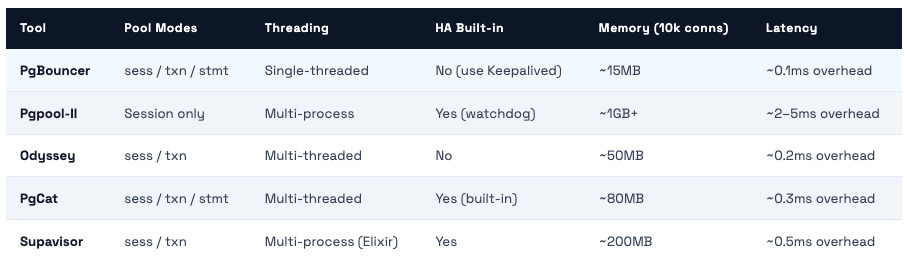
Pgpool-II, Odyssey, PgCat, Supavisor - honest comparison of when each one makes sense
PgBouncer is the most battle-tested PostgreSQL connection pooler and the right default choice for most teams. But there are situations where an alternative makes more sense. Here’s the honest comparison:
When to Use Each

Our Honest Recommendation For 95% of teams: PgBouncer + HAProxy for HA. The simplicity is a feature. The community is enormous. The troubleshooting resources are extensive. The performance is excellent. You can handle hundreds of thousands of client connections with a simple setup. Move to Odyssey or PgCat only when you have a real, measurable problem that PgBouncer genuinely can't solve - and you've verified that PgBouncer's CPU is your actual bottleneck.
Production Checklist
Everything you need before calling your PgBouncer setup production-ready
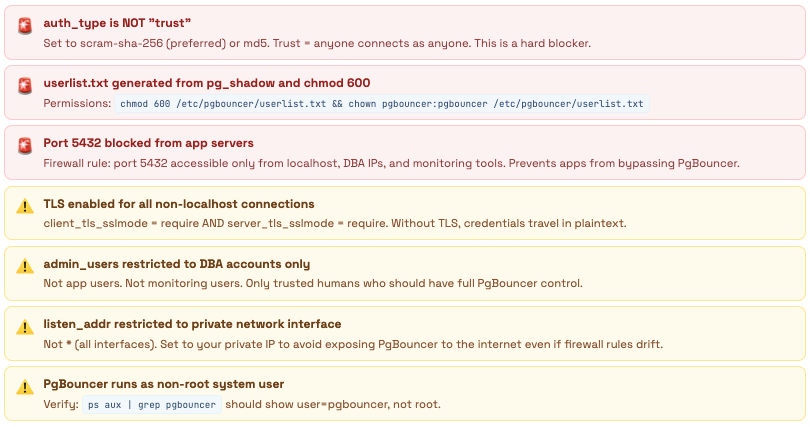
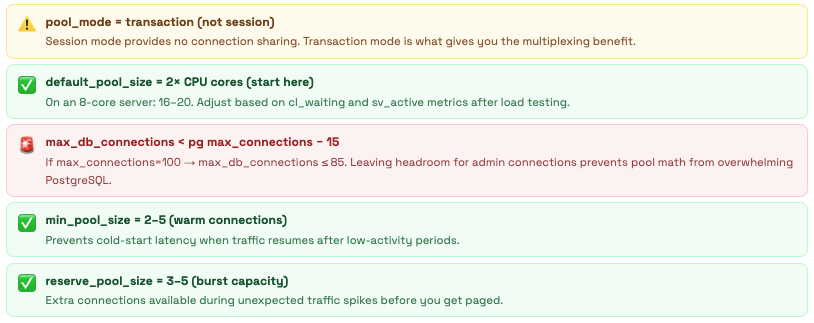
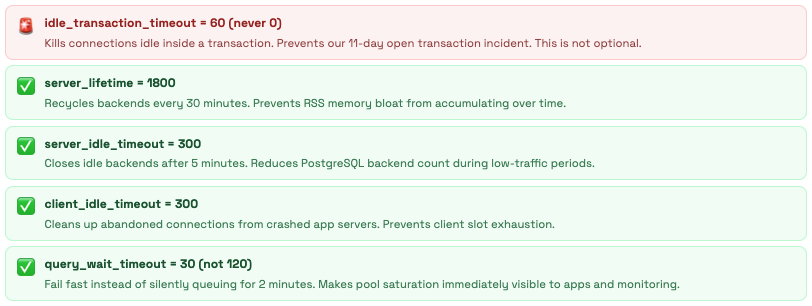
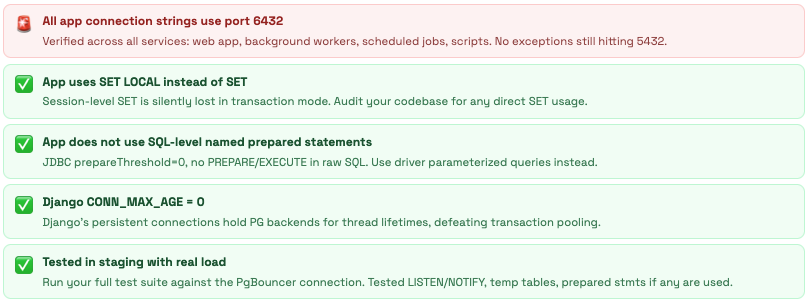
Work through this list before going live. The 🚨 items should be blockers - don’t go to production without them. The ⚠️ items are important but can follow shortly after initial deployment.
🔐 Security - Must Complete Before Production
⚙️ Pool Configuration
⏱️ Timeouts
🖥️ Application Readiness
📊 Monitoring & Operations
Comments (0)
No comments yet. Be the first to share your thoughts.
Leave a comment