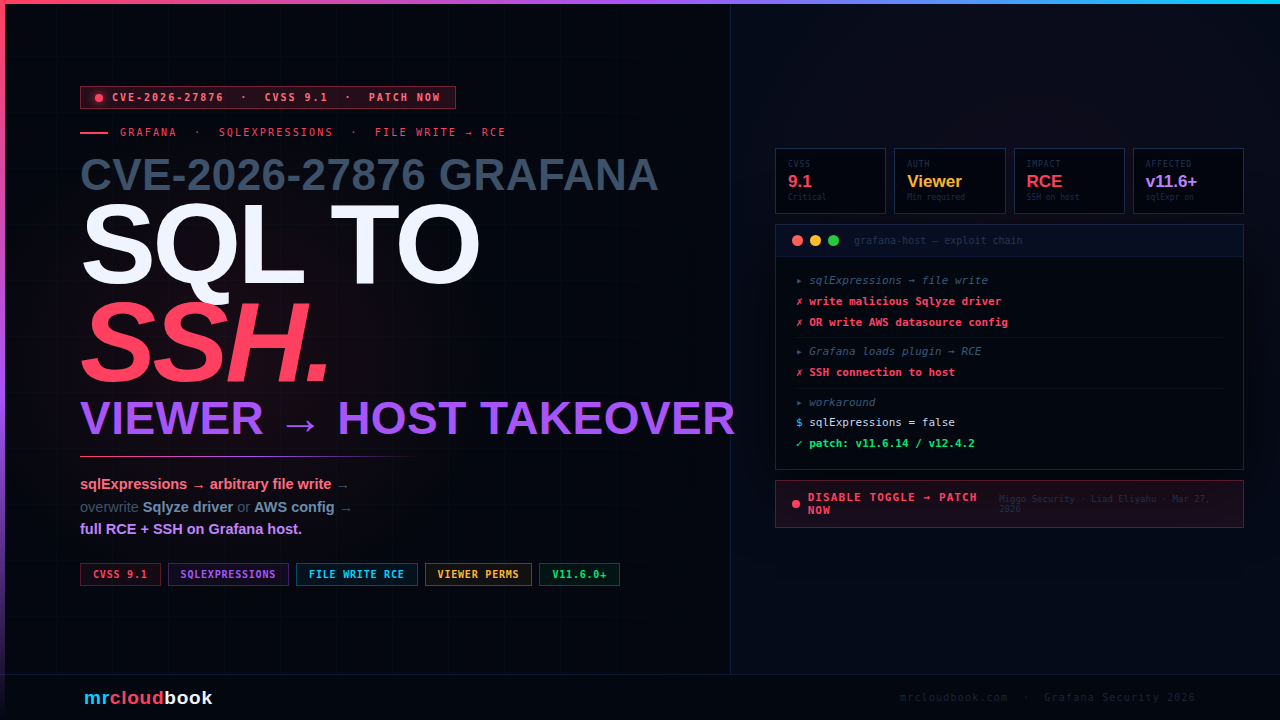
What Is Grafana’s sqlExpressions Feature?
Grafana’s SQL Expressions feature is a data transformation tool that allows users to reshape and combine query results from multiple data sources using familiar SQL syntax - all within the Grafana interface, without needing a separate database. It is toggled on via the sqlExpressions feature flag and is enabled in some Grafana Enterprise and self-hosted deployments.
The intent is to let analysts write SELECT, JOIN, and WHERE logic against in-memory representations of their dashboard data. It is a powerful productivity feature - and, as this vulnerability demonstrates, a powerful attack surface when the underlying file system access is not constrained.
Grafana versions v11.6.0 and later ship with this feature available. It must be explicitly enabled via the sqlExpressions feature toggle. Any Grafana deployment where this toggle is active and any user has at least Viewer-level permissions is in scope for this vulnerability.
⚠ Check If You Are Exposed Right Now Run this on your Grafana host to check if the feature toggle is active: `grep -r "sqlExpressions" /etc/grafana/ /var/lib/grafana/ 2>/dev/null` Or check your Grafana configuration UI: Administration → Feature Toggles → search for `sqlExpressions`. If it is enabled and you are running v11.6.0+, patch or disable immediately.
The Vulnerability - SQL Syntax Becomes Arbitrary File Write
The flaw lies in how Grafana’s SQL Expressions engine processed certain SQL constructs. While designed to operate on in-memory query data, the implementation contained a path that permitted writing files to the underlying filesystem - without any restriction on where those files could be placed or what they could contain.
In Grafana’s own words from the security advisory:
Direct from Grafana Labs Advisory "Grafana's SQL expressions feature enables transforming query data with familiar SQL syntax. This syntax, however, also permitted writing arbitrary files to the file system in such a way that one could chain several attack vectors to achieve remote code execution." "We have confirmed this vulnerability could be exploited to acquire an SSH connection to the Grafana host."
The key insight: arbitrary file write + knowledge of where Grafana loads plugin drivers or configuration files = remote code execution. The SQL Expressions engine provided the write primitive. Grafana’s plugin architecture provided the execution primitive. Together they form a complete exploit chain.
The attack requires Viewer permissions or higher to execute data source queries. Viewer is the lowest authenticated permission level in Grafana - making this accessible to any authenticated user in a multi-tenant or shared Grafana deployment, not just administrators.
The Attack Chain - SQL to SSH in Four Steps
01. Attacker authenticates with Viewer permissions (or higher)
The prerequisite is minimal. Any Grafana user account with at least Viewer-level access and the ability to execute data source queries can trigger this chain. In many enterprise deployments, Viewer access is granted broadly - to analysts, dashboard consumers, and read-only monitoring users.
02. Craft a SQL Expression payload to write an arbitrary file
The attacker constructs a sqlExpressions query that exploits the file write path in the SQL Expressions engine. The exact SQL construct that triggers the file write is not publicly specified in the advisory to protect against weaponisation, but the attack writes a controlled payload to a known filesystem path - either the Sqlyze driver location or an AWS data source configuration path.
03. Overwrite Sqlyze driver binary or AWS data source config
Two confirmed exploit paths exist. Path A: overwrite the Sqlyze driver binary at its expected location - when Grafana subsequently loads the plugin, it executes the attacker’s code. Path B: write a malicious AWS data source configuration file - when Grafana processes it, the configuration triggers code execution through the AWS plugin’s handling logic.
04. Full RCE - confirmed SSH connection to Grafana host
Plugin or driver execution occurs with Grafana’s process privileges. Grafana Labs confirmed the exploit achieves a full SSH connection to the underlying host - not just code execution within the Grafana container, but access to the server running Grafana. This means complete host compromise: all data, all credentials on the system, and potential lateral movement to connected infrastructure.
Two Confirmed RCE Paths
Path A - Sqlyze Driver Overwrite
Sqlyze is a Grafana Enterprise data source plugin. When the SQL Expressions file write is used to overwrite the Sqlyze driver binary at its expected filesystem location, Grafana loads the attacker’s binary in place of the legitimate driver. Because Grafana loads plugin drivers as part of its execution environment, the attacker’s code runs with Grafana’s process privileges.
Mitigation without patching: Update Sqlyze to at least v1.5.0 - the updated version is not vulnerable to being overwritten in this way, or disable the Sqlyze plugin entirely.
Path B - AWS Data Source Configuration Abuse
Grafana’s AWS data source plugins read their configuration from files at known paths. By writing a malicious configuration file to the expected location using the SQL Expressions file write primitive, the attacker can cause the AWS plugin to process attacker-controlled configuration - which in turn triggers code execution through the plugin’s configuration handling.
Mitigation without patching: Disable all installed AWS data source plugins until the patch is applied.
bash - check for vulnerable plugins
# Check if Sqlyze is installed and its version
grafana-cli plugins ls | grep -i sqlyze
# If installed and version < 1.5.0 → vulnerable to Path A

# Check installed AWS data source plugins
grafana-cli plugins ls | grep -i aws
# If any AWS plugins installed → vulnerable to Path B

# Check grafana.ini / grafana.yml for sqlExpressions toggle
grep -ri "sqlexpressions" /etc/grafana/
# If enabled = true → instance is in scope for this CVE

# Disable sqlExpressions as emergency workaround
# In grafana.ini under [feature_toggles]:
# sqlExpressions = false
# Then: systemctl restart grafana-server
CVSS 9.1 - Understanding the Score
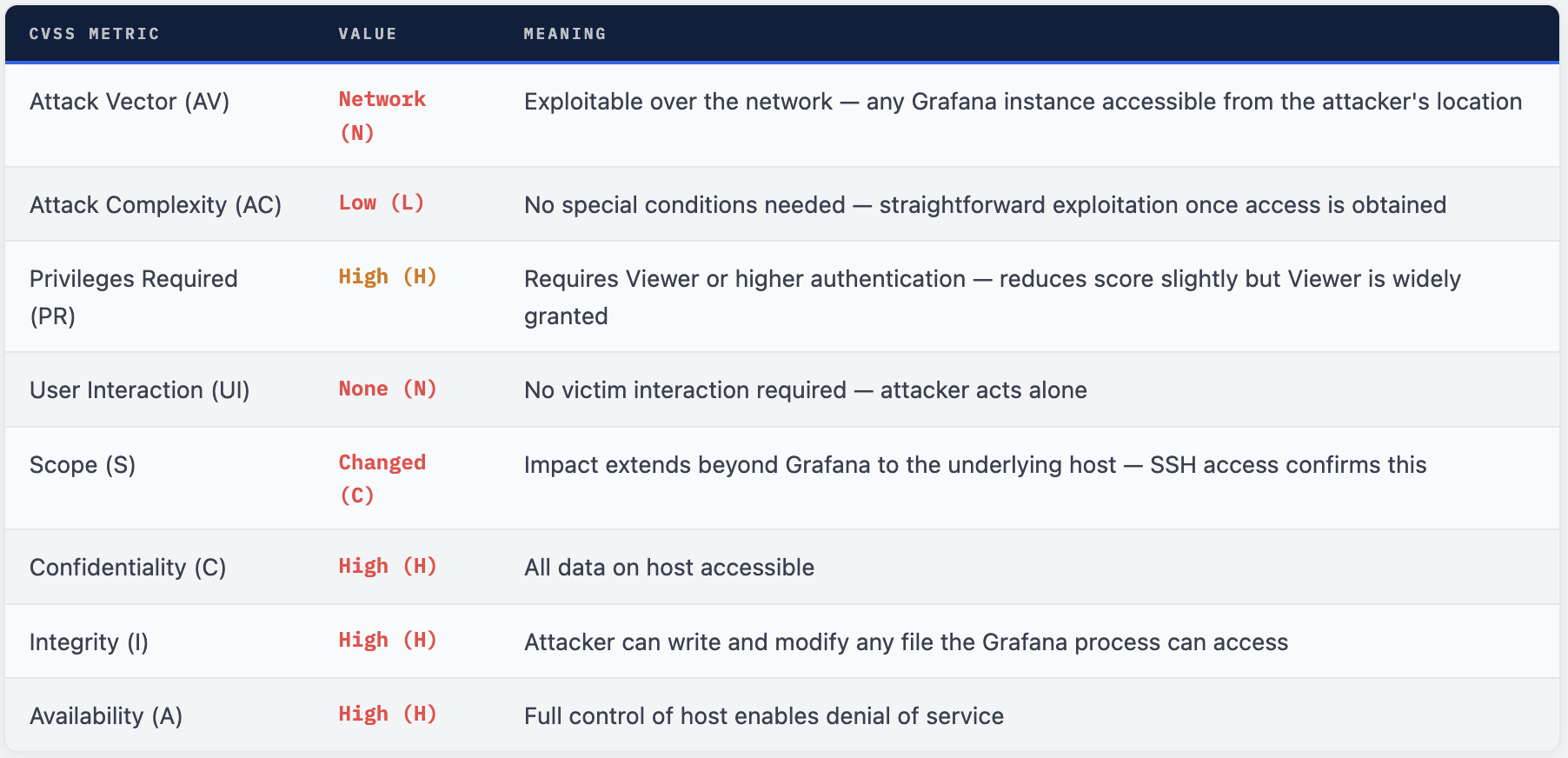
The score is 9.1 rather than 10.0 primarily because PR:H - authentication is required. However, Viewer is the broadest permission level in most Grafana deployments. In enterprise environments with dozens or hundreds of Grafana users, “requires authentication” is a very weak barrier.
CVE-2026-27880 - Unauthenticated DoS via OpenFeature
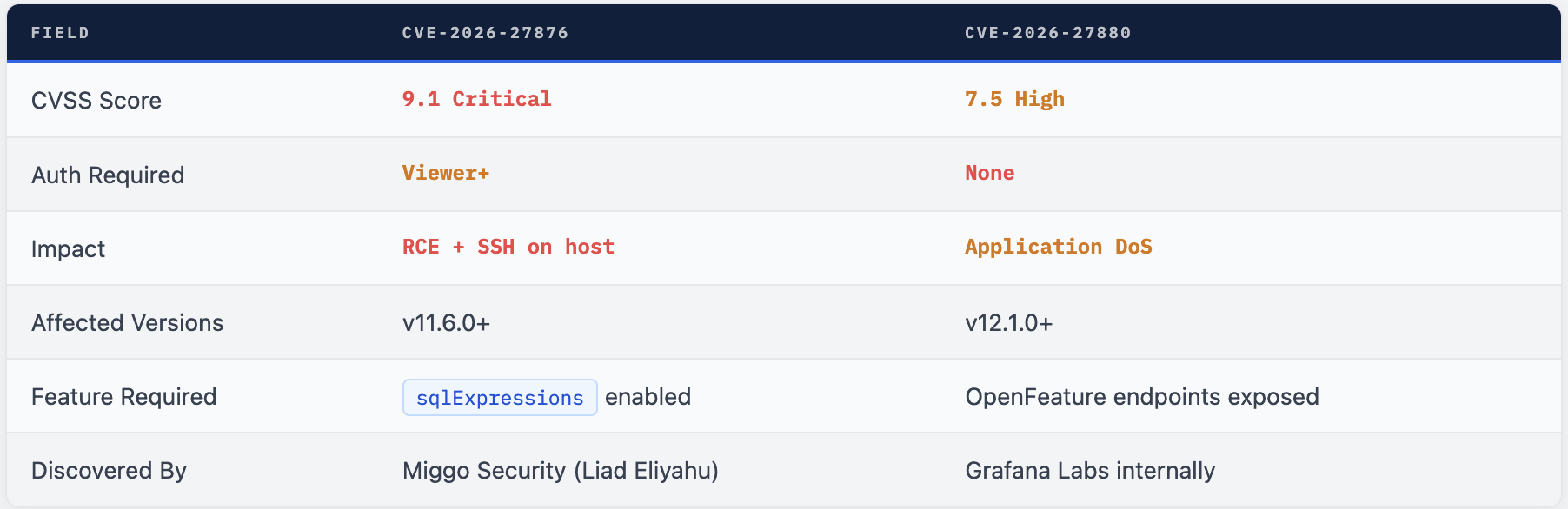
The same security release also addresses CVE-2026-27880 (CVSS 7.5 High), a denial-of-service vulnerability discovered internally by the Grafana Labs security team. This one is different in character - but notable because it requires no authentication.
The flaw affects Grafana versions 12.1.0 and later. Grafana’s OpenFeature feature flag validation endpoints fail to require authentication while simultaneously accepting unbounded user input directly into memory. An unauthenticated remote attacker can send excessively large payloads to these endpoints, causing Grafana to exhaust available memory and crash - taking down all dashboards, alerts, and monitoring in the process.
⚠ DoS Mitigation Without Patching Deploy Grafana behind a reverse proxy (Nginx, Cloudflare, AWS ALB) configured to limit maximum request body size. This prevents the memory exhaustion attack at the network layer. Also configure Grafana in a high-availability environment with automatic restart to minimize downtime if the crash occurs.
Who Is Affected
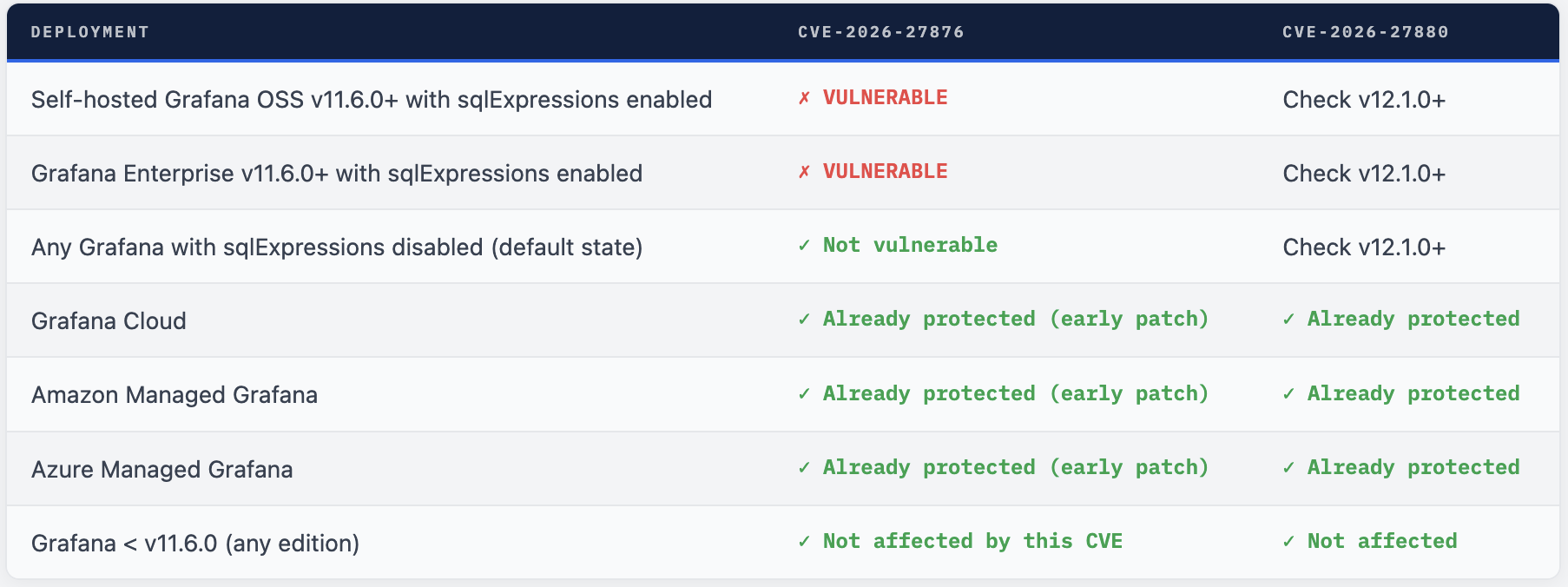
Info. 💡 Managed Services Were Pre-Patched Grafana Cloud, Amazon Managed Grafana, and Azure Managed Grafana all received early embargoed notification before public disclosure and were patched before the advisory went live. If your organisation uses any of these managed services, you are already protected. Self-hosted deployments require manual upgrade action.
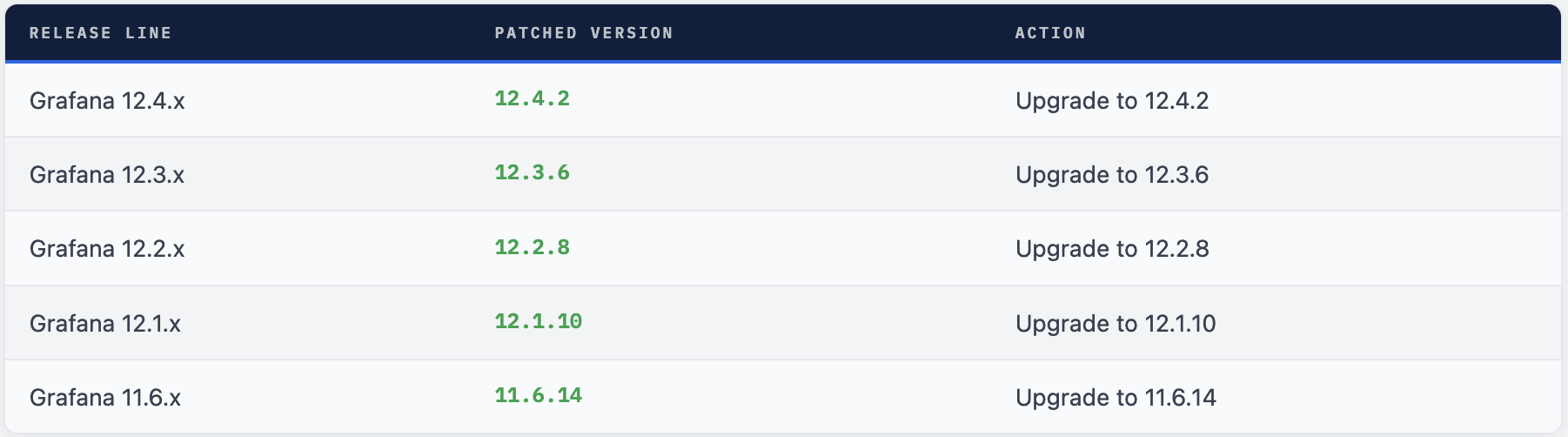
Upgrade to a Patched Version Immediately
# Check current version
grafana-server -v
# OR
grafana --version

# Linux (apt)
sudo apt-get update && sudo apt-get install grafana=11.6.14
# OR for latest in your line:
sudo apt-get install --only-upgrade grafana

# Linux (yum/dnf)
sudo dnf update grafana-11.6.14

# Docker - pull patched image
docker pull grafana/grafana:11.6.14
docker pull grafana/grafana:12.4.2
# Update your docker-compose.yml or Helm chart image tag

# Kubernetes (Helm)
helm upgrade grafana grafana/grafana \
  --set image.tag=11.6.14 \
  --namespace monitoring

# Verify after upgrade
grafana-server -v   # confirm patched version
curl -s http://localhost:3000/api/health | jq .version
What to Do Right Now
- Check your Grafana version immediately: grafana-server -v. If you are on v11.6.0 or later, you are in scope. If sqlExpressions is enabled, this is critical priority.
- Emergency workaround if immediate upgrade is not possible: Disable sqlExpressions = false in grafana.ini under [feature_toggles] and restart Grafana. This removes the attack surface entirely until you can patch.
- Disable or update Sqlyze: If you have the Sqlyze plugin installed, update it to v1.5.0+ immediately or disable it. This closes exploit Path A even on an unpatched Grafana.
- Disable AWS data source plugins if you cannot immediately patch. This closes exploit Path B. Re-enable after upgrading to a patched version.
- Upgrade to a patched version - 12.4.2, 12.3.6, 12.2.8, 12.1.10, or 11.6.14 depending on your release line. This is the only complete remediation.
- Audit Grafana logs for unusual sqlExpressions queries or unexpected file system access patterns during the exposure window. Look for queries with unusual file path parameters.
- For CVE-2026-27880: deploy a reverse proxy with request size limits in front of Grafana and ensure HA/auto-restart is configured if you are on v12.1.0+.
- Review who has Viewer access to your Grafana instances. In multi-tenant or enterprise deployments, Viewer is a low bar - any of those users could have exploited this if sqlExpressions was enabled.
SQL to SSH - Why This Is Serious
CVE-2026-27876 is a 9.1 critical because it converts a data transformation feature into a file write primitive and chains it through Grafana’s plugin architecture to achieve full host compromise. The attack outcome - an SSH connection to the Grafana server - is complete host takeover, not just Grafana compromise. Everything on that host is in scope: database credentials, internal service tokens, network access to connected monitoring targets.
The Viewer permission requirement is meaningful on paper but thin in practice. Grafana is a monitoring platform where broad read access is the norm. The question for most organisations is not “do we have Viewer users?” but “could any of our Viewer users have malicious intent or be compromised accounts?” The answer for any mature deployment is yes to both possibilities.
The good news: the fix is straightforward. Patched versions exist for every supported release line. Managed services are already protected. The emergency workaround - disabling the feature toggle - is a single config change. Grafana Labs responded appropriately and the vulnerability was disclosed responsibly by Miggo Security through the bug bounty programme.
Disable sqlExpressions. Then Patch. In That Order.
If you cannot patch immediately, disable the toggle now. It takes 60 seconds and closes the attack surface entirely while you schedule the upgrade.
RFERENCE
https://grafana.com/security/security-advisories/cve-2026-27876
Comments (0)
No comments yet. Be the first to share your thoughts.
Leave a comment