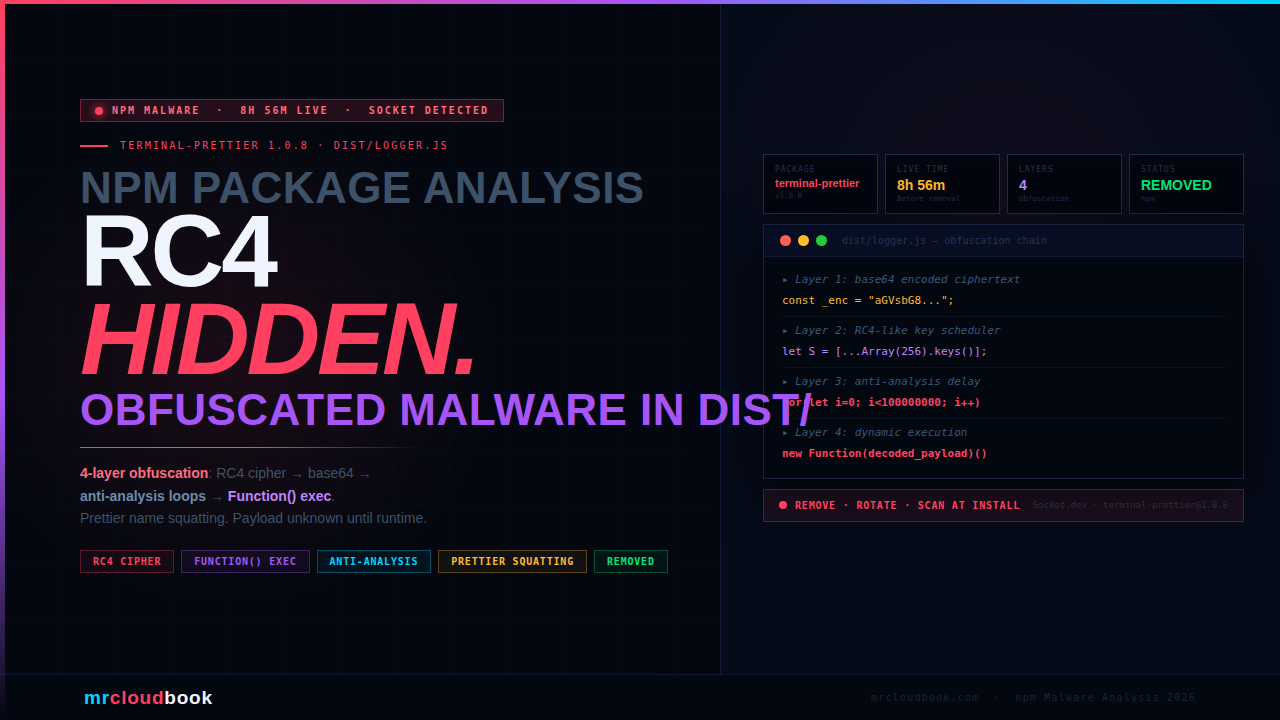
Terminal-prettier exploits the naming convention of the legitimate and hugely popular prettier formatter to appear credible to developers. Version 1.0.8’s dist/logger.js file - flagged by Socket’s automated scanner - implements a four-layer obfuscation chain: RC4-like stream cipher decryption, base64 decoding, anti-analysis delay loops, and a Function constructor that executes the decoded payload as a string - making static analysis of the source code essentially useless. Socket confirmed the package as suspicious and it was removed from npm after 8 hours and 56 minutes live on the registry.
What Is terminal-prettier?
On the surface, terminal-prettier presents itself as a terminal output formatting utility - the kind of small helper package that developers install without much scrutiny because the name is familiar-sounding, the category is mundane, and the package count on npm is enormous. Under the surface, version 1.0.8 is a malicious package with a deliberately obfuscated payload file.
The package name is a calculated choice. prettier is one of the most recognised names in JavaScript developer tooling - an opinionated code formatter with 80+ million weekly downloads. By prepending terminal-, the attacker creates a plausible-sounding package name that a developer scanning search results might not look twice at. This is a naming-convention squatting attack - not a misspelling (typosquatting), but the appropriation of a trusted name into a new, seemingly legitimate context.
The package passed the initial scan that many developers would perform: it had a sensible name, versioning that implied an established package history (thirteen versions exist across 1.0.x), and a dist/logger.js file that looks, at a glance, like compiled output from a legitimate build process. The malice is entirely concealed inside the runtime decryption chain.
💡 Versions on npm terminal-prettier has 13 published versions (1.0.0 through 1.1.2, with 1.0.7 unpublished). Version 1.0.8 is the confirmed malicious version flagged by Socket. The existence of earlier and later versions is part of the credibility pattern - a package with a history looks less suspicious than a brand-new uplo
How It Passes the First-Look Test
Modern supply chain attacks succeed not by being invisible, but by being boring enough not to inspect closely. terminal-prettier 1.0.8 uses several credibility mechanisms to avoid scrutiny before the malicious payload ever runs.
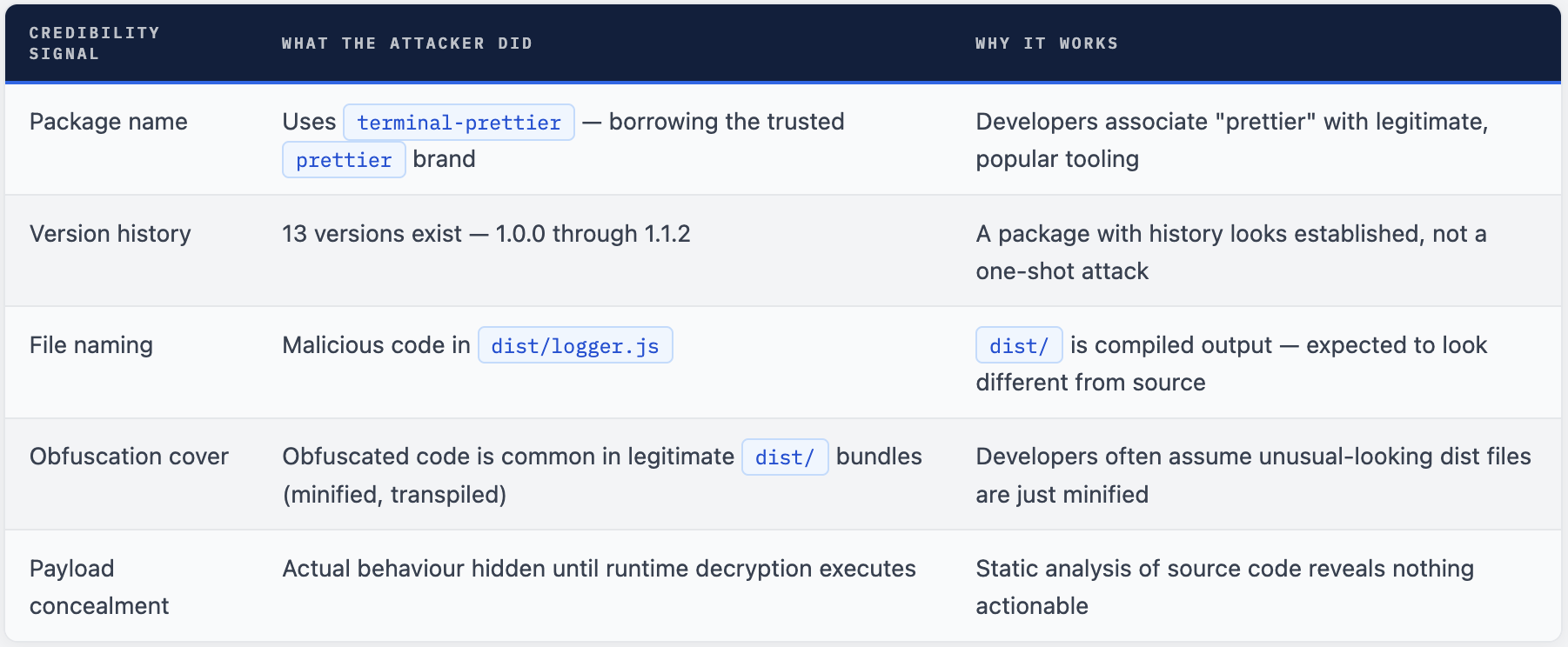
⚠ The "It's Just Minified" Assumption Minification and bundling legitimately produce unreadable `dist/` files. Attackers exploit this. When a developer sees heavily encoded content in a `dist/` folder, the default assumption is "that's just webpack output" - not "that's a cipher decoder concealing a payload." The attacker is deliberately exploiting the visual similarity between minified legitimate code and obfuscated malware.
Four Layers of Concealment in dist/logger.js
Socket’s analysis of dist/logger.js from terminal-prettier 1.0.8 identified a four-stage obfuscation chain that progressively decodes and executes a concealed payload. Each layer serves a specific purpose in evading static analysis and sandbox detection.
dist/logger.js (reconstructed pattern)
// LAYER 1 - Base64 encoded payload string
// The actual payload is stored as a long base64 string
// Looks like bundled/encoded data - hard to read statically
const _enc = "aGVsbG8...";  // base64-encoded ciphertext

// LAYER 2 - RC4-like stream cipher decoder
// Decodes the base64 string using a key-scheduled cipher
function _rc4(key, data) {
  // Key scheduling algorithm (KSA)
  let S = [...Array(256).keys()];
  // Pseudo-random generation algorithm (PRGA)
  // XOR decryption produces the next layer
}

// LAYER 3 - Anti-analysis delay loops
// CPU-burning loops that slow down sandbox execution
// and cause timing-based sandboxes to miss the payload
for (let i = 0; i < 100000000; i++) { /* busy loop */ }

// LAYER 4 - Dynamic code execution via Function constructor
// Decoded payload string executed as live JavaScript
// Static analysis cannot see what this runs
const payload = _rc4(key, atob(_enc));
new Function(payload)();  // ← payload runs here - invisible to static tools

// HIDDEN DYNAMIC REQUIRE
// After Function() executes, a dynamic require() loads
// additional modules whose names are only known at runtime
require(decodedModuleName);  // ← module name was in the ciphertext
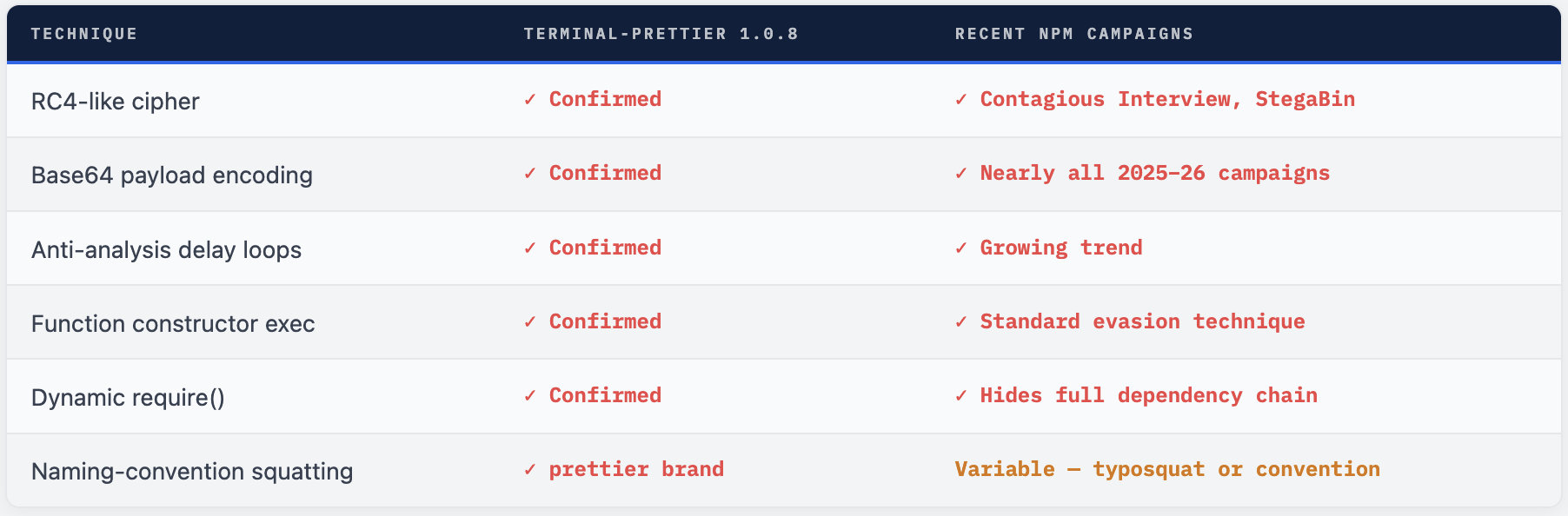
The chain design is deliberate: each layer defeats a different category of detection. Base64 encoding defeats simple string searches for known-bad patterns. The RC4-like cipher means the actual payload content is never present in the source as plaintext. The anti-analysis loops defeat time-limited sandbox environments that abort execution after a fixed period. And the Function constructor defeats static AST analysis - there is no way to know what the final executed code does without running it.
Why Each Obfuscation Layer Exists
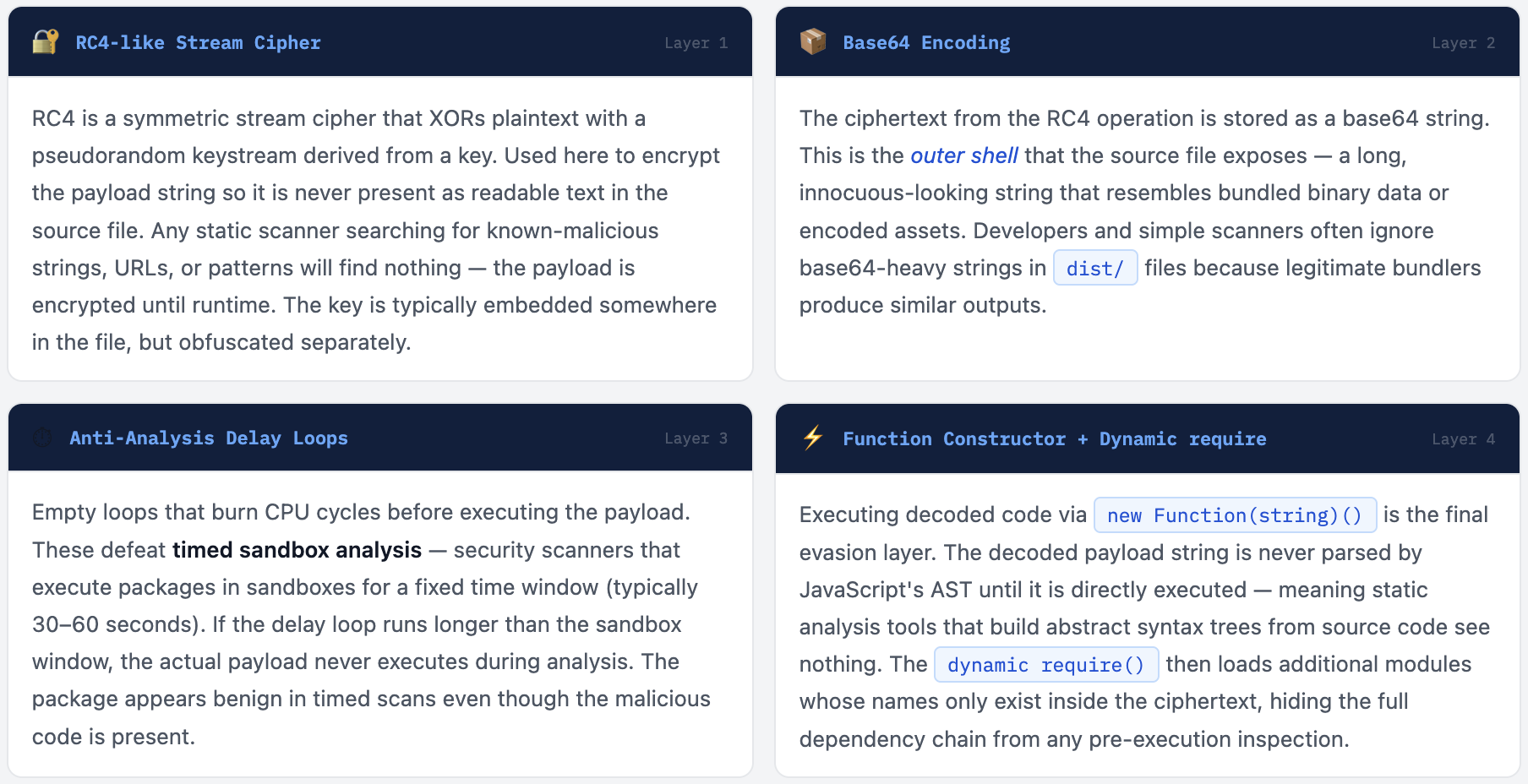
Why This Combination Is Specifically Chosen
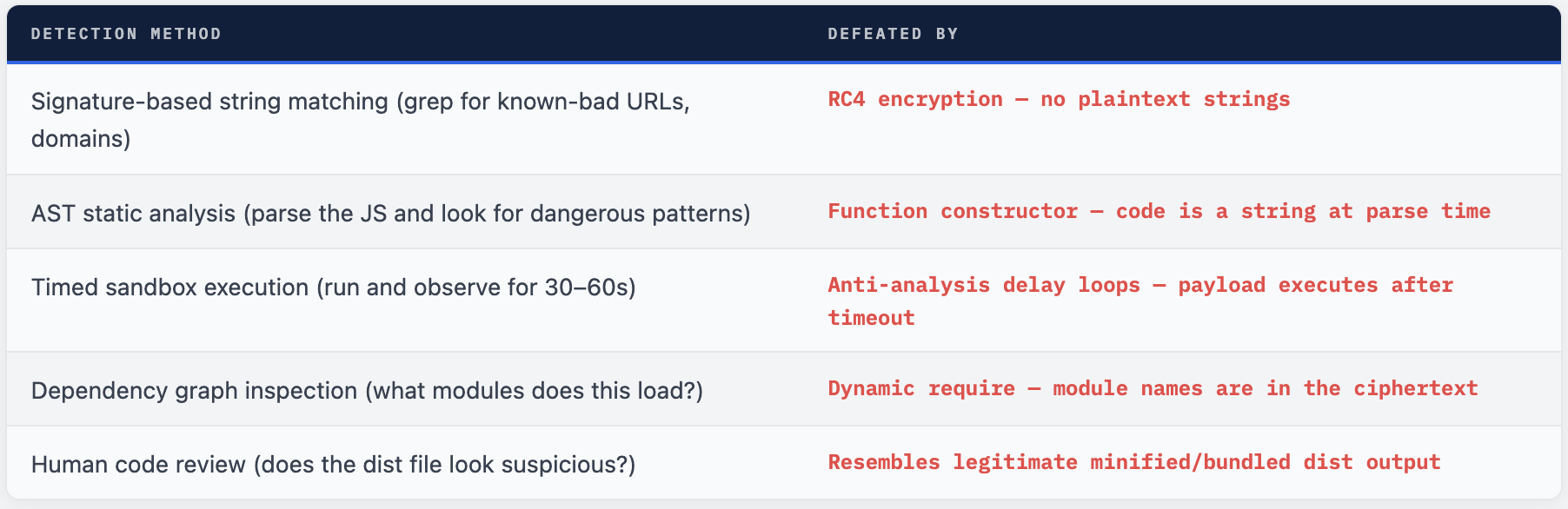
Each technique targets a different detection category. Together they form a comprehensive evasion profile:
Concealed Payload = Unknown True Impact
The most important fact about terminal-prettier 1.0.8 is what we don’t know from static analysis: the actual payload. The RC4 cipher and Function constructor mean the true behaviour - what the package does when installed - is only visible by running it in a sandbox and decrypting the payload at execution time.
Socket’s analysis describes the file as “high-risk for supply-chain or malware-style behavior because the actual behavior is concealed until execution” with “no explicit evidence of exfiltration or system compromise from this fragment alone.” This is important phrasing: the absence of explicit evidence of exfiltration is not the same as evidence of absence. The four-layer obfuscation chain is specifically designed to prevent that evidence from being visible.
The patterns present - RC4-like decoder, base64 decoding, anti-analysis loops, hidden dynamic module import - are the exact same patterns documented in active credential-stealing npm campaigns in 2025 and 2026. They serve no legitimate purpose in a terminal formatting utility. Their sole purpose is concealment.
🔴 If You Installed terminal-prettier@1.0.8 Treat the host as potentially compromised. The payload ran at install time via postinstall or at first require() - before any code review was possible. Without sandbox execution and decryption of the payload, the full scope of what ran on your machine is unknown. At minimum: Rotate all credentials, API keys, npm tokens, SSH keys, and cloud credentials accessible from that machine. Check for unexpected outbound network connections in firewall or process logs around the time of install. Audit any environment variables that were accessible in the Node process at install time.
This Pattern Is Now Standard in npm Malware
terminal-prettier 1.0.8 is not an isolated incident. Multi-layer obfuscation with RC4-like ciphers, base64 encoding, delay loops, and dynamic code execution has become the standard toolkit for npm-based malware in 2025-2026. It appears across campaigns ranging from credential stealers targeting Web3 developers to North Korea’s Contagious Interview campaign to unnamed opportunistic attackers using typosquatting.
The pattern is so common because it works. The gap between “published to npm” and “detected and removed” is the attack window - terminal-prettier 1.0.8 had nearly 9 hours. During that window, any developer or CI pipeline that installed the package executed the payload. The obfuscation chain buys additional time by defeating automated scanners that would otherwise trigger faster removal.
What makes this package particularly instructive is that it did not compromise a trusted maintainer account, did not ride on a 100-million-download package, and did not need a sophisticated phishing campaign. It is a standalone malicious package using nothing but naming-convention exploitation and code obfuscation. The barrier to this class of attack is low. Any attacker with an npm account can publish this.
Why Static Scanners Missed It and Socket Didn’t
Traditional static analysis tools that scan npm packages for known-bad strings, suspicious function names, or dangerous API calls would have found nothing in terminal-prettier 1.0.8 - the entire payload was encrypted. The package would have passed a grep-based scan, a dependency graph audit, and a cursory human code review of the dist/ folder.
Socket’s detection is different. Their scanner flags packages based on behavioral signals in the code structure, not string content. The presence of an RC4-key-scheduling algorithm, base64 decode chains, artificially long loops with no computational purpose, and a Function(string)() call pattern - these are high-confidence indicators of intentional obfuscation regardless of what the encrypted payload contains.
Socket’s AI analysis conclusion was clear: "This file is intentionally obfuscated and implements runtime decoding/decryption and dynamic code execution (Function constructor and dynamic require). That pattern is high-risk for supply-chain or malware-style behavior because the actual behavior is concealed until execution." The package was removed from npm within 9 hours of publication.
# Check if terminal-prettier@1.0.8 is installed anywhere
npm list terminal-prettier 2>/dev/null
find . -path "*/node_modules/terminal-prettier/package.json" \
  -exec grep -l '"version":"1.0.8"' {} \;

# Scan a package for Function() constructor exec pattern
# (crude static indicator of eval-equivalent execution)
grep -r "new Function\|Function(" node_modules/terminal-prettier/ 2>/dev/null

# Check for RC4-pattern (KSA array init - length 256)
grep -r "Array(256)\|new Array(256)\|length.*256" \
  node_modules/terminal-prettier/dist/ 2>/dev/null

# Use Socket's safe npm CLI - wraps npm install with real-time scanning
# npx @socket/safe-npm install terminal-prettier
# → Would have flagged this before install completed
What to Do
- Run
npm list terminal-prettieracross all projects and environments. If version 1.0.8 appears anywhere, treat that machine as potentially compromised. - If installed: rotate all credentials on that machine - npm tokens, SSH keys, API keys, cloud credentials, environment variables accessible at install time.
- Check network logs around the install timestamp for unexpected outbound connections - particularly to unfamiliar domains or IP addresses on non-standard ports.
- If you have no legitimate reason to use terminal-prettier -remove it entirely. There is no confirmed-clean version. If you added it to any project, review why and whether a legitimate alternative achieves the same purpose.
- Add terminal-prettier to any internal package blocklist or deny list in your security tooling, Artifactory, Nexus, or private registry.
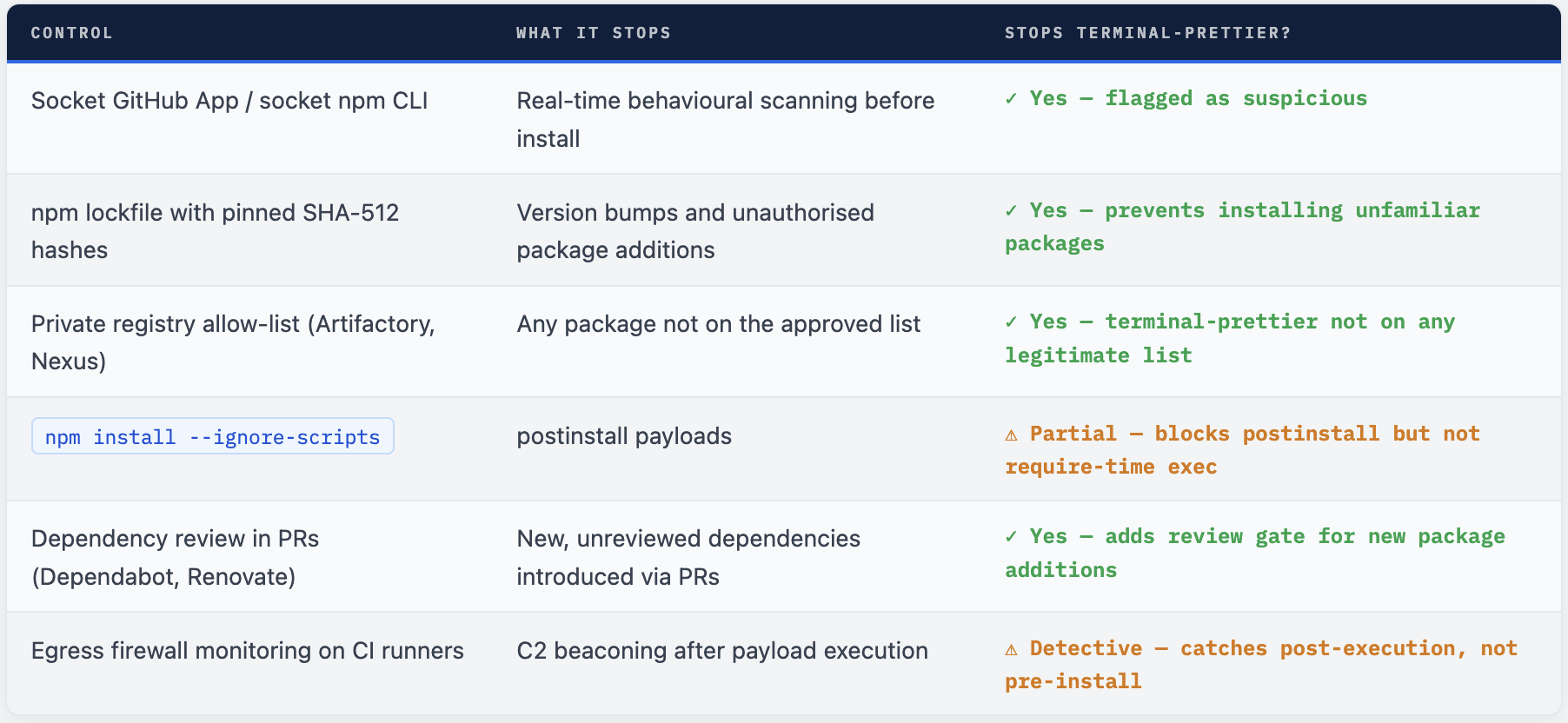
- Enable npm install --ignore-scripts in CI environments. This does not prevent the import-time execution (via require ) but stops postinstall-triggered payloads.
Defence Layers That Stop This Class of Attack
No single control stops all npm malware, but the following layered approach would have prevented installation or execution of terminal-prettier 1.0.8 at multiple stages:
# 1. Use Socket's safe npm wrapper (wraps every install with real-time scan)
npm install -g @socket/cli
socket npm install <package>  # scans before installing

# 2. Enable strict provenance checks (npm 9+)
npm install --prefer-dedupe --audit

# 3. Ignore scripts globally in CI
# In .npmrc for CI:
# ignore-scripts=true

# 4. Add to .npmrc - block packages missing integrity hashes
# package-lock-only=true (fail if lockfile would change)

# 5. Scan for obfuscation patterns in dist/ before committing
# Look for: new Function, eval, atob, Array(256), suspicious long strings
grep -rn "new Function\|eval(" node_modules/ --include="*.js" 2>/dev/null \
  | grep -v ".min.js"  # minified files are expected to have these
The Lesson From terminal-prettier 1.0.8
terminal-prettier 1.0.8 is not the most sophisticated npm attack ever documented. It does not compromise a trusted maintainer account, it does not ride on a 100-million-download package, and it was caught and removed within 9 hours. But it is instructive precisely because of its simplicity: a low-effort package with a plausible name and a four-layer obfuscation chain in a dist/ file is all it takes to get through the default defences of most development environments.
The four obfuscation techniques - RC4 cipher, base64 encoding, anti-analysis delay loops, and Function constructor execution - are not exotic. They are documented in dozens of npm malware campaigns across 2025 and 2026. They defeat the tools that most developers implicitly rely on: grep-based scanners, AST static analysis, timed sandboxes, and the human assumption that dist/ files are “just compiled output.”
The correct posture is not to inspect every npm package manually - that does not scale. The correct posture is to add detection at the install boundary via tools that do behavioural analysis, to use private registries with allow-lists for production dependencies, and to treat any package that was not explicitly reviewed as suspect until proven otherwise.
Comments (0)
No comments yet. Be the first to share your thoughts.
Leave a comment