What Is This Vulnerability?
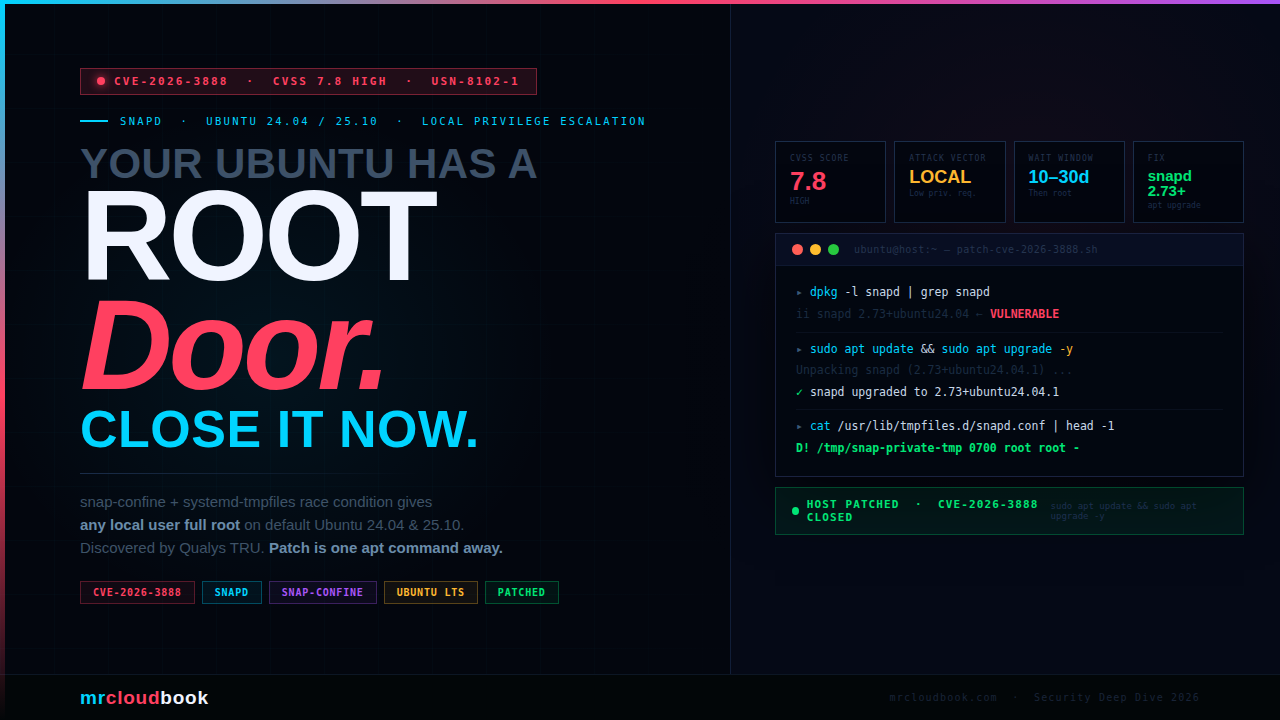
CVE-2026-3888 is a Local Privilege Escalation (LPE) flaw in snapd that allows any unprivileged local user to gain full root access on affected Ubuntu systems. Discovered by the Qualys Threat Research Unit, it stems from an unintended interaction between two otherwise legitimate and well-intentioned system components - snap-confine and systemd-tmpfiles.
Neither component is individually broken. snap-confine is doing exactly what it should. systemd-tmpfiles is doing exactly what it should. The vulnerability lives in the assumption snap-confine makes about a directory that systemd-tmpfiles is allowed to delete - and the race window that opens when that assumption breaks. This is the hardest kind of bug: the kind where two correct programs combine to produce an incorrect system.
The impact when exploited is total - complete compromise of confidentiality, integrity, and availability. An attacker with any local user account gets a root shell. From there, they own the machine: read any file, install any software, exfiltrate credentials, pivot laterally, or destroy the system entirely.
**Why This Matters More Than the CVSS Score Suggests** A Local attack vector often gets deprioritised in patching queues. Don't do that here. This affects default installations of Ubuntu 24.04 LTS and 25.10 - the most widely deployed Ubuntu versions. If your engineering team runs Ubuntu desktops, CI runners, developer VMs, or shared build servers, every one of those is a lateral movement opportunity. A patient attacker on your network can simply wait out the 10-30 day trigger window.
Understanding the Attack Surface
To understand this vulnerability you need to understand both components. Not as a superficial overview - but well enough to see exactly where the gap opens up. The vulnerability is architectural, not a sloppy coding mistake.
snapd - The Snap Ecosystem Manager
snapd is the background daemon that manages the entire Snap ecosystem on Ubuntu. It handles discovery, installation, updates, and removal of snap packages - self-contained application bundles that ship with their own dependencies rather than relying on shared system libraries. Canonical designed the format to eliminate dependency conflicts and give publishers a single packaging target across all Ubuntu versions.
snapd also enforces the permission model governing what each snap can access on the host. This makes it simultaneously a package manager and a security policy engine - a privileged component that sits at a critical trust boundary on every Ubuntu machine it runs on.
snap-confine - The Setuid Enforcement Engine
snap-confine is the component that actually builds the sandbox before a snap application runs. It is a setuid root binary - meaning it executes with full root privileges even when invoked by an unprivileged user. Its responsibilities include:
- Mount namespace isolation - setting up private filesystem views for each snap
- cgroup enforcement - resource limits per snap
- AppArmor policy loading - MAC enforcement for confinement
- seccomp filtering - syscall restrictions for sandboxed apps
As part of constructing the sandbox, snap-confine creates a private temporary directory: /tmp/snap-private-tmp/<snap-name>/tmp. It sets strict ownership and permissions on this directory, then mounts it into the snap’s namespace. The entire security model depends on this path remaining under snap-confine’s control.
systemd-tmpfiles - The Volatile Directory Manager
systemd-tmpfiles manages the lifecycle of volatile directories like /tmp, /run, and /var/tmp. It reads configuration from drop-in files under /usr/lib/tmpfiles.d/, /run/tmpfiles.d/, and /etc/tmpfiles.d/, then creates, adjusts, or deletes files and directories according to those rules - at boot and on a scheduled cleanup timer.
The relevant configuration for snapd lives in /usr/lib/tmpfiles.d/snapd.conf. Before the patch, this file instructed systemd-tmpfiles to clean up the /tmp/snap-private-tmp subtree when entries had not been accessed or modified for a defined period: 10 days on Ubuntu 25.10 and 30 days on Ubuntu 24.04. That cleanup runs automatically in the background, completely invisible to any application running on the system.
⚙ The Architectural Gap
snap-confine assumes that once it creates /tmp/snap-private-tmp/
The Exploitation Mechanism
This is a classic TOCTOU (Time-Of-Check to Time-Of-Use) race condition - but with an unusually long fuse. The attacker doesn’t need to win a tight millisecond race. They need to wait days, then act at the right moment. This makes the attack operationally practical for any patient attacker with an existing foothold.
Attacker Has Local Access
Any unprivileged local user account on the target system. No elevated permissions required - just the ability to create directories in /tmp and run basic commands. This prerequisite is satisfied by: a compromised developer account, a CI runner with shell access, a multi-user workstation, or a container escape that lands a shell on the host.
Wait for the Cleanup Window
The attacker waits for /tmp/snap-private-tmp/<installed-snap>/tmp/.snap to go untouched for 10 days (Ubuntu 25.10) or 30 days (Ubuntu 24.04). This is inevitable on any system where a snap is installed but that snap hasn’t been recently launched. No action needed - just patience. The attacker can poll with a simple stat loop.
systemd-tmpfiles Deletes the Directory
The scheduled systemd-tmpfiles-clean.service fires and removes the stale /tmp/snap-private-tmp/<snap>/tmp/.snap directory as configured in snapd.conf. At this point, there is a brief but exploitable window before snap-confine next runs for any snap on the system.
Attacker Races to Re-Create the Path
Before any snap is next launched - and before snap-confine can re-create its own correctly-owned copy - the attacker creates a symlink or directory in place of the deleted path. The attacker controls what this path points to. Because snap-confine will run as setuid root and will use this path for privileged mount operations, the attacker can redirect those operations to attacker-chosen targets.
snap-confine Operates on Attacker-Controlled Path
When the next snap is launched (by any user, including the victim themselves), snap-confine runs as root and performs privileged operations - mount, chown, permission changes - on a path now controlled by the attacker. This is the classic setuid race: a root binary trusted a filesystem path that the system no longer guarantees it owns.
Full Root Shell Obtained
Through careful construction of the attacker-controlled path using symlinks or bind mounts, the attacker leverages snap-confine’s root-privileged operations to escalate their own process to root. Result: complete system compromise - a fully privileged root shell. All security boundaries on the machine are now gone.
⚠ CVSS AC:High ≠ Hard to Exploit in Practice The CVSS vector shows Attack Complexity: High, which reflects the timing requirement of the race condition. In practice, Qualys confirmed a working exploit. The "high complexity" here means the attacker must poll for the cleanup event and time the directory creation correctly - achievable with a simple shell loop running in the background. Don't let AC:High lower your urgency to patch.
Affected Ubuntu Releases
CVE-2026-3888 directly affects default installations of Ubuntu 24.04 LTS and 25.10. Canonical has proactively applied the same hardening to all older supported releases as a precaution, since non-default configurations on those versions could also be vulnerable. If you run snapd, you should patch regardless of release.
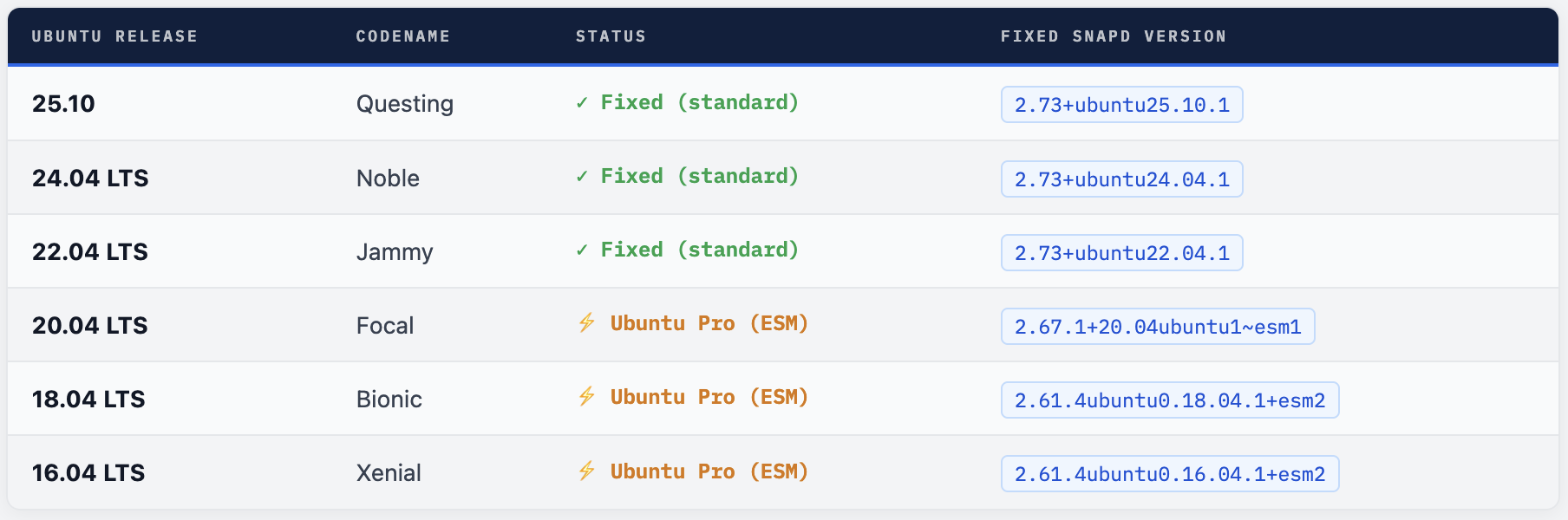
⚠ 20.04, 18.04, 16.04 Require Ubuntu Pro These releases are past standard security maintenance. The snapd fix for Focal, Bionic, and Xenial is only available through Ubuntu Pro (Extended Security Maintenance). Ubuntu Pro is free for personal use on up to 5 machines. If you run production workloads on these releases without Ubuntu Pro, you are unpatched right now. Visit ubuntu.com/pro to subscribe.
💡 Also Fixed: Ubuntu 25.10 uutils Coreutils During the same review cycle, Qualys identified a separate vulnerability in the uutils coreutils package on Ubuntu 25.10. This was mitigated before release through proactive collaboration with the Ubuntu Security Team. No separate CVE action is required for this secondary finding - it was addressed upstream before public release.
Are You Vulnerable? Check in 60 Seconds
Run these commands on any Ubuntu system to determine your exposure status immediately. Do this before moving to the patch step.
Step 1 - Check snapd Version
# Check the installed snapd version
dpkg -l snapd | grep snapd

# Example output on a vulnerable 24.04 system:
# ii  snapd  2.73+ubuntu24.04  amd64  Daemon and tooling ...
#                 ↑ compare this version to the fixed versions table

# Alternatively, using snap itself:
snap version
Step 2 - Check Ubuntu Release
lsb_release -a
Step 3 - Inspect the Vulnerable tmpfiles Config
# View the tmpfiles config that governs snap-private-tmp cleanup
cat /usr/lib/tmpfiles.d/snapd.conf

# If PATCHED correctly, the first line should start with:
#   D! /tmp/snap-private-tmp 0700 root root -
# If it starts with just "!" (no D) - the 24.04 regression is present
# If it has a plain "d" with an age threshold - it is unpatched
Step 4 - Check the Private Tmp Directory Age
# List snap-private-tmp contents and last access times
ls -la /tmp/snap-private-tmp/ 2>/dev/null || echo "Directory does not exist"

# Find entries untouched for 10+ days (inside the danger window)
find /tmp/snap-private-tmp -type d -atime +10 2>/dev/null

# Check when the cleanup timer last ran
systemctl status systemd-tmpfiles-clean.service | grep -E "Active|ago"
systemctl status systemd-tmpfiles-clean.timer
✓ How to Confirm You Are Patched After patching, `cat /usr/lib/tmpfiles.d/snapd.conf` should show `D! /tmp/snap-private-tmp 0700 root root -` as the first line (with the `D!` prefix). The `D` creates the directory and cleans its contents; the `!` restricts this to boot-time only, eliminating the runtime cleanup that opened the race window. If you see only `!` without `D`, you have the 24.04 regression - run the upgrade again.
Patch Now - One Command
The fix is a standard package update. There is no reason to defer this. Apply it immediately on all Ubuntu systems - developer desktops, CI runners, build servers, staging environments, and production machines equally.
Standard Upgrade - Recommended
# Full system upgrade - recommended approach
sudo apt update && sudo apt upgrade -y

# Verify snapd was updated to a fixed version
dpkg -l snapd | grep snapd
Target Only snapd
# If a full upgrade is not possible right now, target snapd directly
sudo apt update && sudo apt install --only-upgrade snapd

# Confirm the version
snap version
Fleet Patching with Ansible
For engineering teams managing Ubuntu machines at scale, here is an Ansible playbook to patch snapd across your entire fleet and verify each host:
---
- name: Patch CVE-2026-3888 - snapd Local Privilege Escalation
  hosts: ubuntu_all
  become: true

  tasks:

    - name: Refresh apt cache (force, no cache validity)
      ansible.builtin.apt:
        update_cache: yes
        cache_valid_time: 0

    - name: Upgrade snapd to patched version
      ansible.builtin.apt:
        name: snapd
        state: latest

    - name: Verify installed snapd version
      ansible.builtin.command: dpkg-query -W -f='${Version}' snapd
      register: snapd_ver
      changed_when: false

    - name: Verify snapd.conf starts with D! (patched indicator)
      ansible.builtin.command: head -1 /usr/lib/tmpfiles.d/snapd.conf
      register: conf_line
      changed_when: false

    - name: Report patch status per host
      ansible.builtin.debug:
        msg: |
          Host: {{ inventory_hostname }}
          snapd version: {{ snapd_ver.stdout }}
          tmpfiles.conf[0]: {{ conf_line.stdout }}
          Status: {{ 'PATCHED ✓' if 'D!' in conf_line.stdout else 'NEEDS REVIEW ⚠' }}
Ubuntu 24.04 Regression - USN-8102-2 The initial 24.04 patch contained a typo in `/usr/lib/tmpfiles.d/snapd.conf` - a missing `D` before the `!` command type. Systems that upgraded on 17 March 2026 may have the regression: `/usr/lib/tmpfiles.d/snapd.conf` starting with `! /tmp/snap-private-tmp` instead of `D! /tmp/snap-private-tmp`. The corrected package was published the same day as USN-8102-2. If you see the warning `Unknown command type '!'` in your upgrade output, run `sudo apt update && sudo apt install --only-upgrade snapd` again to get the regression fix.
If You Cannot Patch Immediately
This is a last resort only. The strongest and cleanest protection is always the security package update. Only use this path if you genuinely cannot apply the package right now - a hard change freeze, an air-gapped system, or a critical production window. Document that you’ve done this so it gets reverted when the package is properly applied.
⚠ Risk of This Approach Manually editing /usr/lib/tmpfiles.d/snapd.conf may cause future unattended security upgrades to fail until the file is reverted to its original state. The unattended-upgrades service may flag the config file as modified and skip the package update. Monitor your upgrade logs after applying this workaround.
The Fix - What Changed and Why
The patch changes how systemd-tmpfiles is instructed to handle the snap-private-tmp directory. Here is a side-by-side of the vulnerable vs patched configuration:
❌ Vulnerable - Before Patch - Instructs tmpfiles to delete stale snap dirs - after 10d/30d of inactivity - opens race window d /tmp/snap-private-tmp 0700 root root 10d
✓ Patched - After Patch D! /tmp/snap-private-tmp 0700 root root - - Allow removing content in the private tmp - folders without affecting their structure. - X /tmp/snap-private-tmp - X /tmp/snap-private-tmp/*/tmp - x /tmp/snap-private-tmp/*/tmp/.snap
The D! directive creates the directory with the specified ownership at boot time, and cleans out its contents - but the ! suffix restricts this rule to boot-time only. This means the directory will never be cleaned by the background timer that fired every 10-30 days, eliminating the race window entirely. The X and x lines explicitly exclude the snap-private-tmp subtree from all cleanup operations as an additional safeguard.
Apply the Manual Mitigation
# Backup the current config first
sudo cp /usr/lib/tmpfiles.d/snapd.conf /usr/lib/tmpfiles.d/snapd.conf.bak

# Write the patched configuration
sudo tee /usr/lib/tmpfiles.d/snapd.conf <<'EOF'
D! /tmp/snap-private-tmp 0700 root root -

# Allow removing content in the private tmp folders without affecting the
# architectural structure of the folders themselves.
X /tmp/snap-private-tmp
X /tmp/snap-private-tmp/*/tmp
x /tmp/snap-private-tmp/*/tmp/.snap
EOF

# Restart the tmpfiles-clean service to apply immediately
sudo systemctl restart systemd-tmpfiles-clean.service

# Verify the service restarted cleanly
systemctl status systemd-tmpfiles-clean.service
Detecting Exploitation Attempts
Understanding what active exploitation looks like in your logs helps you determine whether this vulnerability was used against your environment before you patched. These rules should be deployed alongside your patch - not instead of it.
auditd - Monitor snap-private-tmp Directory Activity
# Add an auditd watch on snap-private-tmp for write/execute/attribute changes
sudo auditctl -w /tmp/snap-private-tmp -p wxa -k snap_tmp_watch

# For persistence across reboots, add to audit rules drop-in:
echo '-w /tmp/snap-private-tmp -p wxa -k snap_tmp_watch' \
  | sudo tee /etc/audit/rules.d/snap-cve-2026-3888.rules

sudo augenrules --load

# Search logs for non-root activity on this path (the suspicious pattern)
sudo ausearch -k snap_tmp_watch | grep -v 'uid=0'

# Also check for directory creation events specifically
sudo ausearch -k snap_tmp_watch -sv yes | grep 'type=SYSCALL' | grep 'mkdir'
Falco Rule - Unexpected Writes to snap-private-tmp
- rule: CVE-2026-3888 Snap Private Tmp Tampering
  desc: |
    Non-root process created or modified a directory under
    /tmp/snap-private-tmp - potential CVE-2026-3888 exploitation.
  condition: |
    (evt.type in (mkdir, mkdirat, symlink, symlinkat, rename, renameat))
    and fd.name startswith "/tmp/snap-private-tmp"
    and not user.uid = 0
    and not proc.name in (systemd-tmpfiles, snapd, snap-confine)
  output: |
    Suspicious snap-private-tmp activity detected
    (user=%user.name uid=%user.uid cmd=%proc.cmdline
     path=%fd.name container=%container.id)
  priority: CRITICAL
  tags: [filesystem, privilege_escalation, CVE-2026-3888, snapd]
Check systemd Journal for Historical Cleanup Events
# View all systemd-tmpfiles-clean runs over the past 30 days
journalctl -u systemd-tmpfiles-clean.service --since "30 days ago"

# Look for snap-confine activity around the same times
journalctl -u snapd.service --since "30 days ago" | grep -i "snap-confine\|private-tmp"

# Check auth log for unexpected privilege changes
grep -E "uid=0|euid=0" /var/log/auth.log | grep -v "sudo\|cron\|unattended"
Beyond the Patch - Hardening Your Fleet
The patch closes this specific vector. But the underlying pattern - a setuid binary trusting a /tmp path that another component can delete - is a recurring class of LPE. Here is how to reduce your exposure to the whole class.
Enable and Verify Unattended Security Upgrades
Ubuntu ships with unattended-upgrades enabled by default on 16.04+. It applies security patches automatically within 24 hours of release - this CVE would have been auto-patched within a day on any machine with it properly configured. Verify it’s actually running:
# Confirm unattended-upgrades is active
systemctl status unattended-upgrades.service

# Check the last successful run
cat /var/log/unattended-upgrades/unattended-upgrades.log | tail -30

# Verify security updates are enabled in config
grep -v "^//" /etc/apt/apt.conf.d/50unattended-upgrades | grep -i security
Audit setuid Binaries on Your Systems
# Find all setuid root binaries - know your attack surface
find / -perm -4000 -user root -type f 2>/dev/null | sort

# Specifically check snap-related setuid binaries
find /usr/lib/snapd /snap -perm -4000 2>/dev/null

# Check snap-confine permissions
ls -la $(find /usr -name snap-confine 2>/dev/null | head -1)
Disable snapd on Servers That Don’t Use Snaps
# Check if any snaps are currently installed
snap list

# If no snaps are needed on this machine, mask snapd entirely
sudo systemctl stop snapd.service snapd.socket snapd.seeded.service
sudo systemctl mask snapd.service snapd.socket

# This eliminates the snap-confine attack surface entirely.
# Only do this after confirming there are no snap dependencies.
Security Notices to Monitor
- USN-8102-1 - Original snapd vulnerability advisory, 17 March 2026
- USN-8102-2 - snapd regression fix for Ubuntu 24.04 (D! typo correction), same day
- Subscribe to ubuntu.com/security/notices mailing list for automatic email alerts on future Ubuntu security patches
- Track upstream snapd in the snapcore/snapd GitHub repository for further hardening in version 2.75.1+
The Bigger Lesson
This vulnerability is a textbook example of a correct + correct = broken interaction. snap-confine was correct. systemd-tmpfiles was correct. The vulnerability lived in the gap between two independent design decisions - and that gap is exactly where the hardest bugs always hide. The same pattern has produced major LPEs in sudo (CVE-2021-3156), polkit (CVE-2021-4034 Pwnkit), and now snapd. Every time you see a setuid binary creating or relying on a path in /tmp, that’s an audit target. The cleanup behaviour in systemd-tmpfiles is not obvious from reading snap-confine’s code, and vice versa. This is the kind of bug that only surfaces when someone reads both components simultaneously - which is exactly what Qualys TRU did.
Patch. Verify. Detect. Harden.
A single apt upgrade closes the door. Falco and auditd tell you if anyone tried it before you patched. Disabling unused snapd instances shrinks the attack surface permanently.



Comments (0)
No comments yet. Be the first to share your thoughts.
Leave a comment