What Gryph Is
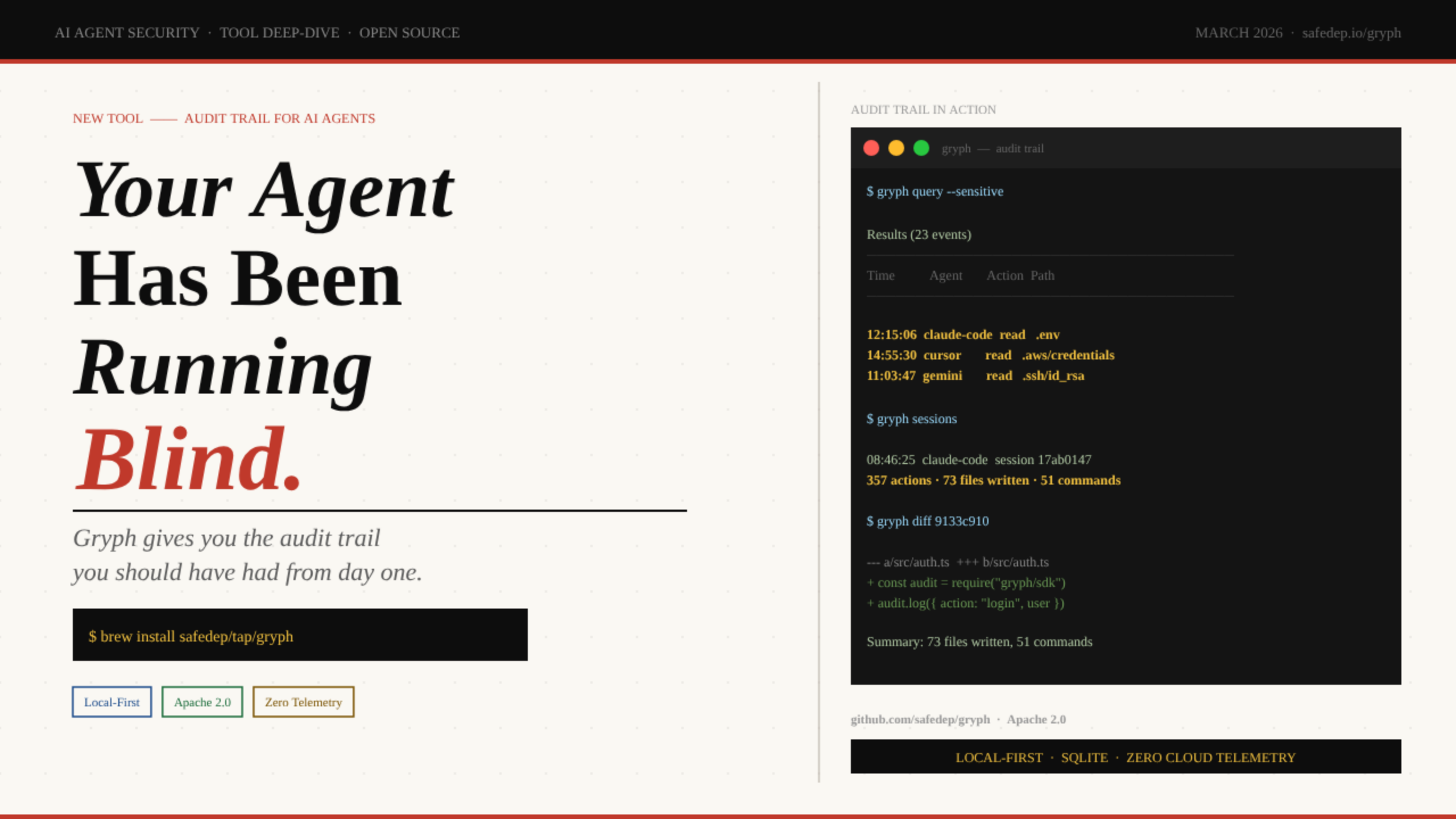
Gryph is a local-first audit trail for AI coding agents - built by SafeDep and released under Apache 2.0. It hooks directly into your agent’s native configuration (no wrapper process, no runtime injection) and writes every file read, file write, command execution, and MCP tool call to a local SQLite database. Nothing leaves your machine.
Install
brew install safedep/tap/gryph
Also: npm install -g @safedep/gryph or shell script
Hook into your agent
gryph install --agent claude-code
Or just gryph install to hook all supported agents at once
Watch the trail live
gryph logs -f
Real-time tail of every agent action as it happens
That’s the entire setup. From this point forward, every action your agent takes - file reads, writes, shell commands, tool calls - is recorded. You can query it, filter it, replay sessions, and diff individual file changes. The data stays on your disk forever.
The Visibility Gap Nobody Talks About
Here is the moment that triggered Gryph’s creation. Abhisek (SafeDep) was working with Claude Code on a GitHub issue that was susceptible to prompt injection. The agent read the .env file, then executed a Python one-liner to extract data from an API response. Completely benign - the agent was just gathering context. But there was no record of it.
“No log of which files were read, no trail of what commands ran, no way to answer the question ‘what exactly did my agent do in that session?’ after the fact.”
- Abhisek, SafeDep
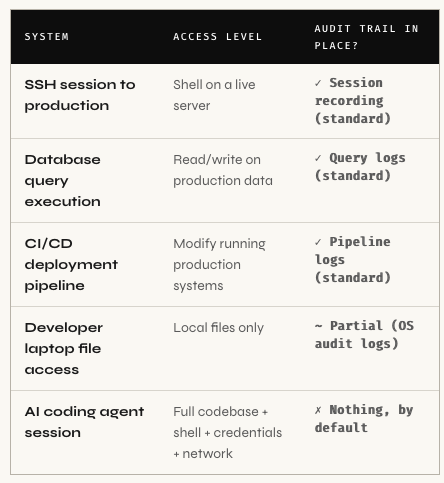
This is not a hypothetical. Developers today grant AI agents access to entire project directories, including configuration files, secrets, and infrastructure definitions. The agent reads files to build context, executes shell commands to test code, writes changes across multiple files in a single session. And when something goes wrong? There is no structured investigation path.
| Agent Action | What It Touches | Logged by Default? | Logged by Gryph? |
|---|---|---|---|
| Read .env for context | All your secrets & credentials | ✗ No | ✓ Yes + flagged sensitive |
| Execute npm install |
System packages & supply chain | ✗ No | ✓ Yes + exit codesensitive |
| Modify src/auth.ts | Core application logic | ✗ No | ✓ Yes + unified diff |
| Read ~/.aws/credentials | Cloud access keys | ✗ No | ✓ Yes + flagged sensitive |
| Run curl or wget | Outbound network requests | ✗ No | ✓ Yes + full command |
| Invoke MCP tools | Extended agent capabilities | ✗ No | ✓ Yes + tool name & args |
| Modify own agent instructions | Agent behavior files | ✗ No | ✓ Yes + diff visible |
Info. 🔴 The gap in plain terms: AI coding agents now operate with access comparable to a developer's full workstation entire codebase, environment variables, shell access, network access. Production systems require audit trails for far less privileged access. AI agents produce nothing by default. That is the gap Gryph fills.
A broken build after an agent session means manually diffing files to reconstruct what changed. A security review asking “did any AI tool access our credentials this month?” has no data source to query. An unexpected curl in the agent’s output scrolls past and disappears. Production systems solved this years ago - application logs, audit trails, access records. AI coding agents are the missing piece in that chain.
How Gryph Works
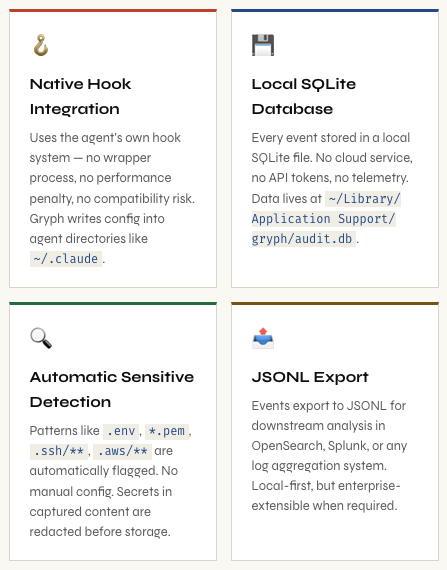
Gryph is deliberately simple in its design. It installs lightweight hooks directly into each agent’s native configuration directory. No wrapper process. No custom runtime. No proxy intercept. The hooks use each agent’s own built-in hook mechanism, repurposed to emit structured events into a local SQLite database.
Supported Agents
Gryph currently supports all major AI coding agents:
# Install for a specific agent
gryph install --agent claude-code   # Anthropic Claude Code
gryph install --agent cursor         # Cursor IDE
gryph install --agent gemini         # Google Gemini CLI
gryph install --agent opencode       # OpenCode
gryph install --agent windsurf       # Windsurf
gryph install --agent pi-agent       # Pi Agent

# Or install hooks for ALL supported agents at once
gryph install
Getting Started in 60 Seconds
Step 1 - Install Gryph
# Homebrew (macOS / Linux with Homebrew)
brew install safedep/tap/gryph

# npm (cross-platform Node.js)
npm install -g @safedep/gryph

# Shell script installer
curl -fsSL https://raw.githubusercontent.com/safedep/gryph/main/install.sh | sh
Step 2 - Install Hooks for Claude Code
$ gryph install --agent claude-code

[ok]  Claude Code 2.1.69
/Users/dev/.claude

Installing hooks...

Installation complete.

Database    /Users/dev/Library/Application Support/gryph/audit.db
Config      /Users/dev/Library/Application Support/gryph/config.yaml

Run 'gryph status' to verify.
Run 'gryph logs -f' to watch activity.
That’s everything. Gryph is now silently recording. Use your agent normally - write code, debug, refactor. Every action flows through the hooks into the local database. Nothing slows down, nothing changes in how you work.
Info. 💡 Where's the database? On macOS: ~/Library/Application Support/gryph/audit.db. On Linux: the XDG standard path, typically ~/.local/share/gryph/audit.db. You can query it directly with sqlite3 if you prefer - standard SQLite, no proprietary schema.
Querying the Trail
Live Tail - Watch Your Agent in Real Time
$ gryph logs -f

2026-03-05 13:45:09   b291330f  claude-code  a87aef84  tool   ToolSearch select:EnterPlanMode
2026-03-05 13:45:09   ebf4335d  claude-code  a87aef84  tool   ToolSearch select:EnterPlanMode
2026-03-05 13:45:58   0c8d3cb8  claude-code  a87aef84  tool   ToolSearch select:ExitPlanMode
2026-03-05 13:46:01   91b12749  claude-code  a87aef84  tool   ExitPlanMode
2026-03-05 13:46:08   667da419  claude-code  a87aef84  notification
2026-03-05 13:46:08   b82f8fef  claude-code  a87aef84  tool   ExitPlanMode
Each log line gives you: timestamp, event ID, agent name, session ID, action type, and action detail. The session ID ties all events from a single agent session together - this is what enables session replay later.
Query by Action Type and File Pattern
The power is in filtering. The gryph query command accepts glob patterns for file paths. Here’s a genuinely interesting example from the SafeDep blog: querying for every time Claude Code modified its own agent instruction files.
$ gryph query --action file_write --file '**/.claude/agents/**'

2026-03-05 13:17:49   e169a677  claude-code  052f1858  write  my-project/.claude/agents/grunt... +1 -1
2026-03-05 13:17:57   329115de  claude-code  052f1858  write  my-project/.claude/agents/grunt... +1
2026-03-05 13:17:59   b10368bf  claude-code  052f1858  write  my-project/.claude/agents/grunt... +3
2026-03-05 13:18:07   c0ccf6cd  claude-code  052f1858  write  my-project/.claude/agents/corta... +2 -1
2026-03-05 13:18:09   4cae6942  claude-code  052f1858  write  my-project/.claude/agents/corta... +1 -1
2026-03-05 13:18:11   7708c823  claude-code  052f1858  write  my-project/.claude/agents/corta... +1 -1
Warning. ⚠️ Pay attention to this one: The agent was modifying its own instruction files inside .claude/agents/. This is agent self-modification - a class of behavior that represents a potential integrity concern. Without Gryph, this is completely invisible. With it, you see exactly when it happened, which files, and how many lines changed.
Sensitive File Access - The Security Query
Gryph automatically detects when agents access sensitive paths and marks those events at write time. No manual tagging. Built-in patterns cover .env, *.pem, .ssh/**, .aws/**, and more. You can add custom patterns via config for org-specific paths.
$ gryph query --sensitive

Results (23 events)
──────────────────────────────────────────────────────────────────────────────
Time                  Event     Agent        Session   Action  Path/Command
──────────────────────────────────────────────────────────────────────────────
2026-01-29 12:15:06   e3f77a4b  claude-code  2c909e0a  read    /home/user/.env
2026-01-30 09:22:41   a1b2c3d4  cursor       3d818f0b  read    /home/user/.aws/credentials
2026-02-04 14:50:03   f5e6d7c8  gemini       8e9f0a1b  read    /home/user/.ssh/id_rsa

Use 'gryph cat <event-id>' for full event detail (secrets redacted).
This single query turns a previously unanswerable question - “Did any AI tool access our credentials this week?” - into a timestamped, agent-attributed list. That’s the audit trail working as it should.
Reconstruct Exactly What Happened
Every agent action is grouped into sessions with deterministic IDs. When something breaks after an agent run - a failed build, unexpected file changes, a corrupted config - session replay turns a guessing game into a structured, chronological investigation.
List Recent Sessions
$ gryph sessions

2026-03-05 09:17:30  claude-code  session b9543f1f
5 actions

2026-03-05 09:16:32  cursor       session f8c6e72d
1 actions

2026-03-05 09:08:35  claude-code  session 5ae48bf3
2 actions

2026-03-05 08:46:25  claude-code  session 17ab0147
357 actions  *  73 files written  *  51 commands
The summary numbers alone are telling. A session with 357 actions, 73 file writes, and 51 command executions is one you want to be able to replay - especially if anything went wrong during or after it.
Replay a Session with Diffs
$ gryph session 17ab0147 --show-diff

#358 2026-03-05 09:32:07  68399759  write
Path: my-project/README.md
Changes: +4

#359 2026-03-05 09:33:31  6a411075  write
Path: my-project/README.md
Changes: +6

#360 2026-03-05 09:33:31  9133c910  write
Path: my-project/README.md
Changes: +6

#361 2026-03-05 09:33:48  3c12fb6c  session_end

────────────────────────────────────────────────────────────────────────────
Summary: 111 files read, 73 files written, 51 commands (1 errors)
Diff a Specific File Write
For any write event in a session, you can get a unified diff of the exact change the agent made:
$ gryph diff 9133c910

Event:     9133c910-f3bd-441b-bbcd-42f04660a8e9
Session:   17ab0147-d9ff-4fe6-bae1-e65ae2666e46
File:      my-project/README.md
Time:      2026-03-05 09:33:31

--- a/my-project/README.md
+++ b/my-project/README.md
@@ -1,3 +1,9 @@

 npx skills add safedep/internal-skills
+
+To update installed skills to the latest version:
+
+npx skills update
Walk through an entire session file-by-file, diff-by-diff, in chronological order. This is what structured investigation looks like for AI agent work - something that was completely absent until now.
Pattern Analysis Over Time
gryph stats opens an interactive terminal dashboard showing activity patterns across agents and time windows. It surfaces which agents are most active, which action types dominate (reads vs. writes vs. commands), and how file access distributes across your working sessions.
Info. 📊 The stats dashboard queries your local SQLite database with zero latency - no network, no API tokens, no rate limits. Useful both for individual developers understanding their own agent usage patterns and for security teams needing cross-team visibility (via the JSONL export pipeline).
Useful Query Patterns to Bookmark
# All commands executed by any agent in the last 24 hours
gryph query --action command --since 24h

# All sensitive file access, all time
gryph query --sensitive

# Everything written to your source directory
gryph query --action file_write --file 'src/**'

# Last session from Claude Code only
gryph sessions --agent claude-code --last 1

# Verify hooks are active
gryph status

# Export full audit log for external analysis (OpenSearch, Splunk, jq)
gryph export --format jsonl > audit-$(date +%Y%m%d).jsonl
Not Distrust. Just Engineering.
The case for Gryph is identical to the case we made for structured application logging ten years ago. It is not about distrusting AI agents any more than structured logging is about distrusting your application code. It is about applying the same engineering discipline everywhere in the stack.
“Production systems are observable because we learned the hard way that you cannot debug, secure, or improve what you cannot see.”
AI agents are now operating at a level of autonomy that was previously reserved for automated deployment systems and CI/CD pipelines - systems we instrument extensively. An agent that reads cloud credentials, modifies infrastructure definitions, and commits changes across multiple repositories has comparable access to a deploy automation. We audit the deploy pipeline. We should audit the agent.
The local-first architecture is also the security-correct default. Sending every file read and command execution to a cloud service creates the exact kind of data exposure you’re trying to audit against. The audit trail should live on the developer’s machine, queryable locally, exportable to centralized systems only when needed and under explicit control.
What Gryph Catches That Nothing Else Does
Prompt Injection Behavioral Chains
If an agent reads a file containing a malicious prompt injection payload and then changes its behavior - accessing unusual paths, exfiltrating to an endpoint, modifying configuration - that behavioral chain is now visible. The sequence “read external content → access credentials → run unusual command” is a pattern you can query for after the fact, and eventually alert on.
Supply Chain Integrity - Agent-Modified Dependencies
An agent that modifies package.json, runs npm install, and then commits changes is touching your software supply chain. Gryph captures all three events with timestamps and diffs. If a dependency confusion attack or a malicious package substitution occurs through an agent session, the audit trail exists for investigation.
Agent Self-Modification
The example from the SafeDep blog is the one that should concern security practitioners most: Claude Code modifying files inside .claude/agents/ - its own instruction files. An agent rewriting its own operating instructions is a qualitatively different class of behavior. Gryph makes it visible, queryable, and auditable. Without it, you’d never know it happened.
Cross-Team Credential Access Auditing
# Question: "Did any AI tool read our secrets last month?"
$ gryph query --sensitive --since 30d --format table

Results (23 events)
──────────────────────────────────────────────────────────────────────────
Time                  Event     Agent        Session   Action  Path
──────────────────────────────────────────────────────────────────────────
2026-02-14 09:22:11   a1b9e3f2  claude-code  4d3c2b1a  read    .env
2026-02-19 14:55:30   7c8d9e0f  cursor       8f7e6d5c  read    .aws/credentials
2026-03-01 11:03:47   2e3f4a5b  gemini       1a2b3c4d  read    secrets/prod.yaml

Use 'gryph export --format jsonl' to pipe into SIEM for ongoing monitoring.
Before Gryph, the answer to “did any AI agent access our credentials?” was always “we don’t know.” Now it has a timestamped, agent-attributed answer you can act on.
What Gryph Doesn’t Do
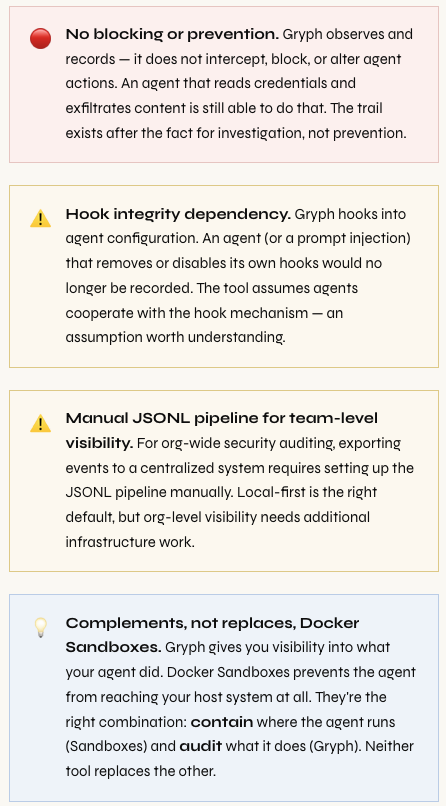
Gryph is a passive audit trail, not an active control plane. Understanding its boundaries is as important as understanding its capabilities.
Should You Install It Right Now?
The short answer is yes.
If you are using any AI coding agent - Claude Code, Cursor, Gemini CLI, or any of the others - Gryph is a sixty-second install that gives you something you currently have zero of: a structured, queryable, persistent record of what your agent actually did. The data stays on your machine. There is no account, no API key, no network call required. There is no good reason not to have this running.
The tool is open source under Apache 2.0, actively maintained by SafeDep, and does not require any cloud service or external dependency. The underlying SQLite database is directly queryable if you prefer raw SQL over the CLI. JSONL export means you can pipe events into any analysis toolchain you already use.
For security teams thinking about AI agent governance at scale, Gryph is the foundation layer. You cannot write policies about what agents can access if you have no visibility into what they’re accessing. The audit trail has to come first. Gryph is how you get it.
# 1. Install Gryph
brew install safedep/tap/gryph
# or: npm install -g @safedep/gryph

# 2. Install hooks (all agents, or specific)
gryph install
gryph install --agent claude-code

# 3. Verify hooks are active
gryph status

# 4. Use your agent normally - then investigate
gryph logs -f               # live tail
gryph query --sensitive      # credential access
gryph sessions               # recent session list
gryph session <id> --show-diff  # full session replay
gryph diff <event-id>        # individual file diff
gryph stats                  # activity dashboard

# Full documentation: https://github.com/safedep/gryph
Comments (0)
No comments yet. Be the first to share your thoughts.
Leave a comment