The Problem Nobody Talks About Honestly
Four years. Four years of Docker, containers, orchestration, and pipelines. I’ve containerized legacy Java monoliths that hadn’t been touched since 2022. I’ve debugged networking between seventeen microservices at 2am. I’ve explained to management why the staging environment is “the same as production, just different.” I thought I’d seen every flavor of infrastructure pain.
Then AI models arrived and somehow - somehow - we collectively forgot everything we learned about reproducible environments and went back to doing it manually. Like it was 2012 and we were thrilled to SSH into a box and sudo apt-get install things directly onto a production server.
You find a model on Hugging Face. The README has that optimistic tone that all READMEs have. You clone it. You run pip install -r requirements.txt. Then the fun begins. Conflict on numpy. Wrong Python version. CUDA 11.8 required but you have 12.1. Some library that needs a system package that breaks something you installed for a completely different project three months ago. You open Stack Overflow and the top answer is from 2021, references a library that’s been deprecated, and has 47 upvotes from people who somehow made it work in circumstances that bear no resemblance to yours.
Three hours later you haven’t run a single inference. You’ve just been fighting the environment. I’ve watched senior engineers - people with decades of experience - lose entire afternoons to this. It’s not a skill issue. It’s the wrong abstraction for the problem. And after a decade in DevOps, you develop an instinct for spotting wrong abstractions.
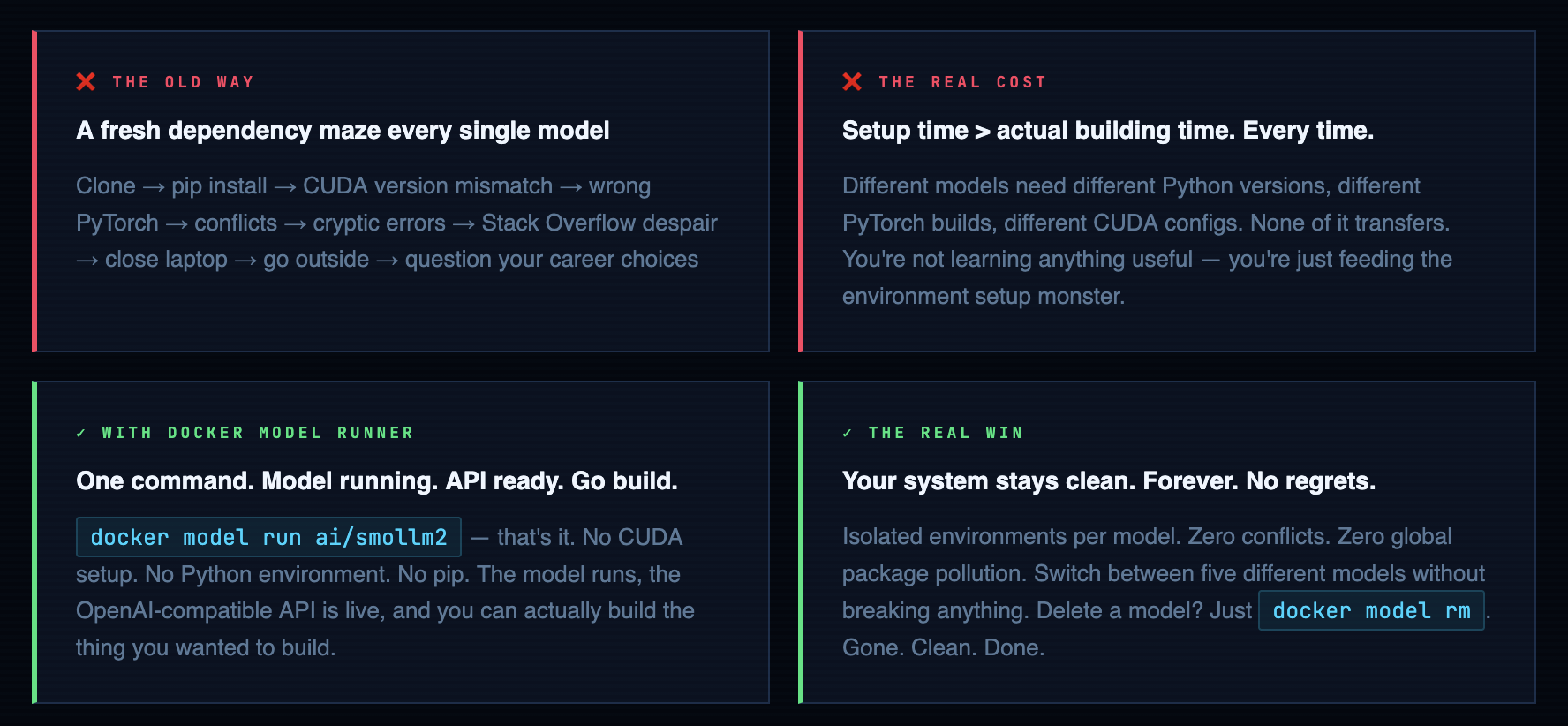
Docker Model Runner’s whole job is this: take the thing that should have always been simple and make it actually simple. The same way Docker did for web apps in 2013. Same trick. Different artifact type. About time.
What is Docker Model Runner?
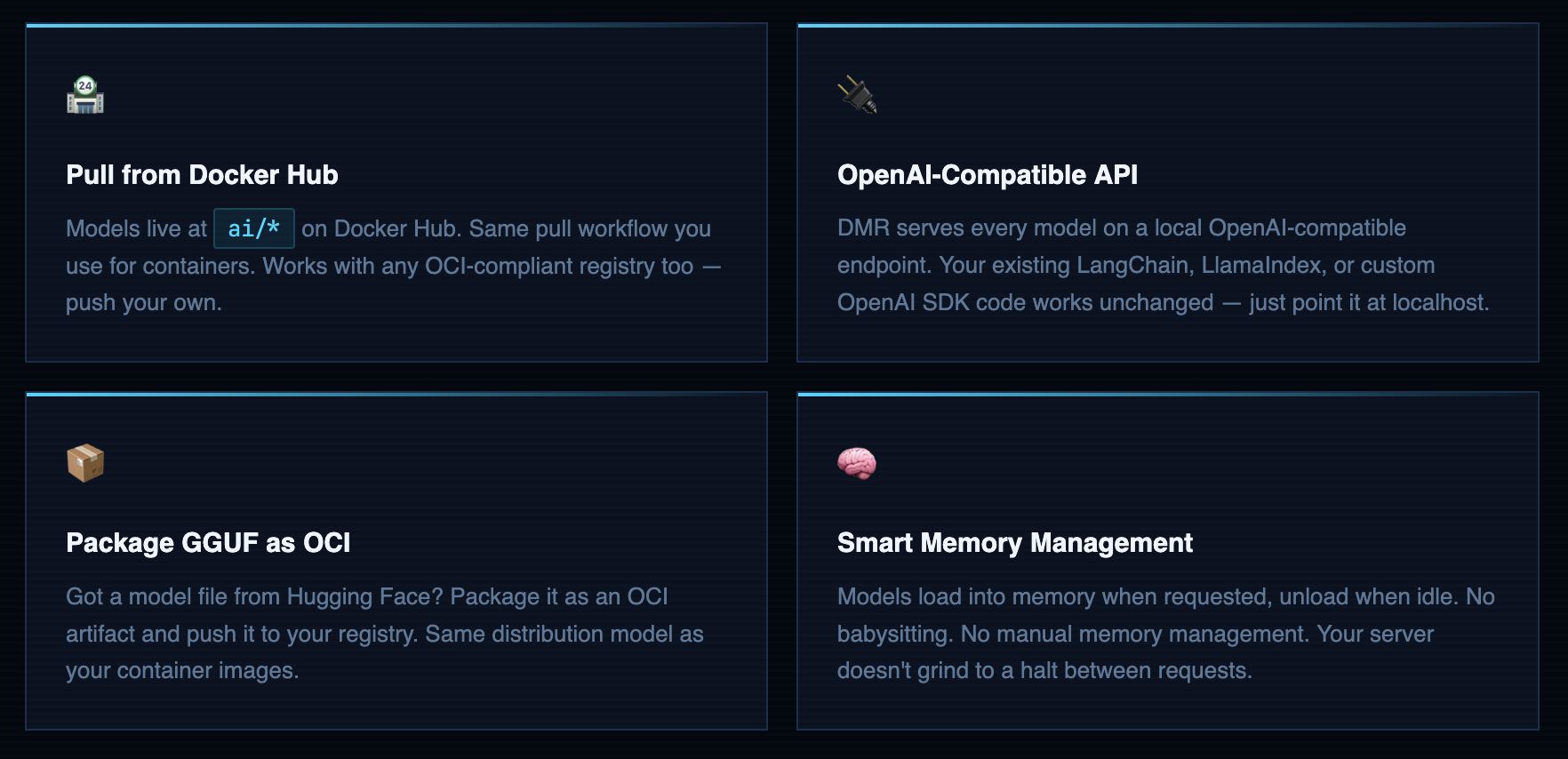
Docker Model Runner (DMR) is a Docker plugin that lets you pull, run, and serve AI models the same way you already pull and run containers. Models are stored as OCI artifacts in Docker Hub or any OCI-compliant registry. You talk to them through an OpenAI-compatible API - meaning anything already built for OpenAI’s API works with your local model immediately. Zero code changes. I tried it the first time and genuinely laughed at how boring the migration was. In a good way.
Here’s the mental model: Docker solved “it works on my machine” for software in 2013. For the next decade we evangelized containers everywhere - and it worked, because the abstraction was right. DMR applies that exact same abstraction to AI models. The model, its runtime, its weights, its dependencies - packaged together, versioned, distributable, runnable anywhere Docker runs. You stop managing environments and start managing outcomes. That’s the job.
That Awesome AI Model You Found? You Can Run It in 5 Minutes.
Ever felt the excitement of discovering a powerful new AI model on a site like Hugging Face, followed by the familiar dread of actually trying to run it? You’re not alone. The journey from “Wow, this is cool!” to a working model on your machine is often a frustrating maze of dependency hell, environment conflicts, and cryptic error messages
What if you could skip all that? What if running a sophisticated Large Language Model (LLM) was as simple as running any other standard piece of software?
That’s the exact problem Docker Model Runner is built to solve.
Think of it this way:
Before, getting an AI model to work was like hiring a world-class chef to cook in your home kitchen. You had to find the right chef (the model), then rush out to buy all the specific, exotic ingredients and weird-looking utensils they needed. If you bought the wrong brand of olive oil (a dependency mismatch), the whole recipe would fail. It’s complicated, messy, and you spend more time setting up than actually cooking.
Docker Model Runner is like a “Chef-in-a-Box” service
It delivers the master chef and their entire professional, pre-configured kitchen right to your computer in a single, neat package.
- No More Shopping for Weird Ingredients: The model comes packaged with every single library, tool, and dependency it needs to work perfectly. You just ask for it.
- A Simple Way to Place Your Order: It automatically sets up a standard “service window” (an OpenAI-compatible API) so your other applications can easily talk to the model without needing a special translator.
- Keeps Your Space Tidy: It manages all these AI “kitchens” in one place, so you don’t have different projects with conflicting tools making a mess of your system.
In short, Docker Model Runner takes the complex, frustrating setup process of running local AI models and makes it simple, standardized, and secure.
What DMR is NOT - Let’s Set Expectations
I’m going to save you from the disappointment I’ve watched people experience when they set this up with the wrong mental model:
-
Not a cloud service. It runs on your hardware. Your data stays on your machine. No API calls going to anyone’s server. This is the whole point for privacy-sensitive workloads.
-
Not a GPU cluster replacement. You’re running quantized GGUF models on whatever CPU (or GPU) you have. For hobby projects, internal tools, and prototypes - great. For production inference serving thousands of concurrent users - not this, not yet.
-
Not magic performance juice. A 7B model on a 4-core VPS with 8GB RAM will be slow. That’s not DMR’s fault. That’s physics. Don’t shoot the messenger.
-
Not GPT-4. Local models are capable and genuinely useful, but they’re not frontier models. Use them for the right jobs - code completion, summarization, classification, prototyping workflows. They’re excellent at those. Expect them to be excellent at those, not at passing the bar exam.
Remember That Time You Tried to Share Your Code Project?
Picture this:
You’ve built something amazing - maybe a cool web app or a data analysis script. You’re excited to share it with your friend or colleague. You send them the code and say, “Just run it!”
Then comes the inevitable text: “It’s not working on my computer.”
Sound familiar?
Your friend has a different operating system, different versions of Python libraries, or maybe they’re missing some obscure dependency you installed months ago and forgot about. Suddenly, your “simple” project becomes a debugging nightmare.
Docker Model Runner solves the exact same problem, but for AI models.
The AI Model Nightmare (Before Docker Model Runner)
Imagine you discover an incredible AI model that can write poetry, analyze your photos, or help you code. You’re excited to try it out, so you:
- Clone the repository - Easy enough
- Install Python dependencies - pip install -r requirements.txt - Still okay
- Download the model weights - 5GB download, but manageable
- Install CUDA drivers - Wait, you need an NVIDIA GPU?
- Install PyTorch with CUDA support - Different version than what you have
- Install additional libraries - Some conflict with your existing setup
- Configure environment variables - More setup
- Run the model - Finally! But it crashes with a cryptic error about missing libraries
Two hours later, you’re still debugging instead of using the AI model.
The Docker Model Runner Solution
With Docker Model Runner, it’s like ordering from a restaurant that delivers the entire meal, including the chef, the kitchen, and all the ingredients - ready to serve.
Docker Model Runner makes it easy to manage, run, and deploy AI models using Docker. Designed for developers, Docker Model Runner streamlines the process of pulling, running, and serving large language models (LLMs) and other AI models directly from Docker Hub or any OCI-compliant registry.
With seamless integration into Docker Desktop and Docker Engine, you can serve models via OpenAI-compatible APIs, package GGUF files as OCI Artifacts, and interact with models from both the command line and graphical interface.
Whether you’re building generative AI applications, experimenting with machine learning workflows, or integrating AI into your software development lifecycle, Docker Model Runner provides a consistent, secure, and efficient way to work with AI models locally.
How Docker Model Runner Works Under the Hood
Models are stored as OCI artifacts in Docker Hub - same format, same registries, same tooling you use for containers every day. First pull downloads and caches locally. Every run after that hits the cache. Models load into memory when a request comes in and unload when they’ve been idle for a bit. No daemons to babysit. No memory leaks to worry about. No pkill python at 3am because something’s eating all your RAM.
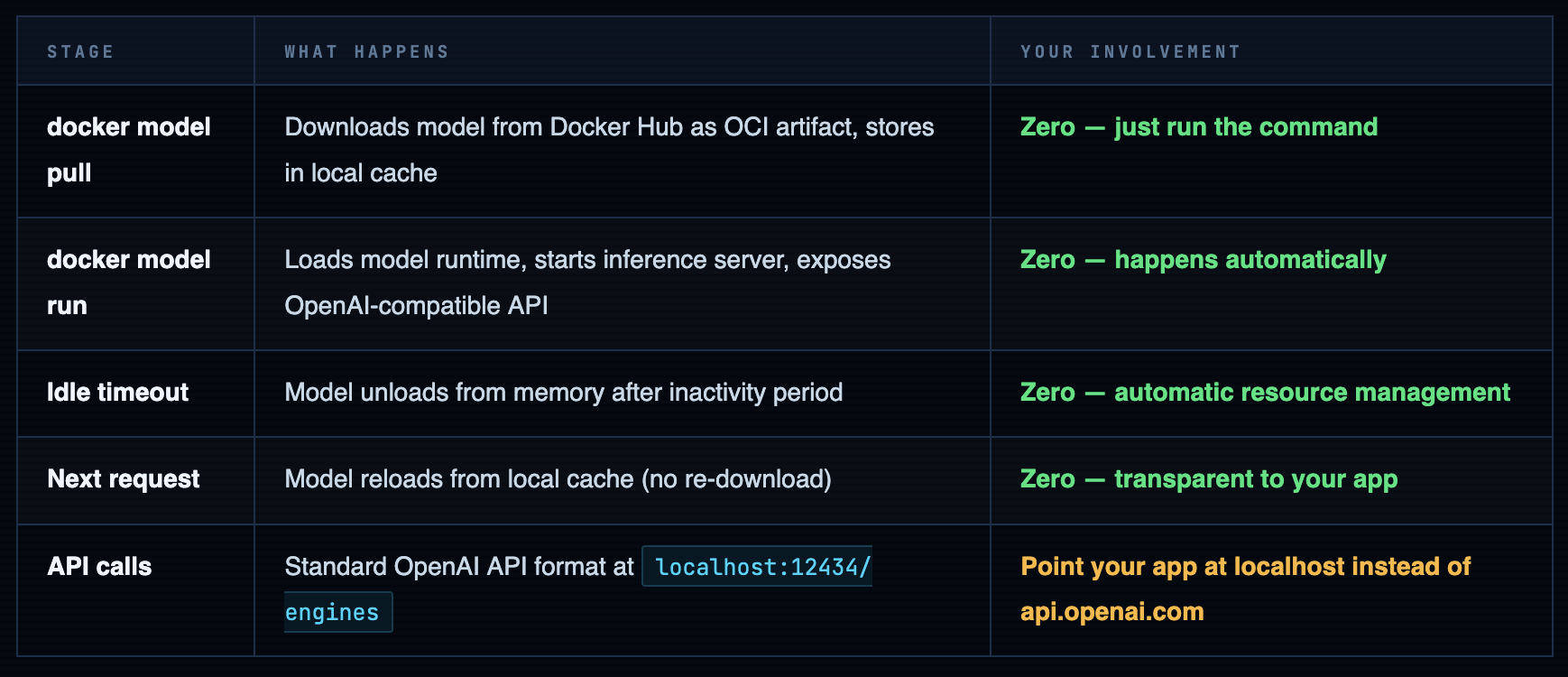
One thing worth flagging for your infrastructure planning: first pull is network-bound and not fast. SmolLM2 is ~200MB - that’s fine. Llama 3.2 1B is ~800MB - still fine. A 7B model sits at 4-8GB depending on quantization. On a VPS with a 1Gbps uplink that’s still a few minutes you’ll want to account for. After that it’s cached locally and the load time is seconds. Plan for the first pull; ignore every subsequent one.
Prerequisites
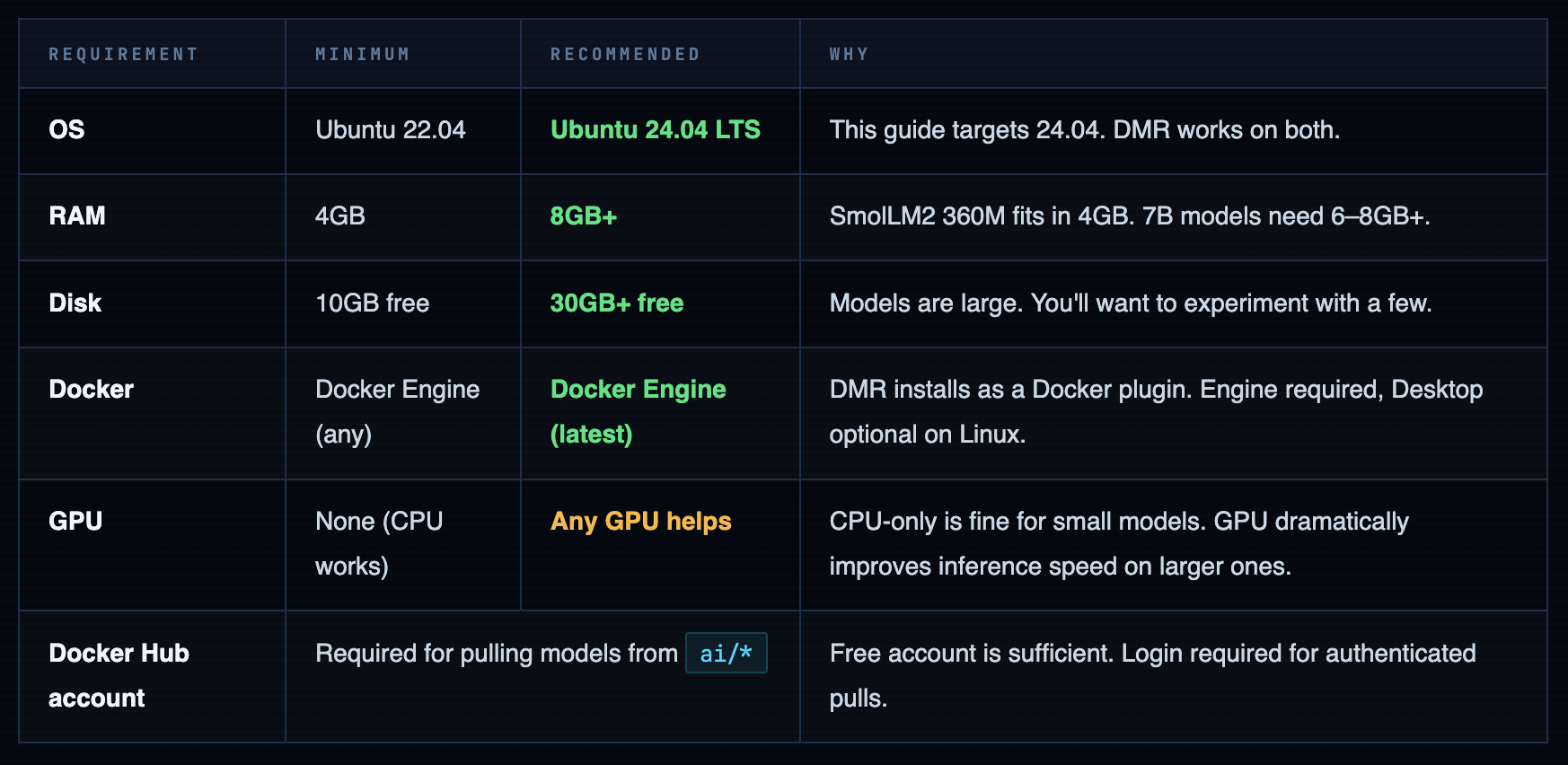
Let me be upfront about the hardware situation before you spin up a server and then blame me when a 7B model crawls. I’ve had teammates try to run LLMs on a t2.micro and then file a Jira ticket saying “the AI is broken.” The AI is not broken. You gave it 1GB of RAM and asked it to think. That’s like hiring a chef and giving them a camping stove. Technically it works. Sort of.
Spin Up Your Ubuntu 24.04 Server
I’m on an AWS EC2 instance - Ubuntu 24.04 LTS, launched fresh for this guide. t3.medium (2 vCPU, 4GB RAM) handles the small models fine. t3.large (2 vCPU, 8GB RAM) gives you room to breathe when you inevitably pull something bigger than SmolLM2. Before we install anything: if you want to reach the demo app in a browser later, open port 8081 in your security group now. You’ll thank me when you’re not debugging why nothing loads at the end.
SSH in. Run the first command you always run on a fresh server - the one you could type in your sleep:
ssh root@
ssh -i ubuntu@ # whatever you use to SSH Feel free to use and connect to server
Once SSH into server , Run our as usual command
sudo apt update && sudo apt upgrade -y
Install Docker Engine on Ubuntu 24.04
Lets run commands to install Docker Engine
# Add Docker's official GPG key:
sudo apt-get update
sudo apt-get install ca-certificates curl
sudo install -m 0755 -d /etc/apt/keyrings
sudo curl -fsSL https://download.docker.com/linux/ubuntu/gpg -o /etc/apt/keyrings/docker.asc
sudo chmod a+r /etc/apt/keyrings/docker.asc

# Add the repository to Apt sources:
echo \
  "deb [arch=$(dpkg --print-architecture) signed-by=/etc/apt/keyrings/docker.asc] https://download.docker.com/linux/ubuntu \
  $(. /etc/os-release && echo "${UBUNTU_CODENAME:-$VERSION_CODENAME}") stable" | \
  sudo tee /etc/apt/sources.list.d/docker.list > /dev/null
sudo apt-get update
Install the Docker packages.
sudo apt-get install docker-ce docker-ce-cli containerd.io docker-buildx-plugin docker-compose-plugin -y
Add Your User to the Docker Group
Running every Docker command with sudo gets old fast and is a sign you haven’t finished the setup. Add your user to the docker group so you can run Docker commands directly:
# Add current user to docker group
sudo usermod -aG docker ${USER}

# Apply group change - log out and back in, or run:
newgrp docker

# Verify - this should work without sudo now
docker ps
# Expected: CONTAINER ID   IMAGE   COMMAND   ...
Warning. Docker group = passwordless root. Yes, really. The Docker daemon runs as root. A container with the right flags can escape to the host filesystem. Adding someone to the docker group on a shared server is not a casual decision - it's handing them the keys. On a personal lab server that only you access? Fine, I do the same. On a multi-user machine or anything public-facing? Think carefully about who you're adding and why.
Log in to Docker Hub
Models live in Docker Hub’s ai/* namespace and require authentication even for free public pulls. If you don’t have a Docker Hub account - it’s free, takes two minutes, and you’re reading a Docker blog so you probably already have one. Use an access token instead of your actual password. Your future self will appreciate it the one time you’re revoking credentials in a hurry.
docker login -u your-dockerhub-username
# Enter your password or access token when prompted
# Access tokens are better than passwords - create one at hub.docker.com/settings/security

# Verify login
cat ~/.docker/config.json
# Should show your auth credentials stored locally
Install Docker Model Runner
Here’s the part where most tool installs would require you to download a binary, set up a systemd service, configure a config file, restart a daemon, and check three log files. DMR is a Docker plugin. One command. I genuinely enjoy how anticlimactic this step is after all the setup drama that used to precede running a model.
# Update and install the Docker Model Runner plugin
sudo apt-get update
sudo apt-get install -y docker-model-plugin

# Verify installation
docker model version

# See all available commands
docker model --help
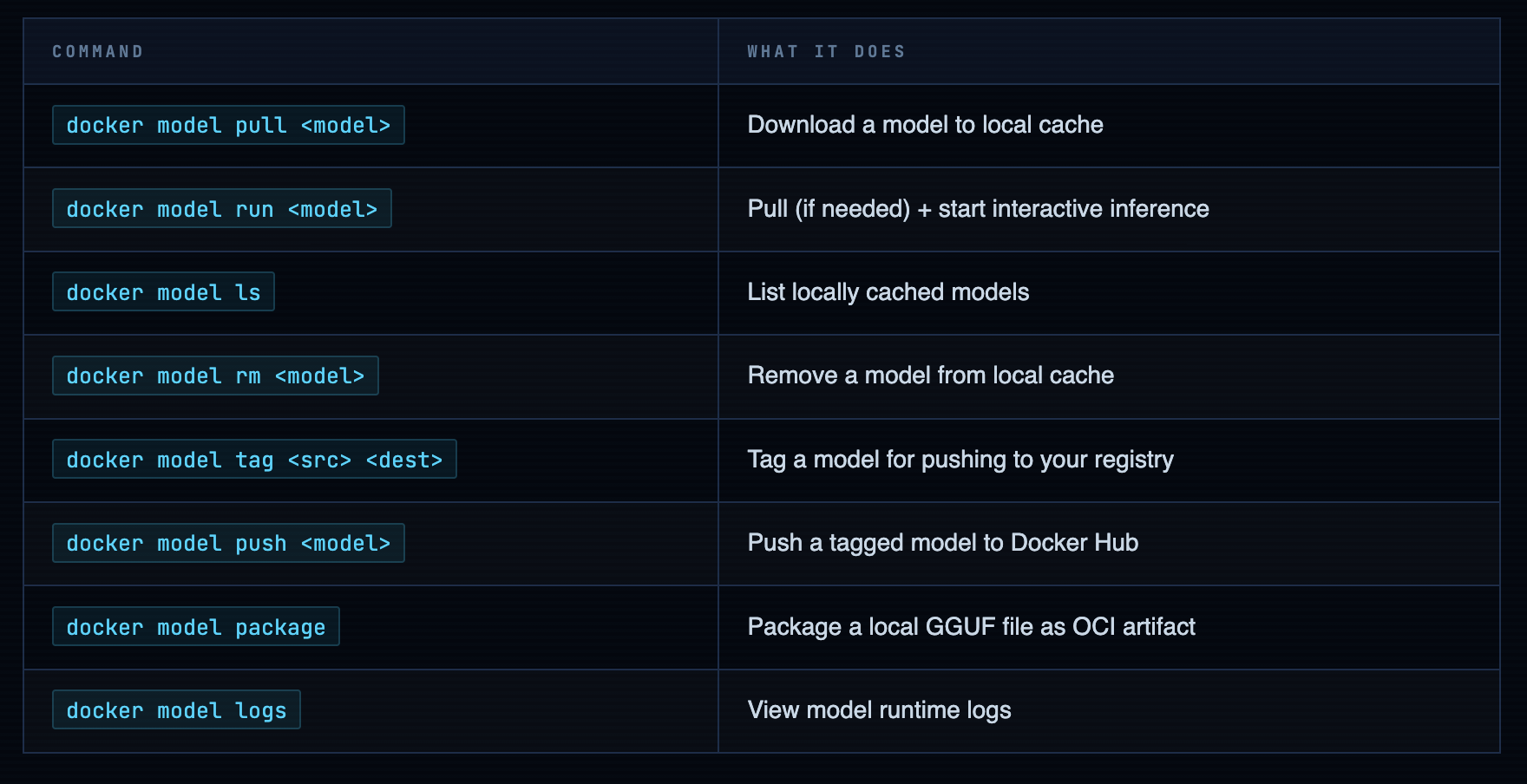
The docker model --help output is clean. Here’s what you’ll actually use - the other commands exist but you’ll reach for these 90% of the time:
Pull & Run Your First Model
Okay. Everything was preamble. This is the actual point. After a decade of watching people fight environments instead of building things, this single command is what I wanted Docker to be able to do years ago:
# Pull and run - SmolLM2 is a good first model
# Small (~200MB), fast on CPU, good for testing the setup
docker model run ai/smollm2

# First run: downloads the model, then drops you into interactive mode
# Ask it something:
> What is a Docker container?

# Type /bye to exit interactive mode
> /bye
It ran. No Python venv. No CUDA. No three-hour debugging session. No Stack Overflow tab still open from last Tuesday. That’s the whole point of this post - this moment right here.
Check What You Have Locally
docker model ls

# Output:
MODEL                 SIZE      DIGEST         CREATED
ai/smollm2            212 MB    sha256:abc...   2 minutes ago
Models Worth Trying - An Honest Breakdown
Honest sizes, honest capabilities, honest advice on what will actually run on your server without making you regret your EC2 instance choice:
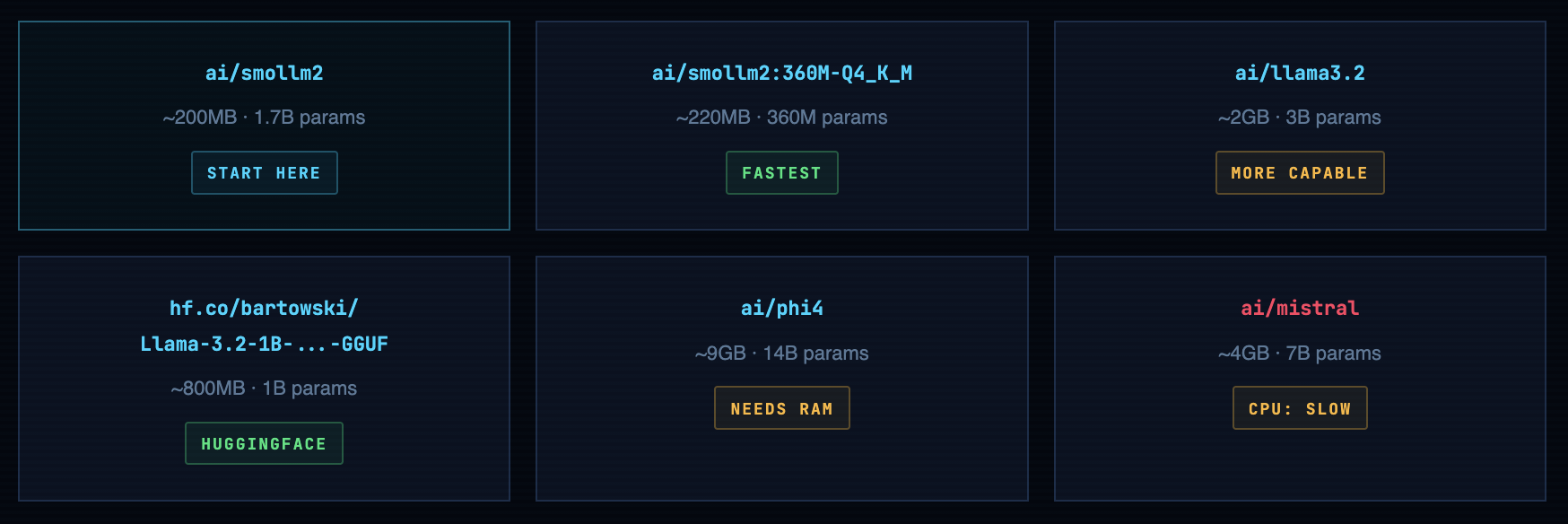
Always validate with SmolLM2 first. It's 200MB, runs on literally anything, and answers questions fast enough that you can tell immediately if the API is working. Pull a 9GB model on a 4GB VPS and you'll wait 15 minutes just to discover it can't load. Use SmolLM2 to prove the plumbing works, then scale up to the model you actually want. This advice comes from watching someone pull Phi-4 on a t2.micro at a workshop. The silence in the room when the OOM killer fired was something.
Pull from HuggingFace Directly
The hf.co/ prefix is underrated. It lets you skip the “download GGUF → package as OCI → push → pull” dance and go straight from HuggingFace to running in one command. The entire GGUF catalog on HF is available through it:
# Pull Llama 3.2 1B from HuggingFace via DMR
docker model pull hf.co/bartowski/Llama-3.2-1B-Instruct-GGUF

# Run it
docker model run hf.co/bartowski/Llama-3.2-1B-Instruct-GGUF

# Pull a specific quantization variant of SmolLM2
docker model pull ai/smollm2:360M-Q4_K_M
Info. Quick quantization primer (Q4_K_M, Q5_K_M, Q8_0…): These are compressed model variants that trade a tiny bit of accuracy for dramatically smaller file sizes and faster inference. Q4_K_M is the sweet spot for CPU-only setups - good quality, reasonable size, loads fast. Q8_0 is noticeably sharper but nearly twice the download. For prototyping and tooling, Q4 is the right call. For production inference where quality matters and you have the RAM - Q8. You can always upgrade when you know the model fits your use case.
Tag, Push & Share Your Models
This is where DMR stops being “cool local toy” and starts being “actual team infrastructure.” Tag a model with your namespace, push it to your registry, and everyone on your team pulls it the same way they pull container images. Your CI/CD pipeline can reference a pinned model version. No more “which quantization was that using again?” in the post-incident retro.
# Tag ai/smollm2 with your Docker Hub username
docker model tag ai/smollm2 your-username/smollm2

# Expected output:
Model "ai/smollm2" tagged successfully with "index.docker.io/your-username/smollm2:latest"

# Push to your Docker Hub namespace
docker model push your-username/smollm2

# Anyone on your team can now pull it:
# docker model pull your-username/smollm2

# Verify it's in your local model list
docker model ls
The auditing story is real. If your application uses an AI model and something goes wrong in production, you want to know exactly which model version was deployed. Same reason you pin container image digests. Your model is infrastructure now - treat it like infrastructure.
Package Your Own GGUF Models as OCI Artifacts
The ai/* catalog on Docker Hub is growing but it’s not everything. When you find a model on HuggingFace that isn’t there yet - and you will - you don’t have to wait for Docker to add it. Download the GGUF file, package it as an OCI artifact, push it to your registry. From that point it behaves like any other DMR model: pullable by tag, versioned, runnable with docker model run. First-class citizen.
# Step 1: Download a GGUF model from HuggingFace
# Using Mistral 7B Q4_K_M as an example (~4.1GB download)
curl -L -o model.gguf \
  https://huggingface.co/TheBloke/Mistral-7B-v0.1-GGUF/resolve/main/mistral-7b-v0.1.Q4_K_M.gguf

# Step 2: Package as OCI artifact and push to Docker Hub
# --gguf: path to the model file
# --push: push directly after packaging
docker model package \
  --gguf "$(pwd)/model.gguf" \
  --push your-username/mistral-7b-v0.1:Q4_K_M

# Step 3: Pull and run from registry (on any machine)
docker model pull your-username/mistral-7b-v0.1:Q4_K_M
docker model run your-username/mistral-7b-v0.1:Q4_K_M
Warning. Read the license before you push anything publicly. This is not bureaucratic box-ticking - it actually matters. Llama models have a community license with specific commercial restrictions. Mistral, SmolLM2, Phi are Apache 2.0 (do what you want). Some models are research-only. The model card on HuggingFace has a License field. It takes 10 seconds to read. Don't push a commercially-restricted model to a public Docker Hub repo and discover this later at the worst possible time.
Run a Full GenAI App Powered by Your Local Model
Here’s where I stop and make you appreciate what just happened. Because DMR serves an OpenAI-compatible API, any application built for OpenAI - LangChain apps, LlamaIndex pipelines, custom SDK code, anything - works against your local model. No porting. No adapters. No rewrites. Docker ships a sample app called hello-genai that demonstrates exactly this, and it’s the right way to verify the full stack is working before you wire DMR into your own code.
# Clone the sample GenAI application
git clone https://github.com/docker/hello-genai.git
cd hello-genai

# The run.sh script pulls your chosen model and starts the app
bash run.sh

# App runs at port 8081 by default
# If running on AWS/cloud: open port 8081 in your security group
# Access at: http://your-server-ip:8081
Info. AWS security group reminder - do this now, not after you're confused why nothing loads. EC2 blocks all inbound traffic by default except port 22. To reach the app from your browser: EC2 console → Security Groups → your instance's SG → Inbound Rules → Add Rule → Custom TCP → Port 8081 → Source: your IP address (use My IP in the dropdown, not 0.0.0.0/0 unless you specifically want it public). This takes 30 seconds. Doing it before starting the app saves you 20 minutes of "why isn't this loading" debugging later.
The OpenAI API - Why This Is the Right Move
The local API endpoint is what makes DMR useful beyond just “interesting toy.” It’s not a custom protocol. It’s not a proprietary format. It’s the OpenAI API running on localhost:12434. Point your existing code at it and it works:
from openai import OpenAI

# Point the OpenAI client at your local DMR endpoint
# No real API key needed - DMR accepts anything in that field
client = OpenAI(
    base_url="http://localhost:12434/engines",
    api_key="not-needed-but-required-by-sdk"
)

# Use it exactly like you'd use the real OpenAI API
response = client.chat.completions.create(
    model="ai/smollm2",
    messages=[
        {"role": "user", "content": "Explain Docker in one sentence."}
    ]
)

print(response.choices[0].message.content)
Two lines change. base_url points at localhost instead of api.openai.com. The model name changes to your local model. Everything else is identical - the method calls, the message format, the response structure. This means the architecture for local development and cloud production is the same codebase. You’re not building a “local version” and a “real version.” You’re building one thing that runs in two environments. Which is what Docker has been telling us to do for containers since 2013. Nice to see the lesson applied consistently.
Practical workflow that actually saves money: Develop against DMR locally - free, fast, works offline, no API bill accumulating while you iterate on prompts. When you need to evaluate against a frontier model or run a performance comparison, swap base_url to the real OpenAI endpoint. The code change is two characters. The cost difference is dramatic. Run all your dev loops locally. Pay for the real API only when you're validating something worth validating.
What You Now Have
-
Docker Engine on Ubuntu 24.04 - from Docker’s own repository, not the distro package that’s always two versions behind
-
Docker Model Runner plugin installed - the anticlimactic one-command install that replaces hours of environment setup
-
SmolLM2 running locally - no Python env, no CUDA, no pip hell, no Stack Overflow tabs still open from last week
-
OpenAI-compatible API on localhost - your existing LangChain, LlamaIndex, or OpenAI SDK code works against it unchanged
-
Model tagging and pushing - version-controlled models in your Docker Hub namespace, pullable by your team or your CI/CD pipeline
-
GGUF packaging - any model on HuggingFace can join the DMR ecosystem without waiting for Docker to add it to the catalog
-
hello-genai running - a full GenAI app on your server, powered by a local model, accessible from your browser
What comes next is up to what you’re building. Wire the API into your application. Experiment with different models for different tasks - SmolLM2 for fast classification, Llama 3.2 3B for generation, something larger if your hardware can support it. Set up a private model registry if your team has models that can’t be public.
After four years of watching infrastructure tooling evolve, this is one of those moments where the right abstraction finally arrived. Models are infrastructure. Treat them like infrastructure. Version them, distribute them, run them reproducibly. Docker already knew how to do all of that. We just needed someone to apply it to the model problem.
Comments (1)
Nice content ,love it Keep posting
Leave a comment